
Once you learn them you'll never go back

Browser shortcuts let you surf the web faster and more efficiently. There’s a lot you can do in your browser with shortcuts: re-open closed tabs, change screen/font size, automatically scroll through pages, and so on.
If you jump between tabs using your computer’s trackpad or mouse, using keyboard shortcuts is faster. In this article, we’ll show you how to switch tabs using your keyboard. We’ve compiled the tab navigation shortcuts for some renowned web browsers—Google Chrome, Microsoft Edge, Mozilla Firefox, Safari, Opera, and Brave.
Table of Contents

These shortcuts should help you access and manage your tabs more easily. Check them out.
Chrome and Microsoft Edge Tab Shortcuts
These browsers run on the same Chromium engine and share a lot of similarities—although Microsoft Edge is more feature-packed. The keyboard shortcuts listed below perform the same functionalities on Chrome and Edge.

Switch to the Next Tab
To jump to the next tab (on the right) press Ctrl + Tab or Ctrl + PgDn on your keyboard. This shortcut works perfectly on Windows devices and other operating systems (e.g Chrome OS on Chromebooks and Linux) with a familiar keyboard layout.
If you use a macOS powered computer, press Command + Option + Right arrow. This key combination will continually move you one tab to the right.
Switch to a Previous Tab
Want to move back to an open tab (on the left)? Press Ctrl + Shift + Tab (or Ctrl + Page Up) on your Windows or Linux computer.
Command + Option + Left arrow button is the macOS equivalent for jumping to the nearest tab on the left.
Switch to a Specific Tab

Web browsers recognize the first eight tabs from the left as Tab 1 to Tab 8. On Windows and Linux, pressing Ctrl followed by the tab number will take you to the specified tab.
For instance, Ctrl + 1 will open the first tab (from the left) while Ctrl + 5 will take you straight to the fifth tab. You can do this up to Ctrl + 8—which opens the 8th tab. Ctrl + 9 switches to the last tab (farthest to the right), while Ctrl + 0 does nothing.
On a MacBook or iMac, Command + 1 through 8 will land you on the first 8 tabs while Command + 9 instantly opens the last tab on the row.
Firefox Tab Shortcuts
Firefox has a “fancy” tab navigation interface that lets you preview web pages when you switch tabs with a keyboard shortcut.

Switch Forward Between Tabs
On Mac, Linux, and Windows devices, press Ctrl + Tab on Firefox to cycle through open tabs (from left to right).
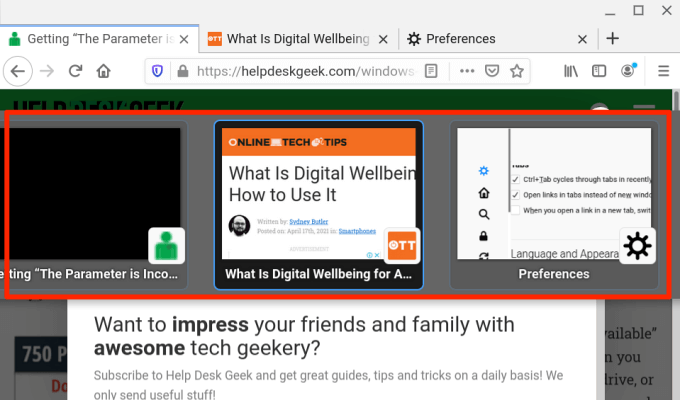
This shortcut brings up a thumbnail of all active tabs; hold Ctrl and keep pressing Tab to move through the tabs (from left to right). When the highlight lands on the tab’s thumbnail, release the keys to open the tab.
Switch to Previous Tabs
Firefox lets you move one tab to the left when you press Ctrl + Shift + Tab (or Ctrl + Page Down) on your Windows or Linux PC. For Mac, you can use either of these shortcuts: Command + Option + Left arrow button (or Control + Shift + Tab).
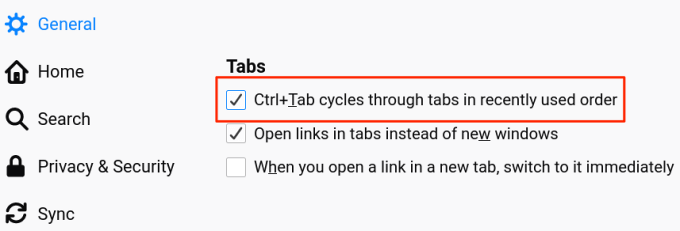
Note that this shortcut is disabled by default on Firefox—because the browser moves through tabs in recently used order. If you want to switch to previous tabs (in a backward sequence), head to Firefox’s Preferences menu and uncheck “Ctrl+Tab cycles through tabs in recently used order.”
Switch to a Specific Tab
Firefox also assigns numbers 1 to 8 to the first eight tabs from the left. To switch to any of the first eight tabs, press Alt + 1 to Alt + 8 (on Linux), Control + 1 to Control + 8 (on Windows), or Command + 1 to Command + 8 (on Mac).
If you need to jump to the last tab on Firefox’s Tab Bar, use Alt + 9 (on Linux), Control + 9 (on Windows), or Command + 9 (on Mac).
Safari Tab Shortcuts
If Safari is your go-to web browser, these keyboard shortcuts will reduce the time you spend navigating between tabs by a great deal.
Switch to the Next Tab
Press Control + Tab to jump to the next open tab on the right. Shift + Command + Right Squared bracket ( ] ) is an alternate shortcut that’ll yield a similar result.
Switch to a Previous Tab
These key combinations will take you one step backward and open the tab on the left: Command + Shift + Tab or Shift + Command + Left Squared bracket ( [ ).
Switch to a Specific Tab
Safari also lets you jump directly to the first 8 tabs and the last tab using dedicated shortcuts. Say you have 12 open tabs on Safari, pressing Command + 1 will switch to the 1st tab (from the right), Command + 7 will open the 7th tab, while Command + 3 opens the 3rd. You can do this up to Command + 9, which opens the last or rightmost tab.
If these shortcuts are opening your bookmarks instead, head to Safari’s preferences menu and activate the tab switch option. Open Safari, click the Apple logo on the menu bar and select Preferences. In the Tabs section, check the box next to “Use ⌘-1 to ⌘-9 to switch tabs.”
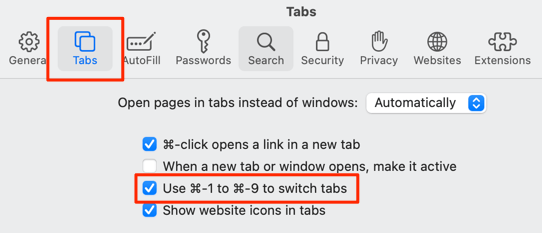
Return to Safari and check if the shortcuts now switch between tabs and not bookmarks.
Opera Tab Shortcuts
Opera only ships with shortcuts for cycling forward and backward through open tabs and windows. The browser lacks shortcuts for switching to a specific tab.

Switch Between Opera Tabs
On Windows, Linux, and macOS devices, press Control + Tab to move forward to the next tab on the right. On the flip side, Shift + Control + Tab will cycle backward through open tabs.
Switch Between Opera Windows
If you have multiple Opera windows opened on your device, you can move through the windows by pressing Command + Backquote ( ` ) on Mac or Alt + Tab on Windows/Linux.
Advanced Tab Navigation Shortcuts on Opera
Key combinations are swift, but how about switching between tabs using a single key? You can do that with Opera’s advanced keyboard shortcuts. Open Opera’s settings menu and go to Advanced > Browser > Shortcuts and select Enable advanced keyboard shortcuts.
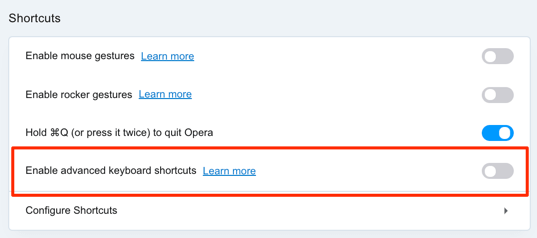
With this option enabled, press 1 on your keyboard to cycle forward through open tabs and press 2 to cycle backward. This works on Mac, Windows, and Linux devices.
There’s an extra advanced tab navigation hotkey for Mac: Control + Backquote ( ` ) lets you alternate between the current and previous tab. Say you switched to the 7th tab from the 2nd tab, this shortcut takes you back to the 7th tab. Pressing the key combination again opens the 2nd tab.
Brave Tab Shortcuts
Brave is one of many alternative browsers that’s fast gaining traction for being relatively faster and more secure than Chrome and Firefox.
If you’re already a Brave user, here are some keyboard shortcuts that’ll help improve your tab navigation speed.

Switch to the Next Tab
For macOS-powered devices, press the Command + Option + Right arrow keys to jump to the next open tab on the right. If you have a Windows or Linux machine, the shortcuts to use are Control + Tab or Control + Page Down.
Switch to the Previous Tab
The default shortcuts to jump one tab to the left on Windows and Linux devices are Control + Shift + Tab or Control + Page Up. On Mac, use the Command + Option + Left arrow key.
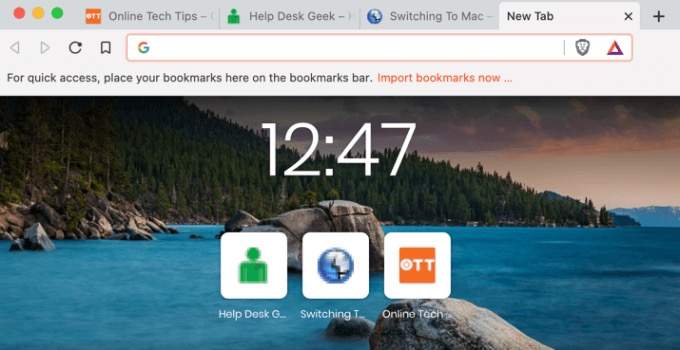
Switch to a Specific Tab on Brave
You can cycle through the 1st and 8th tab using Control + 1 through Control + 8 (on Windows/Linux) or Command + 1 through Command + 8 (on macOS).
Command + 9 will take you to the last tab on Mac while Control + 9 will do the same on Windows/Linux.
Reach Your Destination Tab in No Time
Mastering these shortcuts to switch tabs using your keyboard might be difficult at first, but you’ll surely get accustomed to them when used frequently. Incorporate these shortcuts into your daily web surfing routine and you’ll become a shortcut ninja in no time.

