
What is Sonic Update Manager and how to remove it

Posted on February 18, 2008 at 6:50 am

Here’s another technical walk-through on how to fix a pesky little problem that is caused by computer manufacturers such as Dell! Basically, they load too much crap onto your PC when you buy it and you get lots of junk software installed, one being Sonic Update Manager.

What is Sonic Update Manager?

Sonic Update Manager is not even a full software application, it’s a secondary application or service that run with the Sonic RecordNow software. Sonic RecordNow lets you create cds and dvds, so you don’t want to remove that from your machine.

But you may notice that every time you start up your computer, you get a wonderful message from Sonic Update Manager to enter the Sonic cd, which you don’t have since Dell didn’t give it to you and then pressing Cancel only seems to infuriate the software more because it keeps popping up over and over again! How annoying!

How to remove or uninstall Sonic Update Manager?

There are a couple of ways you can fix the problems associated with Sonic Update Manager and I’ll go through them here one by one.

The first and the simplest, if it’s possible, is to simply go into the Control Panel and then Add/Remove Programs. There look for Sonic Update Manager and if you’re lucky, it might be there. Click Remove to get rid of it. Remember, don’t get rid of Sonic RecordNow as that is the software you use to record cds and dvds.

The second way is to disable the Sonic Update service that starts up when you computer starts. You can do this by going to Start, click on Run, and then typing in MSCONFIG and pressing Enter.

msconfig

Next click on the Startup tab and you’ll see a list of all of the processes that start up when your computer starts up. You can uncheck any service to prevent it from loading during bootup. For the Sonic software, you want to search for any startup item named sgtray, or that has the words Sonic Update Manager or Update Manager in the path for the command or location.
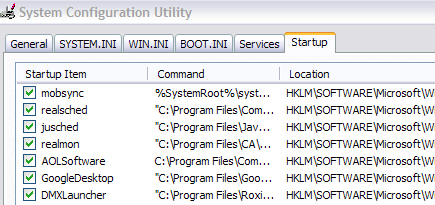
sonic update manager

Also, if you see isuspm or issch, go ahead and uncheck those also as they are culprits for this issue as well. You may also see something called “UpdateService” or “InstallShield” in the command column, make sure to un-check those. Don’t worry about disabling something important, Windows will give you an error if you try, so if you don’t get an error, it probably won’t hurt to disable it.

In some cases, you might have to uninstall it from Add/Remove programs and disable the startup items!

Sonic Update Manager Hotfix

You can also download a Sonic Update Manager hotfix from Roxio itself that could possibly fix your problem.

http://tools.roxio.com/support/dell/isum_hotfix.exe

Once installed, go ahead and restart your computer.

Windows Installer Cleanup Utility

Another step you can take is to clean up the Windows Installer files in Windows as that may have gotten corrupted and therefore cause all kinds of random popups asking for cds, etc.

Description of the Windows Installer CleanUp Utility

The download is from Microsoft and will help if you are still having issues even after trying all of the above steps trying to get rid of Sonic Update Manage.r

You should hopefully be able to resolve your issue with a combination of any of the above steps! Post a comment if you have a question!

[tags]sonic update manager, remove sonic update manager, sonic update manager msi, fix sonic update manager[/tags]

» Filed Under Computer Tips

Related Posts

Comments

59 Responses to “What is Sonic Update Manager and how to remove it”

  1. Nirmal said on :

    Sometimes these kind of softwares can cause problems when you dont know how to remove it. Config file is the best way to change startups.


  2. akishore said on :

    Hey Nirmal,

    Thanks for the info, can you explain a little more what you mean by config file?

    Thanks!


  3. Syahid A. said on :

    I think what Nirmal means is the tool that you use exactly above.


  4. zeqo said on :

    I tried everything above and some more from Google search….didn’t work.I couldn’t find anything related to this so i could try to fix it.This happened when I tried to update my Sonic software.


  5. Nirmal said on :

    Yea, I was telling about the msconfig file itself.


  6. Kathy said on :

    Thanks soooooooooooooooo much for your help. Problem Solved. “God Bless You” ! ! !


  7. Linda said on :

    Excellent advice!! Dell technicians had been totally mystified. I didn’t find Sonic on the start up menu, but did find “isuspm” and “issch” and this has solved the problem. Thanks!


  8. Hector Fabian said on :

    Excellent. Thanks


  9. Patricia said on :

    Hi everyone .. well, it seems my version was more aggressive. When I removed the items from startup – all seemed well. But lo and behold .. there it was yet again.
    In order for me to remove the program, I first disabled all my startup services and applied (but did not restart computer). This stopped the pop ups. Then I was able to remove the program from the system. So far .. so good!


  10. Kenn said on :

    Hmmm…I have tried removing Sonic Update Manager, ran msconfig and unchecked the suggested startup files, downloaded and executed the MS cleanup utility and attempted to run the hotfix program. Nothing works. The MS cleanup utility program would not execute I think because the remove program is still trying to remove the update manager. The only way I can restart the computer is a hard boot (holding down the off button). It’s nice to see that I’m not the only one with this problem but I haven’t been able to resolve it yet.

    Mahalo for any help…


  11. Mark said on :

    Thanks alot, this message was so annoying!


  12. zeqo said on :

    I think that the maker of this software doesn’t want us to use old versions anymore ,they want us to use (buy) latest version, that’s why this problem originated right after I updated sonic version.
    Think about this and consider how hard it is to fix it


  13. dexa said on :

    I used add/remove programs for Sonic Update Manager: it’s GONE and won’t return, I hope. I have an equally bad problem with a trial download from NITRO PDF: I can’t uninstall it.

    I get a Norton malicious script notice; High risk threat, but can’t get rid of it or quarantine. Their ad window pops up whenever I open a WORD file, pagemaker file. Outrageous pest! NITRO denies any problem with their download. It also hijacks my Nuance PDF program; stops file conversion —and leaves a Nitro Icon behind : click it —-the Nitro ad again!

    Any ideas?????Please?


  14. Pactravel said on :

    I have been trying to get rid of “Sonic Update manager” for months I did have the patch but that did not work so I used your idea with MSCONFIG
    Thank you it worked…but I have a question..msconfig doesn’t really get rid of it it just doesn’t start up with your computer correct?


  15. onetrackmind said on :

    thanks for the info. i reinstalled windows onto my dell laptop and had to deal with this issue again.


  16. Andrea Hyde said on :

    Hey! Thanks so much for Sonic the Update Manager fix!


  17. Jodi said on :

    I tried all of the steps above with no luck until I finally did the Windows Installer Cleanup Utility. It hasn’t popped up so far. Keeping my fingers crossed.


  18. JOCHANNAH H said on :

    Thanks. I have been trying to figure out what to do for weeks, and none of the companies can help. However, thanks for explaining what Sonic is, as I didn’t know if I could uninstall safely. I am not always sure which program is needed so never want to change something without some expert opinion. Good to know this is not just me.
    found this site accidentally but will keep it,
    thanks mucho


  19. Charlie said on :

    That worked!

    You said:

    “Sonic RecordNow lets you create cds and dvds, so you don’t want to remove that from your machine.”

    I have itunes. Do I also need Sonic to burn cds? I’m trying to free up space and I’d like to get rid of Sonic if possible.


  20. 8ball said on :

    Thanks for the help. This problem appeared after running System Mechanic 6, which appears to have turned this on. Googled the problem and found your site. Brilliant.


  21. sylvie said on :

    Thanks for the info on Sonic Update Manager. Couldn’t get rid of the damm thing till I came upon this site. Thanks!!


  22. lydia said on :

    What if you have at one time or another accidentally removed sonic recordnow? How do you get it back?


  23. Margie said on :

    Thanks, thanks, and, thanks!!!!! Sonic Update has been silent for two years on my Dell and suddenly was demanding that I update – only I had no disk to update! And since the computer is no longer under warranty Dell wanted $49.99 to let me talk to a tech person. Verizon’s tech person led me to you when I called them because Sonic Update was messing up my virus protection. Thanks soooooooooooooooo much.


  24. Debbie said on :

    Holy cow! I have a Compaq pc, and never had this issue with Sonic Update until this week! I didn’t even know I had this software installed until I got those never-ending pop ups about the resource being on some network drive and not found, blah blah blah. Couldn’t get rid of it from the control panel, so after finding this site (thank you thank you!!) I unchecked it from my startup services and applied (but did not restart computer). This stopped the pop ups. Then I was able to remove the program from the control panel. To return no more, I hope!


  25. Narayan said on :

    I am able to solve this Sonic Headache. Thank you very much for your TIPS!!!


  26. Sassy Girl said on :

    Thank You!! I didn’t even know what Sonic Update was until it started annoying me every day! I found the program and removed it…. hopefully this will solve my problem…..


  27. Ron E. said on :

    Concerning article #22. I also errased the whole SONIC program (on my brothers computer) and I thought ..uh oh, so I went back to the ’system restore’ and saw all the sonic stuff I deleted or removed and was able to put the items back I wanted.


  28. Ajit said on :

    Thanks for the tip. I was able to remove the Sonic Update Manager from the control panel.


  29. muthuraman v said on :

    hi

    Whenever i start the computer “svchost.exe-No Disk” pop up is coming with the message “There is no disk in the drive.Please insert a disk into drive A” and this window is not going …..how to rectify it? pl help me


  30. Mark said on :

    Thanks man! It was really making me angry every time it popped up and it sometimes popped up in a game and crashed my computer :( but thanks for your help im pretty sure its gone now :D


  31. Mike Tilson said on :

    I finally got rid of Sonic Update Manager thanks to you.

    You’re a great person and sign me up if you ever need help.

    Mike


  32. Ed said on :

    Thanks to you I finally got rid of it! Have had this Dell for 2+ years and it popped up today!!! Now it’s gone. Thanks !


  33. BScottie said on :

    Thank you, thank you for this! The endless Sonic Update Manager messages that suddenly appeared on my Dell were driving my blood pressure through the roof!


  34. james said on :

    I was online with HP for over 3 hours they did not have a clue how to get rid of windows installer then this sonic update manager okay it cost me £25 to download the perfect uninstaller but it was worth it now my computer starts up twice as quick I would reccomend it to anyone whose having this problem it was sorted in 10 minutes


  35. gulliver said on :

    i am bothered by Sonic application, i have an IBM, i had to create 5 DVDs and by the time i was through wiht the third, i was left with few space on the system root windows drive. i have checked all folders, to the extent of unhiding the default hidden files and folders. where are these files copied during the process of ‘copying’ a CD/DVD ?


  36. Barbara said on :

    Why didn’t I think of doing this search years ago, Dell stinks


  37. Paul said on :

    Thanks
    I am a computer novice I often get very confused and frustrated by all the technical jargon and with being expected to immediately know ‘computer speak’.
    Your simple and straightforward advice was extremely helpful and, hopefully, has sorted my problem with ’sonic’.
    Thanks again.


  38. richard said on :

    i will certainly try all your recommendations. so far, i have contacted and gotten responses from Roxio and microsoft (via the fixes recommended by Roxio), to no avail. i’ve followed their recommendation/directions and they don’t change anything. i hoped to just un-install Roxio, but the computer said no, you are installing (the elusive update) and it won’t un-install until that’s finished. of course, it’s been frozen – as with all the above comments – for a month now and interfering now with other programs and apps. any suggestions are appreciated. i did try on my own to go into MSCONFIG to change the start up, but my computer is now not allowing me any access to MSCONFIG. thanks for any help.


  39. Kris said on :

    Thank You SO Much for the help.Can you tell me if there are more of these I can safely remove from my Dell? This Sonic Update Manager WAS a real pain!


  40. Toni said on :

    Why when I boot up does my computer pop up an alert
    stating

    “c:\windows\system32\njdwhqjp.dll” and another
    “c:\windowsystem32\cytjtai.dll


  41. chris said on :

    AWESOME!!! That pesky Sonic Update Manager was making me NUTS!! In desperation, I decided to Google it and this page came up immediately… it was SO easy & now I am finally FREE!! Since I didn’t know WHAT “it” was, I didn’t want to remove it because I did that before to free up space on my PC… and ended up removing important programs even though they said RARELY USED (I’m totally computer illiterate!) & that got me in trouble with my son since HE had to travel from out of state to fix!! I’m SO happy I found this site… now THIS grandma won’t have to depend on anyone to help me out!! THANK YOU THANK YOU…. :)


  42. Kim said on :

    Thanks so much. Those steps are almost dummy-proof, which means I figured them out!


  43. Carolyn said on :

    The simple Add/Remove worked. Thank you so very much.


  44. Stephen said on :

    is there any way to get sonic recordnow back or do i really need it? while i was trying to free up space, i deleted it not realizing that it may be something i use later on.


  45. Kuranda said on :

    You are great – no more annyoing messages from Sonic Update! Thank you!


  46. Peter H. Michaelis said on :

    Just wanted to say thanks for your help. I was finally able to get rid of the dreaded “Sonic Update Manager” message. I followed your suggestions, but nothing helped. In the ADD/Remove Programs page I was told the “Sonic Update Manager” could not be removed because of a ” Fatal Error Occurance”.

    Then I downloaded the “Windows Installer Cleanup Utility” from Microsoft. Once I located the “Sonic Update Manager” program, I simply clicked on it to highlight it, hit the “Remove” button and it was gone.

    I double checked in the Add/Remove Program page and it was out of there as well. When I started my Compac Presario with Windows XP the next day, no more annoying messages.


  47. Sunny said on :

    I did the msconfig thing and now my computer is acting up. I get a dialog box that tells me since I’ve used the system configuration utility I can’t start windows normally anymore. I tried system restore and it won’t restore; it tells me it can’t and that no changes were made to my computer. HELP ME FIX THIS MESS!!!
    On the upside, I was able to use windows clean up utility to remove the sonic update manager. But now I’m left with this problem. HELP!!!


  48. Mary Lu Catino said on :

    Thank you SOOO much for telling me how to get rid of this Sonic Update Manager. First I thought it was something from Windows, but I didn’t want to download it until I found out more about it! You were a life-saver!


  49. Michele said on :

    Thanks for your help. You are a life saver. I found your site by accident by searching sonic update manager. I have a HP and this update manager started popping up and giving me a headache. I as able to remove it by using the add and remove programs, but until I found your site I didn’t know if it was safe to do since I do use the Sonic Record Now Program and thought that it was part of that program. When I went to the msconfig and unchecked the isuspm and issch file my computer wouldn’t start normally. I had to go back and recheck those files and now everything seems to be working great. Thanks so much!!!!!!!


  50. Tyler said on :

    Thank you so much! I removed the SUM via add/remove programs and it worked like a charm. I was about to savagely destroy my laptop with a blunt object.


  51. Mike Tilson said on :

    I’ve got a folder that was generater by some convert action and written to my back-up disk. It is marked as “read only”. I can’t delete the folder or change its attributes. I get an “access denied” error. I am the sys admin with full rights (or at least so I thought). My system is W/XP up-to-date with fixes.

    Any ideas out there. FYI I can’t move the file either, but when I try, it copies the file to my target drive. I can then delete the copy.

    Mike Tilson


  52. Rose Ann said on :

    Thanks so much! Your advise was very helpful. I was able to remove Sonic Update Manager from the Control Panel easily and this annoying problem has finally disappeared!


  53. SKYMAN said on :

    If you are stupid like me and tried to delete sonic updater not knowing what it was and how much aggrevation it was going to cause and you have tried the steps above with no luck, im not sure about the steps of how i got rid of this annoiance but ill try!
    -click on start then run
    -type in MSCONFIG
    -not sure on which tab you click on but one of them will say something about restore points
    -select one of you restore checkpoints that was before this problem presented itself out of stupidity
    -and after a short wait everything was back to normal!
    -Oh yea this will only work if this problem happend in the near past because your computer only saves your restore points for so long luckally i still had 2 days still left on the list till i was SCREWED!


  54. Scott said on :

    Thank you! That sonic update was really, really annoying.

    It’s gone now! :-)


  55. Jan Takahashi said on :

    Thank you, thank you. You site was the first on google, so I took a chance. This sonic update thing has been bugging me for months and every other time I have tried anything to fix something on my computer it has either made it worse and/or cost me more than it was worth. Thank you. Thank you.


  56. Suz Troutner said on :

    THANK YOU!!!! I couldn’t get rid of SONIC UPDATE! You made it soooo easy!! Thanks, Again!!


  57. Anthony said on :

    Thanks for the help in removing the pesty sonic update manager.. It worked perfectly…keep up the good work


  58. Mike said on :

    I have a Dimension 9150 running XP. The Dell site studiously ignores the widespread variants of this “update” problem, so far as I can work out.

    I believe what triggered my case was installing Norton Internet Security 2010 over the 2009 version and using a few of the utilities prominently featured with the 2010 version.

    It’s all an absolute pain.

    Mike


    Pingbacks
  1. Fix errors relating to swdsvc.exe and pctstray.exe Says:

    [...] If you don’t even have the software installed on your computer and you are getting error messages with pctstray.exe in them, then you probably have a virus. If you did buy Spyware Doctor, then you probably just need to uninstall the software and download the latest version. If you don’t even know what it is, uninstall it. Sometimes computers come bundled with this type of software, such as with Dell and how you have to remove Sonic Update Manager.  [...]

Please post your comments/suggestions!