
If you need extra speed (only if you know what you are doing)

If you have ever searched for ways to make your Windows computer faster, you’ve probably run across several websites that suggest turning off or disabling certain Windows services. Other websites say it’s dangerous and you should never mess with Windows services. So, who is correct?
Well, the argument can basically be broken down into whether or not you know what you are doing. In my opinion, if you don’t know what a Windows service even is, then you really should not disable any service. If you have some basic understanding of services and programs, then it’s OK to disable only non-Microsoft services.
Table of Contents
As a general rule, I never disable any service that comes installed with Windows by default or that is from Microsoft. If you think a service is unnecessary and might be slowing down your computer, you should Google it and then try to uninstall the program or Windows feature that is creating the service in the first place.

However, when you disable non-Microsoft services, your chances of messing something up on your computer are greatly reduced. Most of these third-party services don’t necessarily need to be enabled. They are usually there to check for updates in the background or something similar.
Windows Services Location
First off, there are two ways to view all the services on your Windows PC. You can go to Start and type in services to open the desktop app or you can type in MSCONFIG to open the system configuration utility.
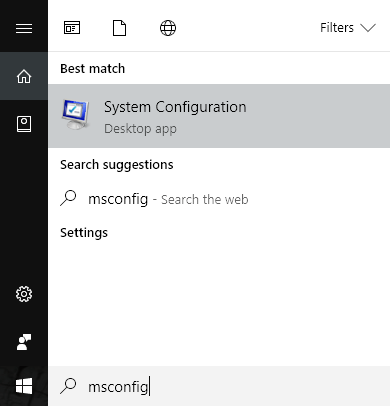
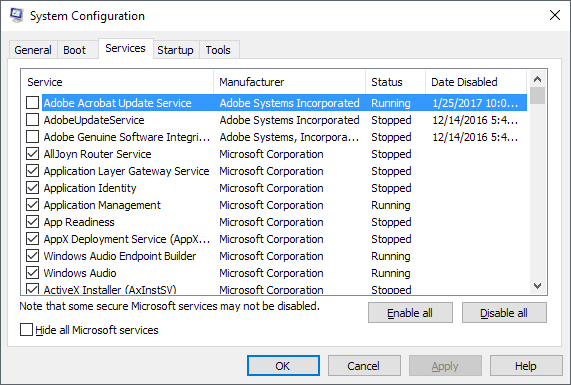
Go ahead and click on the Services tab and you’ll see a list of all services with checkmarks next to each one. If you uncheck the service, it will be disabled the next time you restart the computer.
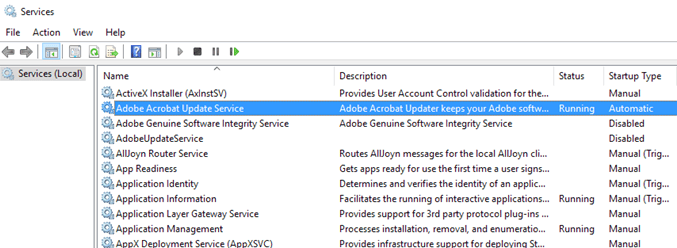
The other method is to click on Start and type in services, which also will list out all of the services, but each service has to be disabled manually and you can’t hide all of the Microsoft services quickly like you can in MSCONFIG. The one benefit, though, is that it gives you a detailed description for each service.
Examine Non-Microsoft Services
In MSCONFIG, go ahead and check Hide all Microsoft services. As I mentioned earlier, I don’t even mess with disabling any Microsoft service because it’s not worth the problems you’ll end up with later. Many sites will tell you that it’s OK to disable service X or service Y because it’s only used when your computer is part of a domain or it’s only needed when a certain feature is enabled in Windows, etc., but you can never really be certain when a service will suddenly need to be started and used.
Once you hide the Microsoft services, you really should only be left with about 10 to 20 services at max. If you have more than that, you probably have way too many programs installed on your computer. If you do have a lot and you need all those programs, then disabling a few of the services will probably make your computer run faster.
So how do you know which service to disable and which to leave alone? The only third-party services I have come across that you shouldn’t touch are any that have the words wireless, intel or display in them. The wireless ones control your Wi-Fi card and if you disable that service, your wireless connection will disappear.
Intel has quite a few services and I usually just leave those alone because they never use a lot of memory or eat up the CPU. Lastly, any graphics card services should remain enabled. This includes anything with NVIDIA or AMD or the word graphics in the service name. Outside of that, everything else is fair game.
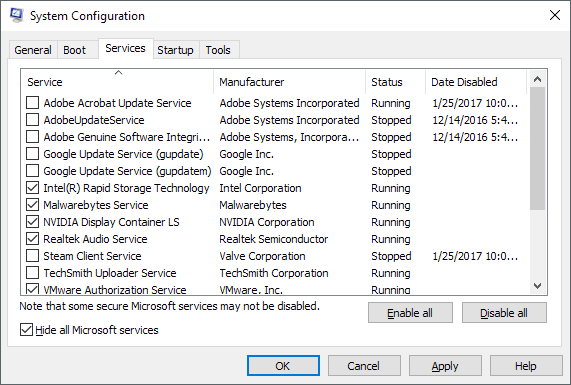
Let’s take a look at some services on my computer. As you can see, I basically disabled all of the services that are related to updates. So does this mean Adobe and Google programs will never update? No, it just means I have to do it manually, which I find myself doing all the time anyway, so it’s not a big deal for me. I also disabled Steam and TechSmith because I don’t use those programs very often and the services turn on automatically once I start the programs.
It’s worth mentioning once that unchecking a service here doesn’t mean it will never run again on the computer. It just means it won’t automatically start when the computer first boots up. When you manually run the program, the services associated with that program will automatically start also.
I kept the Intel Rapid Storage, Malwarebytes, NVIDIA and Realtek audio services enabled for obvious reasons. I want my anti-malware program to be running and I want my graphics and audio to be functioning properly. If you’re not sure by the service name what it does or which program it is associated with, go to the other services app I mentioned and try to read the description. Anything that you’re not sure about, you should leave enabled.
Also, if you do disable something that you find is needed, simply go back into MSCONFIG and check the box to re-enable it. If you’re just messing around with non-Microsoft services, there isn’t a whole lot you can mess up. I also recommend disabling one service at a time, restarting, working on your computer for a while, and then trying another service.
Finally, you may find certain programs starting up that won’t show up in the list of services. In those cases, you have to disable the startup programs, which is in another section. If your computer is slow, check out my previous post on how to speed up Windows. Enjoy!

