
Built-in options great for 15-inch monitors or larger

In recent years, ultrawide monitors have become more readily available – and seen a rise in popularity as a result. There’s just something about the sight of a curved monitor that immerses the user into its sea of pixels, whether they are knocking out a review on the latest gadget or sinking hours into their favorite game. But if you’re only using a single window at a time, you aren’t taking full advantage of all that real estate.
If you split your computer screen monitor, you can run multiple applications, view research on one half of the screen and your word document on another, or display various status displays across your entire monitor.
Table of Contents
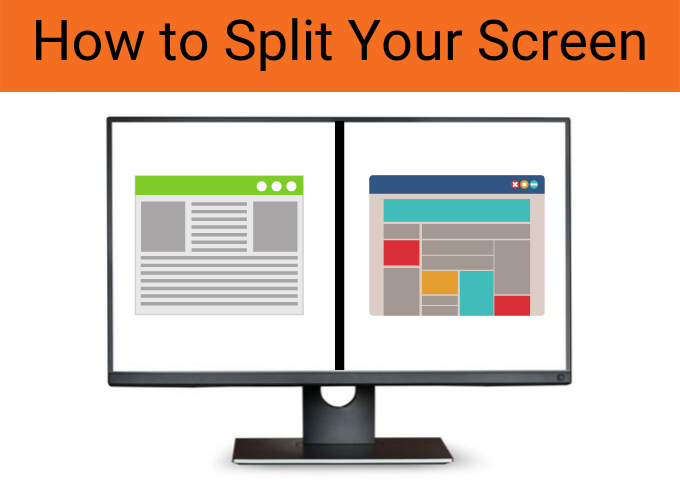
Windows 10 includes a number of default features that make splitting the screen as easy as dragging the display, but more complex control can be achieved with third-party applications.
This article will explore the various options available to you to split one monitor and let you take full advantage of your screen real estate.
Split Screen with Windows 10 Snap Assist
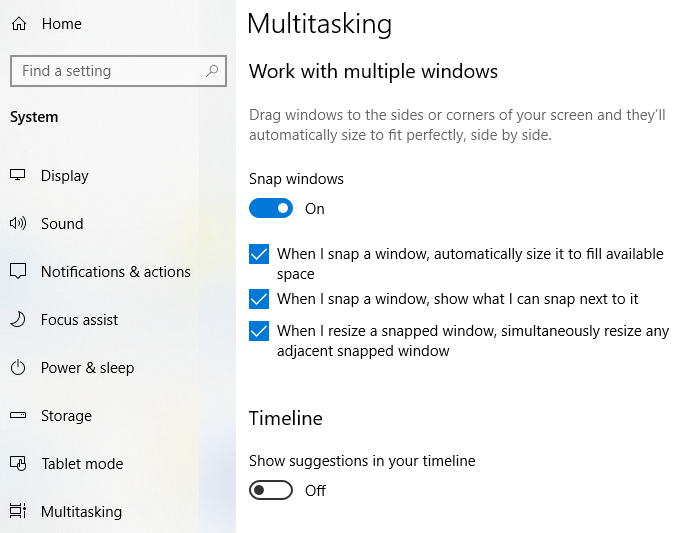
Windows 10 has a feature called “Snap Assist” that allows you to drag and drop a window to the part of the screen you want to snap it to. Make sure this feature is enabled first.
- Click Start and open Settings.
- Click System and select the Multitasking tab.There is a slider called Snap Windows. Make sure it is set to On.
You also have the option to choose certain options, such as:
- When I snap a window, automatically size it to fill available space.
- When I snap a window, show what I can snap next to it.
- When I resize a snapped window, simultaneously resize any adjacent snapped window.
Once enabled, all you have to do is click and drag a window to one side of the screen. Dragging it to the left of the screen will cause it to fill the left-side of the screen to the halfway point, while dragging it to the right will do the opposite.
If you drag a window to any of the four corners of the screen, the window will snap to fill a quadrant of the screen. Dragging it to the top of the screen will make the window fill the entire screen. Once you have snapped a window into place, you can grab the dividing line between any two windows and adjust the size of each one.
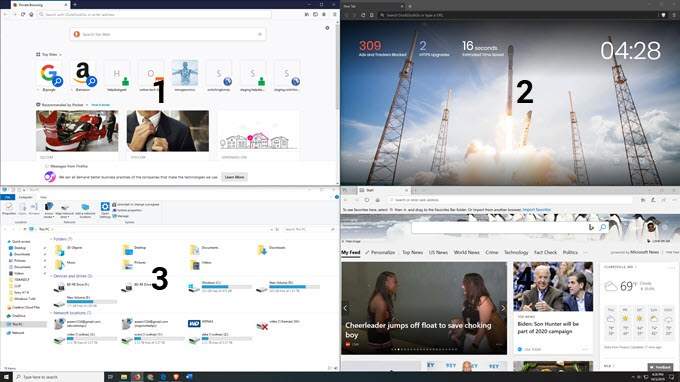
Two windows can be displayed split-screen, or four can be displayed in a quadrant set up. One window can also be set to fill half the screen while two others fill the top and bottom of the other half of the screen. However, you can’t snap three windows in a side-by-side-by-side layout, not without the help of a third-party application.
Split Screen on Windows XP/7/8
If you have an older version of Windows, you might not have access to the same built-in tools as Windows 10, and many of the freeware options won’t work. Never fear, though: there are still ways to split the screen.
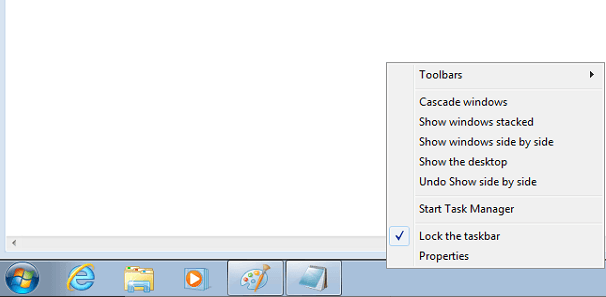
In Windows 7, open two applications. Once the two apps are open, right-click on the taskbar and select “Show windows side by side.” Voila: you’ll have two windows open simultaneously. It’s as simple as that. And if you take a quick pick at the screenshot below, you’ll see that you can also stack the windows on top of one another.
Windows 7 was the first iteration of the Windows OS to support the Snap Assist feature. It worked similarly to how Windows 10 currently implements the feature. Just drag an open window to either the left or the right side of the screen in the center and let it go. It will “snap” into place.
Windows 8 is a little more difficult, but similar in function. Windows 8 was designed with touchscreen devices in mind, but it can still be controlled via mouse. Open two apps, and place one in full-screen mode. If you use a touchscreen, swipe in from the left side of the screen until the app is docked.
If you have a mouse, place it in the top left corner, click and hold the app, and drag it into place on screen. A dividing line will appear in the center of the screen when both apps are in place. You can adjust this line to change the amount of space each app takes up.
Split Screen with Freeware
If the built-in Windows 10 applications don’t give you the control and utility you need, there are freeware applications you can use that grant access to more advanced features. A few of these include WindowsGrid, GridMove, and AltDrag. The first two freeware applications we covered more extensively in a similar post on this topic that explores how each one works.
The downside to freeware applications is that the developers make nothing or next to nothing for their development, so support for these programs can end abruptly. For prolonged support for screen-splitting applications, consider a paid program that serves a similar purpose.
Paid Software Options
Paid split-screen software gives even more features than freeware and is more reliable in that you can trust support will continue as long as people continue to purchase the software. These programs also offer customer support to help you navigate any technical difficulties you might run into.
Here are a few of the best options.
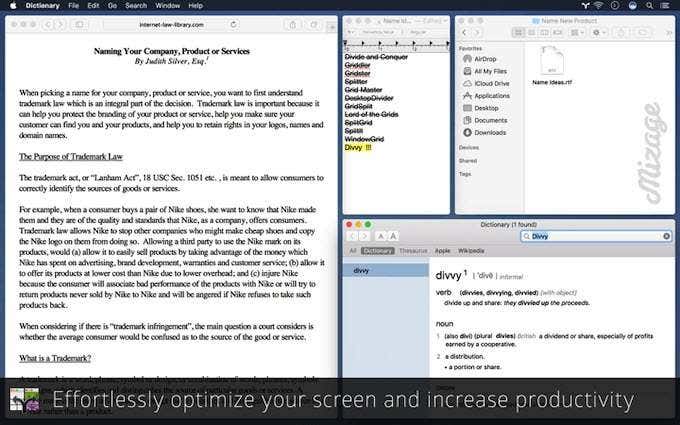
Divvy is a window management tool based around the idea of “divvying up” your windows into different sections. For just $14, the software is well within most budgets and allows users to split their screen into a variety of setups.
While it operates similarly to Windows Snap Assist, users have more options in how they arrange their screens. Divvy makes it possible for users to create their own shortcuts to resize and reshape their screen however they want.
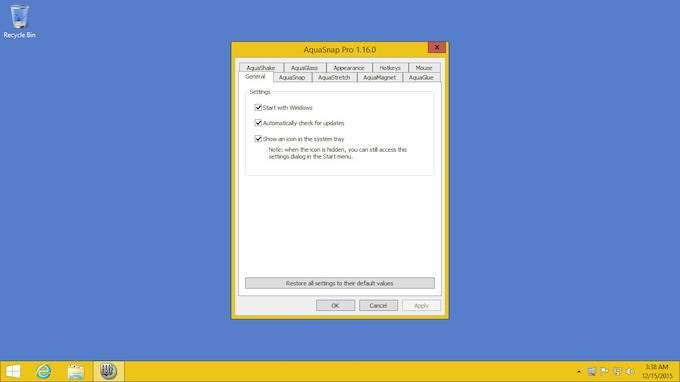
AquaSnap is similar to Divvy, except that it offers the software for free for personal use. The “Pro” version is $18. While less powerful than Divvy, it’s also more user-friendly. AquaSnap doesn’t have as many features or as much control, but the “Pro” version gives access to keyboard, mouse, and other types of shortcuts that make resizing your screen as easy as pressing a few buttons.
You don’t need an ultra-wide monitor to make use of any of these tools. Splitting the screen can be useful in any situation where you need to view multiple sources of information at once, but high-resolution displays are where screen-splits really shine through.

