
Best option is to convert to an ISO image and then mount the ISO

Have you recently downloaded a UIF file and now want to mount it so that you can view the contents? A UIF file is actually a MagicISO CD/DVD image file. The file can contain documents, photos, videos, etc. In order to view the contents, you have to first mount the UIF image file.
There are many formats for creating images files of CD/DVDs, but UIF is used because it provides better encryption and also has better compression. The most common image format is ISO.
Table of Contents
Instead of trying to mount a UIF directly, the best option is to convert the UIF image to an ISO image and then mount the ISO image. In this article, I’ll walk you through the various steps.
MagicISO
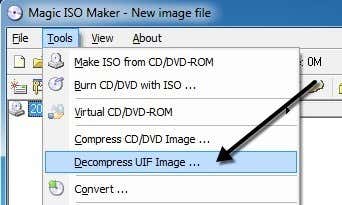
Since MagicISO is the program that creates these UIF files, we can use it to decompress and convert the UIF to to ISO. Unfortunately, MagicISO is not free, but you can still use the trial edition to decompress UIF files up to 300 MB in size. First download the software, run it and then click on Tools and Decompress UIF Image.
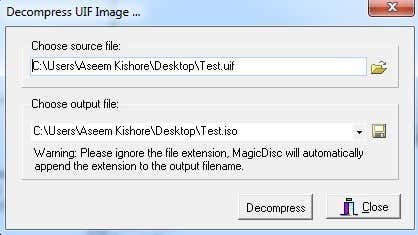
Choose the source file and by default the ISO output file will be created in the same directory. Click the Decompress button and you should have an ISO file within a short time.
If your file is larger than 300MB, then instead of spending any money buying MagicISO, you can use a free third-party utility to perform the conversion.
UIF to ISO
UIF to ISO is a very simple free program that only converts UIF images to ISO images. Run the program and click the Open button to choose the UIF file.
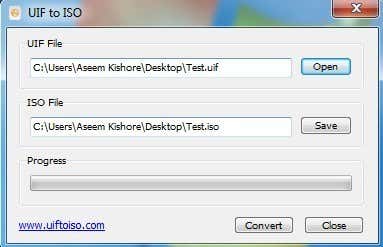
By default, the program will save the ISO to the same directory. Click the Convert button and your file will be converted. It’s that simple! Now let’s talk about mounting the ISO image in Windows.
Mount ISO Image
Mounting an ISO image is also a fairly easy process. Depending on which version of Windows you are running, it may not even require installing any additional software.
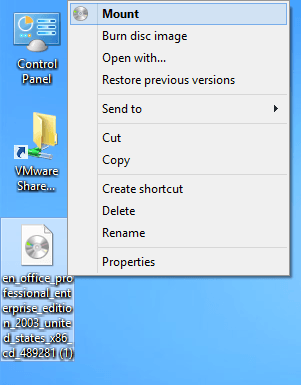
For example, in Windows 8 you can mount an ISO image by simply right-clicking on the file or by clicking the Mount button in Explorer.
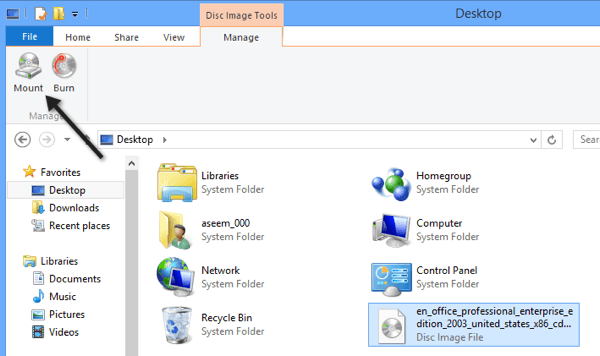
If you are running Windows 7 or earlier, then you have to download a freeware utility to mount ISO images. Read my previous post on creating, mounting and burning ISO image files to mount the ISO file. In that post, I mentioned a tool called Virtual Clone Drive, which I feel is the best overall for mounting ISO images.
However, there are other good programs too. There is another program from MagicISO called MagicDisc, which is free. This program supports a large range of CD/DVD image formats including BIN, CIF, NRG, IMG, VCD, C2D, PDI, and lots more.
To mount an image using MagicDisc, install it and then right-click on the icon in the system tray. Expand Virtual CD/DVD-ROM, choose X: No Media and then choose Mount. By default, only one drive is set, but you can have up to 15 virtual drives connected at once if you like.
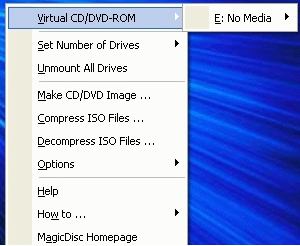
Find the decompressed ISO file on your computer and click Open! You should now be able to go to My Computer and browse the CD or DVD like a normal Windows drive.
In addition to mounting images, the program also lets you create image files, compress them to UIF format, and decompress them from UIF to ISO.
Another extra benefit of MagicDisc is that since it’s created by the MagicISO team, it also supports mounting UIF images. So instead of worrying about converting the UIF file first, you can just download and install MagicDisc and then mount the UIF image directly to read the contents. If you have any questions, post a comment. Enjoy!

