

While one of the most lopsided Discord debates may be choosing between its Dark and Light themes, color-based customization doesn’t reach far outside of this choice and setting custom role colors.
However, Discord supports markdown. If you’re unfamiliar with markdown, it’s the simple symbol-based formatting you apply to messages to add effects like bolding and italicization.
Of all markdown supported by Discord, code blocks may be the most versatile. You don’t have to be a coder to use code blocks, and many users aren’t aware that these blocky boxes actually allow users to add color to their text.
Confused? In this article, let’s talk about code blocks and how you can use them to create Discord color messages.
What Are Code Blocks On Discord?
Code blocks, sometimes referred to as code boxes or simply boxes, are a form of markdown supported by Discord’s rendering engine.
If you’re not sure what markdown is, some of the most commonly-used tricks are to surround your text in single asterisks (*like this*) to italicize text or double asterisks (**like this**) to bold text.
Discord supports markdown for these, along with underlines (__like this__), strikethroughs (~~like this~~), spoiler tags (||like this||), quotes (> like this), and single-line code blocks (`like this`).
However, along with single-line code blocks, Discord also supports multi-line code blocks. A single-line code block adds a dark background to white, monospaced text, making it easy for Discord users to share brief snippets of code is a readable format. Multi-line code blocks allow users to share more complex code that spans across several lines.
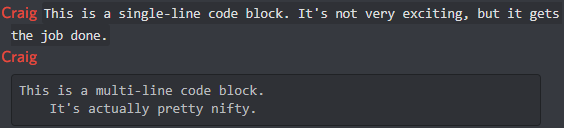
To create a multi-line code block, surround your text in triple backticks (“`like this“`). It will create a large, dark box around your text, format it in a monospaced font, and preserve all indentations.
One thing that really sets multi-line code blocks apart from other markdown is that they support syntax highlighting.
What Is Syntax Highlighting In Code Blocks On Discord?
Syntax highlighting is a feature commonly found in text editors and Notepad alternatives like Notepad++ and Sublime Text. It allows coders to define the programming language of a document so that important elements of the code will be colorized, for easier reading and understanding.
As Discord’s multi-line code block markup is intended to be used for this purpose, there are clever ways that you can take advantage of it to add color to your messages.
To add syntax highlighting to your multi-line code blocks, you have to enter a keyword after the first set of triple backticks. Here’s an example:
“`md
<md> is the keyword to format your code blocks with basic markdown.
< Other syntax highlighting includes JSON and Python. >“`
When written as a message on Discord, that will appear like this:

Knowing which formatting styles bring out which colors is a shot in the dark unless you’ve got a guide covering them all, which we do.
Discord Code Block Syntax Highlighting Styles
Below is a list of all of the known syntax highlighting keywords that Discord’s multi-line code block markup supports.
asciidoc
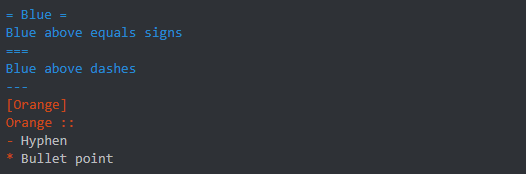
autohotkey

bash
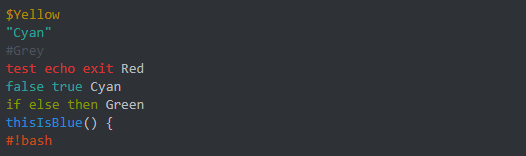
coffeescript

cpp

cs

css
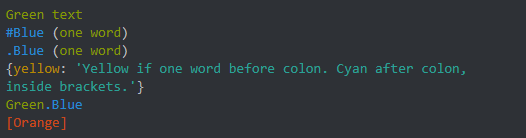
diff

fix

glsl

ini

json

md
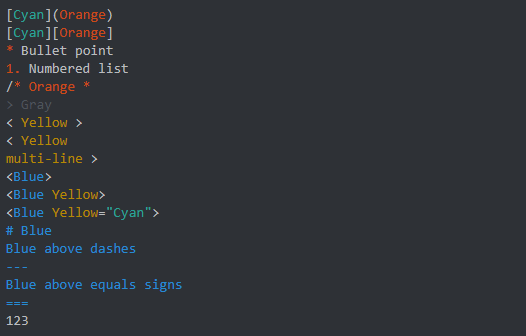
ml

prolog

py

xl

xml

As time passes, Discord may continue to add new syntax highlighting options.
While using Discord’s syntax highlighting may not be as clean an implementation as having the option to just change your text color, it’s still very useful and the best solution available right now to create Discord color messages.
There are plenty of options, so if you ever have a large chunk of text that you need to be formatted for easier reading—such as a command list for your Discord music bot – be sure to try code blocks out.