

Ever tried to add a flair to a Reddit post and just… couldn’t find the button? Or typed **bold** into a comment and watched it show up as literal asterisks, like some kind of typo? You didn’t break anything. Reddit splits control of these features between you and whatever community you’re posting in, and the tools look completely different depending on whether you’re on reddit.com, old.reddit.com, or the app.
This guide covers exactly how flair, spoiler tags, and text formatting work: what you control, what the subreddit controls, and how things shifted on iOS and Android in 2026. By the end you’ll know why some options go missing and how to get your posts looking the way you actually want them to.
What Flair, Spoilers, and Formatting Actually Do
Before jumping into steps, here’s the quick rundown:
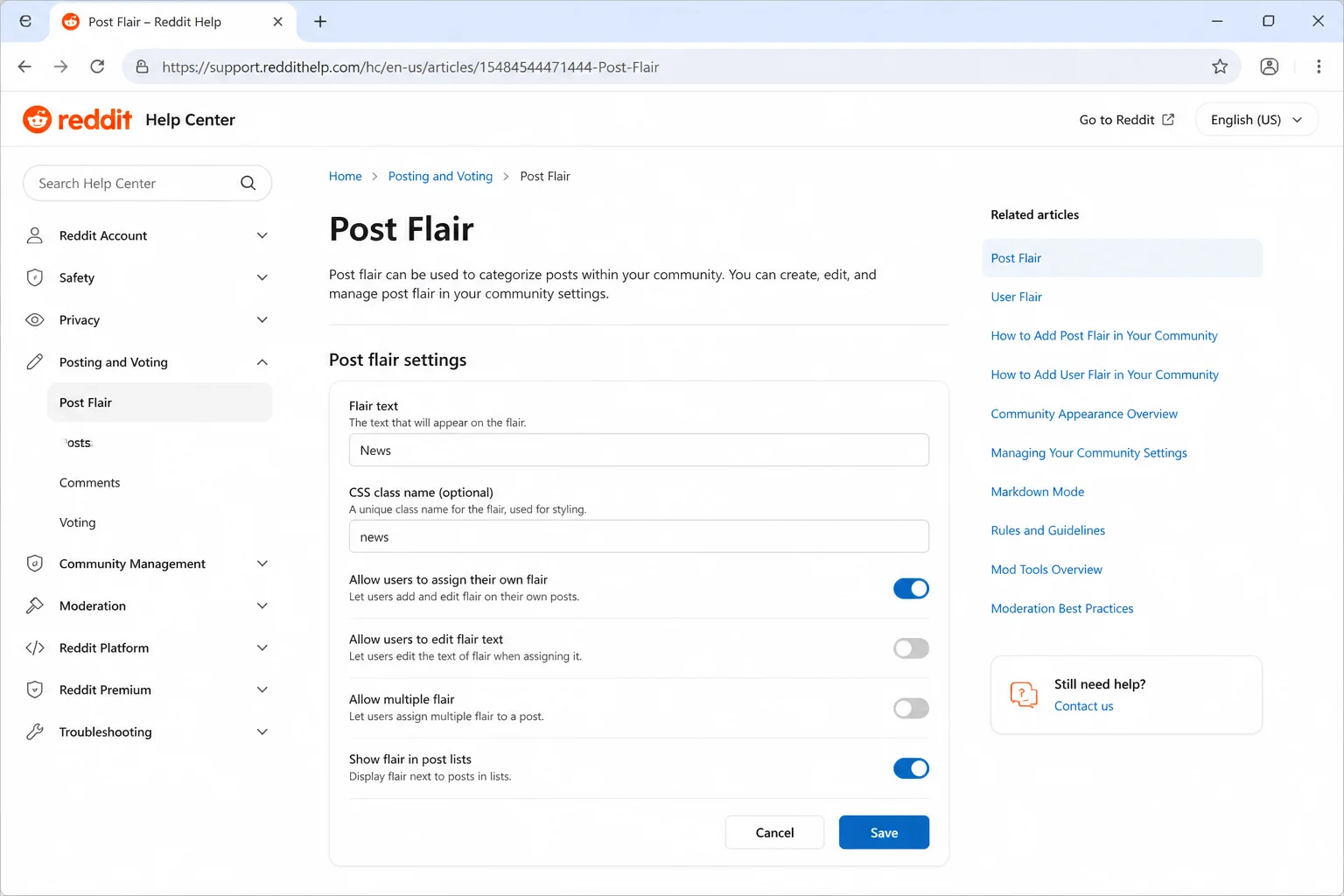
- Post flair is a small label (text, an icon, or both) attached to a post: think “Discussion,” “News,” or “Meme.” Each subreddit’s moderators decide what flair options exist and whether picking one is required.
- User flair is a badge that shows next to your username, but only inside one specific subreddit. It doesn’t follow you anywhere else, and plenty of communities don’t let members set their own.
- Spoiler tags blur out a post or a chunk of comment text until someone clicks to reveal it, handy for talking about a show finale without ruining it for everyone in their feed.
- Rich-text editor is the point-and-click formatting toolbar (bold, italic, links, lists) you get by default on reddit.com and in the official apps.
- Markdown is typed-syntax formatting, using symbols like asterisks and brackets, that’s the default on old.reddit.com and available as a toggle on new Reddit.
Here’s the one thing worth remembering through all of this: flair is a community decision, formatting mode is mostly a device decision. Keep that split in your head and most of the confusion just melts away.
Prerequisites
- An active Reddit account, signed in
- A modern web browser (Chrome, Edge, Firefox, or Safari) for desktop steps
- The official Reddit app installed on iOS (from the App Store) for mobile steps
- Enough karma or membership standing in a subreddit, if that community requires it for flair or posting privileges (check the subreddit’s rules)
- Basic familiarity with posting and commenting on Reddit already
Step-by-Step Guide
Adding or Changing Post Flair
Post flair only shows up if a subreddit’s moderators have turned it on. Here’s how to add it where it’s available.
On Web (reddit.com)
- Go to the subreddit and start a post. Navigate to the community (for example,
reddit.com/r/AskReddit) and click Create Post. - Look for the flair button below the title field. If the subreddit uses flair, you’ll see a button labeled Add flair or similar, sometimes appearing automatically as a required field.
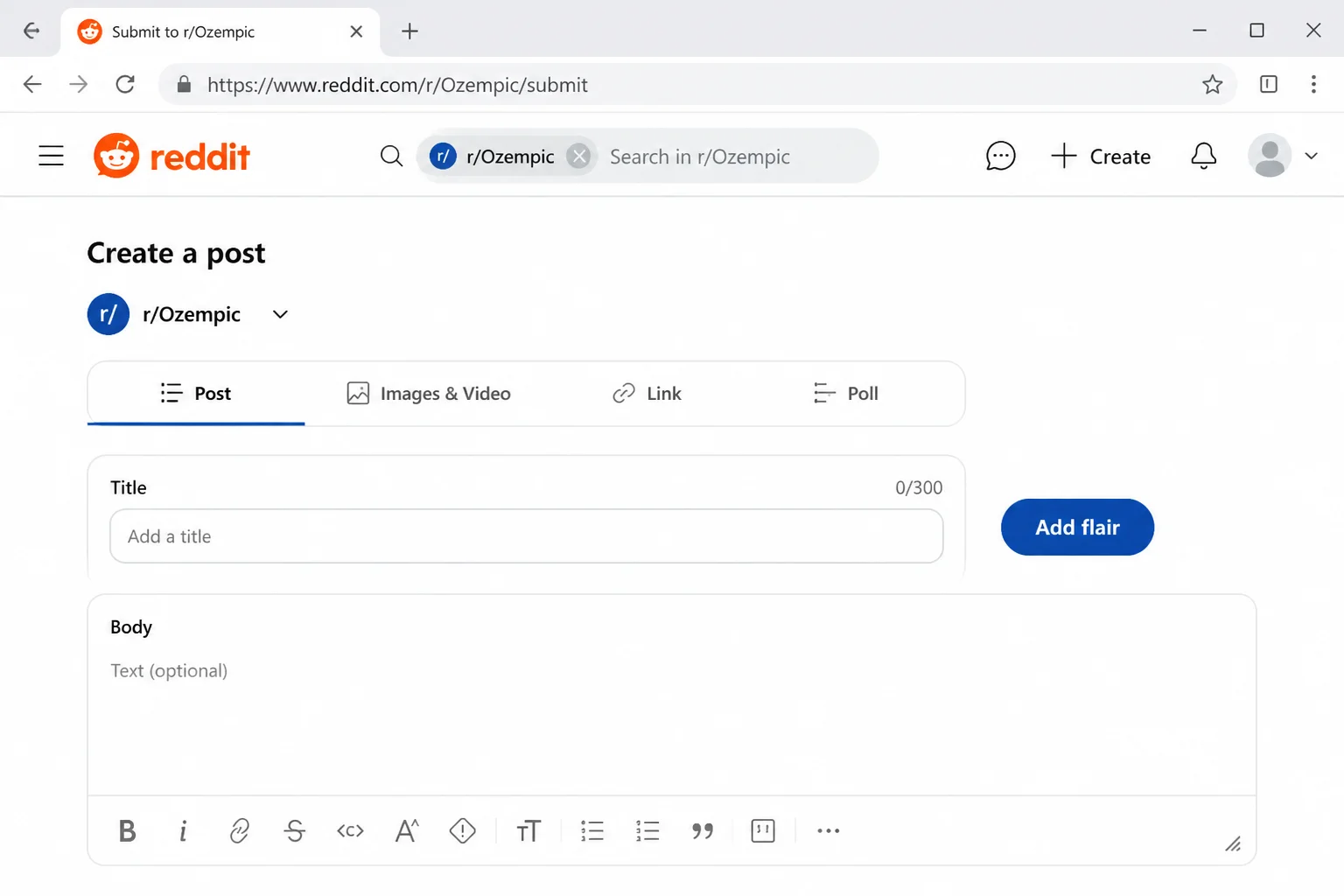
- Click the flair button and pick an option. A panel or dropdown will show the flair choices the moderators created. Click the one that fits your post.
- Confirm your selection and finish your post. The chosen flair will appear as a small tag next to your post title. Click Post to publish.
Expected result: Your submission shows the flair label directly next to the title in the subreddit’s feed.
To change flair after posting, open the post, click the three-dot menu (…), and look for Edit flair; this only works if the subreddit allows post authors to change their own flair after submission.
On iOS
- Open the Reddit app and tap the community you want to post in.
- Tap the plus (+) icon at the bottom of the screen and choose Post.
- Write your title and body, then look above the keyboard or near the post options for a flair chip. It’s often labeled Add flair or shows as an empty tag icon if the community supports it.
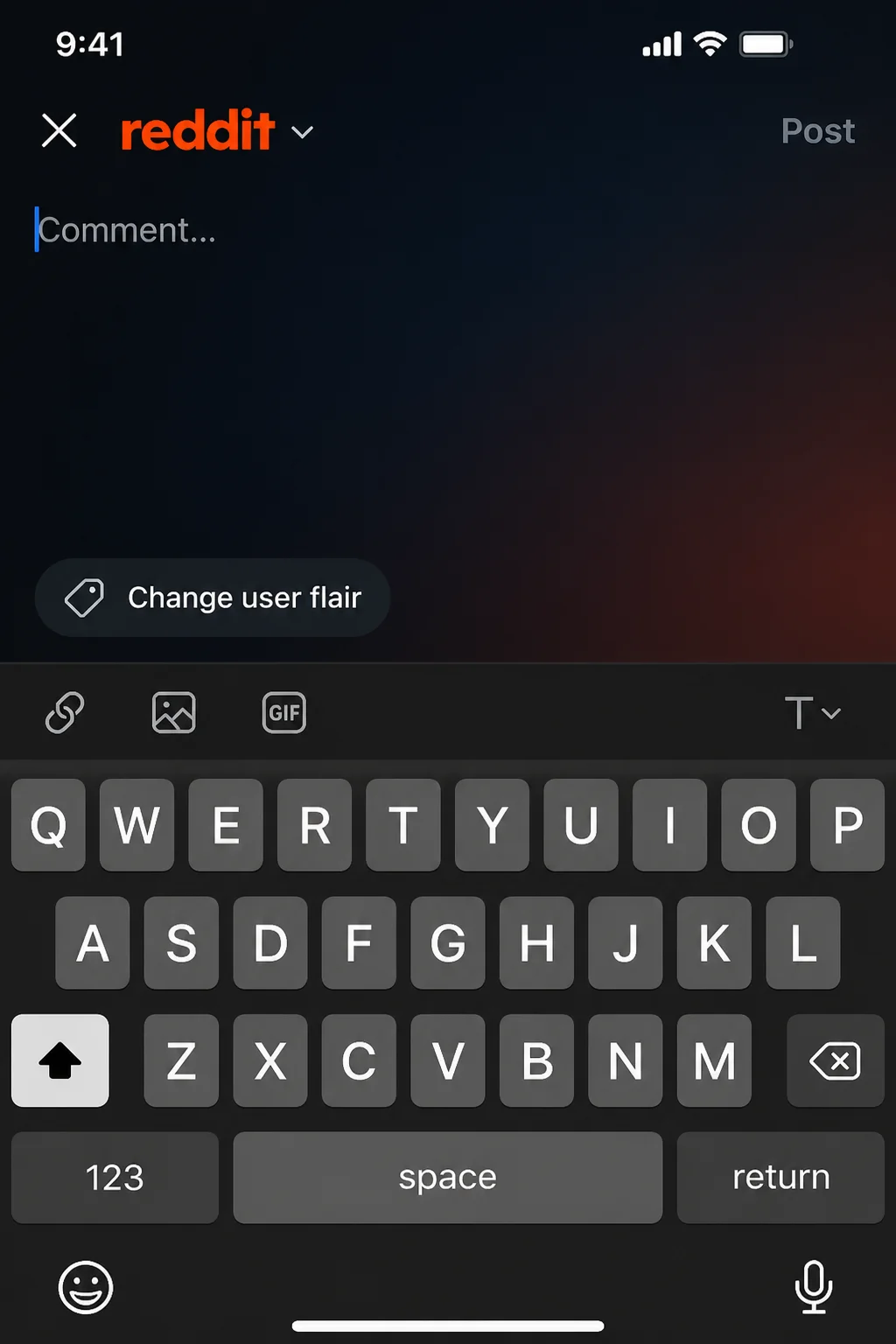
- Tap it, select a flair from the list, and tap Apply.
- Tap Post in the top-right corner to publish.
Expected result: The flair tag appears attached to your post in the community feed, matching what you’d see on desktop.
Why can’t I add flair to my post? If you don’t see any flair option at all, the subreddit hasn’t enabled post flair, or it’s restricted to moderator use only. Check the subreddit’s sidebar or “About Community” section for a flair policy before assuming something’s broken.
Setting User Flair (When a Community Allows It)
User flair is different from post flair: it’s a badge tied to your username inside one specific subreddit, and a lot of communities disable self-service editing entirely.
On Web
- Go to the subreddit’s main page.
- Look in the right-hand sidebar (new Reddit) or the top of the sidebar (old Reddit) for your username with an edit icon (a small pencil) next to it.
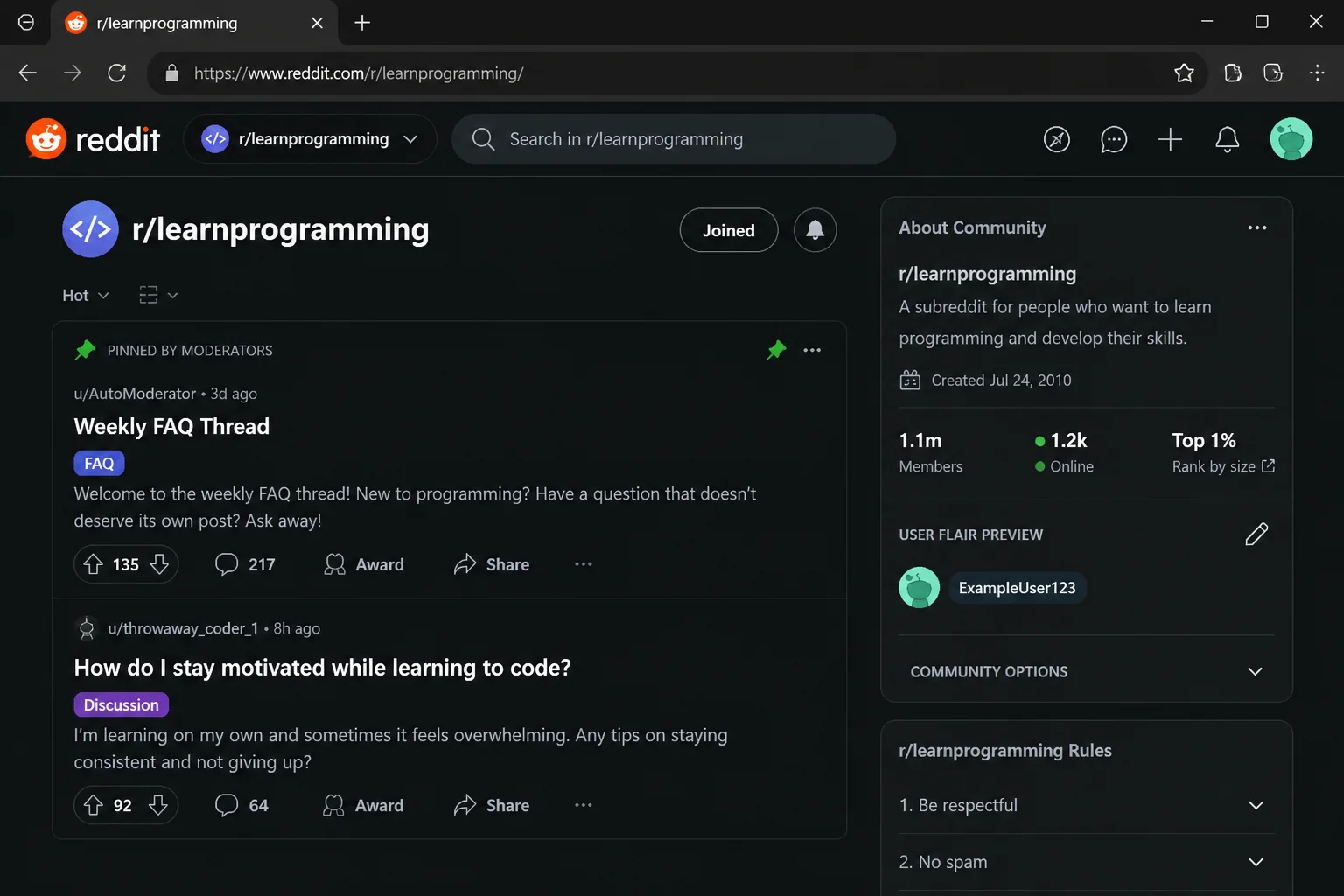
- Click the pencil icon or “Edit” link. A panel opens showing available user flair options for that community.
- Select a flair (or type custom text, if the subreddit allows it) and click Save.
Expected result: Your username now displays the chosen flair whenever you post or comment inside that specific subreddit only.
On iOS
- Open the subreddit and tap the three-dot menu (…) in the top-right corner.
- Look for Community Options or Change User Flair in the menu that appears.
- If the option exists, tap it, choose a flair, and tap Save.
Expected result: Your username flair now appears in that community across the app.
Why don’t I have an option to set user flair in this subreddit? Many subreddits keep user flair moderator-assigned only (common in sports or gaming communities that hand out flair for verified achievements). If there’s no pencil icon or menu option, self-service user flair is disabled by a community setting, not a bug.
Marking a Post or Comment as a Spoiler
Marking an Entire Post as a Spoiler
On web:
- While composing your post, look below the text box for a Spoiler toggle (usually next to an NSFW toggle).
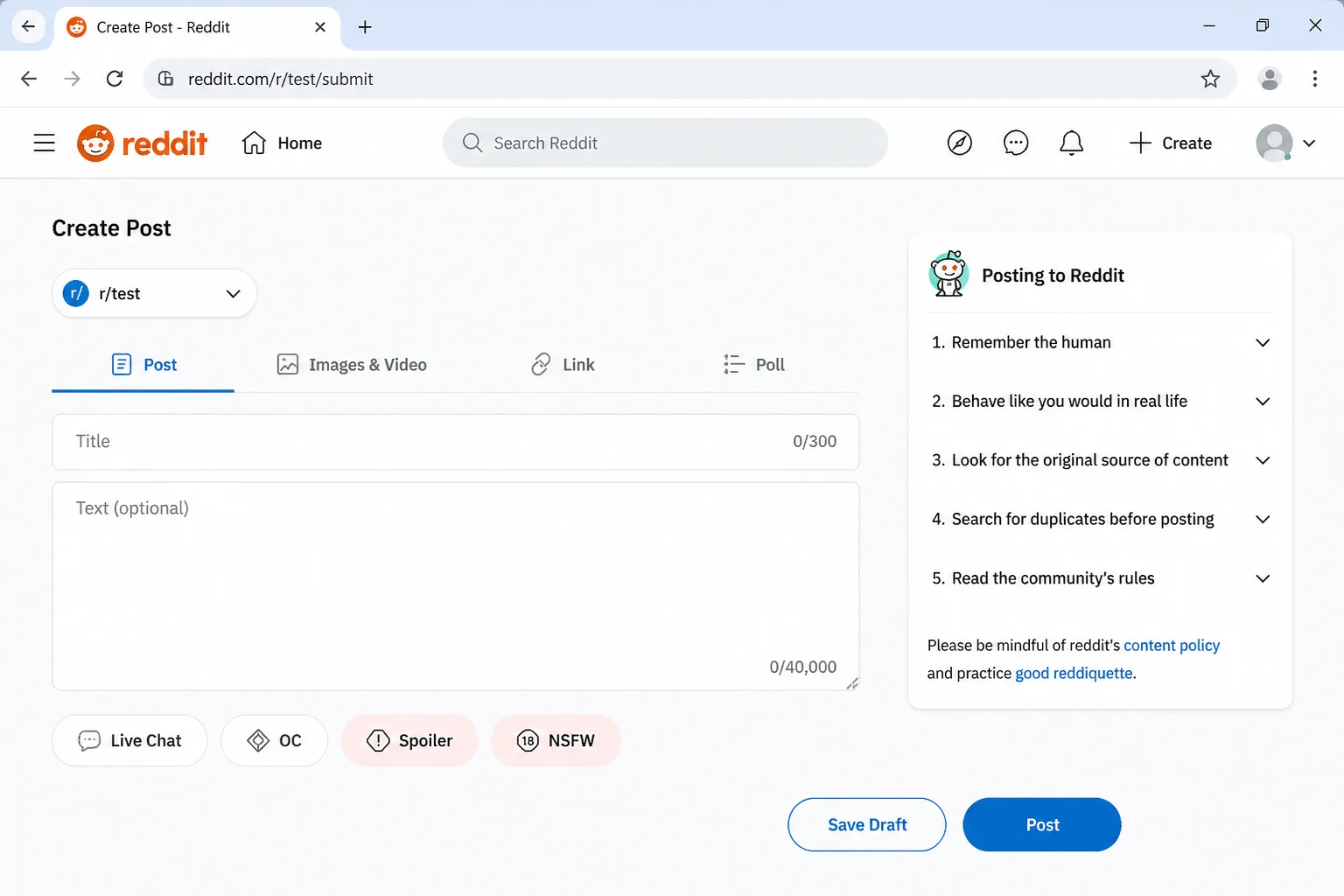
- Click the toggle so it’s switched on.
- Click Post to submit.
On iOS:
- In the post composer, tap More options (or the gear/settings icon, depending on your app version).
- Toggle Spoiler on.
- Tap Post.
Expected result: The post’s thumbnail and preview text are blurred in feeds until a reader taps to reveal it.
Marking Specific Text Inside a Comment as a Spoiler
- Highlight the text you want to hide within your comment box.
- In the rich-text toolbar, click the spoiler icon (it typically looks like an eye with a line through it, or is labeled directly).
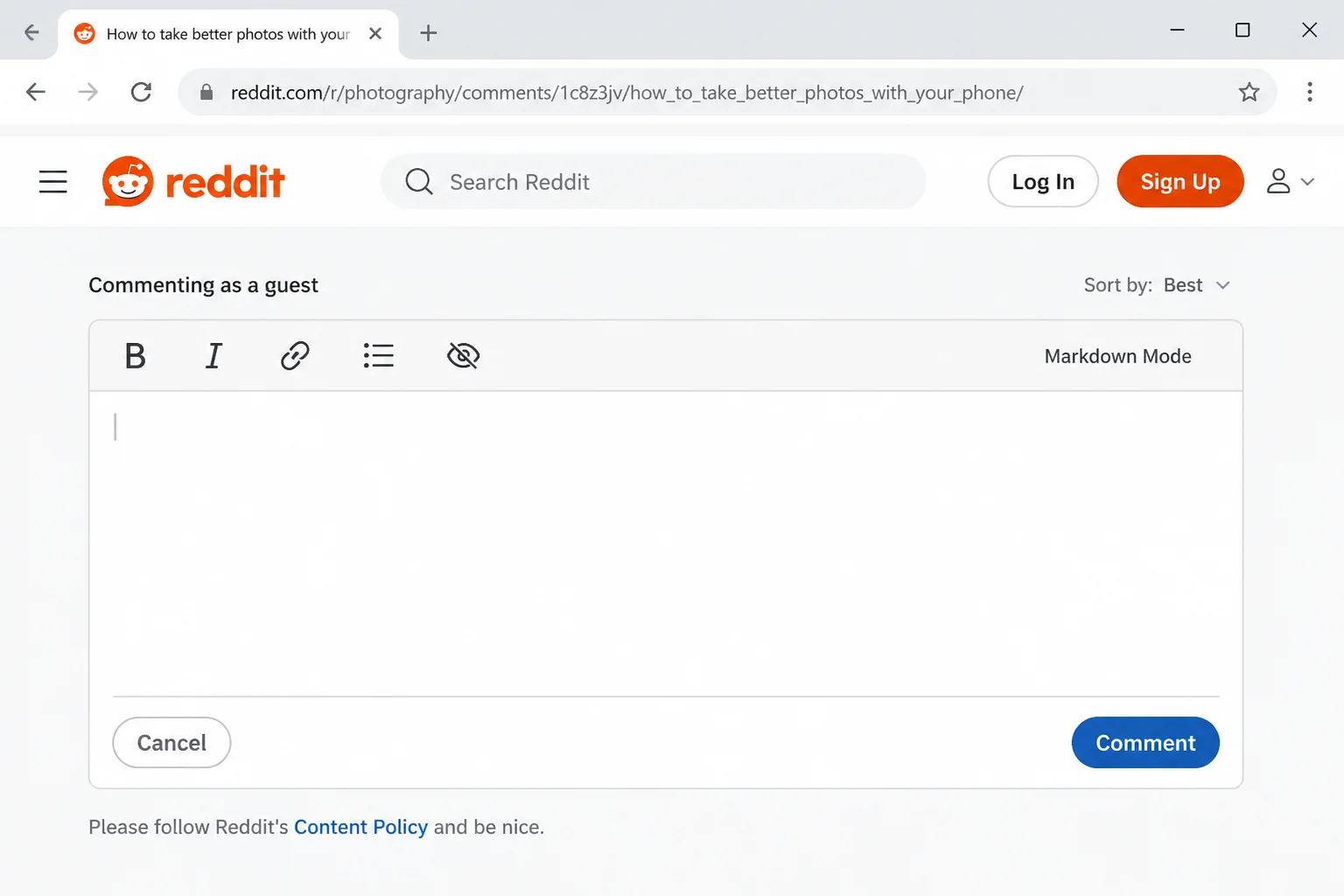
- If there’s no toolbar button available (for example, in Markdown mode), type the spoiler manually using this syntax:
>!This part of the comment is hidden until clicked!<Expected result: The wrapped text appears as a gray blurred bar in the published comment; clicking it reveals the hidden text.
How do I mark my post or a specific comment as a spoiler? Use the post-level toggle for whole posts, and either the toolbar spoiler button or the
>!text!<syntax for specific words or sentences inside a comment.
Using the Rich-Text Editor
The rich-text editor is the default on reddit.com and the official apps. No typing shortcuts required, just click and go.
- Click or tap into any post body or comment box.
- Highlight the text you want to format.
- Use the toolbar that appears above or below the box to click Bold, Italic, link, list, quote, or spoiler buttons.
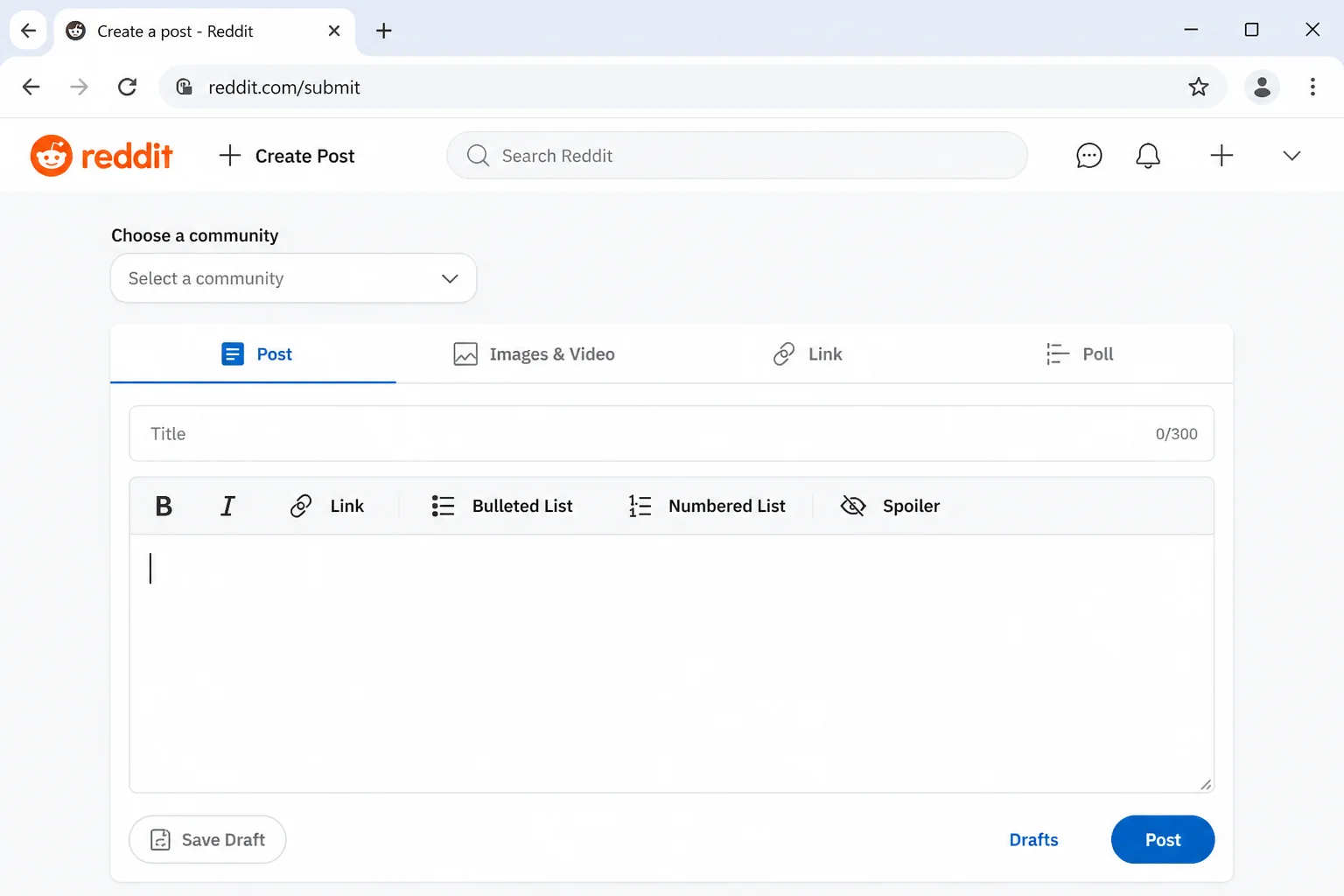
- Continue typing, the formatting applies live, so you see the finished look immediately (this is called WYSIWYG, short for “what you see is what you get”).
Expected result: Formatted text renders instantly in the box, matching how it’ll look once published.
Using Markdown on reddit.com and old.reddit.com
If you’d rather type shortcuts than click buttons, Markdown’s got you covered.
On reddit.com
- Click into a post or comment text box.
- Look for a small toggle near the toolbar, usually labeled Switch to Markdown or shown as a
</>icon.
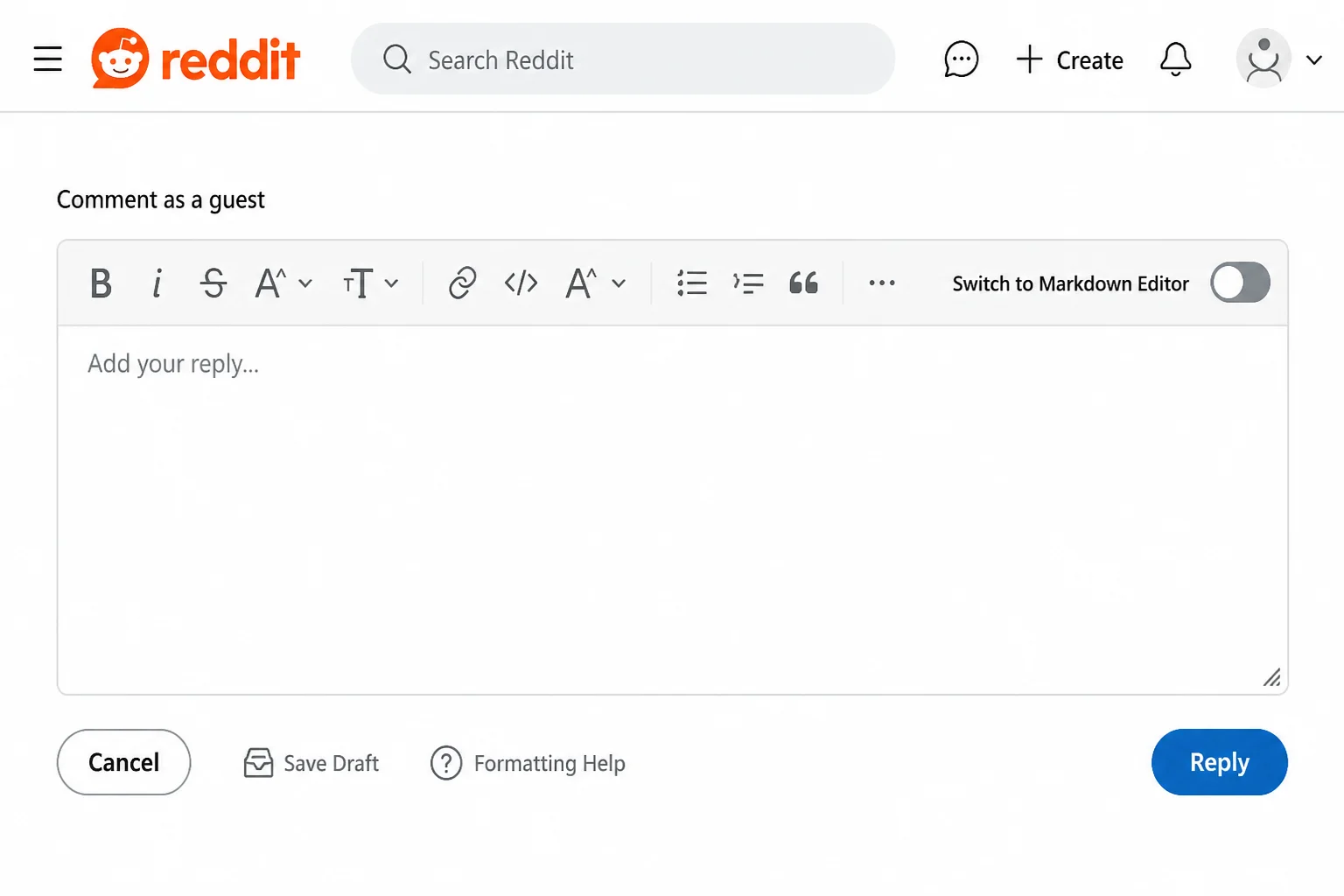
- Click it to switch the box into plain-text Markdown mode.
- Type your formatting manually, for example:
**bold text**
*italic text*
[a link](https://www.reddit.com)
Expected result: The box now shows raw symbols as you type instead of live-rendered formatting; Reddit converts it to styled text only after you post or comment.
On old.reddit.com
Old Reddit skips the rich-text option entirely, every comment and post body box is Markdown by default. It’s a bit like driving a stick shift: more input required, but some people genuinely prefer it.
- Go to
old.reddit.comand open any post’s comment box. - Type your comment using Markdown syntax directly.
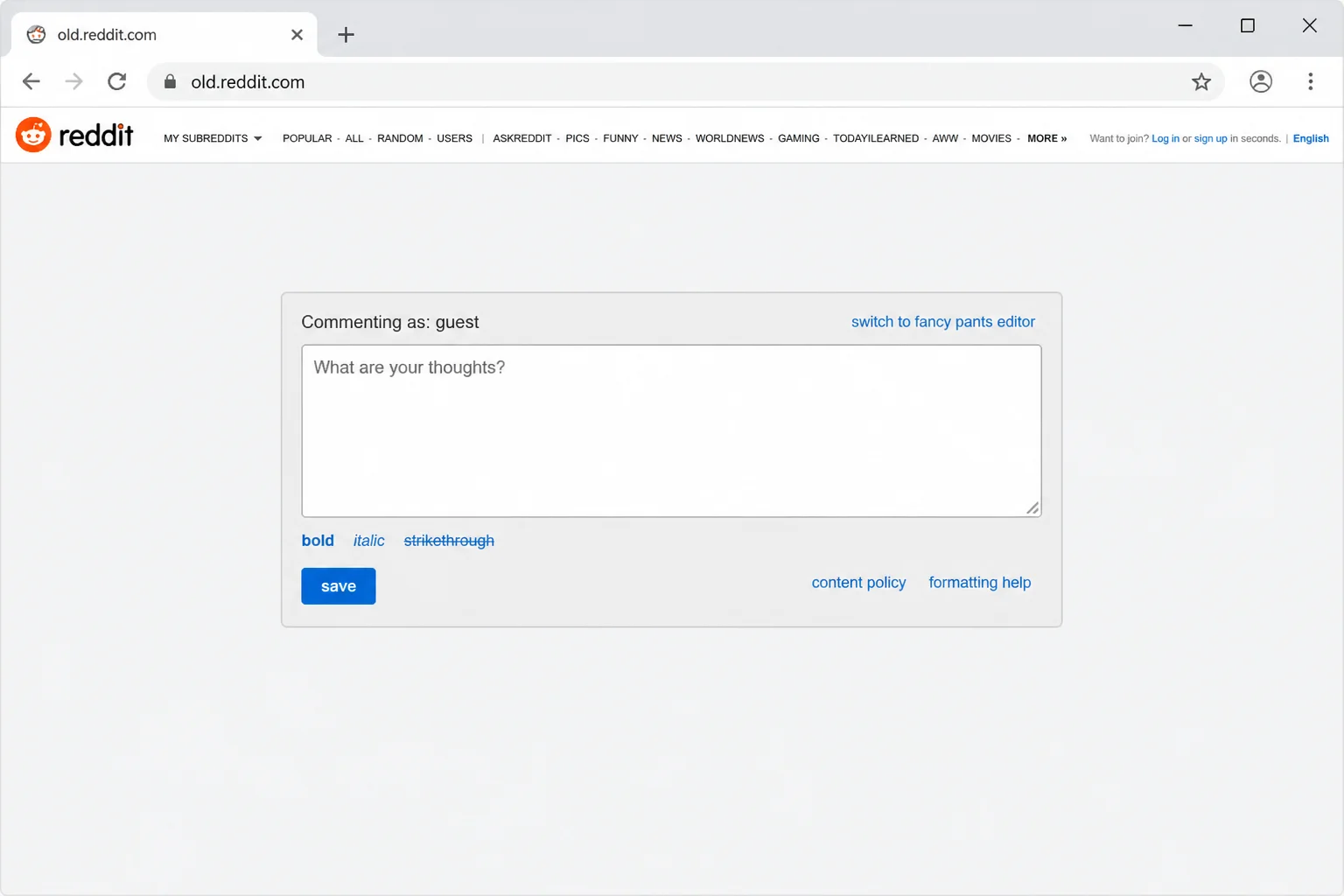
- Check the small formatting help text/link below the box if you forget the syntax for something.
- Click save to post your comment.
Expected result: Your comment renders with normal formatting (bold, links, etc.) on both old and new Reddit, since Markdown output is the same everywhere, only the input method differs.
What’s the difference between the rich-text editor and Markdown? Rich-text is point-and-click with live formatting previews; Markdown is typed syntax that gets converted to formatting after you submit. Both land on the same final result, they’re just different ways of getting there.
What Changed in the iOS and Android Composers in 2026
If you’ve used Reddit’s mobile apps for a while, you probably remember typing symbols like ** or # and watching them auto-convert into bold text or headers as you went. That’s changed: per Reddit’s official Help Center changelog (support.reddithelp.com, May 7, 2026 entry), Reddit retired the legacy Markdown editor on its iOS and Android apps effective May 4, 2026, replacing it with the rich-text composer — so standard Markdown syntax no longer auto-converts on mobile (desktop keeps working with Markdown as before). A follow-up changelog update on June 2, 2026 expanded what the rich-text toolbar can do, with Reddit noting plans to keep adding formatting functionality there rather than to the old Markdown path. In practice, this means:
- Typing
*word*or**word**in the app composer no longer auto-converts to italic or bold text — this was a one-time cutover on May 4, 2026, not a gradual, version-by-version rollout. - The dedicated toolbar buttons (bold, italic, link, list, spoiler) above the keyboard are now the primary way to format text in the app, and Reddit has been adding more formatting options there since the June 2 update.
- If your app still auto-converts Markdown shortcuts, you’re likely on an older build — updating the app brings it in line with the current toolbar-first behavior. Reddit’s official Help Center at support.reddithelp.com keeps its changelog current if you want to double check.
What changed with Markdown shortcuts in the Reddit mobile apps? Per Reddit’s official Help Center changelog, Reddit retired the legacy Markdown editor on its mobile apps on May 4, 2026 in favor of the rich-text composer, so typed Markdown shortcuts on iOS and Android no longer auto-convert the way they used to. The safest approach now is tapping the toolbar icons directly instead of typing symbols and hoping they auto-format.
Configuration
A few settings are worth knowing about once you’ve got the basics down:
- Default editor mode: On reddit.com, your last-used mode (rich-text or Markdown) is generally remembered per browser session, if you keep landing in the “wrong” mode, just click the toggle again.
- Per-subreddit flair visibility: Even if you set a user flair in one community, it never appears in another. If you want a consistent look everywhere, you’ll need to set it separately per subreddit (only where allowed).
- Spoiler formatting persistence: Spoiler tags applied via Markdown (
>!text!<) render identically whether viewed on old Reddit, new Reddit, or the app, so they’re a safe bet if you’re not sure which surface your audience will use.
Tips and Troubleshooting
Problem: There’s no flair option when I try to post.
- Check the subreddit’s “About Community” panel or sidebar for a stated flair policy.
- If flair is required but you don’t see a selector, try refreshing the page or restarting the app; sometimes the flair list fails to load.
- If it’s still missing, the subreddit likely restricts flair selection to moderators; you may need to message the mods to request one.
Problem: My spoiler syntax shows up as plain text with >! visible instead of blurring.
- Confirm you’re in Markdown mode, not rich-text mode, when typing
>!text!<manually. - Alternatively, switch to rich-text mode and use the toolbar’s spoiler button instead of typing syntax.
Problem: My formatting (bold, links) shows literal symbols instead of styled text.
- Check whether you’re in rich-text mode, typed symbols won’t auto-convert there.
- Toggle to Markdown mode if you want typed shortcuts to work, or use the toolbar buttons if you’re staying in rich-text mode.
Problem: A post looks fine in the app but broken on old.reddit.com (or vice versa).
- Remember that old Reddit only understands Markdown output, rich-text formatting created elsewhere should still convert correctly, but unusual formatting (like nested spoilers or tables) can render inconsistently across surfaces.
- Use the preview pane when available before submitting to catch surprises.
Tip: Bookmark the Help Center. Reddit’s official documentation at support.reddithelp.com gets updated as composer behavior changes, which is useful since mobile formatting has shifted more than once recently.
Tip: When in doubt, use the toolbar. Across every surface (web, iOS, Android), clicking a formatting button beats typing a shortcut and crossing your fingers.
Quick-Reference Table
| Feature | reddit.com | old.reddit.com | iOS/Android App |
|---|---|---|---|
| Post flair | Available if enabled by subreddit | Available if enabled by subreddit | Available if enabled by subreddit |
| User flair | Available if enabled by subreddit | Available if enabled by subreddit | Available if enabled by subreddit |
| Spoiler toggle (whole post) | Yes, checkbox at submission | Yes, checkbox at submission | Yes, in post options |
| Spoiler syntax in comments | >!text!< in Markdown mode, or toolbar button in rich-text | >!text!< only (Markdown-only interface) | Toolbar button recommended; typed syntax may not auto-convert |
| Rich-text editor | Default | Not available | Default |
| Markdown mode | Toggle available | Default and only option | Not directly toggleable; toolbar preferred |
| Auto-convert typed Markdown shortcuts | Only in Markdown mode | Yes (native Markdown) | No — retired May 4, 2026 (toolbar preferred) |
Wrapping Up
Once you know flair lives at the community level and formatting lives at the device level, Reddit’s tools stop feeling random. Post flair and user flair depend entirely on what each subreddit’s moderators switched on. Spoiler tags and formatting come down to whether you’re using rich-text, Markdown, or the app’s toolbar.
The app dropping auto-conversion for typed Markdown shortcuts takes some getting used to if you’re set in your ways. But leaning on the toolbar buttons instead makes formatting predictable everywhere you go, and that’s a trade worth making.
| Step | Action | Applies To |
|---|---|---|
| 1 | Add or change post flair via the flair selector at submission | Web, iOS |
| 2 | Set user flair via the sidebar pencil icon or Community Options menu | Web, iOS |
| 3 | Toggle Spoiler for a whole post, or use >!text!< / toolbar for comment text | Web, iOS |
| 4 | Format with the rich-text toolbar for point-and-click styling | Web, iOS |
| 5 | Switch to Markdown mode on reddit.com, or use it by default on old.reddit.com | Web |
| 6 | Use app toolbar buttons instead of typed shortcuts | iOS, Android |
Resources
- Reddit Help Center
- Reddit (official site)
- What Is Reddit Flair (and How to Use It)
- How to Use Discord Spoiler Tags
- How to Mute Words, Phrases, or Hashtags on Twitter (X)
- How To Add Color To Messages On Discord
- You Can Now Share Up to 20 Slides in Your Instagram Post
- GoodNotes vs Notability: Which Is Better?
- How to Highlight Texts in Google Sheets (Manually and Automatically)
- The 6 Best Free AI Image Generators
- How to Use Obsidian as a Personal Wiki on Your Computer
- What Is a JSON File and How to Open It?
- 6 Best Reddit Alternatives You Can Use For Free
- 25 Best Music Subreddits to Discover New Music
- Can You Use a Keyboard and Mouse for Console Gaming?
- Reddit formatting guide 2026
- Reddit formatting 101: bold, italics, lists
- Formatting guide
- Guida alla formattazione
- Reddit formatting
- How do I format my comment or post
- Markdown Guide for Reddit
- How to format Reddit comments: A practical guide for pros
- How to Apply Text Formatting on Reddit
- Formatting guide: How to make your posts look