
Need to save a webpage or website so that you can view it offline? Are you going to be offline for an extended period of time, but want to be able to browse through your favorite website? If you’re using Firefox, then there is one Firefox add-on that can solve your problem.
ScrapBook is an awesome Firefox extension that helps you to save web pages and organize them in a very easy to manage way. The really cool thing about this add-on is that it’s very light, speedy, accurately caches a local copy of a web page almost perfectly and supports multiple languages. I tested it out on several web pages with a lot of graphics and fancy CSS styles and was surprisingly happy to see that the offline version looked exactly the same as the online version.
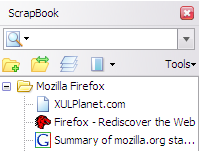
You can use ScrapBook for the following purposes:
- Save a single Web page
- Save snippet or portion of a single Web page
- Save an entire Web site
- Organize the collection in the same way as Bookmarks with folders, sub-folders
- Full text search and fast filtering search of the entire collection
- Editing of the collected Web page
- Text/HTML edit feature resembling Opera’s Notes
Installing ScrapBook
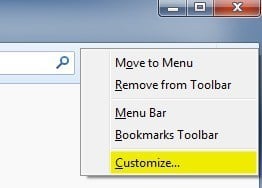
If you’re running the latest version of Firefox, which is v33 for me as of this writing, you’ll have to adjust some settings so that you can use ScrapBook properly. By default, the ScrapBook icon won’t show up anywhere, so the only way you can use it is if you right-click on a webpage. Add the button to your toolbar or to the menu by right clicking anywhere on the toolbar and choose Customize.
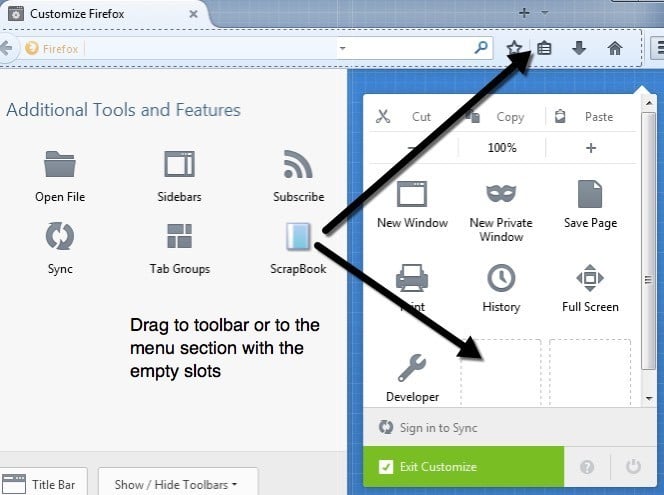
On the Customize screen, you’ll see the ScrapBook icon on the left-hand side. Go ahead and drag that to either the toolbar at the top or to the menu. Then go ahead and click on the Exit Customize button.
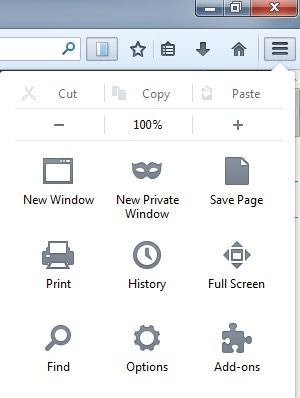
Before we get into using ScrapBook to save a website, you might want to change the settings for the add-on. You can do that by clicking on the menu button at the top right (three horizontal lines) and then clicking on Add-ons.
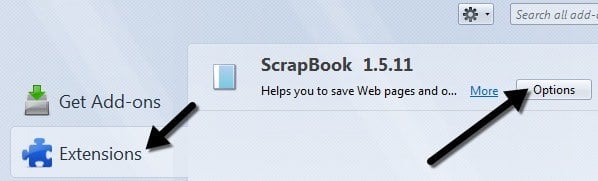
Now click on Extensions and then click on the Options button next to the ScrapBook add-on.
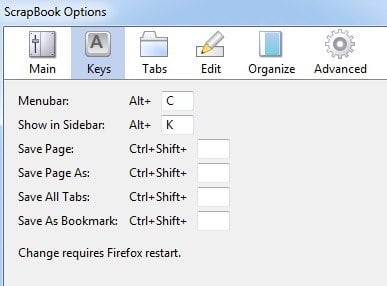
Here you can change the keyboard shortcuts, the location where the data is stored and other minor settings.
Using ScrapBook to Download Sites
Now let’s get into the details of actually using the program. First, load the website you want to download web pages for. The easiest way to start a download is to right-click anywhere on the page and choose either Save Page or Save Page As towards the bottom of the menu. These two options are added by ScrapBook.
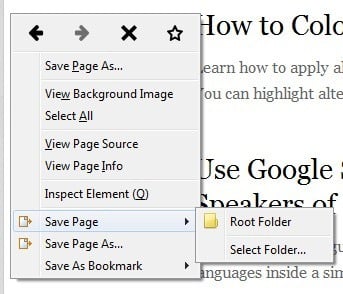
Save Page will let you choose a folder and then automatically save the current page only. If you want more options, which I normally do, then click on the Save Page As option. You’ll get another dialog where you can pick and choose from a whole lot of options.
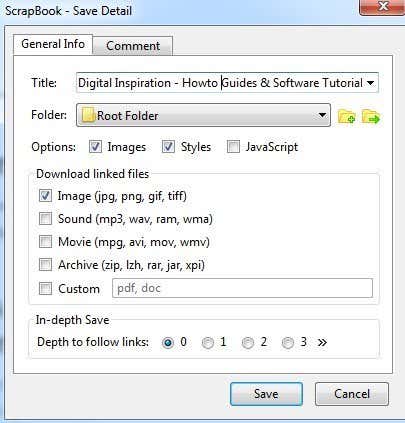
The important sections are the Options, Download linked files section, and then In-depth Save options. By default, ScrapBook will download images and styles, but you can add JavaScript if a website requires that to work properly.
The Download linked files section will just download linked images, but you can also download sounds, movie files, archive files or specify the exact type of files to download. This is a really useful option if you are on a website that has a bunch of links to a certain type of file (Word docs, PDFs, etc) and you want to download all the associated files quickly.
Lastly, the In-depth Save option is how you would go about download larger portions of a website. By default, it’s set to 0, which means it won’t follow any links to other pages on the site or any other link for that matter. If you choose one, it will download the current page and everything that is linked from that page. Depth of 2 will download from the current page, the 1st linked page and any links from the 1st linked page also.
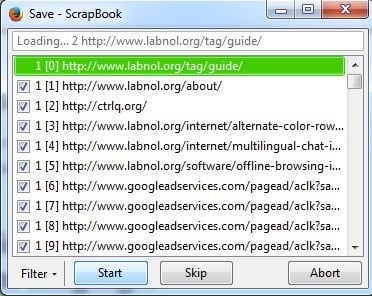
Click the Save button and new window will pop up and the pages will begin to download. You’ll want to press the Pause button immediately and let me tell you why. If you just let ScrapBook run, it will start to download everything from the page, including all the stuff in the source code that may link to a bunch of other sites or ad networks. As you can see in the image above, outside of the main site (labnol.org), it’s downloading ads from googleadservices.com and something from ctrlq.org.
Do you really wants the ads to show up on the site while you’re browsing it offline? This will also waste a lot of time and bandwidth, so the best thing to do is to press Pause and then click on the Filter button.
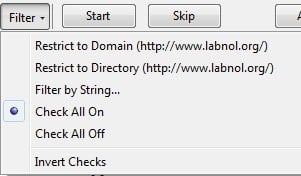
The best two options are Restrict to Domain and Restrict to Directory. Normally these are the same, but on certain sites they will be different. If you know exactly what pages you want, you can even filter by string and type in your own URL. This option is fabulous because it gets rid of all the other junk and only downloads content from the actual website you’re on rather than from social media sites, ad networks, etc.
Go ahead and click Start and the pages will start to download. The time to download will depending on your Internet connection speed and exactly how much on the website you are downloading. The add-on works great for most sites and the only issue that I have run into is that on some sites, the URLs they use for linking to their own content are absolute URLs.
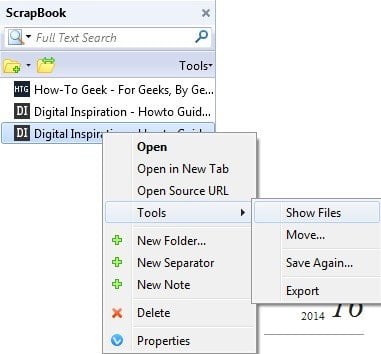
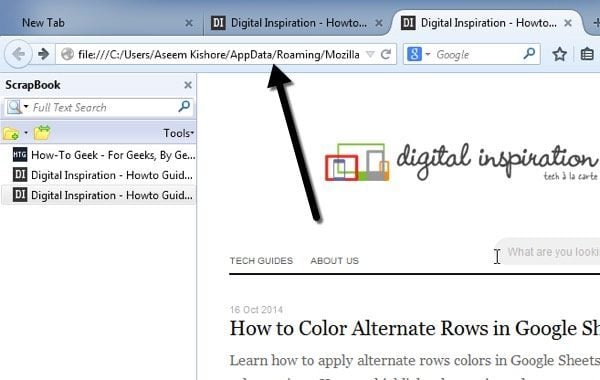
The problem with absolute URLs is that when you open the index page in Firefox while offline and try to click on any of the links, it will try to load from the actual website rather than from the local cache. In those cases, you have to manually open the download directory and open the pages. It’s a pain and I’ve only had it happen on a handful of sites, but it does occur. You can view the download folder by clicking on the ScrapBook button on your toolbar and then right clicking on the site and choosing Tools – Show Files.
In Explorer, sort by Type and then scroll down to the files called HTML Document. The content pages are normally the default_00x files, not the index_00x files.
If you’re not using Firefox and still want to download webpages to your computer, you can also check out a software called WinHTTrack that will automatically download an entire web site for later browsing offline. However, WinHTTrack uses up a good amount of space, so make sure you have enough free space on your hard drive.
Both programs works well for downloading entire websites or for downloading single webpages. In practice, downloading an entire website is almost impossible because of the massive number of links that are generated by CMS software like WordPress, etc. If you have any questions, post a comment. Enjoy!