How to fix an IP address conflict

Posted on August 4, 2009 at 5:37 am

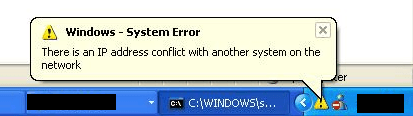
Ever get the following message when turning on your computer or taking it out of sleep mode?

There is an IP address conflict with another system on the network

You may also see a different error message for the same problem:

This IP address is already in use on the network. Please reconfigure a different IP address.

This occurs when two computers on the same LAN network end up with the same IP address. When this occurs, both computers end up not being able to connect to network resources or perform other network operations.

This problem, though rare, can occur because of the following reasons:

  • Two computers are assigned the same static IP addresses
  • One computer is assigned a static IP address that falls into the DHCP range for the local network and the same address is assigned to a computer by the DHCP server
  • A laptop is put into sleep mode and then turned on while connected to another network that uses the same IP address
  • If you have multiple network adapters, it is possible for a to have an IP address conflict with itself

ip address conflict

How to resolve an IP address conflict

There are a few ways you can go about fixing this problem. I’ll start with the simplest and move on.

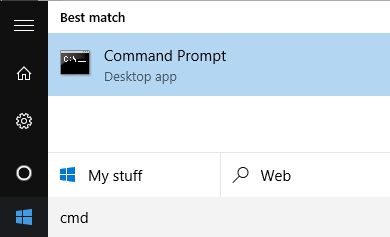
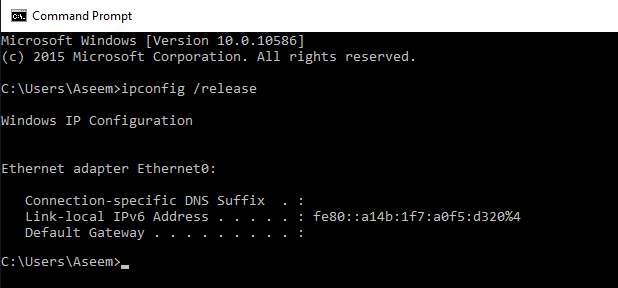
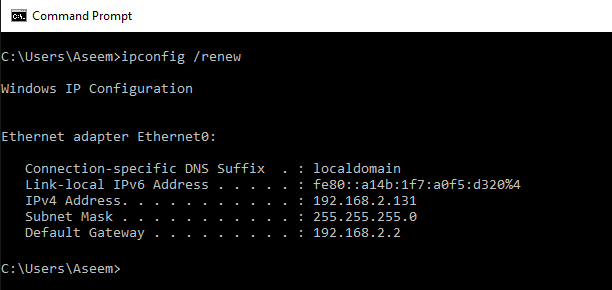
1. Renew IP Address – You can release and renew the IP address for your computer using the command prompt. Read my previous post on how to renew an IP address.

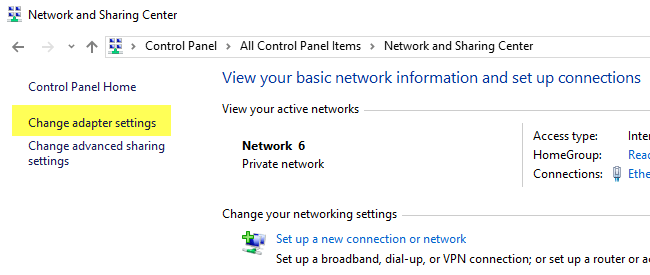
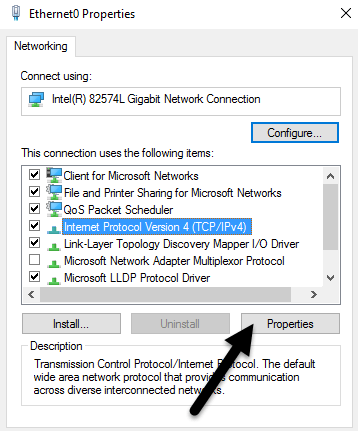
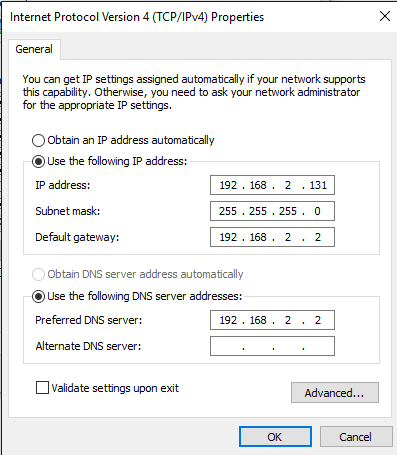
2. Reconfigure Static IP Address – If your computer is using a static IP address, it is best to try and use a different one in the same subnet. One way to check to make sure the one you are picking is not already being used is to simple ping the IP addresss (ping x.x.x.x).

You can read my previous post on how to change your IP address using the command prompt.

3. Use DHCP – If you don’t need to use a static IP address, it’s best to simply choose DHCP instead of manually configuring the IP address. The server will know which addresses are free and which are taken.

4. Update firmware – In some rare instances, the actual DHCP server can malfunction and assign more than one computer the same IP. In this case, it is best to try and update the firmware on your router.

If you’re still having an IP address conflict, post your problem here and I’ll try to help you out! Enjoy!

» Filed Under Computer Tips

Related Posts

Comments

31 Responses to “How to fix an IP address conflict”

  1. BC said on :

    So how would you find out if you have multiple network adapters, it is possible for an adapter to have an IP address conflict with itself?


  2. BC said on :

    Hi, well I tried your steps 1-4 but no joy. There still is a notice about a windows system error – ip conflict. My gut tells me that it’s a “If you have multiple network adapters…” problem. I had a Trendnet wireless PCI card that went bad and in my haste to install the new Linksys wireless PCI card I forgot to uninstall the Trendnet.

    I’m connected to the internet with the Linksys PCI card installation was by the book, I’m using Windows to configure the wireless connection (not the Linksys software). I’ve tried the show hidden devices in the Device Manager (set devmgr_show_nonpresent_devices=1) and I found a couple of network adapters that weren’t in use anymore, even an old USB wireless-b stick and I uninstalled them with no problem, but still the message shows up, even on start up before entering my windows logon info. Not sure what to do? This IP address conflict message is getting irritating, please help… -BC


  3. Bakhit said on :

    What will happen if I have two PCs with same ip addresses in the same LAN? Will they work?
    This question has been asked in my exam in the HCU university, and answer is our teacher says that they will work? I am disagree with my teacher, how it can work two PCs with same ip addresses in the same LAN? If any one knows please help me!


  4. Catherine said on :

    Hi. I have a linksys WRT54G v5 router with a Dell laptop using Windows XP. I use DSL modem from att that I have had for years. I also have another laptop Gateway that uses Vista. Last night, my internet was stating on the Gateway that I have limited to no connectivity. It happened before that so I unplugged the modem and router, plugged back in and they worked fine.

    Last night, did the same thing except I reset the modem and router after failing for plug in to work. Well now my Dell and Gateway will connect with limited or no connectivity. I can however hook the Dell up with a cable and connect to the internet. I upgraded the firmware on the router. Unplugged, replugged router, modem and then rebooted computer. To no avail. I also release and renew in cmd prompt to no avail. My cable works with correct IP addresses but I cannot get the IP address correct on the wireless adapter (linksys) I use under cmd. It is alway a 169. XX XX number. What can I do? I am at my wits end and linksys won’t help because out of warranty. Thanks so much…


  5. jane kilala said on :

    hi,

    I have a problem with IP address conflict. The problem is that when you try to ping an IP address, its request timed out, meaning you cannot ping it, but when you try to assign it to a machine, it says that IP address conflict, that the IP is already used on the network.

    Please help.

    Thanks,


  6. jason said on :

    hey there..ive got a problem with my connection..it keeps going off every now and then..what i mean is i get limited connectivity when the internet is down and somehow on another computer it says ip conflict..so basically what i have to is RESET the router everytime this happens and things will go back to normal…and it will occur again somehow…3-4 times a day..its tiring..

    well, what i did was i switched to static ip address on my computer and for the other…and it still does the same thing…well my problem is quite similar to CATHERINE..using linksys router too…so my question is, if im using static IP…SHOULD i go into the router settings and DISABLE DHCP in order for it to work?


  7. akishore said on :

    @jason – Yes you could go into the router and disable DHCP and then setup static IP addresses on the computers, however, this seems unnecessary to me. Go into your IP configuration and make sure both computers are set to dynamically receive IP addresses. Maybe your other computer already had a static IP address and that is what was causing the problem?


  8. Lou said on :

    I occasionaly have the IP conflict error popup and I’m not sure I need to do anything about it as the error message goes away within a few seconds. This may not occur for months and then it’s there several times a day. My real problem, tho, is not being able to stay connected to the open WIFI router at the main office of the RV park I’m in. The connection goes off and on many many times an hour. A few other people have the same problem and others have no problem. Why is this happening and what can I do?


  9. Albin Sebastian said on :

    I wrote an article about how to identify the source of an IP address conflict”

    binbert.com/blog/2009/12/ip-address-conflict-source-device-identification


  10. anaconda said on :

    Hi, we have 46 D-Link switches in our network and our servers will intermediately pop up with the IP Address Conflict message even though we changed the IP addresses. We repair the connection and it goes away, but pops back up in 20 mins! We think it is a switch that is causing the problem, how can we determine which one and prevent the IP conflict?


  11. Rod said on :

    I’m having an odd issue. Brand new PC. Setup for DHCP. The card gets assigned an address and then generates the duplicate IP address error. When I look at the DHCP server, the only device assigned that IP is the new PC. Yet if I disconnect the PC from the network and ping the assigned address from another PC it replies. I do have two DHCP servers but with distinct IP ranges. One ends at xxx.xxx.2.164 and the other starts at xxx.xxx.2.165.


  12. Rod said on :

    Never mind. Turns out it was an Apple computer that had been left on for God knows how many days and was asleep. Why it didn’t show up in DHCP as owning the address, I can’t figure out but at least my issue is resolved. BTW, if you ping the address and it responds it will be added to the ARP cache and then you can see the MAC address by using ARP -a. Then you can lookup the manufacturer by going here:

    http://www.coffer.com/mac_find/.

    I used that to find out it was an Apple device on my network that was causing the problem.


  13. Steven Li said on :

    Hi. I have two Packard Bell IMedia’s (1901 & 1428) running Windows XP Home Edition (for my children). Neither can connect to the wireless network. 1901 – has Windows XP SP 2 and 1428 – Windows XP SP3 (via Windows Update). I have installed the latest Netgear Driver 3.4.0 for the wireless adapters WG111v2 but although both Netgear utilities & Windows recognise an excellent strength signal from my Sky (Sagem) broadband router, Windows is constantly in the status ‘aquiring IP Address’.

    I have tried both Netgear & Windows Zero Wireless utilities to configure the connection and tried amending the IP/TCP to a fixed IP address (advice from Sky Broadband help) and it does connect but then cuts off after a short period of time? I have even tried a BT Voyager 1055 adapter and uninstalled the Mcafee suite (incase of conflict), turning Windows firewall off but the problems still exist. My Fujitsu-Siemens Li 2727 laptop running Windows Vista connects to the wireless network with no problems.

    Your help will be greatley appreciated as I’ve run out of ideas!


  14. Rick said on :

    I am a new user and am running Windows 7 on a Inspiron 1545. My problem is that I have been connecting to the Internet thru un-secured wireless connections and all was well until recently. A small window on the task bar showed up with a message saying something to the effect that Windows has detected another computer with the same ip address. I am currently connected thru a unsecure linksys connection but the one I can no longer use is Netgear. Please help


  15. Pocaa said on :

    I managed to get through this and fix my problem with the conflicting IP addresses! Thanks!


  16. ALVARO said on :

    Hello everyone, I am having some problems on my network. We have several wireless repeaters in our setup and for some reason I keep getting an IP address conflict even though there is only one DHCP server. How is this possible? Can someone help?


  17. noel k. cruz said on :

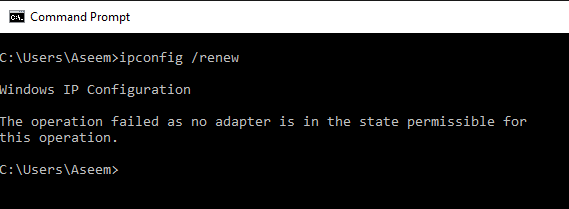
    I am trying to resolve an IP Address Conflict in my local network. I’ve already followed the instructions above on how to release and renew the IP Address however I keep getting the error: The operation failed as no adapter is in the state permissible for this operation. This is becoming too technical for me since I don’t have that much background in computer programming. I hope you could help. I will be looking forward to your speedy reply on this matter Thank you very much!


  18. admax said on :

    Ciao a tutti!

    Sulla rete è impostato il DHCP ma quasi tutti i PC fissi hanno indirizzi IP statici. Ho fatto un ping su 192.168.0.165 e la risposta è “host non raggiungibile”. Allora ho impostato una scheda di un pc della rete con questo indirizzo ma viene visualizzato il messaggio di conflitto IP. Ho provato anche senza impostare il gateway o il dns ma il messaggio è sempre lo stesso.

    Ho dovuto impostare un indirizzo IP 192.168.0.166 e tutto funziona correttamente, ma perché non posso impostare 192.168.0.165 se il messaggio del ping mi dice che è disponibile?

    Grazie
    Ciao


  19. madasamy said on :

    There is an IP address conflict with another system on the network. But my system is a DHCP client. What is the reason for this?


  20. femi said on :

    is there any sofware that can help me locate someone using my IP on my network? i discover that most times, people change IP at will on my network thereby resulting in IP conflict. is there a software that can trace who is using a particular IP at a point in time and what are the names or examples of such sofwares, thanks!


  21. Fatu Jo said on :

    I have the duplicate name exists on network error but only use static IPs and no 2 computers were configured using the same IP. The other thing is that the IP in question is a server’s IP address so when that happens users lose connection to network resources. Please help I need to fix this as it is creating a lot of problems for me.


  22. christopher said on :

    i have a software that i use static ip address in order to work on a network.the static ip does not allow me to browse the internet.when i use automatic ip am able to browse the internet but my software will not work.I want to know how i can configure for my software and my internet connection to work at the same time.


  23. manuel said on :

    Hola , tengo un problema en mi portatil lo tenia conectado a un cablemodem y funcionaba muy bien pero intente probar otro cablemodem igual q el que tenia instalado y de repente empezo a darme errores de conexion limitada o nula y al volver a poner el cable modem q tenia instalado en primer lugar me pasa lo mismo y ahora no tengo conexion .He intentado renovar la ip a traves de ms-dos(ipconfig/renew) pero no me la renueva y me dice que el dhcp ha caducado


  24. Matias said on :

    Hola tengo elmismo problema me tira el mismo error, y solo tengo 1 pc, por lo tanto no la tengo en red,y no puedo solucionar el problema, quisiera saber si alguno me puede ir guiando o algo por el estilo. Desde ya gracias


  25. David said on :

    I’m currently trying to use my laptop as a wireless adapter for my xbox 360. I have my Wireless connection and my Ethernet connection bridged, and every time that I try to sign on to xbox live or connect to the Internet using my 360, it says that “There is an IP address conflict with another system on the network.” I am using DHCP.


  26. Krystal said on :

    Hello, I have a LINKSYS Router, WRT150N V1.1 and when I installed it about a year ago everything is fine. But, since my mom got her an iPhone, she wants to use the WiFi (since AT&T no longer has unlimited data plans.), and we have been having to split the internet times. I’m tired of having to wait for her to play on her phone while I need to do things online. Everytime she connects to the WiFi on her phone it pops up with an “IP Address Conflict” on my screen and kicks me offline and lets her on. It’s not fair! I’ve tried contacting LINKSYS and AT&T (intrenet provider) and we just can’t come up with a solution.. Please help….


  27. Brian said on :

    I have a strange question… is it possible to see the sites from another computer on your local network after having an IP conflict?

    Here’s what happened…

    I opened my browser today and was told that I had an IP conflict with another computer on the network. I’m deployed and share a LAN with about 13 other guys on the same router. I closed the warning, released the IP address (forgot to renew it, however) and went about my business. Later that day, I opened facebook and I was logged into the page of another guy who is here on this same LAN.

    This isn’t the first time this has happened; I was once approached by a guy here, who knows nothing about computers, who asked me if I’d been in his room on his computer, because I was logged into facebook on his as well. I really didn’t believe him, but I guess this proves it.

    I’ll add that I know my releasing the IP and forgetting to renew it isn’t the cause, because of the time this happened in the past.


  28. gelo said on :

    IM having a ip address conflict whenever i connect my smartphone in my wifi connection at home. im using laptop at the same time. i already renew the ip address and still the same.. there is less option in my handset so i dnt kniow how to fix this problem.. pls help. thanks


  29. bjvanpp said on :

    we are trying to hook up an ip camera to a POS system, but keep getting conflicting ip address being assigned to both


    Pingbacks
  1. How to release and renew an IP address Says:

    [...] You’ll need to do this a lot during your IT career and it’s really useful for getting your computer reconnected to the Internet or to the local LAN network. Renewing an IP address can also help fix an IP address conflict. [...]

  2. Pingbacks
  3. “Duplicate name exists on the network” Windows error Says:

    [...] about what would happen if you had two computers with the same IP address on the same network: an IP address conflict. But what happens when you have two computers with the same name on a [...]

Please post your comments/suggestions!