

If you’re considering the option to disable SSID broadcast on your wireless router, you should understand the real security issues that are involved.
If you disable SSID broadcast, it’s true that the network name will not show up when someone searches for available networks using their standard wireless network adapter.
However, this does not hide the network itself in any way. With the right software or technique, anyone can “see” your network and connect to it as they normally would with the network ID and password.
In this article you’ll learn how SSID broadcasting works, how people can still connect to “hidden” networks, and finally how you can disable SSID broadcast on your router. If you only want to see how to disable SSID broadcast, you can scroll down to the last section of this article.
How a Router SSID Works
When you first turn a wireless router on, most routers are set up by default to broadcast the name of the wireless network. This is known as the Service Set Identifier, or SSID.
A standard wireless adapter and its associated software will recognize and list all available SSIDs for networks that are within range.
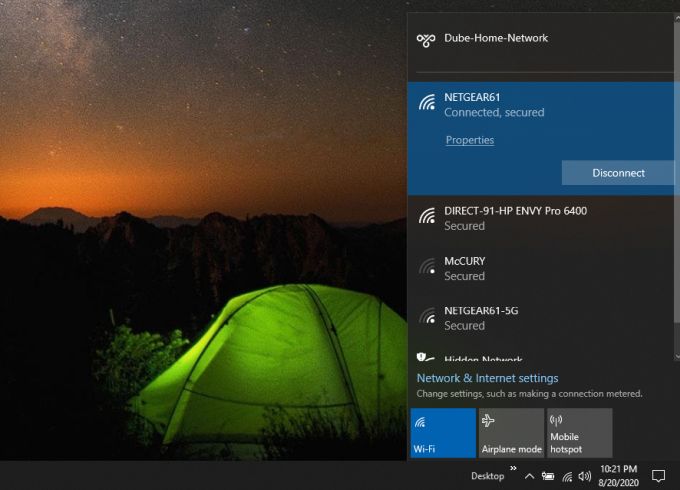
When someone disables SSID broadcast on any of those networks, the network will no longer show up in the wireless adapter’s list of available networks.
For example, if the router is adjusted so that the network shown above called Netgear61-5G no longer broadcasts its SSID, that network will not appear when anyone scans for available networks.
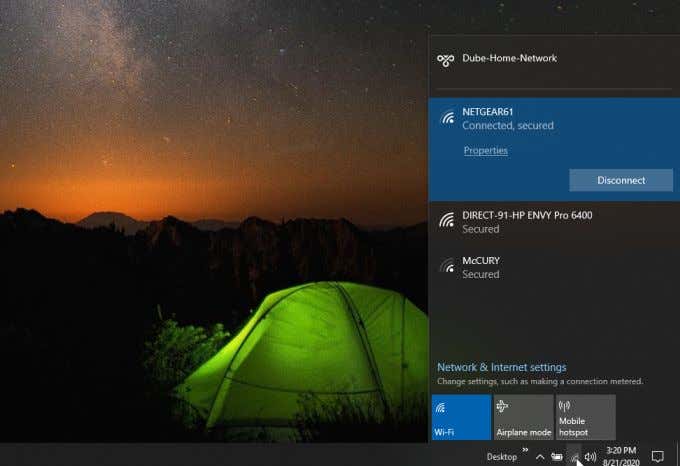
This only happens because when you disable SSID broadcast, the SSID name changes to NULL, which will not show up in any list of available networks.
This doesn’t mean the network is inaccessible, it just means the identifier isn’t broadcast.
If blocking access to your network is what you really want to do, stop here and read our guide on preventing someone else from using your Wi-Fi network.
How People Can See Networks With Disabled SSID
The 802.11 standard for wireless networks requires the router managing the wireless network to send out “management beacon packets” that provide basic information about the Wi-Fi network. The routers send this out regardless of whether or not they’re transmitting an SSID for the network.
There are free and paid software packages anyone can get that can not only see Wi-Fi networks that have no SSID, but they can also identify the SSID fairly easily.
The software can “see” those management packets and identifies available networks that way, rather than by SSID. It can also connect to the network by either attempting an initial connection to obtain SSID, or intercepting packets to and from other clients. When the disabled-SSID network responds to any requests, those responses include the network SSID name.
Hint: Enabling Wi-Fi encryption can help protect against this kind of unwanted interception of packets.
Different monitoring applications have different levels of capability. One example of a free software application that lets you see whether there are any nearby “hidden” networks is NetSpot.
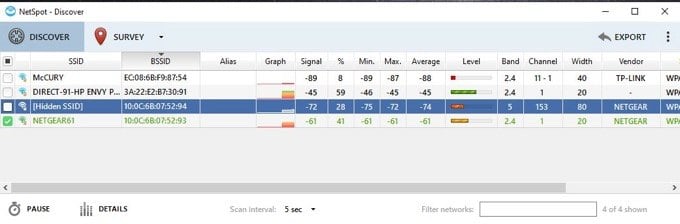
You can see networks that aren’t broadcasting their SSID in the list that comes up when you launch the app. Those are identified with Hidden SSID listed under the SSID field.
Other free tools like WifiInfoView actually take this a step further. Not only can you view hidden networks, but you can connect to them as well.
When you launch WifiInfoView, you’ll see a similar list of networks. You can even right click on the hidden networks and connect to them.
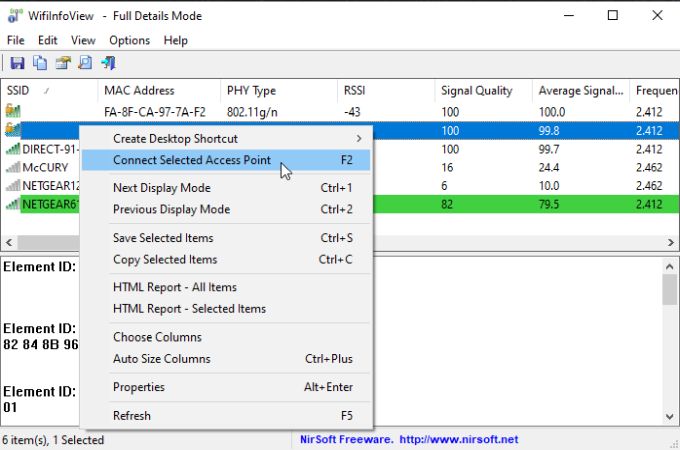
You still need to know the network password in order to connect, but not having the SSID will not prevent a connection attempt from being made.
Other software applications that let people see Wi-Fi networks where the SSID is not being broadcast include:
How To Disable SSID Broadcast On Your Router
If you still want to disable SSID broadcast on your router, it only requires a few steps. Before you can do this, you’ll need to know how to connect to your router using the admin password.
To get your network’s router IP address, open a Windows command prompt and type the command ipconfig/all and press Enter.
Scroll down all of the returned information until you see the Default Gateway IP.
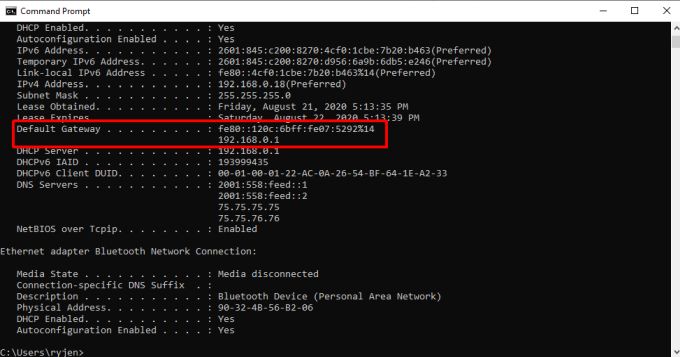
Open a web browser and type this IP address (in this example, 192.168.0.1) into the URL field and press Enter. This will take you to the router login screen where you’ll need to log in using the admin password.
If you’ve never changed your admin password, then it’ll be the default admin password you can find on your router.
Note: If you are using the default password, it’s a good idea to change it in order to better secure your WiFi network.
Netgear Genie
Once you’re logged into your router, you’ll need to find the Wireless menu to change the SSID broadcast setting.
On Netgear Genie, you’ll find this under the Basic tab. Select the Wireless menu, and then disable the Enable SSID Broadcast checkbox for the 2.4Ghz or 5Ghz network you want to hide.
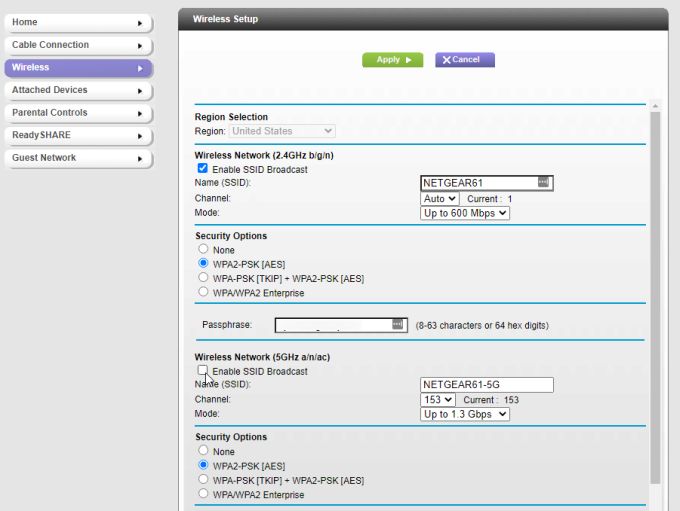
You’ll need to select Apply at the top of the page for the changes to take effect.
On other Netgear routers, you may find this in the Advanced tab, by selecting Wireless settings and unchecking Enable SSID Broadcast. (On older Netgear routers, this may be Enable Wireless Router Radio).
Disable SSID Broadcast Other Routers
The procedure to do this varies from router to router. On other routers, follow the procedure below for the router that matches yours.
- Linksys: Select Wireless and Basic Wireless Settings from the menus. Set SSID Broadcast to Disabled. You’ll need to do this for both 2.4GHz and 5 GHz.
- D-Link: Select Setup and Wireless Settings from the menus. Then select Manual Wireless Network Setup and set Visibility Status to Invisible. Alternatively, you can select Enable Hidden Wireless. Select Save Settings to enable changes. (On older D-Link Routers, you’ll need to disable the Wireless Radio button under the Wireless menu.)
- Belkin: Select Wireless in the left menu and then select Channel and SSID. Deselect the checkbox next to Broadcast SSID.
If none of these instructions match your router, or if your router model isn’t listed here, check your router’s manual. You should be able to find and download it from the manufacturer’s website.