

Staring at the same sentence for the tenth time, trying to reword it without sounding like a robot? I stumbled upon the world of paraphrasing tools a while back, and honestly, some of them caught my eye more than others. Whether you’re writing emails that don’t sound stiff, polishing up blog posts, or just trying to express an idea differently, these tools can actually save you time (and maybe your sanity).
You could sit there manually rewording every sentence, but why not let AI do the heavy lifting? After testing a bunch of options, here are the paraphrasing tools that are genuinely worth a look in 2026.
What Are Paraphrasing Tools?
Paraphrasing tools are AI-powered writing assistants that take your text and rewrite it while keeping the original meaning intact. Think of them as smart rewording machines that can transform a clunky sentence into something that flows better.
Key features you’ll find:
- Multiple rewriting modes: Formal, creative, simple, academic — pick your style
- Instant results: Paste your text, click a button, get rewritten content in seconds
- Built-in thesaurus: Suggests alternative words to avoid repetition
- Integration options: Browser extensions and plugins for Google Docs, Microsoft Word
- Plagiarism prevention: Helps you avoid accidentally copying someone else’s phrasing
These tools are perfect for students working on essays, content creators avoiding repetitive phrasing, professionals polishing emails, and anyone who wants to express ideas more clearly.
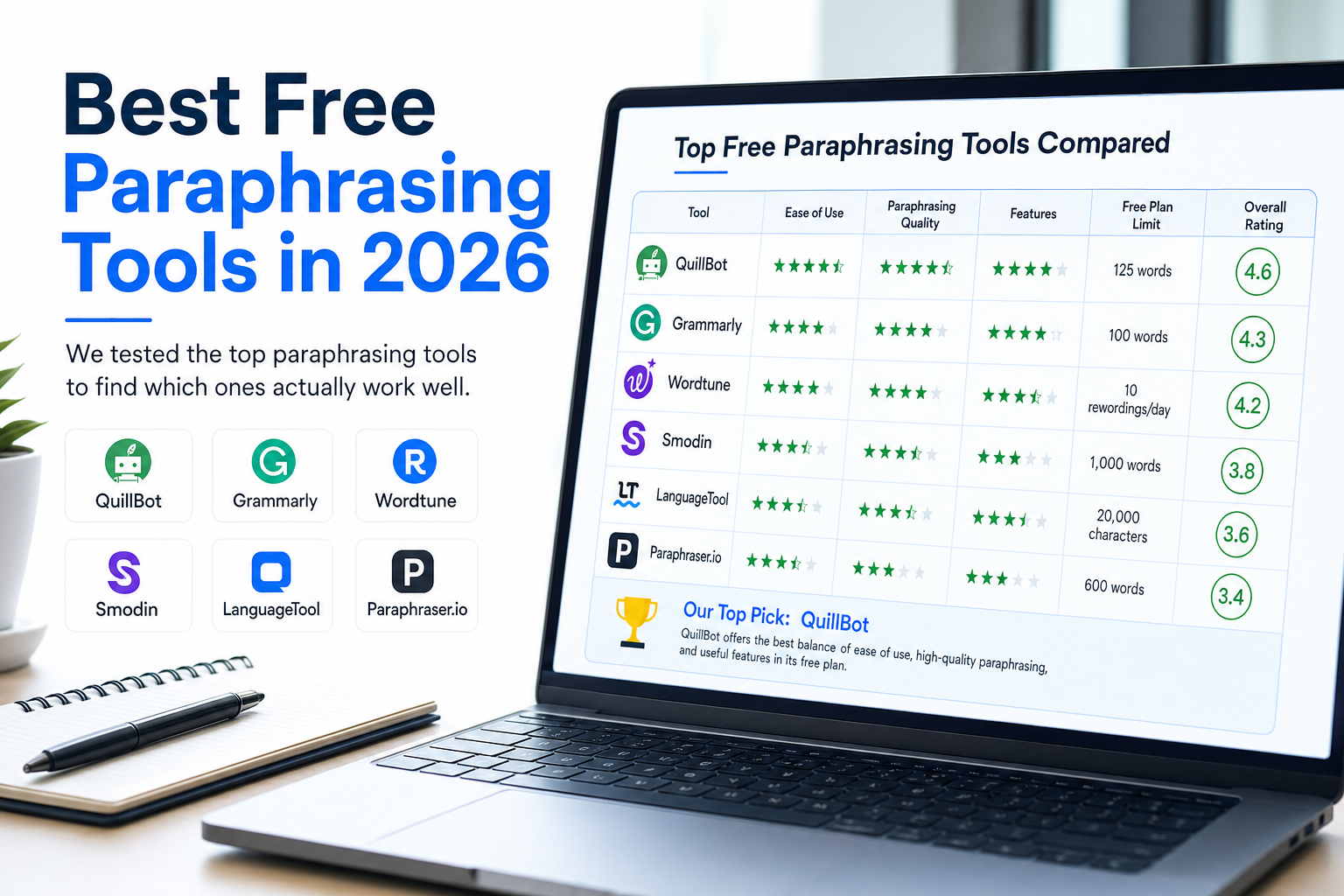
1. QuillBot – The Reliable Go-To
QuillBot is probably the first name that comes to mind when people think paraphrasing tools, and there’s a good reason for that. It’s been around long enough to get the basics right, and the interface actually works the way you’d expect it to.

What makes QuillBot nice is the variety of writing modes — Standard, Fluency, Formal, Simple, Creative, Expand, Shorten, and Academic. Each mode tweaks the tone and complexity differently, so you can match whatever you’re writing. The built-in thesaurus lets you swap individual words if the AI didn’t quite nail what you wanted.
The tool supports 23 languages beyond English, including Spanish, French, German, and Chinese. Plus, it has browser extensions for Chrome, Firefox, and Edge, along with plugins for Google Docs and Microsoft Word, so you don’t have to copy-paste between windows.
The catch: The free version only handles 125 words at a time (which is pretty limiting), and you’re stuck with just two writing modes. The premium plan costs $19.95/month but gives you unlimited words, faster processing, and access to all the modes.
Best for: People who want a solid, dependable tool that integrates well with their existing writing workflow.
2. Grammarly – Quality Over Quantity
If you’re already using Grammarly for grammar checking, their paraphrasing tool is a natural extension. It’s not the most feature-packed option, but what it does, it does well.

Grammarly’s paraphrasing tool gives you multiple rewrite options and shows you exactly how each version compares to your original text. The results tend to be more natural-sounding than some competitors — less of that weird AI phrasing that makes you cringe.

The limitations: The free version caps you at 500 characters (roughly one paragraph), which is pretty restrictive. Grammarly Premium starts at $12/month and removes the character limit while adding plagiarism detection.
Best for: Writers who prioritize natural-sounding results and are already in the Grammarly ecosystem.
3. JustDone – The All-in-One Workspace
JustDone is the new kid on the block that’s actually making waves. Instead of just paraphrasing, it’s positioned as a complete writing workspace that combines paraphrasing, plagiarism detection, AI detection, and content humanization all in one platform.

What’s clever about JustDone is that it addresses the whole workflow — not just the paraphrasing part. You can rewrite text, check if it passes plagiarism scanners, and even make sure it doesn’t trigger AI detection tools. For content creators and students, that’s genuinely useful.
The interface feels a bit “full” with all the features, so there’s a learning curve. But once you get the hang of it, having everything in one place is pretty smooth.
Best for: People who want an integrated solution and don’t mind a slightly more complex interface.
4. Paraphraser.io – The Budget Champion
If you’re looking for generous free limits without breaking the bank, Paraphraser.io is worth checking out. The free version handles 500-600 words per paraphrase, which is significantly more than most competitors.
The tool supports 20+ languages and offers multiple paraphrasing modes. It even has a mobile app, which is handy if you want to paraphrase on the go. The results are decent quality — not groundbreaking, but solid enough for most use cases.
Premium plans are reasonably priced compared to QuillBot, making this a good middle-ground option if you need more features but don’t want to pay premium prices.
Best for: Budget-conscious users who need higher word limits than other free tools offer.
5. Spinbot – Simple and Straightforward
Spinbot keeps things refreshingly simple. Paste your text, hit the button, get paraphrased content. No fancy modes, no complex settings — just basic paraphrasing that gets the job done.

One nice touch: Spinbot doesn’t automatically change capitalized words, which helps preserve proper nouns and titles. You can toggle this behavior if needed. The free version handles up to 10,000 characters, which is pretty generous.
The downside? The interface feels a bit dated, and advanced features require QuillBot Premium (since they’re powered by QuillBot’s engine).
Best for: People who want something simple and don’t need fancy features.
6. Paraphrase Online – The Value Pick
Paraphrase Online might not win any design awards, but it offers solid value. The free version comes with ads (as expected), but the premium plans start at just $5/month — significantly cheaper than most competitors.

You can upload files directly (.doc, .pdf, .docx, .txt), which saves time if you’re working with longer documents. The premium version includes five different paraphrasing modes and higher word limits.
Best for: Users who want premium features at budget prices and don’t mind a basic interface.
7. WordTune – The Context-Aware Rewriter
WordTune takes a slightly different approach to paraphrasing. Rather than just swapping out words, it tries to understand the context of what you’re writing and offer rewrites that feel genuinely intentional. The result is suggestions that often sound like a real person wrote them, not a machine.
The tool gives you multiple rewrite suggestions at once, so you can pick the one that fits best. You can also shorten or expand your text on the fly, which is handy when you’re trying to hit a word count or trim a sentence that’s running too long. WordTune integrates with Google Docs and works as a Chrome extension, so it fits naturally into an existing writing workflow.
The free plan is fairly limited in how many rewrites you can generate per day, but the premium tier unlocks unlimited suggestions and more advanced controls.
Best for: Writers who want context-aware suggestions and multiple rewrite options to choose from.
8. Smodin – The Multi-Language Powerhouse
Smodin stands out for how seriously it takes multilingual support. If you’re writing in a language other than English — or need to paraphrase content across multiple languages — Smodin handles it better than most tools in this space. It supports a wide range of languages and does a decent job of preserving tone and meaning across all of them.
Beyond paraphrasing, Smodin also offers an AI writer, plagiarism checker, and text summarizer, making it a reasonable all-in-one option for students and researchers in particular. The free tier is usable, though it comes with usage limits that can feel restrictive if you’re working through longer pieces regularly.
The interface is clean and straightforward — you won’t feel overwhelmed when you first open it up.
Best for: Non-English writers and students who need paraphrasing alongside other research and writing tools.
9. LanguageTool – The Grammar-First Option
LanguageTool comes at paraphrasing from a different angle. Its primary strength is grammar and style checking — it catches errors, flags awkward phrasing, and suggests cleaner alternatives as you write. The paraphrasing feature is built on top of that foundation, which means rewrites tend to be grammatically tight and stylistically consistent.
It supports over 30 languages, which puts it ahead of many competitors on that front. There’s a browser extension, a desktop app, and integrations with Google Docs and LibreOffice. The free version covers basic grammar checking and limited paraphrasing, while the premium plan unlocks advanced style suggestions and higher usage limits.
If you’re someone who cares as much about correctness as you do about variety in phrasing, LanguageTool is worth a look. It won’t replace a dedicated paraphrasing tool for heavy rewriting work, but for polishing and light rewording it punches above its weight.
Best for: Writers who want paraphrasing and grammar checking in one place, especially those working in multiple languages.
Tips for Getting Better Results
After testing these tools extensively, here are some tricks I’ve learned:
Start with shorter chunks: Even tools that claim to handle long text work better with paragraphs rather than entire articles. Break your content into smaller sections for more accurate results.
Try multiple modes: If the first result sounds weird, switch to a different paraphrasing mode. “Standard” and “Fluency” modes usually give the most natural results.
Always review the output: AI paraphrasing isn’t perfect. Sometimes it changes the meaning slightly or creates awkward phrasing. Read through the results and tweak as needed.
Use the built-in thesaurus: Most tools let you click on individual words to see alternatives. This is handy for fine-tuning specific phrases.
Common Issues and How to Fix Them
Problem: The paraphrased text sounds robotic or unnatural
This usually happens when you use aggressive paraphrasing modes. Stick to “Standard,” “Fluency,” or “Simple” modes for more natural-sounding results. If you’re using QuillBot, avoid the “Creative” mode unless you specifically need dramatic rewrites.
Problem: The meaning gets changed during paraphrasing
Break your text into shorter sentences before paraphrasing. Complex sentences with multiple clauses often confuse AI tools. Also, review each paraphrased section to ensure it still conveys your original intent.
Problem: Free version word limits are too restrictive
Try Paraphraser.io or Spinbot for higher free word limits. Alternatively, break your content into smaller chunks and paraphrase section by section.
Which Tool Should You Choose?
After spending way too much time testing these tools, here’s my honest take:
For most people: Start with QuillBot’s free version to get a feel for paraphrasing tools. If you like it and need more features, the premium version is worth the upgrade.
For natural-sounding results: Grammarly’s paraphrasing tool produces the most human-like output, even if it’s more limited in scope.
For budget-conscious users: Paraphraser.io offers the best free word limits, while Paraphrase Online has the cheapest premium plans.
For comprehensive writing workflow: JustDone is a gem if you need paraphrasing, plagiarism checking, and AI detection all in one place.
For multilingual writing: Smodin handles non-English content better than most, while LanguageTool is a strong pick if grammar accuracy matters as much as rewording.
For context-aware suggestions: WordTune is worth trying if you want rewrites that feel deliberate rather than mechanical.
The paraphrasing tool landscape has definitely matured since a few years ago. While free versions are mostly good for testing, if you’re doing serious writing work, budgeting for a premium subscription makes sense. These tools can genuinely speed up your writing process — just remember they’re assistants, not replacements for good editing and review.
I’d recommend bookmarking a couple of these and trying them out with your own content. You might be surprised at how much time they can save you, and spreading the word about the good ones helps other writers discover tools that actually work.