

Twitter is one of the best places on the internet to find interesting news, images, videos, and other forms of media. However, sometimes when we see something, we aren’t prepared to read or browse it right away.
With how mobile has taken over the online world, sometimes you’ll be at work, out with friends, with family, or somewhere else where you can’t be disturbed immediately to look deeper into something neat that you’ve come across on Twitter. In other cases, you may have the time, but you still want to preserve that content forever – be it for journalistic or other purposes.
If you ever find yourself in one of these situations, Twitter itself can actually help solve your problems. Twitter’s API has allowed developers worldwide to create interesting websites, services, and bots to enhance the way we browse this social network. With that has come many ways to save content from Twitter, on Twitter.
In this article, let’s explore three Twitter bot accounts that can help you save the content you see for later.
DownloadThisVideo
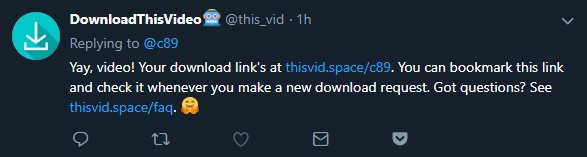
If you’ve ever been scrolling through the comments of a fresh meme or anything else that’s in video format, chances are you’ve seen people mention DownloadThisVideo (@this_vid).
The DownloadThisVideo bot account serves a very simple purpose: delivering download links for videos embedded in tweets. Its website explains the very simple process of using the bot, but doing such doesn’t require an entire website.
All you have to do is mention DownloadThisVideo (“@this_vid” anywhere in your tweet) in a reply to the tweet that contains the video you want.
The bot will (possibly) reply when your download is ready. However, Twitter bots can only send 300 automated tweets every three hours. As the DownloadThisVideo account has gained massive popularity across, it’s often affected by this limitation.
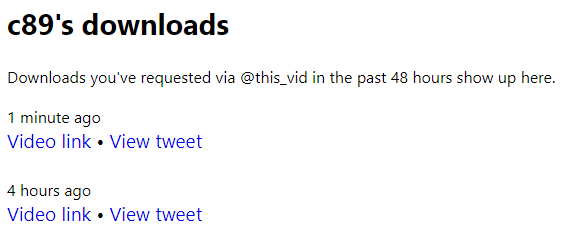
Due to this, it’s recommended that you visit your personalized download URL (by appending your Twitter username at the end of “https://thisvid.space/”) roughly a minute after queuing up your request. You should find the download link there.
Tweetstamp
Last month, I wrote an article discussing the three best sites for archiving webpages. While all three of them work perfectly fine for archiving tweets and other pages on Twitter, Tweetstamp.org (@tweet_stamp) offers a much more tailored and comprehensive alternative.
Using the Tweetstamp bot account, you can archive tweets against a timestamping proof standard, OpenTimestamps, which is vendor and blockchain independent.
Tweets run through Tweetstamp will have the original tweet stamped and archived (with OpenTimestamps), as well as show the OpenTimestamp, Stringifyed, and SHA256 data related it.
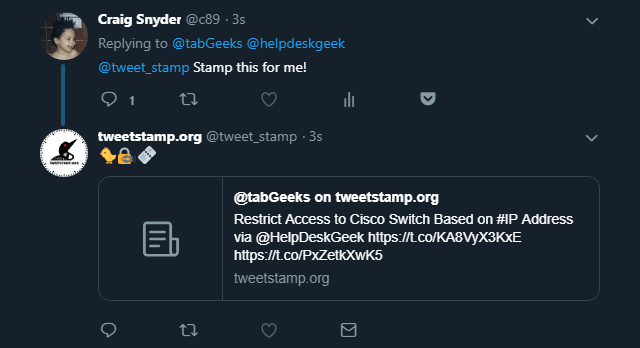
All you have to do is reply to a tweet that you want to stamp and mention the Tweetstamp.org Twitter account (@tweet_stamp anywhere in your tweet) with the word stamp somewhere in your tweet. The bot will reply to your tweet within a few seconds with a stamped permalink.
If you prefer a more private method of stamping tweets, you can direct message the bot a link to the tweet you wish to stamp. It will reply back with the permalink. Here is an example of what a Tweetstamp.org stamped tweet looks like.
Remind Me Of This Tweet
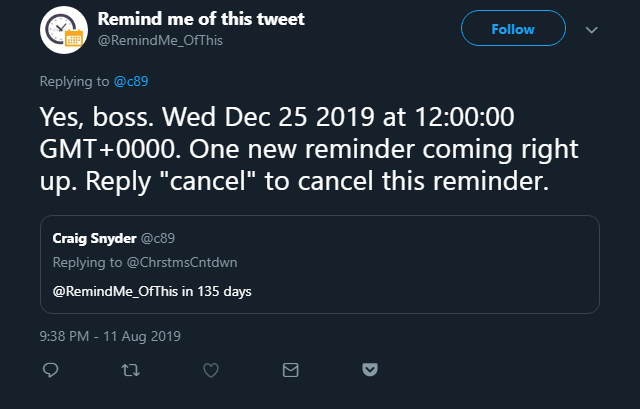
Have you ever been on your phone or in the middle of something important and come across a tweet that you definitely want to look more into at another time? If so, the Remind Me of This Tweet bot account (@RemindMe_OfThis) sounds perfect for you.
All you have to do is reply to a tweet and mention the Remind Me of This Tweet bot account (@RemindMe_OfThis anywhere in your tweet) with a reference to the date at which you want to be reminded. Some examples are “in 4 days“, “in a year“, “next month“, “tomorrow night“, and “December 20“.
This bot is open source on GitHub, so savvy users will be able to dissect all of the possible formats they can use when referencing a specific date. However, I suggest you keep the text as simple as possible to be sure that the bot parses it correctly.
What better to help you enjoy and experience Twitter better than Twitter itself? All credit for these awesome bots go to their creators, and we hope to find more useful Twitter accounts like these in the future.