

Over the past decade, Reddit has gone from a simple Digg competitor to a complete replacement for a large portion of the internet’s forum and chat communities.
Today, with over 26 million active users, it’s the go-to social news and discussion platform. If you don’t use Reddit, you’re missing out on a wealth of breaking information and some very interesting conversations.
The good news is, if you’re just recently joining Reddit, there’s a backlog of millions of posts for you to search through! Want to know tips for getting started on the keto diet? Reddit’s got them. Need information on which credit card is the best option for a teenager? Reddit can help. However, finding exactly what you’re looking for requires you to know a few tricks.
In this article, let’s go over Reddit’s advanced search operators and learn how to navigate through Reddit’s search like a pro.
Keyword Search Operators for Reddit
Reddit’s keyword search operators use terms that tell the text thereafter how to filter results. Using them is the most advanced way to narrow down your search to the content you’re looking for. There are currently nine of these, all shown below.
title
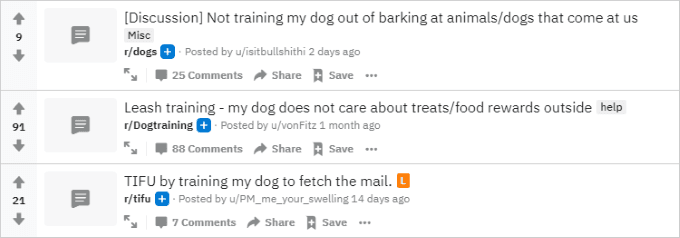
The “title” search operator limits results to posts where the text thereafter (requiring quotation marks if more than one word) is found within the title. This can be used as a way to find entire threads about a particular topic.
- Example: title:”training my dog”
author
The “author” search operator limits results to posts made by a specific user. This is not case sensitive.
- Example: author:spez
selftext
The “selftext” search operator limits results to self-posts where the text thereafter (requiring quotation marks if more than one word) is found within the body. This can sometimes behave strangely when used with more than one word, even if wrapped in quotation marks.
- Example: selftext:”playstation”
url
The “url” search operator limits results to link posts that contain the exact URL thereafter. This can sometimes return a small percentage of link posts that don’t match the URL.
site
The “site” search operator limits results to link posts that contain URLs that belong to a specific domain name.
- Example: site:online-tech-tips.com
nsfw
The “nsfw” search operator allows you to toggle showing (with “yes” or “1”) or hiding (with “no” or “0”) NSFW posts.
- Example: nsfw:no
self
The “self” search operator allows you to toggle showing (with “yes” or “1”) or hiding (with “no” or “0”) self-posts.
- Example: self:yes
subreddit
The “subreddit” search operator limits results to posts made within a specific subreddit.
- Example: subreddit:gaming
flair
The “flair” search operator limits results to posts tagged with a certain flair text.
- Example: flair:news
Boolean Search Operators for Reddit
Reddit’s boolean search operators use strict conditions to limit search results. I’ve noticed that these operators do not seem to work properly when using Reddit’s new design, so you’ll need to revert to the old design if you want to make use of these.
AND
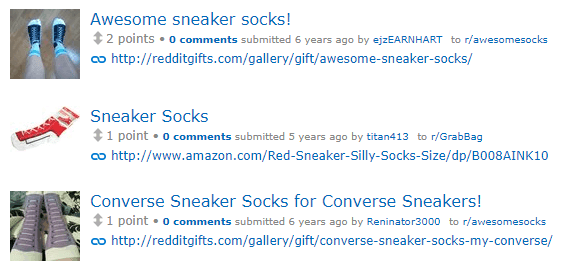
The “AND” search operator limits results to posts that include both terms. This works by default for basic query searches, meaning you don’t have to use it, but this may be required in advanced cases where several different operators are used.
- Example: sneakers AND socks
OR
The “OR” search operator limits results to posts that include either term. You must surround a term with quotation marks if it contains more than one word.
- Example: pineapples OR mangos
NOT
The “NOT” search operator limits results to posts that do not include the text thereafter. You must surround a term with quotation marks if it contains more than one word.
- Example: cheese NOT pizza
The best part about Reddit’s advanced search operators is that they can be used together! By surrounding each operator in parentheses, you can string together a long set of conditions that can help you narrow down millions of posts to just a small handful.
Another big tip is to try your search using both the new and old Reddit designs. For some reason, certain operators seem to behave differently across each. As noted above, the boolean operators actually only work while using the old design. While Reddit clearly hasn’t ironed out all of the kinks in their search feature, there’s no doubt that with the dozen operators listed above, searching through Reddit is a breeze.