

Becoming an influencer on Twitter isn’t an easy task. Analyzing when Twitter users have followers or unfollowed you can help you better understand what type of content your followers appreciate. This also applies to us average Joes—sometimes it’s nice to know when and why our Twitter followers have abandoned us.
Whether it’s industry colleagues or just friends that you’ve met online, being able to track your followers allows you to stay on top of your social media presence. Not to mention, how about those mutuals that unfollow you? Is it in your best interest to continue following them? This is a choice you can make as soon as you have access to the data.
We’ve tried many solutions when it comes to monitoring your Twitter followers count. Several of them force you to post an obnoxious tweet that advertises how many followers you’ve gained or lost. Others will direct message you every day with insignificant statistics. For those interested in a less verbose alternative, we’ve found one.
Using Who Unfollowed Me, you can track each and every gained or lost follow for any of your Twitter accounts.
Log in to Who Unfollowed Me’s Website
To begin using Who Unfollowed Me, you’ll need access to a web browser and your login information for Twitter.
After logging into the Twitter account you want to track, you’ll be redirected to a page that shows all of your recent statistics. However, this data should be full of zeros since you’ve only just begun tracking your account with Who Unfollowed Me.
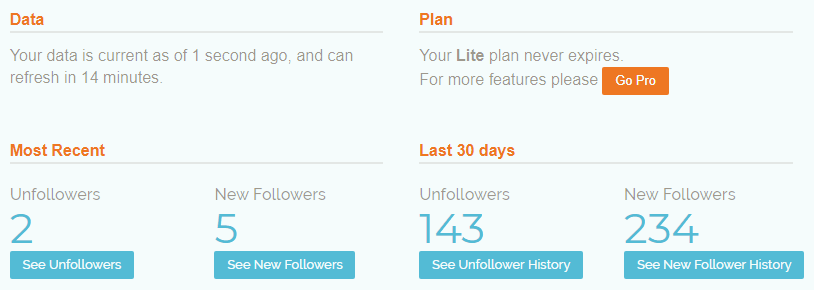
When you return to Who Unfollowed Me at a later date, at a minimum of 14 minutes later, you’ll begin to see your follow and unfollow counts. The Most Recent section shows your data since your last visit to Who Unfollowed Me, and the Last 30 Days section shows your data within the past up-to-30 days (can be less if you’re a new user).
Viewing Who Unfollowed You
On this same Dashboard page, you’ll see buttons under each of your follow or unfollow counts that allow you to access lists of the corresponding Twitter users.
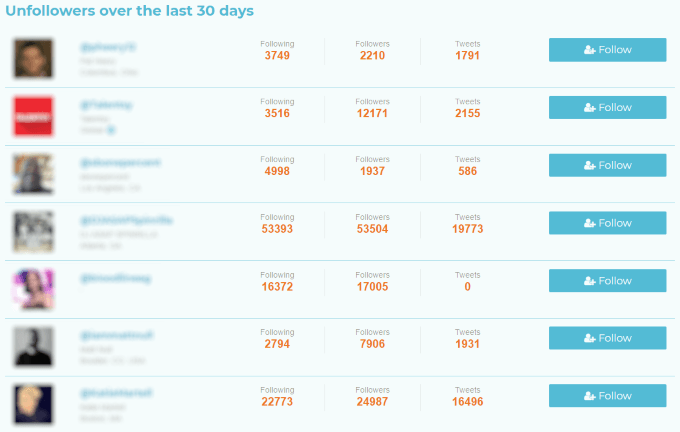
For example, clicking on the See Unfollower History button takes you to the page shown in the screenshot above. Here, the following information is displayed:
- Twitter photo and
name - Following count
- Followers count
- Total tweets
Additionally, you can follow or unfollow these users under the rightmost column. This makes it easier to keep you follows (and unfollows) mutual.
Speaking of mutuals, it’s easy to overlook Who Unfollowed Me’s features for managing yours.

In the navigation bar across the top of the page, clicking Connections will allow you to view lists of users who aren’t following you, who you aren’t following, and your mutual followers. These lists are limited to the 100 most-recent users, but if you aren’t wildly popular and check frequently, it’s easy to manage.
Who Unfollowed Me is the best way to view your Twitter unfollowers and we hope this guide has helped you unlock its benefits. Keep in mind that you’ll need to track how often you’re using this service, since your recent unfollowers are tracked since the time you last used it. Good luck with your growth on Twitter!