
Do you use the command prompt on a daily basis? If so, I recently found a way to turn on auto-complete for the command prompt via a simple registry edit. When typing in long path names, simply type in the first few letters and then press TAB to autocomplete either folder or file names.
For example, if I am typing in C:\Documents and Settings\, I would just need to type in C:\Doc and then press the TAB key.
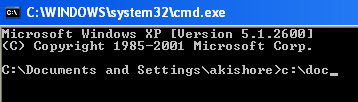

As you can see, there is only one folder that starts with “doc“, so it automatically gets completed with quotes added. Now that’s pretty neat. If you want to continue further, just add another \ to the end and then press TAB. Note that you can add the forward slash after the quote and it will still work just fine.
You can continue through the different folders and files in a directory by simply pressing the TAB key. So if you type in C:\ and then keep pressing the tab key, you will be able to cycle through all the folders and files in that path in alphabetical order, i.e. C:\Documents and Settings, C:\Program Files\, etc.
Note that this really only applies to Windows XP. In Windows 7 and higher, autocomplete will work automatically when you press the TAB key.
Enable Autocomplete for Command Prompt
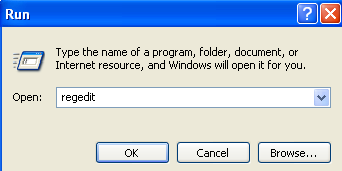
Step 1: Click on Start, then Run and type in regedit in Windows XP. In Windows 7 and higher, just clicking on Start and then type regedit.
Step 2: Navigate to one of the following registry keys:
HKEY_LOCAL_MACHINE\SOFTWARE\Microsoft\Command Processor
HKEY_CURRENT_USER\SOFTWARE\Microsoft\Command Processor
So which one do you pick? Well, here’s how it works. The Local Machine key will apply to all users on the computer, but will be overridden by the Current User key if the value is different. For example, if autocomplete is disabled at the HKLM key, but enabled on the HKCU key, then it will be enabled. You can tell if autocomplete is disabled when pressing the TAB key simply inserts a TAB space.
You can change the settings in both locations if you like, but it is really only needed in the HKCU key for autocomplete to be enabled.
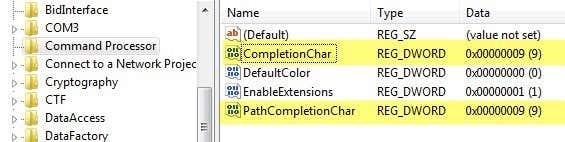
Step 3: Double-click on the CompletionChar key and change the value to 9 in decimal format. CompletionChar enables folder name completion.
You can also enable file name completion by changing the value of PathCompletionChar to 9 also. Note that the value 9 or 0x9 in hexadecimal is to use the TAB control character for autocomplete. You can also use other keys if you like.
For example, you can use 0x4 for CTRL + D and 0x6 for CTRL + F. I personally find the TAB key to be the most intuitive key, but you have other options if you need.
You can also use the same control character for both file and folder completion if you like. In this case, autocomplete will show you all matching files and folders for the given path.
As mentioned earlier, the default value in Windows 7, Windows 8 and higher is 0x40 (64 in decimal) in the HKLM key. It should be set to 0x9 (9 in decimal) in the HKCU key by default, which means it will be enabled. If not, you can manually go and change it.
Overall, this is a great time saver for anyone who has to type a lot of DOS commands. If you have any questions, feel free to post a comment. Enjoy!