How to track the original location of an email via its IP address
Posted on October 9, 2007 at 7:14 am
Here’s a quick how-to guide on how you can track email to it’s originating location by figuring out the email’s IP address and looking it up. I have found this to be quite useful on many occasions for verification purposes since I receive lots of emails daily due to my blog. Tracking the IP address of an email sender does require looking at some technical details, so be ready to dig your heels in!
There are basically two steps involved in the process of tracking an email: find the IP address in the email header section and then look up the location of the IP address.
Finding the IP address of an email sender in GMail, Yahoo Mail, and Outlook
Let’s go ahead and take a look at how you would do this for Google, Yahoo and Outlook since those are the most popular email clients.
Google’s Gmail
1. Log into your account and open the email in question.
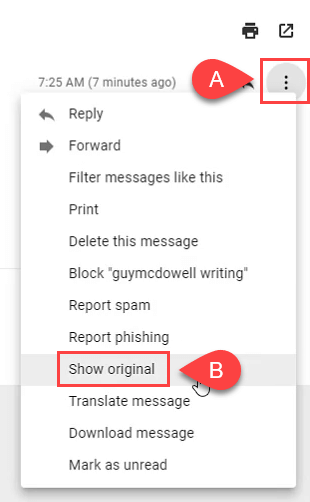
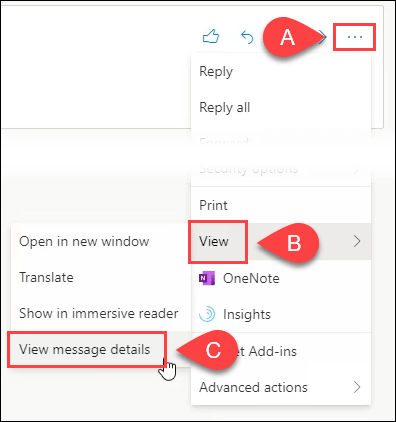
2. Click on the down arrow that’s to the right of the Reply link. Choose Show Original from the list.
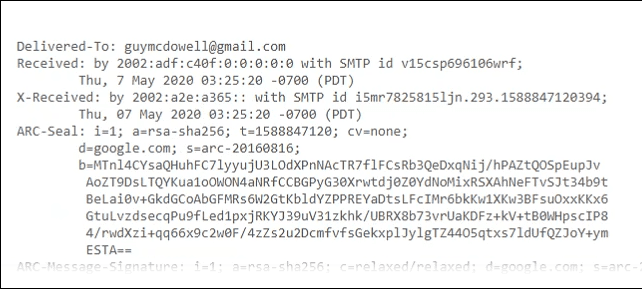
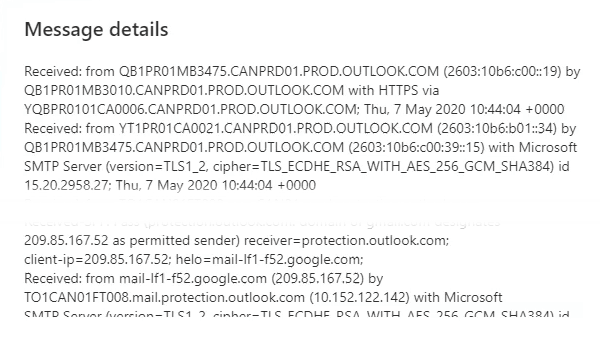
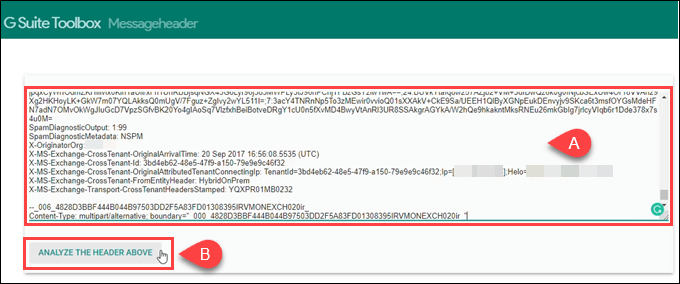
Now here’s the technical part that I was telling you about earlier! You need to look for the lines of text that start with “Received: from“. It might be easier to simply press Cntrl + F and perform a search for that phase. You’ll notice that there are several Received From’s in the message header. This is because the message header contains the IP addresses of all of servers involved in routing that email to you.
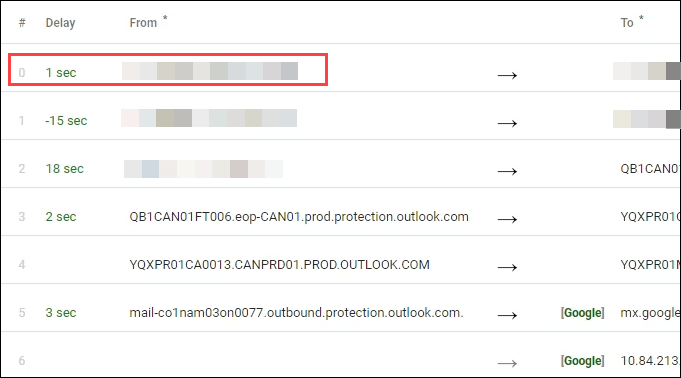
To find the first computer that originally sent the email, you’ll have to find the Received From that’s farthest DOWN. As you can see from the above image, the first one is from a computer called “aseem” with the IP address 72.204.154.191. Then it was routed to my ISP’s server at eastrmmtao104.cox.net and so on and so forth till it got to your email server.
The computer aseem is my personal home computer and that’s my public IP address for my house! I’ll go through Yahoo and Outlook before talking about tracking the location of that IP address.
Yahoo Mail Beta
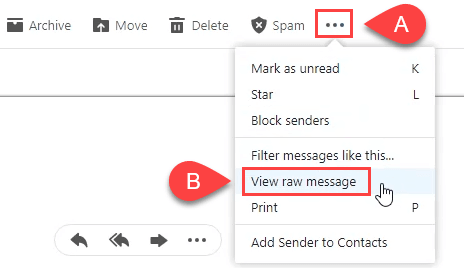
1. Log into your account and open the email (if you’re using Yahoo Mail Beta with the new preview interface, make sure you double-click on the email so that it opens in a new tab)
2. At the top right, you’ll see there is a drop-down option where Standard Header is selected by default.
3. Click on it and choose Full Header.
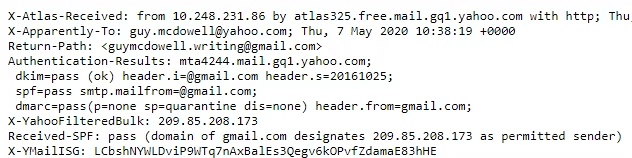
Again, you’ll see the same information as before, just in a different window:
Microsoft Outlook
1. Open the email in Outlook by double-clicking on it
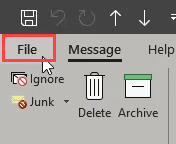
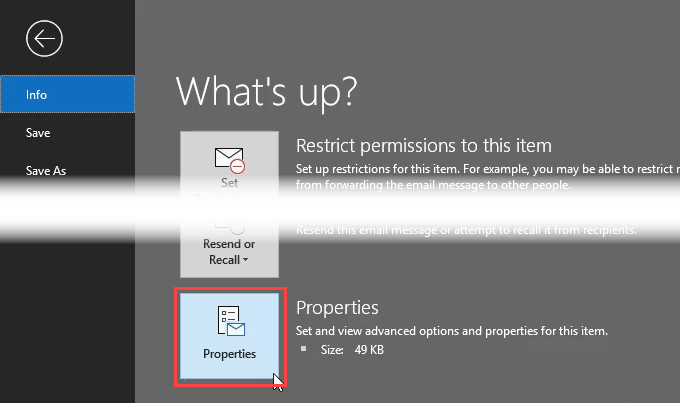
2. Go to View at the top menu (the menu options for the email, not the main Outlook window) and choose Options.
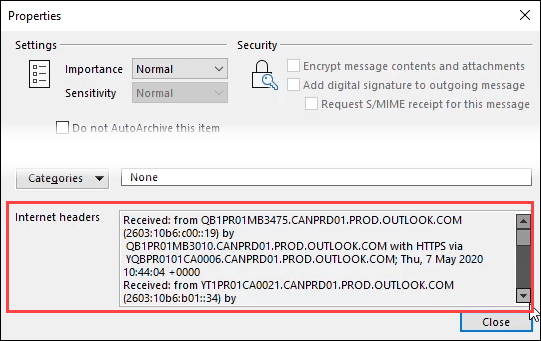
You’ll get a dialog box where you can set the message options and at the bottom you’ll see the Internet Headers box. For some silly reason, the box is very small and you have to scroll a lot, so it’s best to simply copy and paste the text into Notepad to view it more easily.
Tracking the location of an IP address
Now that we have our originating IP address of 72.204.154.191, let’s find out where that is! You can do this by perform a location lookup on the IP address. My favorites are IP2Location and GeoBytes IP Locator.
GeoBytes gave me a big map of New Orleans, LA along with a bunch of other information about the location itself.
IP2Location also gave me the same information pretty much, including the ISP (Cox Communications). Of course, this is correct since I live in New Orleans!
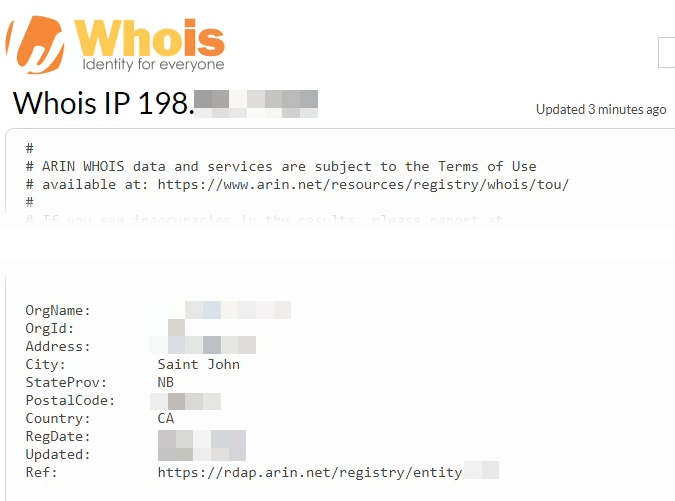
If you want more information, you can do a WHOIS database search also. My favorite one is the ARIN WHOIS Database Search. This will give you information on who hosts that IP address and their registration information. You can always contact them to try and find more information on that particular IP address.
Have fun tracking down those emails! Questions, comments, or suggestions? Post a comment!
Technorati Tags: track email, track an email, track email ip, find email ip address, locate email, find location, locate ip address
If you enjoyed this post, make sure you subscribe to my RSS feed!
» Filed Under Computer Tips
Related Posts
- How to check all of your email accounts from Gmail
- How to setup email on the iPhone - Access Gmail on iPhone
- How to change your default mailto client to GMail or Yahoo
- Outlook Tip #1: How to attach another Outlook item (email, contact, task, or calendar item) to an email
- Use GMail as an online database with super fast search
61 Responses to “How to track the original location of an email via its IP address”
Pingbacks
-
Chat Marchet News Digest » How to track the originating location of an email via it’s IP address Says:
[...] Full story This entry was posted on Sunday, October 14th, 2007 at 11:07 pm and is filed under le Chat Marchet. You can follow any responses to this entry through the RSS 2.0 feed. You can leave a response, or trackback from your own site. [...]
October 14th, 2007 at 8:33 pm
Pingbacks
-
How to track the original location of an email via its IP address « ICT NEWS Says:
[...] details… [...]
October 14th, 2007 at 10:54 pm
Pingbacks
-
» How to track the originating location of an email via it’s IP address Says:
[...] read more | digg story Uncategorized [...]
October 15th, 2007 at 7:56 am
Pingbacks
-
How to track the originating location of an email via it’s IP address « digg the wordz Says:
[...] read more | digg story [...]
October 15th, 2007 at 8:58 am
Pingbacks
-
Tracking An Emails Location | Technology Blog by Colbert Low Says:
[...] tip on how to find out the IP address on the spam emails and do something about blocking them. via Here’s a quick how-to guide on how you can track email to it’s originating location by figuring [...]
October 15th, 2007 at 8:33 pm
Pingbacks
-
Technogab | Technology News Podcast with a touch of Rock Says:
[...] How to track the original location of an email via its IP address [...]
October 19th, 2007 at 2:33 pm
Pingbacks
-
Monday morning links serving: The October 22nd edition | [Geeks Are Sexy] Technology News Says:
[...] -How to track the original location of an email via its IP address Here’s a quick how-to guide on how you can track email to its originating location by figuring out the email’s IP address and looking it up. [...]
October 22nd, 2007 at 4:20 am
Pingbacks
-
5 Ways To Increase The Loading Speed Of A WordPress Blog Says:
[...] an article of mine entitled “How to track the original location of an email address” was Dugg on Digg and got the most Diggs I’ve ever received on an article with over [...]
October 24th, 2007 at 9:05 am
Pingbacks
-
How to track down Spam email… « Kenjun Says:
[...] http://www.online-tech-tips.co.....-via-its... [...]
October 25th, 2007 at 6:17 am
Pingbacks
-
How to track the original location of an email via its IP address « DEEP IMPACT Says:
[...] How to track the original location of an email via its IP address How to track the original location of an email via its IP address [...]
October 27th, 2007 at 7:31 am
Pingbacks
-
5 ways to increase the wordpress's loading speed Says:
[...] is a guest post by Aseem from Online Tech Tips. Recently, an article of mine entitled “How to track the original location of an email address” was Dugg on Digg and got the most Diggs I’ve ever received on an article with over 1800! It [...]
November 1st, 2007 at 7:40 pm
Pingbacks
-
Tracing email’s IP address « Troubleshooting PC Problems Says:
[...] >> More details on Aseem’s site [...]
November 17th, 2007 at 5:18 pm
Pingbacks
-
Website statistics and blog income report for November 2007 Says:
[...] How to track the original location of an email via its IP address [...]
December 1st, 2007 at 1:22 pm
Pingbacks
-
Webマーケティング最前線 » すばらしいヴァイラルコンテンツのための6つのアイデア Says:
[...] IPアドレスからEメールの発信元場所を調査する方法 [...]
February 19th, 2008 at 3:13 pm
Please post your comments/suggestions!
[...] Full story This entry was posted on Sunday, October 14th, 2007 at 11:07 pm and is filed under le Chat Marchet. You can follow any responses to this entry through the RSS 2.0 feed. You can leave a response, or trackback from your own site. [...]
October 14th, 2007 at 8:33 pm[...] details… [...]
October 14th, 2007 at 10:54 pm[...] read more | digg story Uncategorized [...]
October 15th, 2007 at 7:56 am[...] read more | digg story [...]
October 15th, 2007 at 8:58 am[...] tip on how to find out the IP address on the spam emails and do something about blocking them. via Here’s a quick how-to guide on how you can track email to it’s originating location by figuring [...]
October 15th, 2007 at 8:33 pm[...] How to track the original location of an email via its IP address [...]
October 19th, 2007 at 2:33 pm[...] -How to track the original location of an email via its IP address Here’s a quick how-to guide on how you can track email to its originating location by figuring out the email’s IP address and looking it up. [...]
October 22nd, 2007 at 4:20 am[...] an article of mine entitled “How to track the original location of an email address” was Dugg on Digg and got the most Diggs I’ve ever received on an article with over [...]
October 24th, 2007 at 9:05 am[...] http://www.online-tech-tips.co.....-via-its... [...]
October 25th, 2007 at 6:17 am[...] How to track the original location of an email via its IP address How to track the original location of an email via its IP address [...]
October 27th, 2007 at 7:31 am[...] is a guest post by Aseem from Online Tech Tips. Recently, an article of mine entitled “How to track the original location of an email address” was Dugg on Digg and got the most Diggs I’ve ever received on an article with over 1800! It [...]
November 1st, 2007 at 7:40 pm[...] >> More details on Aseem’s site [...]
November 17th, 2007 at 5:18 pm[...] How to track the original location of an email via its IP address [...]
December 1st, 2007 at 1:22 pm[...] IPアドレスからEメールの発信元場所を調査する方法 [...]
February 19th, 2008 at 3:13 pm


Congrats aseem for getting dugged! And hey that’s a nice and informative guide
“It’s” is always a contraction; the possessive form of “it” has no apostrophe.
but thats only if the sender used a mail client on his own computer. if the sender uses gmail.com web interface to send the mail, u’ll just see googles server in the “recieved: from” section. not useful!
Hi Beno,
I agree it’s not useful if the email is sent from Gmail via a web browser. However, there are tons of people who send emails from their office computers (Outlook, etc) and in those cases, tracking the location would be useful!
Aseem
agreed, for such scenarios! i thought more people used the web interface than local clients. anyways, have a great day!
The IP shown isn’t necessarily the originating IP. I could quite easily use someones else IP range and send emails.
This isn’t always the case with webmail.
If you are in Europe getting your mail, it will still
look like you are in the US.
Their’s some good news with mail like HotMail, you
can check one of the X-headers like:
X-Originating-IP: [38.99.194.90]
new_msg = replace(old_msg, “their’s”,”there’s”)
Lexx - “In fact, the only part of the email header that can’t be faked is the Received: line, which references your mail server. Spammers often add spoofed Received: headers to try to hide the true origin of the unwanted email, but modern mail transfer programs record the sender’s correct IP address. So even if the sender uses a fictitious or false name when contacting the receiving server, you can determine the origin of the spoofed message.”
http://searchsecurity.techtarg.....58,00.html
The three way handshake that is part of every TCP communication prevents IP spoofing.
Not useful: the LAST Received: line may be private IP, you have to look up the last non-private IP.
Be careful when relying on this information. Spoofing IP’s in emails is trivial.
You can’t spoof the originating IP address. Its part of the three way handshake. All the others are easily spoofed.
That’s how SPAM filters check reverse DNS.
His article does state to use the bottom IP address, which is the only one you can rely on.
Nice article!
Well done!
This may not work all the time as others have said. But Ive had success in using these procedures in tracking down businesses who have gotten my email from other websites, such as when you use a directory submittal site.
TRaef06 and Doug,
Thanks for the positive comments! I wasn’t meaning this to be a super comprehensive guide to detect the location of spam email. Mostly I’ve used this to track down emails from malicious businesses or individuals. Most of them don’t even know how to spoof an IP address!
Thanks!
IP in email is too easy to fake. Nice article though, well done.
Sounds cool… Like it was being said above, it is not always the case whereby you can trace the mail from the originating server; as a single server can be shared by many hosts.
Do you have any idea on how to traceback a mail sent from a gmail id ?
I had a quick question. Is there any way that you know of to track the IP address for mail coming to just Hotmail?
This is a great tip. Stumbled.
What a wonderful post.
Hi,
Any idea how would it work for Outlook Express 6.0, please?
Cheers,
Shahid.
When going for spammers, I generally look up the IP of the smtp server and report ‘em. I find that lots of people nowadays use webmails, and that doesn’t accurately report the IP address of the sender.
Nice tip though 
Even if you have got a genuine IP I can’t really see how useful knowing the location of the ISP is anyway. No ISP is going to tell you which of their users was using ‘x’ IP address on ‘x’ date at ‘x’ time anyway.
For example, if I sent you an email from where I am and you looked the IP up it would tell you I’m in Ipswich, UK. I am, however, about 40 miles from there, how useful is this?
ya.. tried it.. got to know many things… thanks
I prefer IP Address Locator
It seems to be more accurate.
I m geeting abused unwanted mail form same mailer many time like to trace him but i have no idea how to do this. please help me out if u can
If I use outlook express as the default mail and also have access to webmail. My laptop PC is at work but I am replying my emails from another PC. Can the Administrator find out from what PC I am replying to my emails? Remember is an external PC and using an external site to check emails. Please advise. Thanks
This site is cool!
Could I ask something?
Is there any way I can locate the person who uses a different host? Like Friendster.com?
It would really help us, thanks!
JLS
Thank you for helping me with a problem. you are outstanding!
thats perfect all but i want to know how to find the IP number from the hotmail. Thanks to all of you!!!
Great Post. Liked the inforamtion.
I think i’m a little late in posting my comments (the blog appeared in October & I’m posting my comment in December). The article is really interesting but you have not mentioned how to track an email received on a hotmail account. I want to track an email that I received on my hotmail account but I don’t know how to do it. Someone had told me that I should go to the “options”, click “message display settings” and i’ll find full headers there. But i couldn’t find any “message display settings”, so there’s no way to find full headers. is there a way to track such a mail? how can this be done?
good job.you also can paste lattitude to google earth to search directory ans see location from space
I needed to track the location of an e-mail wichi came to me from a suspeciouse person. This was really help ful to me.
thnx
Question for you.
How can I retrieve an email posted a couple years ago and no longer on my pc. Isn’t there a public repository of these email posts? I did a search once (don’t even remember what I queried) and pulled up email messages from several people to others. These were private emails to a party I was not privy to. I need to retrieve some emails that may involve possible posts that indicate wrongdoing if this is possible.
Send to my email or post publicly, your call, but lpease notify me of answer.
Thanks.
Proxies!
Thanks
Great post, very informative…..I also liked your recent posts about wireless security, its amazing how many people are blissfully unaware how many malicious companies and hackers are constantly trying to steal information…
its good
hey aseem i was just wondering if i could track some one sending from gmail and i also recieving it from gmail ..i ther a way because your thing i tried and didnt work …there was no recieved from…can u help me
how to interfere with the persons computer when i have the ip address, i would like to make fun with my brother
some people here criticize as if they are the brightest people on earth. Come on this guy is just sharing his knowledge. If you find the article not useful to you it does not mean it has no use to every person who will read. full of boastful people generation.
is it possible to find out who is chatting with whom using gtalk within gmail too? in this scenario the mail would not be sent, but the chat has been initiated
A Better way to track anonymous, unknown users
http://www.techtola.com/2007/0.....rs-on.html
can you tell me, if i have an IP address from a year ago, but still saved it..can you still figure out where the computer was that it came from, I am told IP addresses change withing hours/minutes and it’s no longer trackable?
can someone help me do this?
Very nicely written article akishore …cheers!
Though I agree that most people have now shifted from desktop email clients to Gmail…but this still is a very informative post.
I have had the same Yahoo email for 20 years, +or-, when I pull down the arrow to the right of “REPLY” I only have two choices. Reply to Sender or Reply to Everyone I do not know what to do next. Would you help me please. Your article was most informative and I could actually understand some of it. Thanking you in advance, Teri 865.556.9246 Notify me any way its convenient for you.