
Skip to content
ONLINE 101010 TECH 010101 TIPS
  • Latest
  • News
  • How-To
  • Social
  • Streaming
  • Gaming
  • Reviews
  • Latest
  • News
  • How-To
  • Social
  • Streaming
  • Gaming
  • Reviews
  1. Home/
  2. Social Media/
  3. Use YouTube Incognito Mode to Watch Videos Privately on Mobile Devices

Use YouTube Incognito Mode to Watch Videos Privately on Mobile Devices

Aseem Kishore
June 15, 2019
2 min read
 - youtube mobile

YouTube has become an incredible source of video content and an open platform for anyone to share their videos with the world. One of the reasons it’s such a popular service is thanks to Google’s algorithms, which predict what you’d like to watch most and then suggests it to you. Everything you do on YouTube is carefully recorded and learned from, but that’s not always something you’d want.

Someone might send you a link to a video you’d rather not have in your history. Perhaps you don’t want that particular video influencing your suggestions.

There are also situations where you are sharing a device within the household or need to borrow someone else’s phone. Whatever the reason, you’ll be glad to know that YouTube now offers an incognito mode similar to private browsing modes for its Android and iOS apps.

Engaging Incognito Mode in the YouTube App

The instructions for using Incognito Mode in the YouTube App is the same whether you’re on iOS or Android. Of course, you need to be logged in with a YouTube account for this to work. If you aren’t then the point is rather moot.

Open the YouTube App at its home screen.

 - YouTube Incognito 1

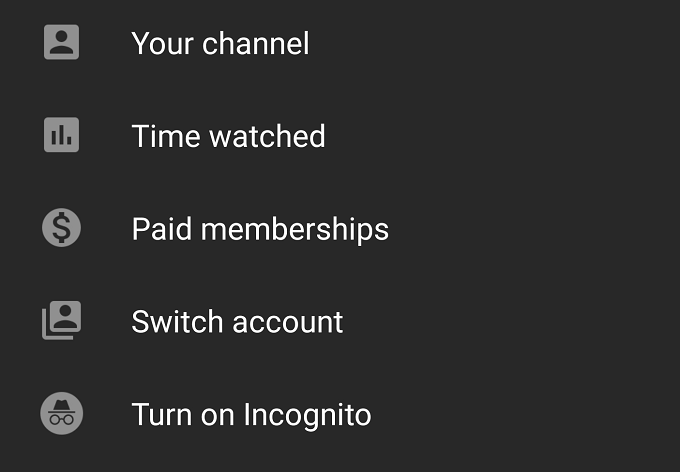
Now tap your profile icon and then tap “Turn on Incognito”
 - YouTube Incognito 2

You’ll notice that your profile icon has been replaced by this icon.

 - YouTube Incognito 3

Always check for this sign that Incognito Mode is active. When you are done with your private viewing, you need to turn the mode off.

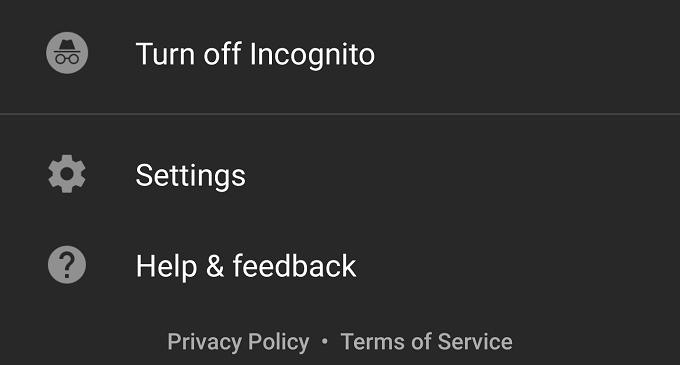
Tap the profile icon, then tap “Turn off Incognito” on the menu that pops up. Now Youtube is tracking your viewing habits again.
 - YouTube Incognito 4

As you can see, it’s pretty easy to quickly switch between modes. So it’s a good idea to get into the habit of thinking about what you want YouTube to retain about you.

With smart use of Incognito mode, you can really fine-tune your experience and avoid getting videos pushed on you that don’t gel with your tastes.

Tags: YouTube
Share
Written by

Aseem Kishore

Founder of Online Tech Tips and managing editor. He began blogging in 2007 and quit his job in 2010 to blog full-time. He has over 15 years of industry experience in IT and holds several technical certifications. <a href='https://www.online-tech-tips.com/author/akishoreott/'>Read Aseem's Full Bio</a>

View Aseem's Profile

Recent Posts

  •  - personal finance tools
    10 AI Money Apps That Make Mint Look MedievalJun 6, 2025
  •  - smartwatches
    Is a Smartwatch Worth It in 2025 and Beyond?May 20, 2025
  •  - slow wifi
    How to Fix Slow Wi-Fi on Your SmartphoneMay 6, 2025
  • Programmer coding at computer. - vibe coding
    Vibe Coding 101: Your Guide to AI-Powered ProgrammingMar 26, 2025

Search

Categories

  • Gaming (345)
  • How-To (1,120)
  • News (43)
  • Reviews (437)
  • Social Media (461)
  • Streaming (173)
  • Uncategorized (4)

Popular Tags

Adobe AI Alexa Amazon Android Buying Guides ChatGPT Chrome Discord Explainers Facebook FireTV Gadget Reviews Gmail Google Google Docs Google Maps Google Sheets Home Networking Hulu Instagram Internet LinkedIn Minecraft Netflix Nintendo Switch PlayStation Premiere Reddit Remote Work Roblox Roku Roundups Smart Home Snapchat Software Reviews Spotify Steam TikTok Twitch VR WhatsApp Windows X (Twitter) YouTube

Our Publishing Family

Online Tech Tips is part of the AK Internet Consulting publishing family.

  • HELP DESK GEEK
  • THE BACK ROOM TECH
  • SWITCHING TO MAC
  • XBOX ADVISOR

Daily Email Newsletter

Connect With Us

About Online Tech Tips

Online Tech Tips has published easy-to-follow technology tutorials, honest reviews, and practical how-to guides since 2007 — helping millions of readers solve tech problems and get more from their devices.

Learn More →

© 2007-2026 Online Tech Tips.com, LLC.
All Rights Reserved.

  • Home
  • About Us
  • Editorial Standards
  • Contact Us
  • Terms of Use
  • Privacy Policy
Online