

It’s understandable to want a break from social media. If left unchecked, social media use can turn into a seemingly endless time suck. This could be wreaking havoc on your productivity, mental health, or cause other issues. One step many people decide to take in these situations is deleting social media accounts.
However, deleting an account might sound like too much of a commitment. Many sites, like Facebook, have made a way you can deactivate your account instead of deleting it forever. This means you’ll still be able to get back into it, and your account data will stay intact just as you left it.
What’s the Difference Between Deactivating and Deleting?
For other people looking at your account on Facebook, there isn’t much difference between deleting or deactivating it. Your account won’t show up for those who try to see it, and nobody will be able to send you friend requests. You also won’t show up in searches or on people’s friend lists.
The main difference is that you’ll still be able to log into and access your deactivated account at any time. Once you log into a deactivated account, it will become active again. It will work the same as when you left your Facebook account. Any data you had on your account also won’t be deleted when you deactivate it. This means posts or pictures you had on your account.

When you delete a Facebook account, you won’t be able to access it again once it’s gone. Facebook stalls account deletion for a few days after it’s requested, so if you log into the account a day or so after you requested to delete it, you should be able to get it back. But after that, it will be permanently gone.
This is why deactivating an account may be a better option if you have a lot of content and data on your account you’d like to save. It’s also better if you plan on eventually coming back to the site. You should also keep in mind that whether you delete or deactivate a Facebook account, you’ll always still be able to use Facebook Messenger and all your messages there will stay intact.
How to Deactivate a Facebook Account
If you decide you’d rather deactivate your Facebook instead of deleting it, here’s how.
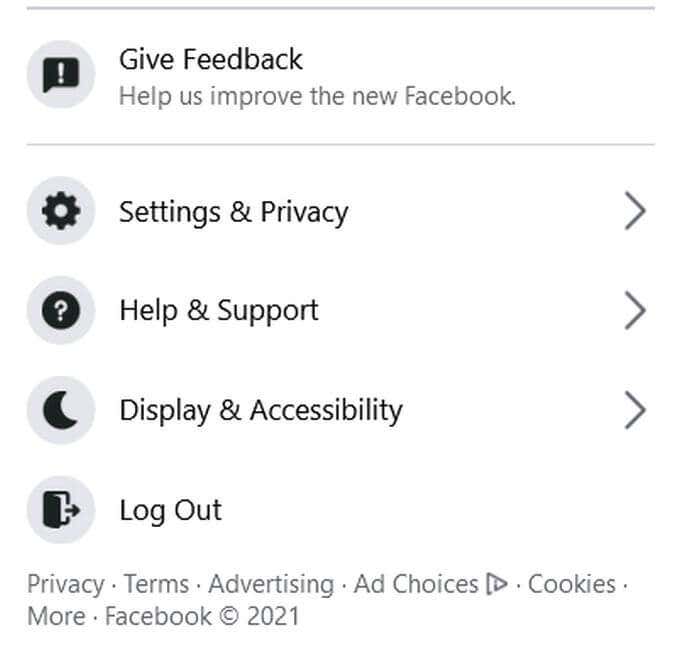
- On your main page, click on the Account button in the top right corner and select Settings & Privacy > Settings.
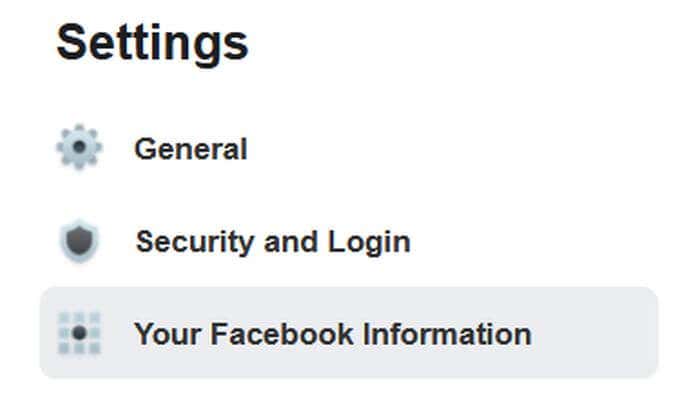
- On the left sidebar, select Your Facebook Information.
- Next to Deactivation and Deletion, select View.

- On the next page, select the Deactivate Account box. Then click Continue to Account Deactivation.

- Now, enter your password to access the account deactivation page.
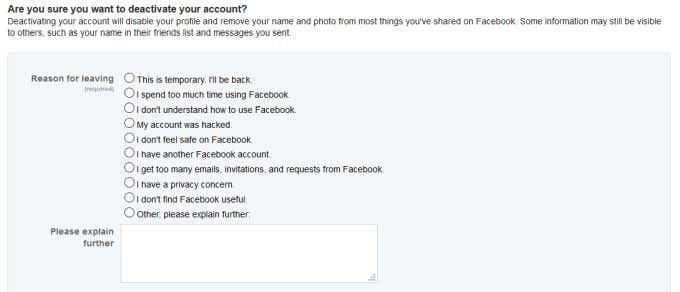
- On this page, you can select your reason for leaving or explain more in the provided text box. You can also see what groups you are an admin of that you may lose control over after your account is deactivated for 20 days. You can also opt out of emails from Facebook. Once you’ve finished with these settings, click on the Deactivate button at the bottom of the page.
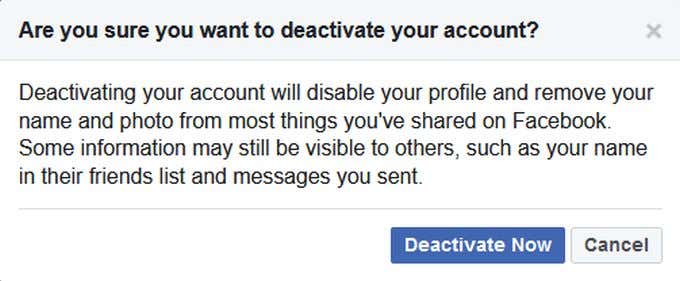
- There will be a pop up asking if you are sure you want to deactivate. Select Deactivate Now to finish deactivating your account.
For each option you may choose as your reason for deactivating, Facebook will provide you with some resources related to your concern that you can use instead of completely deactivating. You can still close these, though, to continue the deactivation.
If you choose This is temporary. I’ll be back. as your reason for leaving, you can set a time for your account to automatically reactivate, up to a week in the future. You’ll have to set a time to reactivate if you choose this option.

If you wish, you can now log into your deactivated account whenever you want to get back into it.
What Happens After Deactivation?
Your account will no longer be visible to others, including posts, photos, or your information. If you were admin to any groups on Facebook, you will lose admin-ship from them after 20 days of deactivation.
You also won’t be able to use this Facebook account to access other accounts you have connected to Facebook without reactivating it by logging in again. If you log into other services using Facebook, you may want to change your login info or create new accounts so they aren’t connected to Facebook.
You’ll always be able to use Facebook Messenger and continue to message your friends. Deactivating or deleting a Facebook account doesn’t do the same for your Messenger account.

There is no limit to how long you can have your account deactivated. It’ll always be available for you to log back into if you wish. Facebook downloads and stores all the data on your deactivated account so that it’ll still be there when you return.
To reactivate your Facebook account, log into the site using the same information you had for the deactivated account. Then you’ll be back on your account as if you had never left.
Should You Deactivate or Delete Your Facebook Account?
There are good reasons for both deactivating or deleting a Facebook account. If you’re unsure whether you’ll want to come back or not, deactivating is the best way to go. As mentioned earlier, if you do delete your account, you’ll have a few days afterward to log back in if you wish. But a complete deletion is permanent.
On Facebook, you can actually download your data if you want to delete your account but don’t want your data to disappear. You can also always download your photos. But after you delete your account, you won’t be able to get it back and will have to create an entirely new account if you want to be on Facebook again.
So, deactivation is much better if you only want to leave the site temporarily, and make sure your data is still available to you.