
Skip to content
ONLINE 101010 TECH 010101 TIPS
  • News
  • How-To
  • Social
  • Streaming
  • Gaming
  • Reviews
  • News
  • How-To
  • Social
  • Streaming
  • Gaming
  • Reviews
  1. Home/
  2. Social Media/
  3. How to Change Your TikTok Username

How to Change Your TikTok Username

Sandy Writtenhouse
December 8, 2022
2 min read
 - preview-media-Featured-ChangeTikTokUsernameiPhone

If you’re not fond of your TikTok username, you can choose something you like better. Here, we’ll show you how to change your TikTok username in the mobile app and on the web.

About Changing Your Username on TikTok

Here are a few things to keep in mind if you’re considering picking a new TikTok username:

  • You can only change your username once every 30 days.
  • You must pick a unique username that only contains letters, numbers, periods, and underscores. You cannot have a period at the end of the username.
  • Changing your username also changes your profile link.
  • Changing your username removes the verification if you have a verified TikTok account. In this case, you can contact TikTok support for assistance in changing your username.

Change Your TikTok Username in the Mobile App

You can easily change your username in the TikTok app on Android or iPhone on your profile page.

  1. Open TikTok and sign in if necessary.
  2. Go to the Profile tab at the bottom.
  3. Tap Edit profile.
  4. Select your current Username.
  5. Type your new handle in the Username box. You’ll see a green checkmark if the one you pick is available.
  6. Tap Save to finish and use the arrow on the top left to exit.
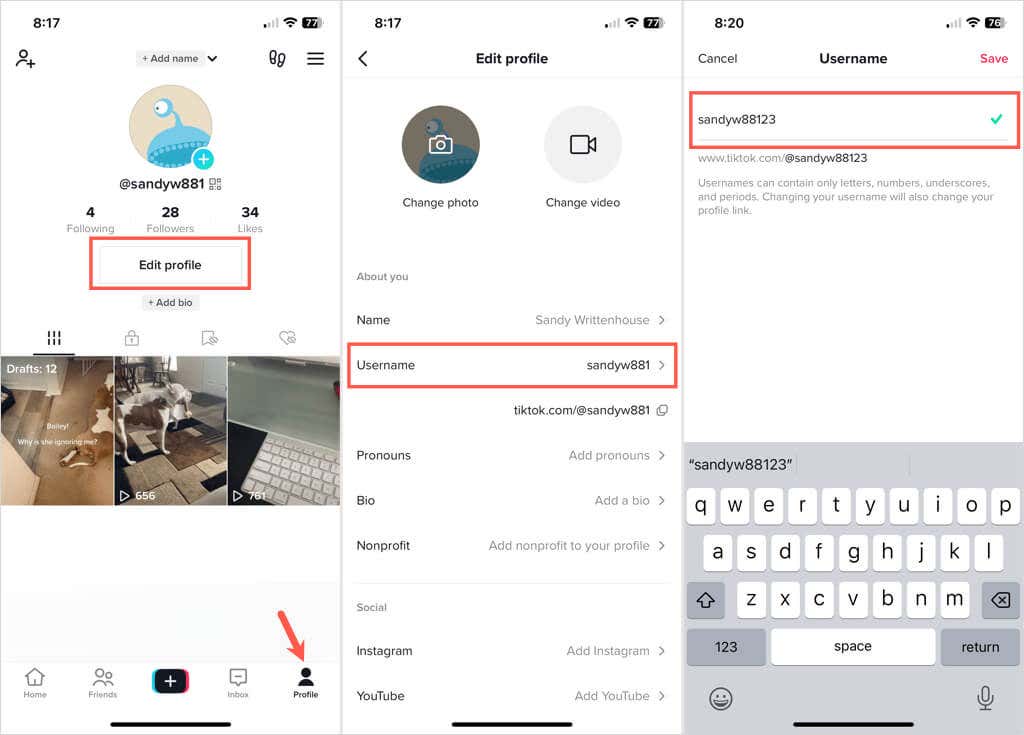
Change Your TikTok Username in the Mobile App image

Change Your TikTok Username on the Website

If you use TikTok on your computer, you can change your username on the TikTok website in just a few steps.

  1. Visit TikTok.com and sign in.
  2. Select your profile icon on the top right and select View Profile.
  3. On your profile page, choose Edit Profile.
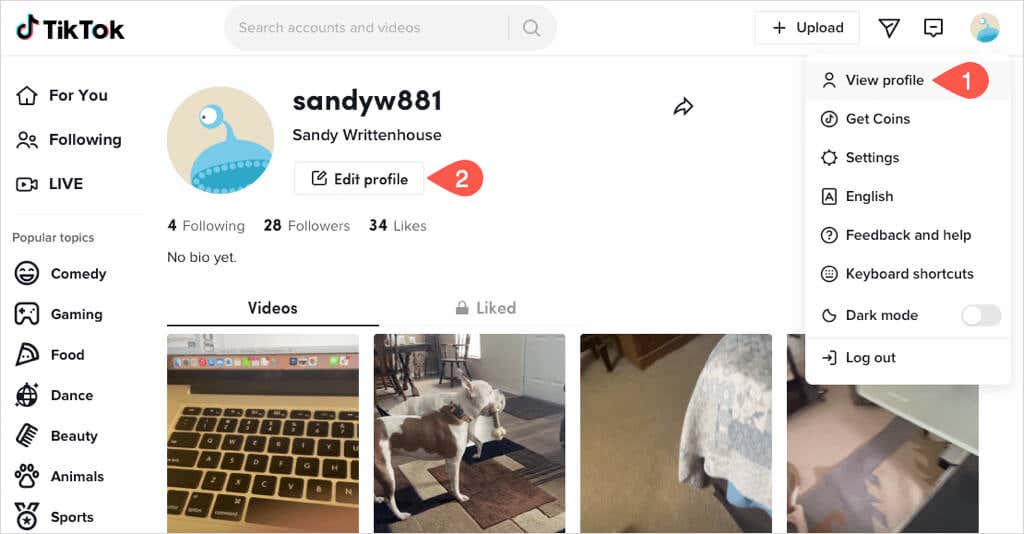
Change Your TikTok Username on the Website image
  1. Type your new handle in the Username box of the pop-up window.
  2. If the name is available, you’ll see a green checkmark. Select Save to keep the new username.
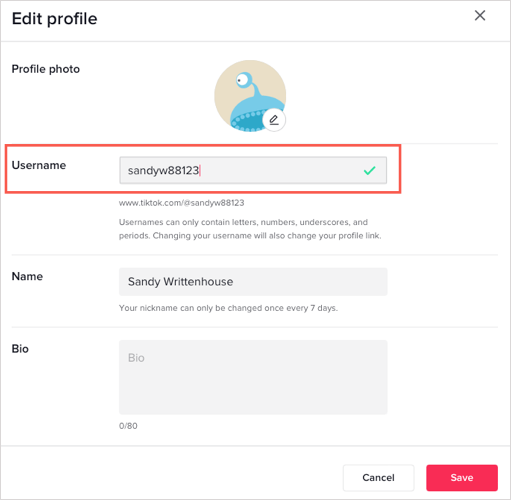
Change Your TikTok Username on the Website image 2

Picking out a TikTok username that suits you better is easy in the app or on the web. For more, take a look at how to get featured on TikTok’s “For You” page with our step-by-step guide.

Tags: TikTok
Share
Written by

Sandy Writtenhouse

Sandy Writtenhouse is a freelance technology writer and former Project, Department, and Program Manager. She turned her education, job experience, and love of technology into a full-time writing career. With all sorts of gadgets in her home and her hands, she seeks to help others make life easier through technology. <a href='https://www.online-tech-tips.com/author/swrittenhouse/'>Read Sandy's Full Bio</a>

View Sandy's Profile

Recent Posts

  • Center glowing play button icon with 'AD' text on both sides in a blue neon, digital ad/video concept background. - featured-4
    5 Ways to Watch YouTube Without Ads (That Actually Work)Apr 29, 2026
  • How to Spot Fake AI Images in 2026: The Complete Detection Guide - How to Spot Fake AI Images in 2026: The Complete Detection Guide
    How to Spot Fake AI Images in 2026: The Complete Detection GuideApr 29, 2026
  • Woman in a cream sweater sits at a wooden table, gazing at a laptop displaying a document with a Before/After comparison, with a mug and notebook nearby to create a cozy workspace scene. - featured-3
    The 9 Best Free Paraphrasing Tools in 2026 (Actually Worth Using)Apr 27, 2026
  • The Hidden Value in Your Amazon Prime Bill: How to Link Amazon Prime to Twitch and Claim Your Free Perks (2026) - The Hidden Value in Your Amazon Prime Bill: How to Link Amazon Prime to Twitch and Claim Your Free Perks (2026)
    The Hidden Value in Your Amazon Prime Bill: How to Link Amazon Prime to Twitch and Claim Your Free Perks (2026)Apr 22, 2026

Search

Categories

  • Gaming (347)
  • How-To (1,128)
  • News (45)
  • Reviews (439)
  • Social Media (462)
  • Streaming (175)

Popular Tags

Adobe AI Alexa Amazon Android Buying Guides ChatGPT Chrome Discord Explainers Facebook FireTV Gadget Reviews Gmail Google Google Docs Google Maps Google Sheets Home Networking Hulu Instagram Internet LinkedIn Minecraft Netflix Nintendo Switch PlayStation Premiere Reddit Remote Work Roblox Roku Roundups Smart Home Snapchat Software Reviews Spotify Steam TikTok Twitch VR WhatsApp Windows X (Twitter) YouTube

Our Publishing Family

Online Tech Tips is part of the AK Internet Consulting publishing family.

  • HELP DESK GEEK
  • THE BACK ROOM TECH
  • SWITCHING TO MAC
  • XBOX ADVISOR

Daily Email Newsletter

Connect With Us

About Online Tech Tips

Online Tech Tips has published easy-to-follow technology tutorials, honest reviews, and practical how-to guides since 2007 — helping millions of readers solve tech problems and get more from their devices.

Learn More →

© 2007-2026 Online Tech Tips.com, LLC.
All Rights Reserved.

  • Home
  • About Us
  • Editorial Standards
  • Contact Us
  • Terms of Use
  • Privacy Policy
Online