
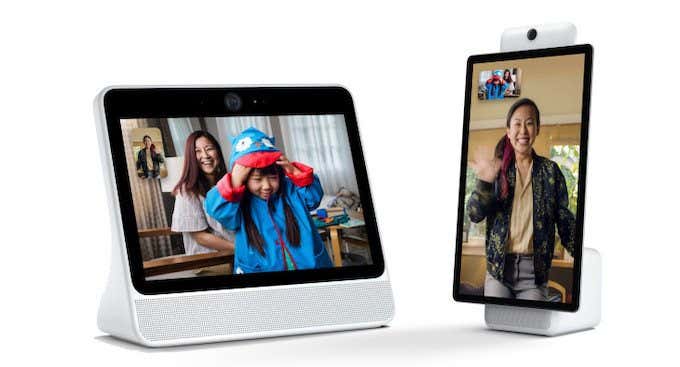
You might have seen the Facebook Portal on a shelf at Best Buy or seen one of the more recent advertisements on TV, like that over the top Super Bowl commercial. And like many viewers, you might have asked yourself: what exactly is the Facebook Portal device? The smart device has not gotten as much widespread media coverage as others have, a fact that Facebook is now taking pains to remedy.
Of course, the Portal is also plagued by the 2018 Cambridge Analytica controversy and more modern ongoing privacy concerns. If you’re interested in the device, this article will explain exactly what the Facebook Portal device is and how it works.
What Is The Facebook Portal Device?
The Facebook Portal device is a smart display. Its primary purpose is to make video calls to friends and family via Facebook Messenger’s built-in video calling service, but the Facebook Portal also boasts Alexa functionality.
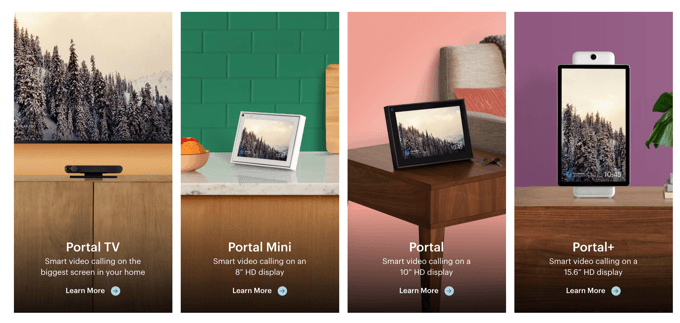
Although the initial release featured only a single portal, there are now four options to choose from: the 10-inch Portal, the 8-inch Portal Mini, the set-top Portal TV that utilizes your television as the screen, and the Portal+, a 15.6” display.
What Sets Facebook Portal Apart?
If you make a lot of video calls, Facebook Portal has a couple of features that make it stand out from other video-calling services.
First and foremost, its Smart Camera automatically pans and zooms to make sure everyone in the call remains in the frame. It will widen its field of view to make sure newcomers to the conversation stay within the chat, and if you move around the room the camera can follow you to keep you centered in the frame.
The Facebook Portal device also has its own voice commands. Users can activate the unit by saying “Hey Portal,” and then the command you want it to perform. Facebook Portal can be used to check the weather, the time, and to call friends. You can ask it to call someone based on their relationship to you, or you can simply give it a name. You can also use the “Hey Portal” command to control the brightness of the display and activate various camera effects.
Thanks to the built-in Alexa functionality, Portal can also be used to set alarms, create to-do lists, shop online, and play music through services you have connected to your Amazon account. It even provides users with some control over their smart home devices, provided the units have been linked to their Amazon account.
Since Amazon is linked to Facebook Portal, users also have access to Alexa Skills. The Facebook Portal can essentially do anything Amazon Alexa can do, with the added bonus of video calling.
What Services Does Portal Use To Make Calls?

Facebook Portal can use both Messenger and WhatsApp to make video calls to friends and family. If they don’t have a Facebook Portal device themselves, the calls will go straight through to their smartphones or tablets. You will need a WhatsApp account of your own to make calls to the service, however.
You will need to make sure your microphone and camera are turned on before making video calls.
Is The Facebook Portal Safe?
Given the controversy surrounding the Facebook Portal device and the privacy concerns that Zuckerberg has stirred up after repeated visits to Washington, many people are wary of putting a Facebook device directly in their home.
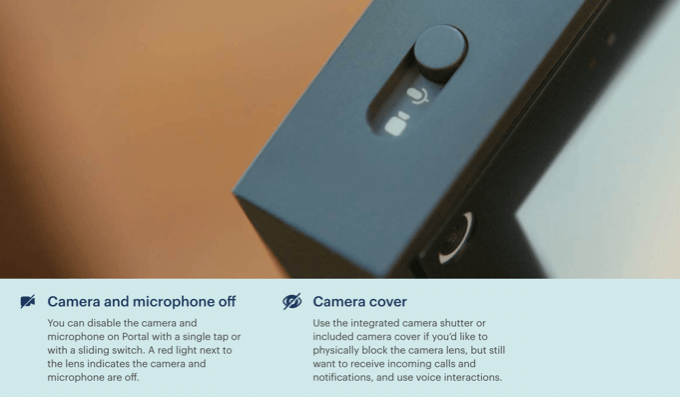
According to the company, the Facebook Portal is very secure—the microphone and camera are turned off by default. If you want that extra bit of privacy, the Portal has a physical camera shutter that can be moved to block the camera lens.
Portal also includes a passcode to lock the screen. The passcode can be anywhere from four to twelve digits, allowing for relatively complex security; however, it is limited to numbers. Facebook also claims that all Portal WhatsApp calls are encrypted end-to-end, while Messenger calls are encrypted in-transit.
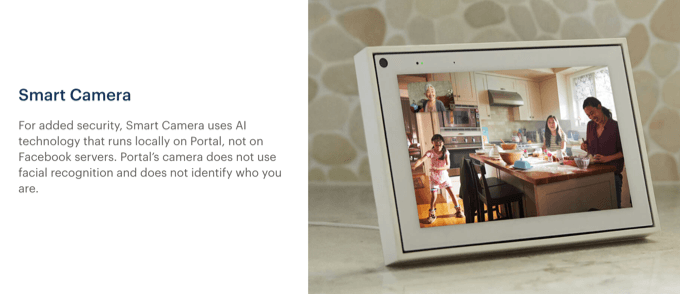
For those concerned about the security of the smart camera, Facebook says the AI is processed locally on the device and not on their servers. On the other hand, any command using the “Hey Portal” feature is processed on Facebook’s servers. There is an option with the Portal Settings to view, listen, and delete any recordings. You can also turn off storage of any commands.
One caveat, however, is that Portal does collect information for advertising purposes. From their FAQ section on security:
“When you use Portal, we collect information in a similar way to other Facebook products. Some of this information, including the fact that you logged into your account, made a call, or how often you use a feature or app, may be used to inform the ads you see across Facebook. For example, if you make lots of video calls, you might see some ads related to video calling.
Facebook does not listen to, view, or keep the contents of your video or audio calls on Portal, so nothing you say on a Portal Call is used for advertising.”
Should I Buy a Facebook Portal?
The Facebook Portal is a specialized device. Although it has built-in Alexa functionality, that alone isn’t enough to make it a go-to device for most users. If you use Facebook or WhatsApp and make a lot of video calls, you might enjoy the added features of the Portal.
On the other hand, if you are looking for a smart display but you don’t care about video calls, you might find more value in the Amazon Echo Show or the Google Home Hub.