
YouTube’s decision to hide dislike counts on videos sparked mixed reactions and left many wondering how to gauge video quality. The move marked a significant change in how viewers interact with content.
If you’re a creator, you can still see the dislike count on your YouTube videos. If you’re a viewer, the official method doesn’t exist anymore, but there’s a workaround. Here’s what you need to know.
Why Did YouTube Remove Dislikes?
YouTube removed the public display of dislikes from videos back in November 2021. This decision was largely influenced by the platform’s concern for small creators, who were found to be adversely affected by the dislike feature which was reportedly discouraging and damaging their online presence.
Another big reason YouTube hid the dislikes was to stop what they call “dislike attacks” or “dislike campaigns.” This is when a bunch of people band together and deliberately dislike a video, often as a form of bullying or targeted harassment against a creator, but also sometimes as a form of protest.
YouTube framed this decision as a way to make YouTube more inclusive and friendly. Even though the rationale is good, the move received a mixed reception from the community, largely due to dislikes being a key metric that viewers used to determine the quality of a video.
You Can Still See Dislikes If It’s Your Video
Even though YouTube has hidden the dislike counts from public view, if you’re a video creator, you still have the ability to see how many dislikes your videos are getting.
- First, open a browser, go to YouTube Studio, and then log into your account.
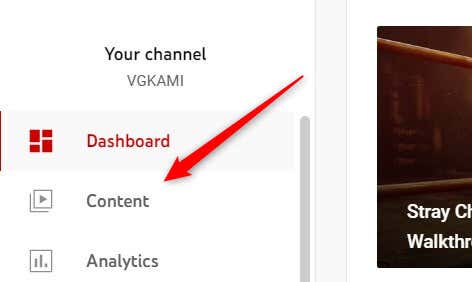
- Once logged in, click the Content option found in the left-hand pane.
- You’ll see a list of your videos along with some accompanying data. Among this data is a Likes (vs. dislikes) column. Hover your cursor over the number and the dislikes will appear in the pop-up window.
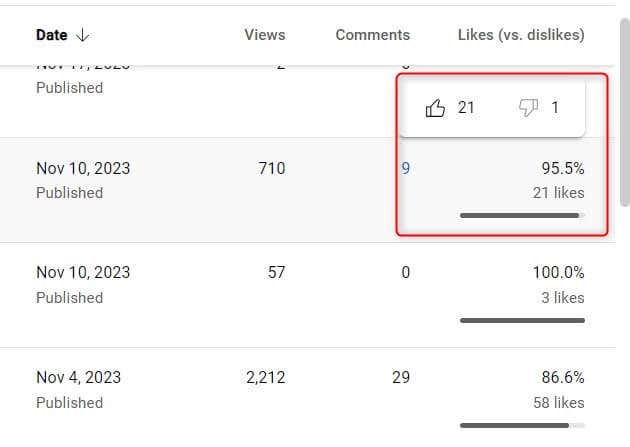
This setup means that as a creator, you’re not totally in the dark about how your videos are being received. You can see both the likes and dislikes, which can be useful to gauge feedback and understand your audience better. It’s just that your viewers won’t be able to see the dislike count when they’re watching your video.
If You’re a Viewer, Use a Browser Plugin
For viewers who miss seeing the dislike counts on YouTube videos, there’s a workaround: browser plugins. The best we’ve found is Return YouTube Dislike which has received a 4.8 star rating out of over 15,000 reviews on the Chrome Web Store alone.
- To install the browser extension, head over to the install page on the Return YouTube Dislike’s official webpage.
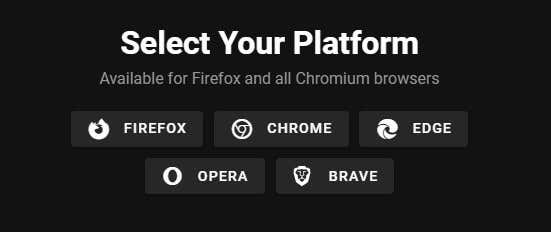
- Click the browser you would like to add the extension to. You can also add it to newpipe forked Android devices or jailbroken iOS devices, though there are risks involved.
- You’ll now be brought to the extension page for the respective browser. Simply click Add (or whichever variation of text may appear) to install the plugin.
Once you’ve installed the extension, there’s no need to restart the browser. Simply refresh the YouTube video if you have one open and you’ll see the number of dislikes appear.
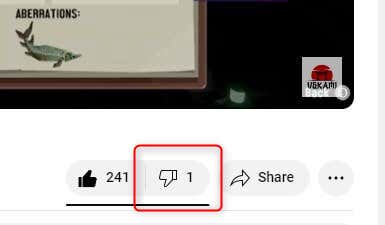
Just a heads up, though. Third parties, not YouTube, make these plugins. That means they’re not officially supported by YouTube, so there may be some discrepancy between the number of dislikes you see and the actual number of dislikes, and there’s always a bit of a risk when using software from outside sources.
Will YouTube Dislikes Come Back?
As for whether YouTube will bring back public dislikes, it’s a bit of a guessing game. Right now, there’s no clear sign that YouTube is planning to reverse its decision. When they removed the dislikes, it seemed like a pretty final choice. They were quite firm about their reasons, wanting to protect creators and reduce negativity.
So, don’t hold your breath waiting for the return of public dislikes on YouTube. But, you never know. These companies can be full of surprises.