

In this article, I’m going to mention five tips on getting more views on YouTube. I’ll explain how I managed to get my own channel to gain 11 million views in just 9 months by following these YouTube algorithm optimizations. Before we begin, I’ll give a quick guide on how views come to YouTube in the first place.
Once you’ve finished reading, you’ll have a good understanding of the YouTube algorithm and how to adjust your content to match it.
The Basics of the YouTube Algorithm
There are possibly hundreds, if not thousands of factors that help to boost your video views on YouTube, but there are two that are abundantly more important than any other in 2019. This is click-through rate and average audience retention rate.
Click-through rate is the percentage of people that click your video when they see it on their screen. Average audience retention rate is the percentage of a video your audience watches, averaged out across all watch sessions.
If you can improve these values, your videos will be recommended more. That means more impressions, more clicks, and more views.
Make a Good Thumbnail
The YouTube thumbnail is what drives the most attention and gets the most clicks. So how do you create an engaging thumbnail? First, choose to include text. Your text should take up two thirds of the image and engage your audience with relevant buzz words.
Don’t use clickbait because people will just leave your video and that damages audience retention. More on that in a minute. Instead, take a topic that you think will get people’s attention, then include the topic in the text.

Let’s say, for example, you want to offer golfing tips. Here’s a good thumbnail example for that. So to summarize this image, we’ve done a number of things.
- Choose a bright background color (Blue or green work best)
- Choose a contrasting text color
- Use two thirds for text, one third for facial expressions or topic context
By creating these thumbnails, you’re going to improve your clickthrough rate drastically. Improving your click through rate is great because it means for each impression your video gets, you’ll get more views.
For example, a video that gets 100,000 impressions with a 5% clickthrough rate will get 5,000 views, whilst a 12% clickthrough rate will get you 12,000, a huge 140% increase in views.
For more tips, initially try A/B testing with each video to test different colors and backgrounds. Once you’ve found a good option, stick with it – viewers love consistency.
Get People Engaged Straight Away
To ensure your videos get recommended to more people, the average audience watch time needs to be as high as possible. Videos of 5 to 12 minutes long are going to perform better than videos less than 5 minutes.
However, video length doesn’t matter if more viewers leave early. So, we need to ensure we get people engaged straight away. To do this, don’t go off topic. Provide quick evidence why you should be trusted, then get straight to the point. Avoid having any pointless intros, avoid long B-rolls, and don’t waste time asking for likes and subs.
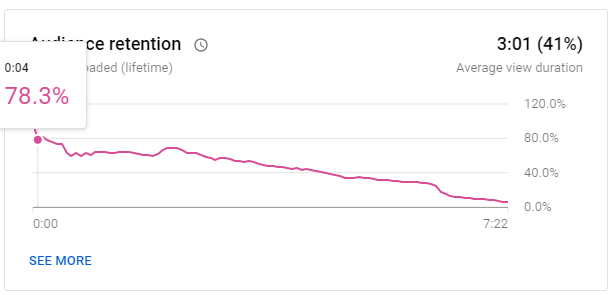
I learned this the hard way. You can see here how even a 4 second intro gets 20% of my viewers to leave the video entirely. I dropped the intro and I maintained that same 78% audience retention for an additional 42 seconds.
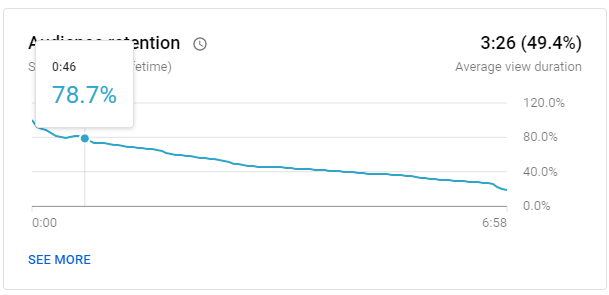
In summary:
- Get straight to the topic ASAP
- Explain your expertise quickly
- Tease viewers with the content, then lead straight into it
- Fewer B-rolls, intros, or begs for likes
Monitor Your Audience Retention
We can use this same audience retention report to learn why people leave our videos. To find it, click on any video in your dashboard. Then, click analytics on the separate video page. After, click the engagement tab.
Here we can see the audience retention report. Remember, the better your audience retention, the higher chance you’ll have to be recommended. We have two reports here – one for a healthy video and one with some potential issues. From my experience, videos with 45% or higher retention perform particularly well compared against my other videos.
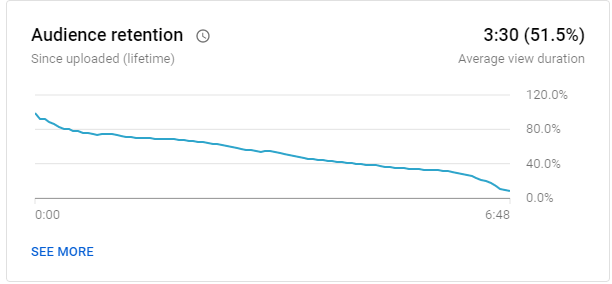
Notice how the chart above, for the most part, gradually declines. There are no steep drops.
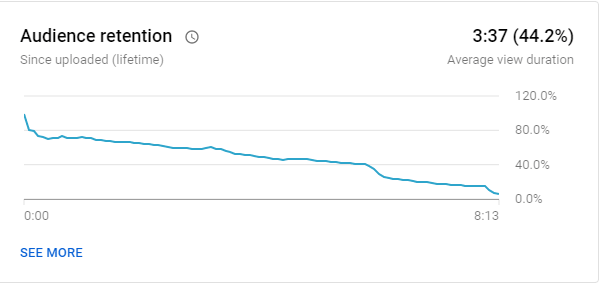
Next, we have the unhealthy report. The audience retention is a lot lower. 44% still isn’t bad, but there are three significant drops where viewers leave the video. We can go to those moments in the video to find out what happened.
In this video, I attempted to add more length by talking about another unrelated topic, but my viewers dropped. So my solution should be to stay on topic and not worry about the video length past 5 minutes. You can do the same with your videos to learn more about your mistakes.
Build More Loyal Return Viewers
Each viewer is a real person. Pin a comment and suggest for your viewers to comment and share their thoughts. Interact with them, talk to them.
As you build more real viewers, you’ll have a better head start each time you post a video. Your loyal viewers will be more engaged, pushing up your audience retention and click through rate.
Find the Best Time to Post Your Video
The best time to post your video is the time you can post videos the most consistently. Stick to what works best for you. Consistency is key for building a loyal audience that will always be there to kickstart your views.
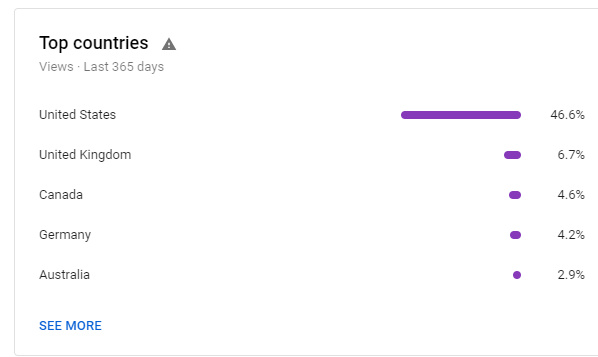
With that being said, it’s usually a good time to post in the early evening for your most popular region. You can find your ‘Top countries’ report in the audience tab in analytics on the dashboard.
Summary
Thanks for reading my top five tips on getting more views on YouTube. I hope these tips have helped. Have any specific questions for me? Feel free to reach out on social media and I’ll be happy to help.