
If you’ve not yet experienced the menacing evils of an online shadowban, consider yourself fortunate. The shadowban was created as a way to combat how easy it is to evade traditional ban systems, which revolve around things like user accounts or IP addresses.
When you’re shadowbanned from an online community like Reddit, you often don’t know it – and that’s the point. A shadowbanned user can use a website or service as if nothing has changed, but all of their submitted content goes into the void. If you try to make a post or comment, it appears as if it has been submitted, but no one else sees it.
Many social media sites use shadowbans to counter abuse, but none may be more recognized than Reddit. Reddit’s user-managed communities allow it to be the Wild West, and although subreddit administrators can’t execute a full shadowban in the way that Reddit’s official staff can, moderation bots can still be leveraged to achieve nearly the same effect.
When shadowbanned on Reddit, all of your posts appear as normal when viewed on your own account, but show as “[removed]” (after automated deletion) when viewed by everyone else. /u/AutoModerator automatically deletes them.
In this article, let’s look into three different ways in which you can tell if you’ve been shadowbanned from a subreddit.
Reddit Shadowban Test Tool
Reddit Shadowban Test Tool is a third-party web application that utilizes Reddit’s API to test for shadowbans.
We find that Reddit Shadowban Test Tool is the most accurate and trustworthy service because, unlike alternatives such as Reddit Showban Tester, it’s open source and hosted on GitHub.
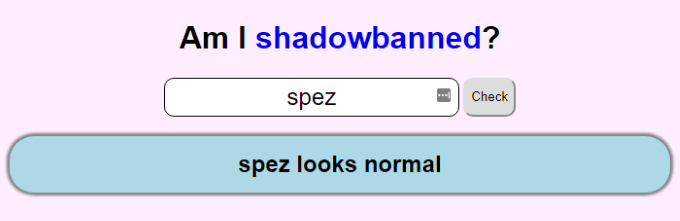
All you have to do is type in a Reddit username and the site checks to see if the user is shadowbanned on Reddit. If the response says that the user “looks normal,” that indicates that there is no shadowban in place. Anything else should reflect some type of shadowban.
/r/ShadowBan
/r/ShadowBan is a subreddit where users can make a text post and receive a near-instant reply from the subreddit’s bot, /u/MarkdownShadowBot, with details on if they are or aren’t shadowbanned.
You may find this solution more telling and easy to understand than alternatives, because /u/MarkdownShadowBot will even let you know which of your comments have been spam-filtered or manually deleted, which may otherwise have you convinced that you’re shadowbanned.
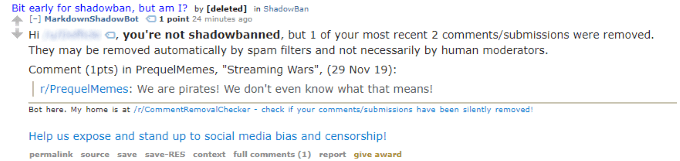
Replies from /u/MarkdownShadowBot won’t come instantly, but the bot should get back to you within a few minutes.
Incognito Mode
Sometimes, to get the job done, you’ve just got to do it yourself. Luckily, Chrome’s Incognito Mode is a quick and easy solution for checking your Reddit posts to see if they’re being automatically deleted without you knowing.
All you have to do is make a post, copy the URL, then open a new incognito tab and paste the URL to view it. If you see your post, you aren’t shadowbanned from the subreddit. If you see “[removed]”, it doesn’t necessarily mean you’re shadowbanned on Reddit—but you could be.
Assuming your post contained links, it may have been deleted based on a spam filter. If it didn’t, you can safely assume you’re shadowbanned.
The most foolproof way to check that you’re shadowbanned on Reddit and not being filtered is by creating an original post, without adding any links to it, that carefully follows the rules of the subreddit. If it’s immediately deleted, you’re shadowbanned.
These three methods should help you draw a conclusion on if you’re shadowbanned in any particular subreddit. Reddit shadowbans are tricky and sometimes go through iterations, so our best advice is to cross-verify your ban (or lack thereof) using each of ways outlined in this article.