

Have you ever wanted to send a friend or colleague a short and important snippet of a YouTube video without linking them to the entire thing? Although linking to the specific timestamp of a YouTube video is possible, it isn’t supported on every device and can be rather glitchy.
Along with making video clips shareable with friends, cropping and trimming YouTube videos is a tactic that many viral marketers and influencers use. You’ve probably seen instances of a Twitter user tweeting part of a video and getting thousands of retweets, right? How do they make it look so easy?
To crop and trim a YouTube video, it doesn’t take expertise with a program like Vegas Pro. All you need is a video link and to know which video trimming web service is best.
In this article, let’s go over the two best websites that will allow you to instantly trim and crop a YouTube video without downloading any special applications.
YT Cutter
YT Cutter is our pick for the best overall web-based YouTube trimmer and downloader. It has a clean and intuitive interface and provides numerous download options.
The process is simple. First, paste the URL of the YouTube video you’d like to trim and press the Enter key or Start button (on the page).
The video will then load, and you’ll notice UI controls to the left of it. As you play through the video, you can click the Start or End buttons to create a range that you’d like to crop out of the video. Everything before and after this range will be cut out.
You can also use the < and > buttons to increase and decrease your current paused time by tenths of a second, allowing you to precisely select parts of the video.
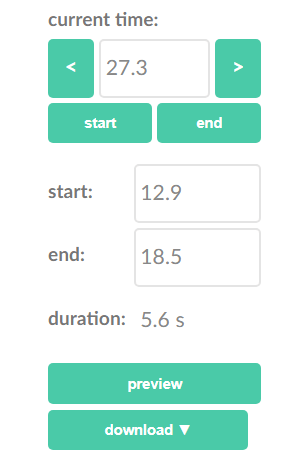
Once you have start and end times set, you can click the Preview button to play your selection and see if it’s to your liking. If satisfied, you can download your selected clip in various formats.
Click the Download button to reveal four options:
- Video file: An MP4 file of your clip (with audio)
- GIF animations: An animated GIF image of your clip
- Audio file: An MP3 file of your clip (no video)
- Screenshot: A high-resolution screenshot of the start of your clip
In rare instances after selecting a format, you may get an error stating that a rate limit set by YouTube has been exhausted. If you wait several seconds before trying again, your download should start successfully. If not, give it a bit of time and try again.
ytCropper
ytCropper functions a bit differently than YT Cutter, but it’s nice to have alternatives and options when it comes to trimming YouTube videos.
On the ytCropper website, start by pasting the link of a YouTube video and clicking the Crop! button. You’ll then be taken to a page where you’re able to play and preview the video.
ytCropper features a marker system that you may be familiar with if you’ve experimented with common video editing applications. Rather than asking users to click on a button to determine the stop and start points, you drag these elements of the UI.
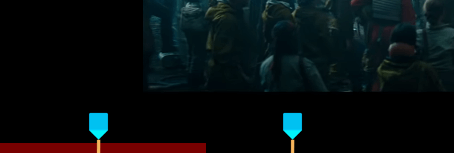
One immediate downside of cropping on ytCropper is that this system does not support fractions of seconds, meaning your clip may be less precise. On the upside, these markers act as visual indicators for you to see where exactly along the play bar your cropped clip is located. It makes extending or shortening the selection very easy.
When you’re satisfied with your selection, click the next Crop! button. Here, your video clip can be played.
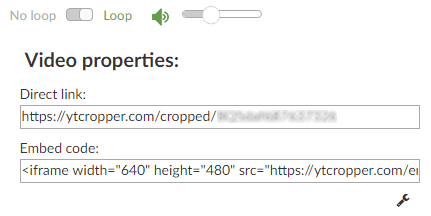
ytCropper does not offer to directly download cropped clips, and all it really does is embed the YouTube video on a page where it will start and stop at the times you’ve selected. One interesting feature it does support is looping—this is particularly useful for when you’re cropping your favorite part out of a song.
The video is shareable by the direct link provided on the page.
While we’d love to offer more alternatives, unfortunately, a lot of the YouTube trimming services out there are flat-out broken or insufficient. For example, YouTube Trimmer has still not been updated to fix the way it uses deprecated YouTube URL parameters.
Kapwing Video Trimmer looks and feels like a great service, until you get to the part where you process your clips and realize you’ll need to sign up or deal with watermarks. It also doesn’t provide the best method of sharing your clips.
HeseTube was once a go-to solution for cutting and downloading YouTube videos, but now it’s riddled with “can’t process the video” errors. You’ll see these more often than not.
Luckily, both sites we’ve listed in this article fill particular voids: YT Cutter is great for downloading and keeping cropped YouTube videos, and ytCropper is great for linking to cropped versions of YouTube videos. We hope they can be helpful!
Also, be sure to check out our Ultimate List of YouTube Tips, Hacks, and Shortcuts. Using it, you can find some great ways to improve your YouTube viewing experience.