
Cybersecurity is super-important. We live a significant part of our lives online and on computing devices. Whether it’s a laptop, a smartphone or your desktop computer at work – you’ve got valuable information shady people would love to have. Wouldn’t it be nice if you knew how to protect your computer from hackers and all the other hazards of the digital world?
The good news is that it’s not difficult to learn some core tips and tricks that will significantly improve your safety on the net. Get ready, because this is going to be a mega guide of practical advice that will help you use a computer and the internet without getting burned.
Learning Good Cybersecurity Habits
When we’re young, our parents teach us general rules for life meant to keep us safe. Always look both ways before crossing the street. Never get in a car with a stranger. That sort of thing.
Sadly the technology of today didn’t exist when many of us were young, so there’s a definite need to have the same sort of common sense, but adapted for the digital world.
Use Strong Passwords & a Password Manager
Passwords are still one of our best defenses against getting hacked. Most sites will have a minimum password complexity. For example, they’ll say a password must be a certain length and contain a particular mix of character types. Sadly, any sort of password that a human being can easily remember is likely to be one that can be broken through brute-force guesses sooner rather than later.
The best thing you can do to protect your computer from hackers is use a trusted password manager. These managers keep track of all your passwords securely and will generate randomized strong passwords that are almost impossible to guess using brute force or any other password cracking method.
The good news is that most people don’t have to go looking very far for a password manager. Google Chrome already has a very competent one built in. You can generate strong passwords within the browser and sync them to the cloud. So wherever you’re logged into your Google Account, you can retrieve passwords with ease.
Password Protect Everything
Of course, you need to set passwords on anything that could fall into the wrong hands. Your computer, phone and tablet should all have their own passcodes or passwords. Biometric unlocking, such as fingerprint or facial recognition, aren’t quite as secure. So it’s a good idea to familiarize yourself with your device’s biometric kill-switch if it has one.

This is a command or keypress that disables anything but passcode entry. For example, if someone forces you to hand your computer or phone over, they can’t access the device without your code. They can however point the camera at your face or place your finger on the fingerprint sensor.
Use Encryption Wherever Possible
Encryption is a technique that mathematically scrambles your data, so that it can’t be read without the proper key. For example, websites that start with “https” use a secure encrypted method of sending data. So only you and the receiving website know what’s being said.
Outsiders, such as your service provider or anyone inspecting the data packets as they pass through various stops on the internet only know your IP address and the address of the page you’re visiting.
Not only should you avoid websites that don’t use encryption, you should also stick to chat services that offer “end-to-end” encryption. WhatsApp is an example of this. End-to-end encryption stops even WhatsApp itself from knowing what’s being said in your chats.
Don’t Trust Anyone Blindly
One of the biggest risks you’ll face when online, comes from impersonation and anonymity. When interacting with someone, you have no idea whether they are who they say they are. In fact, thanks to artificial intelligence, you can’t even be sure that you’re interacting with a real human being at all.

This means that it’s very important to get some sort of third-party confirmation that you’re in contact with the person you should be. Even if the person is who they say, you should also take their claims and promises with a pinch of salt. Treat them with at least the same skepticism as you would with a new acquaintance in real life.
Use Two-Factor Authentication (2FA) Whenever Possible
Two-factor authentication is a security method where you use a completely different channel as the second part of your password. It’s one of the best ways these days to protect your accounts from hackers. So, for example, you might receive a one-time PIN through your email account or as a text message to a registered number when you log into a service. With “2FA” getting your password stolen isn’t enough for the bad guys to access your account.

Of course, with enough effort, it’s possible for criminals to get around 2FA. They can also try to hack your email password or perform a “SIM swap” scam and take control of your phone number. However, this is a lot of extra effort and risks, which makes it unlikely that you’ll be targeted in this way at random. As such, 2FA is one of the strongest deterrents you can put in place.
Dealing With Hackers
The term “hacker” has a broad set of meanings in the computer world. Lots of people think of themselves as hackers and people who really are hackers might not conform to the image most people get from the movies. Nonetheless, hackers are out there, which means you need to know how to deal with them.

Types Of Hackers
Let’s start off by clearing up a few misconceptions. Not all hackers are criminals. It used to be that legal hackers insisted that criminal hackers be referred to as “crackers”, but the term never really stuck in the mainstream.
There are three kinds of hackers: white hat, grey hat and black hat.
White Hat hackers are also referred to as “ethical” hackers. These hackers never break the law and everything they do is with the consent of their targets. For example, a company wanting to test their network security may hire a white hat hacker to do a “penetration test”. If they manage to break in, they’ll steal or damage nothing. Instead, they’ll report to the client and help them devise a fix for their security vulnerability.
Grey hat hackers also don’t deliberately do harm, but they aren’t above breaking the law in order to satisfy their curiosity or find holes in a security system. For example, a grey hat may do an unsolicited penetration test on someone’s system and then let them know about it afterwards. As the name suggests, grey hats can be criminal, but not malicious.
Black hat hackers are the boogeymen that most people think of when you use the word. These are malicious computer experts who are out to make money or simply sow anarchy. It’s the black hat variety that we’re all meant to be wary of.
Be Aware of Social Engineering
It’s easy to think of hackers using high-tech methods to break into systems, but the truth is that the strongest tool in a hacker’s arsenal doesn’t involve computers at all. A system is only as strong as its weakest link and, more often than not, that weak link is a human being. So, rather than taking a strong technological system on, hackers will target the weaknesses in human psychology.

One common tactic is to phone someone, such as a secretary or low-level technical staff at a company. The hacker will pose as a technician or an authority and ask for information. Sometimes the information isn’t obviously sensitive.
There are also social engineering techniques that can be done via text chat, in-person or in email.
Learn To Spot Harmful Emails
Email remains one of the most popular ways for malicious people to get at you. It’s perfect, because you can simply send off millions of emails and find a few lucrative victims through sheer large numbers.
The best defense against harmful emails is to know how to spot them. Any email which offers you implausible rewards and requires you to part with money, should be discarded. It may be easy to laugh at the idea of a prince in some far off land who’ll give you millions of dollars, if you’ll only part with a relatively small amount now. Yet, each year millions of dollars are stolen from people who fall for these scams. If something seems fishy or too good to be true, it probably is.

One of the best ways to detect these scams is to put the text of the email into Google or by visiting a site like ScamBusters. There’s bound to be a very similar scam already on the record.
Apart from the general class of scam emails, there are also phishing and spear phishing emails. These emails aim to get information from you that can then be used in further attacks. The most common targets are usernames and passwords.
A phishing email usually has a link in it that leads to a fake website, meant to look like your online banking facility or some other site you have an account with. Thinking you’re on the real site, you enter your user name and password, handing it directly to people who should not have it.
Spear phishing is the same thing, except that those targeting you know who you are. So they will tailor the email to contain details specific to you. They might even try to pose as your boss or someone you know.
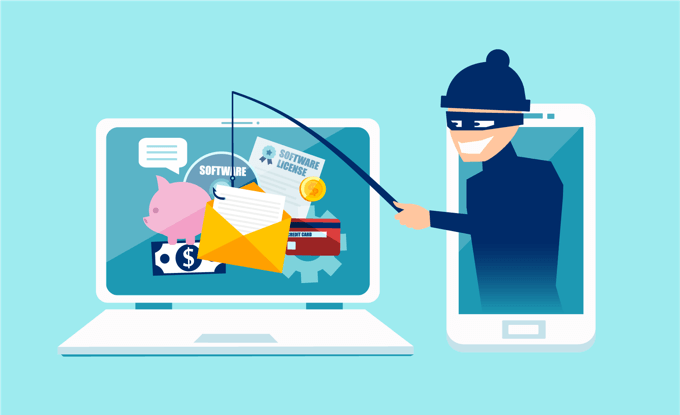
The way to deal with phishing attempts and protect your computer from hackers is to never click on links from unsolicited emails. Always navigate to the site yourself and make sure the web address is exactly correct. Spear phishing attempts can be thwarted by using a second channel to verify it.
For example, if it’s someone saying they are from your bank, phone the bank and ask to speak with that person directly. Likewise, pick up the phone and ask your boss, friend or acquaintance whether they really sent the mail in question or not.
Be Extra Cautious When Away From Home
It’s easy to think of hackers as people who ply their trade from miles away, sitting in front of a computer in a dark room somewhere. In real life, the person sitting at a table in the coffee shop could very well be hacking you while sipping on a latte.
Public spaces can provide easy pickings for hackers. They can try to fool you in-person by asking you for private information. The sort of stuff you’d put in security questions or can be used in social engineering attacks. Sometimes people can simply look over your shoulder as you type in a password or display sensitive information.

A common threat is public WiFi. Anyone who’s on the same WiFi network as you, can see the information your device is sending and receiving. They may even get access to your device directly if it’s not configured properly somehow.
The most important precaution to take if you have to make use of a public WiFi network is to use a VPN, which will encrypt all data leaving your computer. You should also use a firewall and specifically mark the WiFi network as a public one, to block direct access from other users on the network. Usually you’’ll be asked if a network is private or public when you first connect to it.
The last major thing you should be wary of is public USB devices. Never stick a found flash drive into your own computer or a work computer. Hackers often leave infected drives with spyware around hoping that someone will plug it into their computer, giving them access.
Public charging spots are also dangerous. You should use a USB cable that can only provide power and not data when charging from unknown sources. Just in case the charger has been replaced with a hacked one.
Dealing With Malicious Software
Malicious software includes viruses, spyware, adware, trojans and various other subtypes of nasty software packages.We’ll go over each type of malicious software and then also cover how to either avoid or fix the issue.
Computer Viruses
Quite possibly the best-known form of malware, a computer virus is a self-replicating piece of software that spreads from one computer to the next through disks, drives and email. Viruses are not standalone programs. Instead, they usually tack themselves on to another legitimate program and execute their code when you run that program.
Apart from making copies of itself to infect new computers, viruses also have a “payload”. This can be something harmless or mildly irritating, such as a message that pops up to laugh at you or it can be serious. Such as a virus that completely wipes all your data.

The good news is that viruses cannot spread themselves. They need help from you! The first and most important safeguard is antivirus software. Windows Defender, which comes with Windows 10, is perfectly adequate for most people, but there are many choices out there. While macOS and Linux viruses exist, these markets are relatively small, so virus creators don’t bother too often.
That’s changing however, and if you do use one of these operating systems it’s a good idea to find an antivirus package you like, before their increasing popularity brings a flood of new opportunistic viruses.
Apart from using an antivirus package, common sense precautions include not sticking your USB drives into any old computer you come across. Especially public machines. You should also be very wary of running software you find on the internet that’s not from a reputable source. Pirated software, apart from being illegal, is a hotbed of viruses and other malware.
Trojans
Named for the wooden horse that snuck a bunch of soldiers into the city of Troy, this type of software pretends to be a legitimate utility or other useful program. As with a virus, the user executes the program and then the malicious code goes into effect. Also, as with a virus, what that payload is depends on what the creators want to accomplish.Trojans differ from viruses in the sense that they are standalone programs and don’t self-replicate.

Most antivirus software keeps a database of trojan signatures, but new ones are being developed all the time. This makes it possible for a few new ones to slip through. In general it’s best not to run any software that comes from a source you don’t entirely trust.
Ransomware
This is a particularly nasty form of malware and the damage ransomware can do is staggering. Once infected with this malware, it quietly begins encrypting and hiding your data, replacing it with dummy folders and files with the same name. Ransomware authors have different approaches, but usually the malware will encrypt files in locations that are likely to have important data first. Once it’s encrypted enough of your data, there will be a popup demanding payment in exchange for the encryption key.
Sadly, once encrypted, there is no way to get your information back. However, under no circumstances should you ever give money to ransomware creators! In some cases you can get previous versions of important files by checking the Volume Shadow Copy. However, the most effective way to protect yourself against ransomware is to store your most important files in a cloud service such as DropBox, OneDrive or Google Drive.
Even if the encrypted files get synced back to the cloud, these services all offer a rolling backup window. So you can go back to the moments before the files were encrypted. This turns a ransomware attack from a major disaster into a mild irritation.
Worms
Worms are another form of self-replicating malware, but there’s one major difference when compared to viruses. Worms don’t need you, the user, to do anything for them to infect a machine. Worms can roam networks, entering through unprotected ports. They can also make use of vulnerabilities in other software programs that allow for malicious code to run.

What can you do about worms? They aren’t as much of a problem these days, but make sure you have a software firewall on your computer and/or router. Always keep your software and operating system up to date. At the very least when it comes to security updates. Of course, keeping your antivirus up to date is also an essential precaution.
AdWare & Spyware
AdWare and Spyware are two types of pretty irritating malware that can do varying levels of harm. AdWare usually doesn’t damage anything on purpose. Instead, it makes advertising pop up on your screen.
This can make the computer unusable by cluttering the screen and using up a ton of system resources, but once you’ve removed the AdWare your computer should be no worse for wear.
Spyware also rarely does any direct damage, but is much more malicious. This software spies on you and then reports back to its creator. That can involve recording your screen, watching you through your webcam and logging all your keystrokes to steal passwords. That’s scary stuff and, since this happens in the background, you won’t even know something is going on.
Specialized malware removal apps such as AdAware will make short work of these programs, but you can also prevent infection the same way you do for trojans and viruses.
Browser Hijackers
Browser hijackers are a particular pain in the neck. This malware takes over your web browser and redirects you to pages that benefit the creator. Sometimes this means fake or dodgy search engines. Sometimes it means being redirected to fake versions of sites or pages filled with nasty adverts.

The good news is that the same anti-malware software that takes care of adware and spyware will also deal with browser hijackers. If you’re running Windows 10 they are also much less of a problem, because WIndows requires your permission to make the sorts of changes that browser hijackers need to work.
You’re The Most Important Part!
If people are usually the weakest part of a computer security system they can also turn out to be the strongest component of all. Try to read up on the latest cybersecurity threats when you have a chance. Try to practice the basic, common-sense safety principles we discussed above and learn to trust your gut. There is no such thing as perfect security, but that doesn’t mean you have to be a passive victim of cyber crime.