How to move a half-finished download in uTorrent

Posted on April 16, 2009 at 5:55 am

If you download a lot of software, movies, and other illegal stuff from uTorrent, you might have run into this problem once or twice: you start a huge download, let’s say 24 Seasons 1 through 5, which is a whopping 60GB and you know it’s going to take at least two weeks to fully download.

In the meantime, you install other software on your computer and realize that you are running out of space on your main drive! Now what? Should you just not doing anything for two weeks and wait for the download to finish and then move it? Or do you want to delete what you already downloaded and start over at another location?

Heck no! You can actually move a uTorrent download in the middle of a download by following the steps below. And yes, I figured this out because I was downloading something huge!

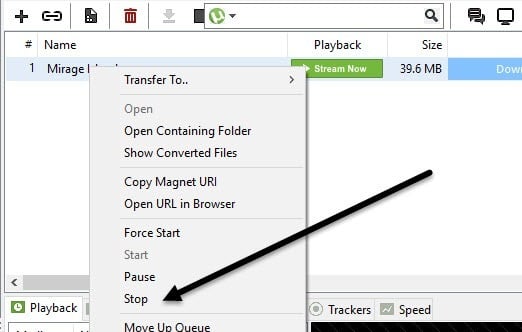
Step 1: First of all, in order to change the download location of a uTorrent download in the middle of a download, you have to stop the download, otherwise it’ll give you an error that the files are in use.

So right-click on the entry and choose Stop:

move utorrent download

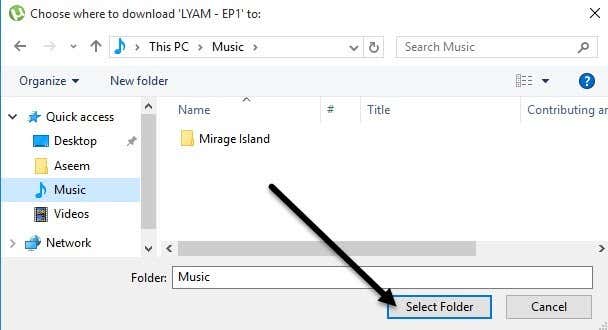
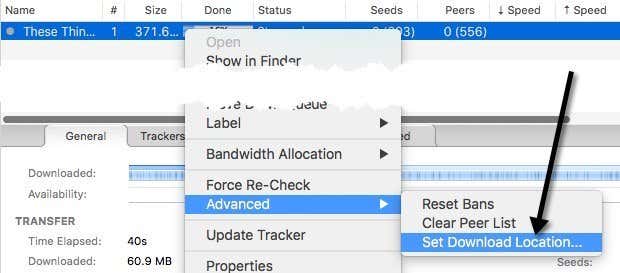
Step 2: Ok, so now that it is stopped, we can tell uTorrent a new location for where we want it to continue download the torrent. To do this, right-click and choose Advanced and then choose Set Download Location.
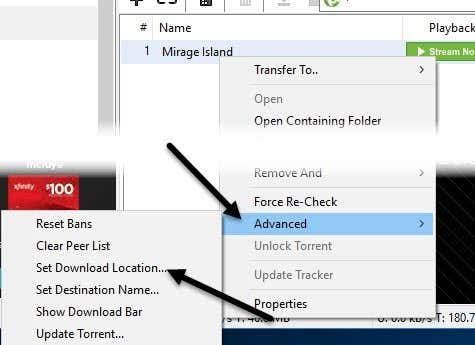
Go ahead and navigate to the new download location and click Save (do not change the file name).

change utorrent download location

Step 3: Now that the new location is set, you need to physically move the half-downloaded files from the old location to the new location that you just set in uTorrent.

Note that you can keep uTorrent open when moving the files because the torrent is Stopped and therefore not accessing the files. If the download consisted of a folder, make sure to move the entire folder, otherwise just move the single file.

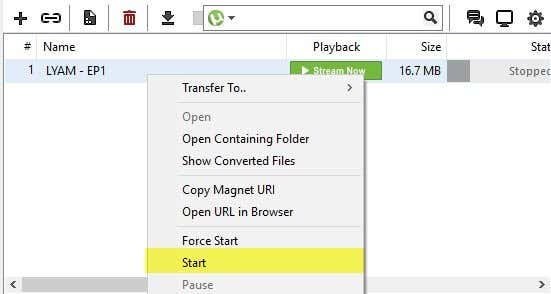
Step 4: Now that the files have been moved, you need to start up the download again. uTorrent will recognize that the files are now in this new directory and will verify the files by scanning them.

So right-click and choose Start and then wait a few minutes while it verifies how much has already been downloaded:

move utorrent download location

Under Status, it should say Checked and then the percentage. If you have a very large download, it may take a little while, but it is NOT re-downloading the content. After that it will say Queued and then will go to Downloading status.

That’s it! So now your uTorrent download has been moved to a new location and is downloading at the new location. Enjoy!

» Filed Under Computer Tips

Related Posts

Comments

11 Responses to “How to move a half-finished download in uTorrent”

  1. Mayur said on :

    That’s a very useful tip. I didn’t knew about it earlier.
    Thanks


  2. MJ said on :

    Hey Aseem,

    This can be very useful. I have had to do it a couple of times myself. A nifty piece of advice.

    Thanks.


  3. Adamr said on :

    Its a good tip..but a more direct approach & much simpler would be to stop first the torrent file, (u must first select the “Show detailed info” – F5),then right click directly on file & select “Relocate”.


  4. Mini said on :

    I used this to move the downloaded files of a couple of big HD movies to another drive and restart seeding. Thanks for the tip !


  5. Freddy said on :

    Hi,
    The file I moved was almost finished downloading, 98%, then I stop, change the donload location to my external HD, move the half finished folder by copy the folder and paste it to the Ex-HD then start the download again, but it does not start from 98% somehow it restarted downloading…..:(


  6. Junaid Atari said on :

    Great Tip. It was really useful to me.

    Cheers :)


  7. Montu lima said on :

    Hi, I need to move a half downloaded uTorrent file to another system server, what do I have to do?


  8. Sncatalin said on :

    Thank you for the information, it was very useful.


  9. Sahil Amin said on :

    Thanks for explaining how to do this! Very useful!


  10. Sirap said on :

    Even faster is to cut and paste the file(s) inside the window that pops up when you select Set Download Location. Although I wish uTorrent had the option to “append label to file path” after torrent has finished, that would save me from doing this every time I want to keep seeding


    Pingbacks
  1. Move Half-Finished uTorrent Downloads To Another Drive | Lifehacker Australia Says:

    [...] How to move a half-finished download in uTorrent [Online Tech Tips] Tagged:bittorrentp2ptorrents [...]

Please post your comments/suggestions!