

Have you ever seen somebody disappear from your Facebook timeline and wondered why?
It’s natural to be curious about your friends list—especially if you’ve noticed that certain users no longer pop up in your feed. You might not even realize you’ve been ghosted, as Facebook doesn’t alert you if you’ve been removed as a friend.
It can be frustrating and hurtful to learn that you’ve been unfriended. If you want to see if this has happened to you, there are some methods you can try to check if you’ve been unfriended on Facebook without directly asking them.
Are There Official Methods for Checking Who Unfriended You on Facebook?
There’s no official way to check who unfriended you on Facebook. The social media platform won’t alert you when someone removes you from their friends list. There’s no official method to see who unfriended you in the past, either.
While Facebook doesn’t have the best reputation for upholding its user’s privacy, this is an understandable decision. If Facebook did alert you when you were unfriended, it’d probably create a lot of unnecessary drama and conflict.
If you aren’t keeping track, you’ll need to look a bit more closely at your account to see if you can figure it out for yourself. We’ve outlined some possible ways to do this below.
Check Your Timeline
The quickest and best method for seeing if you’ve been unfriended on Facebook is to take a good look through your timeline. If you don’t spot them, you might have been unfriended.
If someone has unfriended you, they’ll no longer be able to see your private posts, but more importantly, you won’t be able to see theirs. If you’re still following the user (which is possible, even if you’ve been unfriended), you’ll only see their public posts.
These posts have a globe icon under their name.
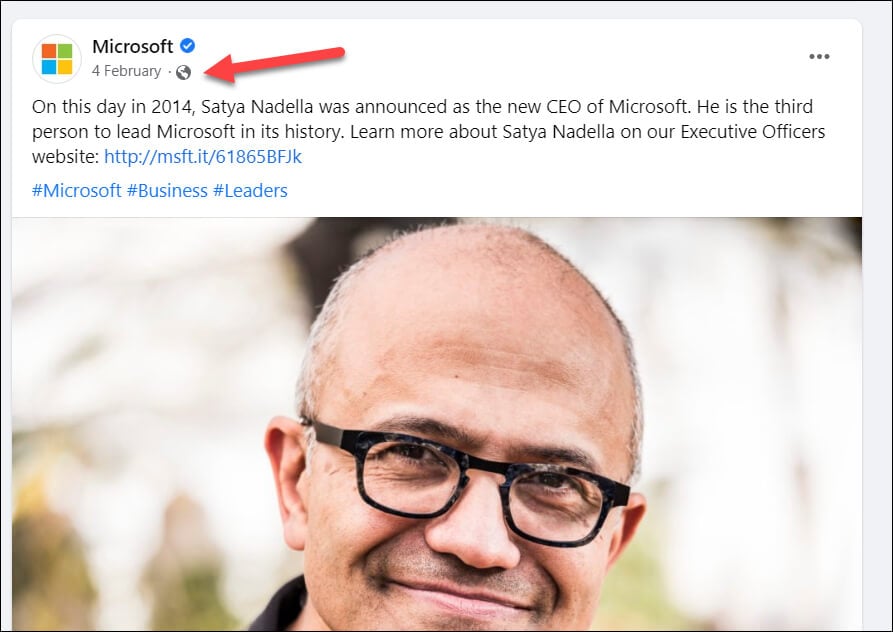
The only way to check this, however, is to go through your timeline and look for anything unusual. If you think someone specifically has unfriended you, but you’re still following that user and see their posts with a globe icon, it’s probable that they’ve unfriended you or restricted you from seeing their private posts.
However, this method isn’t foolproof—some people may only share public posts anyway. If they’ve restricted you instead of unfriending you, you will still be friends with them, but you won’t see their private posts (and won’t know this, either).
Search Within Your Friends List
Another way you can check if you’ve lost a friend is to search within your Facebook friends list for the person’s name. This is a simple and accurate way to check if someone is still your friend or not.
- First, open the Facebook website and sign in.
- Click your profile icon in the top-right, then select your name.

- On your profile page, select Friends.
- Use the search bar in the Friends tab to search for a specific friend.
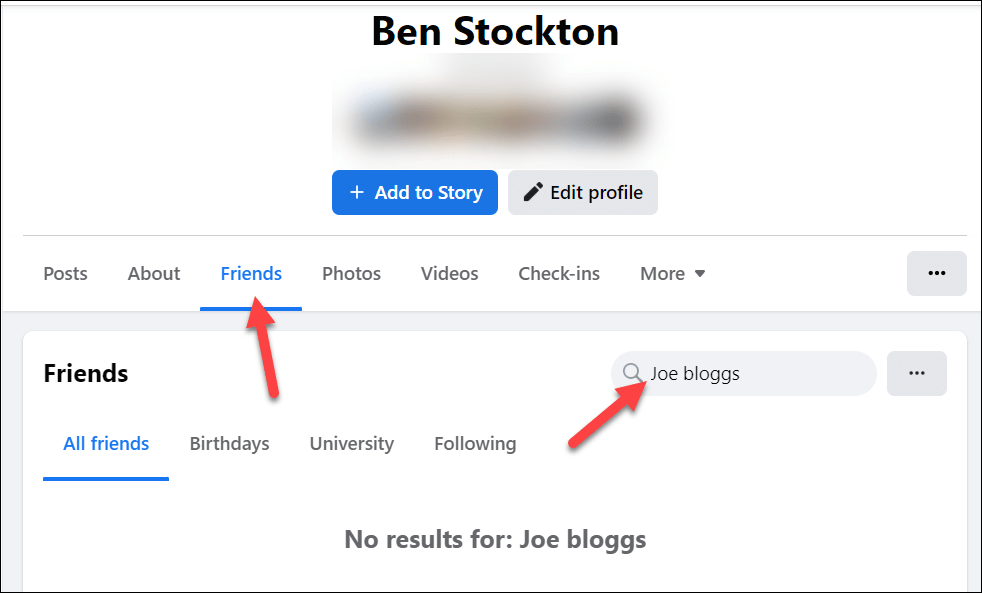
If your friend still appears in the list, you’re still friends—you’ve not been unfriended. However, if the person doesn’t appear on the list, you’re (probably) not friends.
The only exception to this rule, however, is if the other person has deactivated or deleted their account. The effect is still the same, however, with the account no longer being accessible to you.
Check That Person’s Profile
The third and final method you can try to check if someone has unfriended you on Facebook is to check that person’s profile directly. This is a very obvious way to see if someone has unfriended you or not, but this is only possible if you suspect someone specifically has removed you.
- To do this, open the Facebook website and sign in.
- Type in the friend’s name using the search bar at the top.
- Select the friend from the search results.

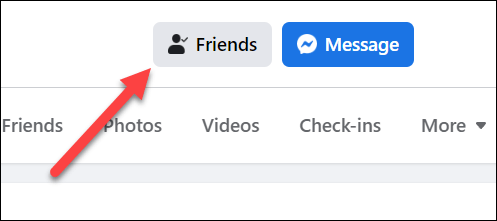
- If you’re a Facebook friend, you’ll see Friends listed as an icon on that person’s profile.
- If you aren’t a Facebook friend, you’ll see an Add friend button on the profile instead.
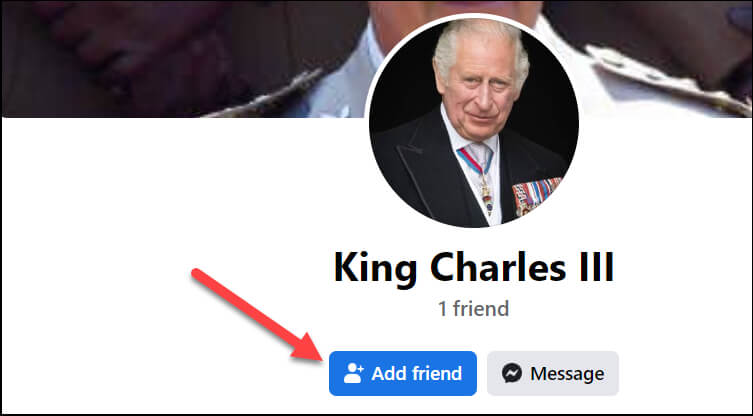
In some circumstances, you may not see an Add friend button on a user’s profile, even if you aren’t their friend. That’s usually because the person is only allowing users with mutual friends to add them in their Facebook privacy settings, for instance.
Can’t find the friend in your search results? You might have been blocked, or the user has deactivated or deleted their account. If you’ve been blocked, you’ve been unfriended, too.
If the friend’s account is only deactivated temporarily, you can see their profile when they reactivate it (and your friendship will continue from that point). Otherwise, the friendship will also be deleted when the account is deleted.
You can also look for other signs on their profile page, such as whether they have any mutual friends with you or whether they have any recent activity. The other person’s privacy settings might restrict access to posts and photos—if you can’t see them, you’ve probably been unfriended.
Can You Use a Third-Party Tool to Check If You’ve Been Unfriended on Facebook?
You might be tempted to try and use a third-party tool to track who has unfriended you on Facebook over time. There are plenty of tools online that claim to be able to tell you if you’ve been unfriended on Facebook—either for free or for a fee.
These tools don’t work, so don’t waste your time. They’re often unreliable and unsafe, requiring unnecessary permissions to your Facebook account. For obvious privacy reasons, we wouldn’t recommend this as an option.
Managing Your Privacy on Facebook
With no official way to know if you’ve been unfriended on Facebook, you’ll need to use your sleuthing skills to figure it out for yourself. The methods above are the best (current methods) for doing this, but don’t be tricked into using third-party apps to help you—they just don’t work (or they risk your safety in the process).
Worried about what you’re sharing online? You canmanage your Facebook privacy settings to limit what friends and others can see. For instance, you might want to make your photos private on Facebook to stop others from seeing them.
You can also turn off your Facebook active status to stop yourself from being seen online when you’re scrolling in private.