
While people use LinkedIn for different purposes like looking up people online, most users on the network use it for job search.
If it’s not your first time on LinkedIn, you probably know that simply registering your profile and uploading a resume isn’t enough to land a job. LinkedIn has a rather complex but efficient job search system that you can use to find your perfect workplace. Here are the most essential tips that you can use to improve your job search on LinkedIn.
How to Find a Job on LinkedIn
Before you start searching for a job on LinkedIn, you need to craft a smart resume to make a great first impression online. Make sure to showcase your professional knowledge and experience by adding relevant skills and keywords, and getting other people to endorse you on LinkedIn.
It may be that you’re happy with the look of your LinkedIn profile. You followed all of the tips and tricks to creating a better resume, but still don’t get the results you expected from job hunting on LinkedIn. If that’s the case, try the following techniques to improve your chances of finding employment on the network.
Keep Your Profile Up to Date
The first tip isn’t so relevant if you’re new to LinkedIn and have just created your profile. However, if you’ve been using LinkedIn for a while, it’s easy to forget how crucial it is to keep your profile up to date at all times.
When you apply for a job and send your resume to a recruiter, they’re bound to have a look at your LinkedIn profile. If the two don’t match, it’s going to affect your professional image in the eyes of the hiring manager. Ideally, your LinkedIn profile should be longer than your resume. Your profile’s purpose is to not just list your past work places and positions, but also provide the details about your responsibilities and achievements at each of the previous roles.

If your resume doesn’t include a picture, your LinkedIn profile is a great tool that the recruiters will use to “put a face to the name”. Make sure to use a quality photo (ideally a professional headshot) as your LinkedIn profile picture.
Let People Know You’re Open To Opportunities

The beauty of using LinkedIn to find a job is that sometimes you don’t even have to look for work yourself, as the job finds you first. There are always recruiters and employers looking for new talent. You just need to let them know you’re available and open to new opportunities.
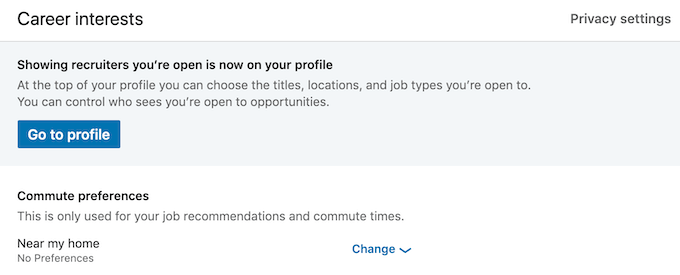
To do that, open LinkedIn and go to the Career interests tab on the Jobs page and select Go to profile.
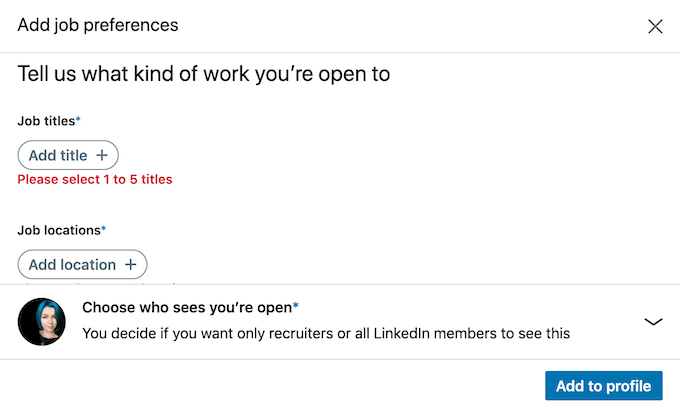
In the Add job preferences window add the titles, locations, start date, and job types that you’re open to.
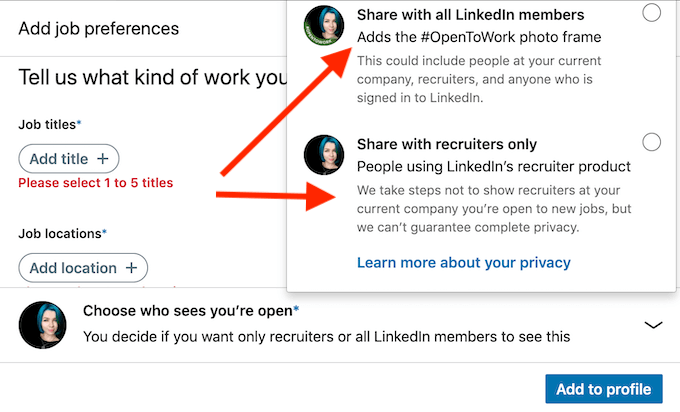
Then select who sees you’re open to opportunities. First option is to Share with all LinkedIn members. This will add a photo frame with the #OpenToWork. If you want to be more discreet about your job search, or don’t want your current employers to find out you’re looking for a job, you can select the Share with recruiters only option.
Take Advantage of the LinkedIn Job Search Filters
When you search for a role, LinkedIn doesn’t just throw every listing they have that matches the keywords that you type in the search bar. There’s a number of filters available that will help you narrow down your search to make sure you don’t waste time viewing options that don’t suit you.
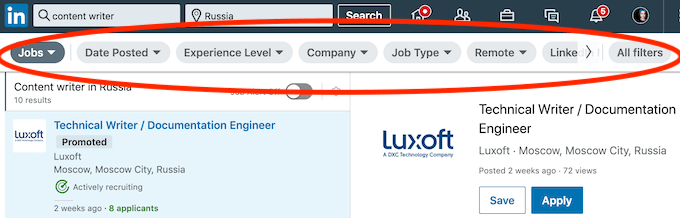
After you type in your desired job title and location in the search bar, make sure to go through all of the job filters and set your requirements. To view only the most relevant positions, you can filter the listings by the Date Posted. You can also select the desired Experience Level, Job Type, select a specific Industry and even specify the job Title again.
Set Up LinkedIn Job Alerts
If you didn’t find the role you were looking for, you can set the Job Alerts on the same page. LinkedIn will then notify you if there’s a new listing that matches your description.
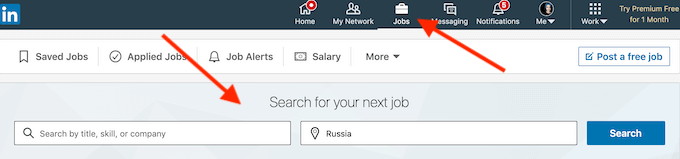
To set up job alerts on LinkedIn, go to the Jobs page and begin a new job search by typing in your job title and location into the Search Bar.
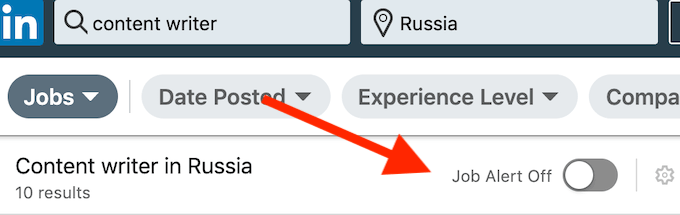
On top of the vacancies list, toggle the Job Alerts Off switch on.
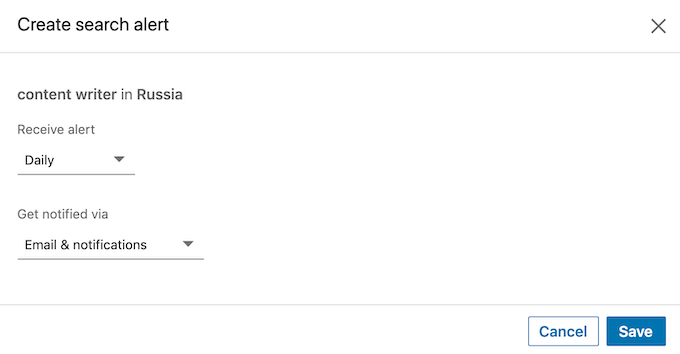
Set up how you want to receive the notifications and how often. Then select Save. You can edit your job alerts or switch them off at any time.
Use In Your Network Job Search Filter
LinkedIn is all about networking. Aside from the endorsements and recommendations that you can get from your connections, you can also ask them for a referral when applying for a specific job. Your potential employer is more likely to get back to you if you’re referred by someone who’s already working at their company.
You can narrow down your job search to the companies your connections work for using the In Your Network job search filter.

Go to the Jobs page on LinkedIn and start a regular job search. When you get to the vacancies page, select All Filters in the upper-right corner of the window.
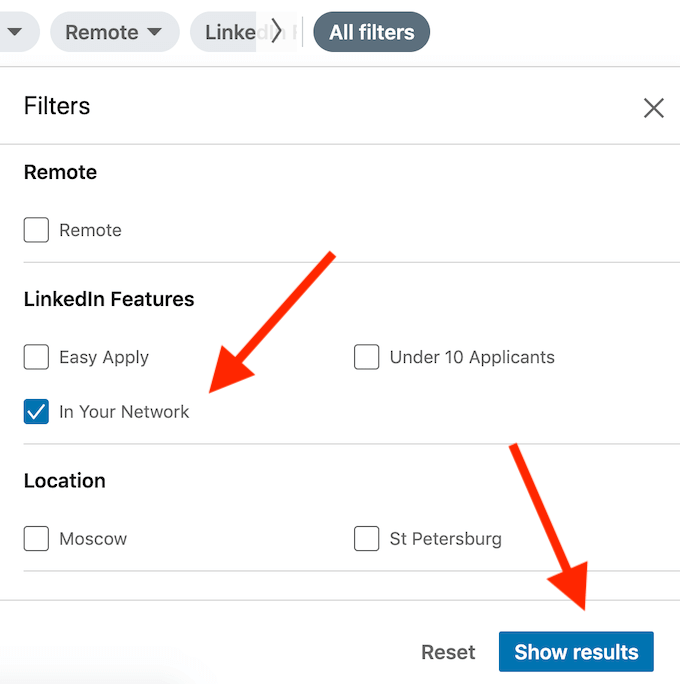
Scroll down to LinkedIn Features and select In Your Network > Show Results.
Now your list only consists of the vacancies from companies where your connections work.
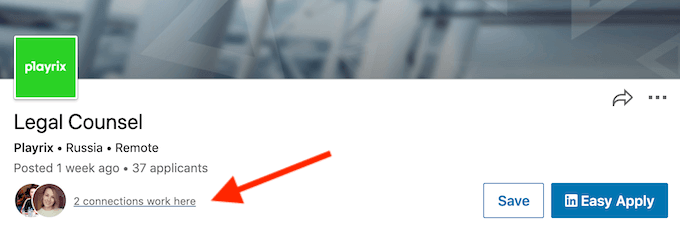
When applying for one of those vacancies, you’ll have an option to message those people directly and ask them for a referral. It’ll boost your chances of getting the job and put you above other applicants.
Manage Your Income Expectations With LinkedIn Salary
When applying for a job, you’ll probably be asked what your salary expectations are. To take all the awkwardness out of it, visit the LinkedIn Salary page before applying.
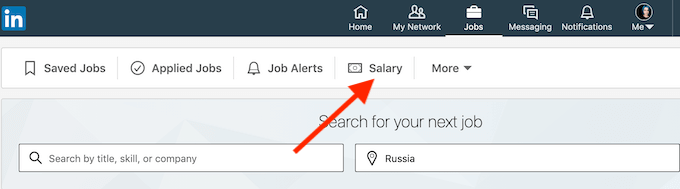
Go to the Jobs page on LinkedIn and select Salary.
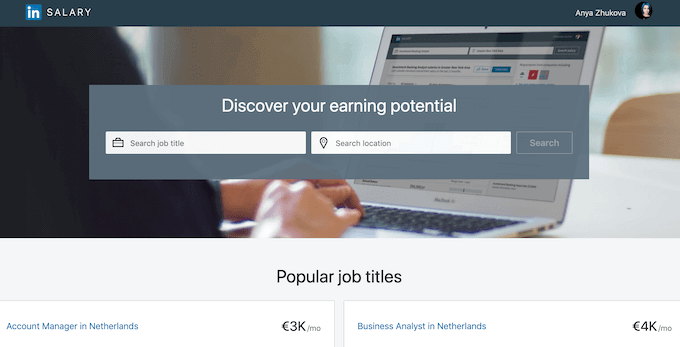
Type in a job title and location, and select Search. LinkedIn will provide you with a breakdown of salaries in the location of your choice, as well as show you the top salaries in that industry in different regions. You can then use that information to set your own salary expectations when applying for a job on LinkedIn.
Find Your Perfect Next Role on LinkedIn
If you’re trying to find a new job but don’t know where to start, LinkedIn is the best place to look. Take some time to learn how to use all of the job search tools, features, and services that LinkedIn offers. That and a smart resume will take all the effort out of the job search and ensure the best results.
Do you use LinkedIn for job hunting? What are the features that you find the most useful on LinkedIn? Share your best LinkedIn job search practices with us in the comments below.