

TikTok is one of the most popular social media platforms around, with 1 billion global monthly active users. Chances are, you make TikTok videos and share them regularly, but what happens if you also want to share your TikTok videos on Facebook? Or perhaps you want to share content from other TikTokers to your Facebook Story or Timeline? We’ll show you how to share TikTok videos to Facebook Timeline and stories — it’s easier than you think.
How to Share TikTok Videos to Facebook Timeline
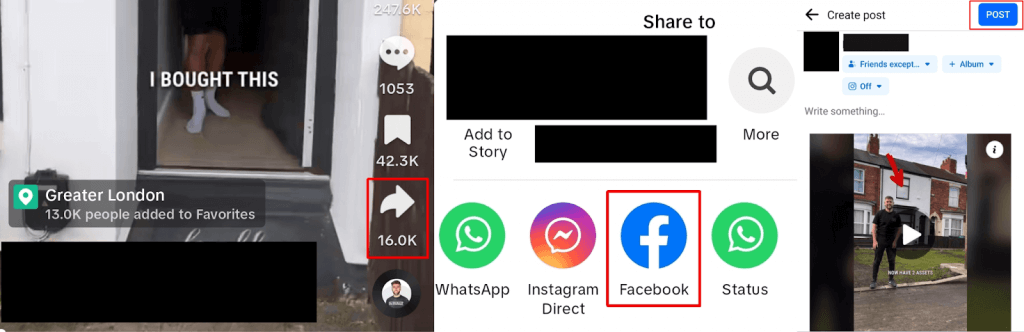
The easiest way to share a TikTok video to Facebook is to share it directly from the TikTok app to your Facebook Timeline. You’ll need both the TikTok and Facebook apps installed on your phone. Here’s how to share TikTok videos to Facebook Timeline:
- Launch the TikTok app and navigate to the video you want to share. If it’s a video you watched previously, you can find it in your TikTok Watch History.
- If it’s your own video, tap the three dots to share. If it’s someone else’s video, tap the Share arrow at the bottom right.
- Scroll through the apps until you find Facebook.
- Tap the Facebook icon, and the Facebook app will launch.
- You should see a draft post with the TikTok video.
- To share this to your Facebook Timeline, just tap Post.
- You might want to press Play to preview the video before sharing, and you can also adjust the privacy settings, too.
How to Share TikTok Videos to Facebook Stories
Sharing TikTok videos to Facebook Stories is a bit more complicated. There are plenty of tutorials online claiming that it’s easy to share TikTok videos directly from the app to your Stories on Facebook, but sadly this isn’t the case (although this may work for some videos). The lack of ability to share a TikTok video to Facebook Stories directly is actually the topic for various posts on Reddit, and it’s an issue TikTok hasn’t yet fixed.
Don’t worry, though — there are a couple of options available to you if you want to share a TikTok video to your Facebook story, and we’ll take you through each option below.
How to Save and Share a TikTok Video to Facebook Stories
If you don’t mind downloading the TikTok video you want to share to your device, then you can share it from there to Facebook Stories. Here’s how to do that:
- Launch the TikTok app and find the video you want to share.
- If it’s your own video, tap the three dots; if it’s someone else’s video, tap the Share arrow at the bottom right of your screen.
- Tap Save Video and wait for the video to download. This may take some time, depending on the size of the video file.
- You should see the progress bar for the download at the bottom of your screen. Once the video has finished downloading, the Share to menu will pop up, but you can ignore this since we’re sharing to Facebook Stories.

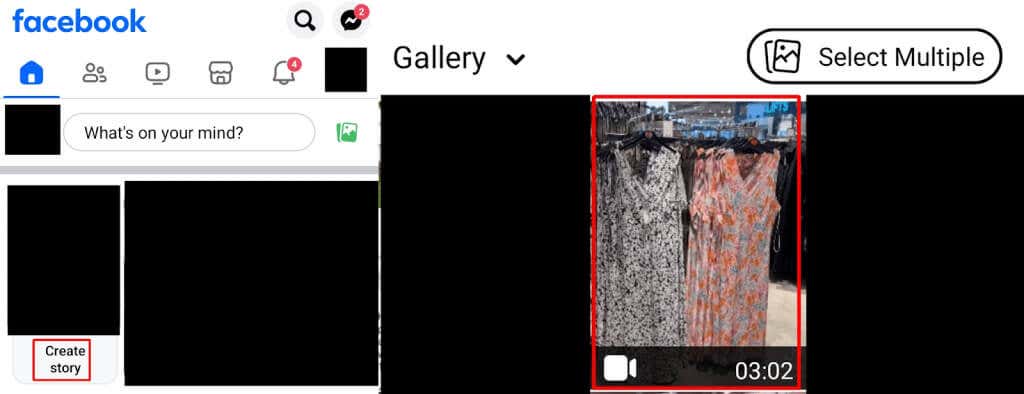
- Open the Facebook app and tap Create Story at the top.
- Choose the saved TikTok video from your Camera Reel.
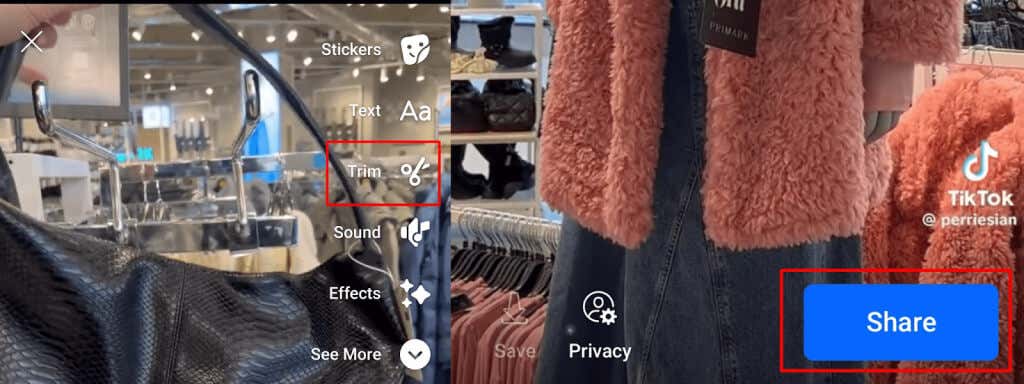
- Note that longer videos are trimmed to 60 seconds, but you can also choose to trim a specific section of the video by tapping Trim.
- You can add effects, text, or emojis to your video before sharing if you like.
- To share your video to Facebook Stories, tap Share.
How to Share TikTok Videos to Facebook Stories via Instagram
Since you can’t currently share most TikTok videos directly to Facebook Stories, there is another way. Provided your Instagram account is connected to your Facebook, you can share content posted on Instagram to Facebook. Here’s how to share a TikTok video to Facebook Stories via Instagram:
- Open the TikTok app and find the video you want to share.
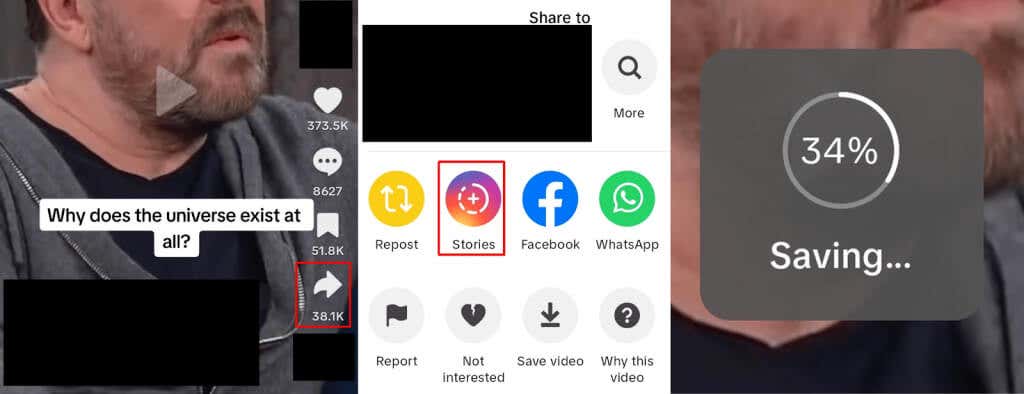
- Tap the three dots if it’s your video and the Share arrow if it’s someone else’s video.
- Tap the Stories (Instagram) icon.
- Your video will automatically show a saving icon. Once it reaches 100%, Instagram will open.
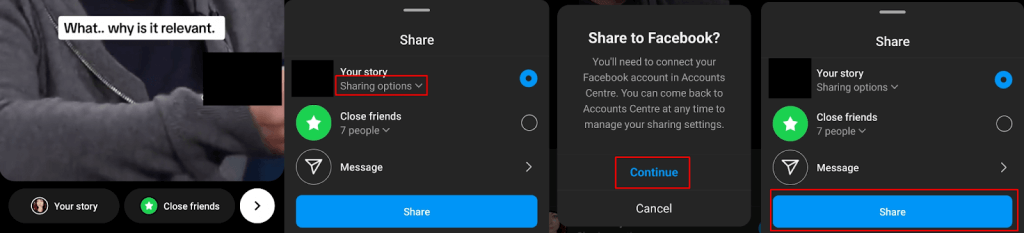
- To share the story, tap the arrow at the bottom right.
- Tap Sharing Options.
- When the Share to Facebook screen appears, tap Continue. If your Facebook and Instagram accounts aren’t already connected, follow the on-screen prompts to link your accounts.
- Tap Share to share the video to both your Instagram and Facebook Stories.
On some videos, you may see an option to directly share to Facebook Stories when you tap the three dots or the Share arrow. However, this option isn’t reliable and doesn’t currently appear for all videos.
Hopefully, this has helped answer the question of how to share TikTok videos to Facebook Timeline. Both methods are pretty quick and convenient, so it really comes down to whether you prefer to download the video to your device or share it via your Instagram account. This might depend on the amount of available storage space on your device. It only takes a few seconds to share TikTok videos on Facebook, whichever method you choose.