

It’s too easy to forget a friend’s birthday, but Snapchat makes it easy to look up birthdays for all your friends. We’ll show you how to see birthdays on Snapchat and how to share your own birthday.
How to See Birthdays on Snapchat
It used to be possible to use the Birthday mini to see a birthday on Snapchat, but that feature has been disabled. Now, there’s no way to see a list of all your friends’ birthdays. Though that’s quite inconvenient, thankfully, you can still see when one of your friends is celebrating a birthday. Here’s how:
- Launch Snapchat.
- Tap your Profile icon at the top-left of your screen.
- Scroll down and select My Friends to view your friends list.
- Select a friend from the list to open a chat with them.
- To view their profile, tap their Profile picture at the top-left of your screen.
- You should see their birthday listed underneath their Snapchat username.
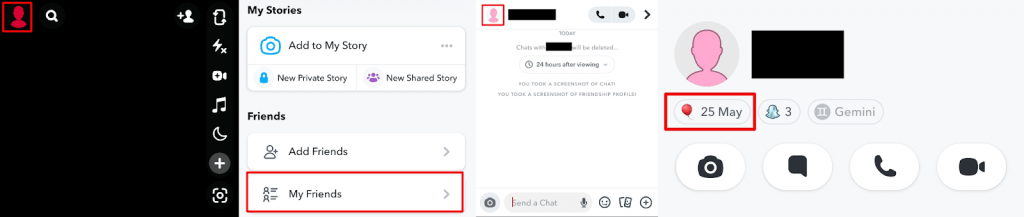
Note: You should also see a cake icon next to a friend’s name in your chat if it’s their birthday. However, if your friend hasn’t enabled Birthday Party, you won’t be able to see the cake icon when it’s their birthday.
How to Enable Birthday Party in Snapchat
If you want friends to see your birthday on Snapchat, you can enable Birthday Party. Here’s how to do that so your friends have no excuse for missing your birthday ever again!
- Launch Snapchat.
- Tap your Profile icon at the top-left of your screen.
- Tap Settings in the top-right of your screen.
- Under My Account, tap Birthday.
- Add your birthday date and year, then tap Save.
- Ensure the box next to Birthday Party is checked to share your birthday with your friends. This also displays your zodiac sign on your profile.

Note: Your age is never revealed to other Snapchatters — only your birthday day and month is revealed.
How to See People’s Astrological Signs on Snapchat
Did you know that you can also see a friend’s astrological sign on Snapchat? Provided you’ve both entered your birthday details and enabled Birthday Party, you can see each other’s zodiac signs and view their astrological compatibility. Here’s how to do that:
- Launch Snapchat.
- Tap your Profile icon at the top-left of your screen.
- Scroll down and select My Friends to view a list of all your friends.
- Tap on any friend in the list to open a chat with them.
- Tap their Profile picture at the top-left of your screen to view their profile.
- You should see their birthday under their Snapchat username, and their zodiac sign should be to the right of this.
- If they have enabled the feature, you can tap on their zodiac sign to see your compatibility.

Now you know how to see birthdays on Snapchat, you’ll never have an excuse for missing your friends’ birthdays ever again — and you can also ensure that your birthday is visible to all your friends. You can also view their astrological sign and find out how compatible you are, if you’re into astrology. Before you go, why not check out some of the best Snapchat privacy tips?