Skip to content
ONLINE 101010 TECH 010101 TIPS
  • Latest
  • News
  • How-To
  • Social
  • Streaming
  • Gaming
  • Reviews
  • Latest
  • News
  • How-To
  • Social
  • Streaming
  • Gaming
  • Reviews
  1. Home/
  2. Social Media/
  3. How to Recover a Deleted Facebook Account

How to Recover a Deleted Facebook Account

Marshall Gunnell
May 19, 2023
2 min read
 - facebook

We’ve all been there – maybe you decided to take a break from social media or accidentally deleted your Facebook account. Now, you’re feeling the FOMO and want to get back in touch with your online friends and communities.

Facebook understands that things happen, and they’ve got your back—for thirty days, at least. If you deleted your account, you’ve got to act quickly if you want to recover it and jump right back into the world of likes, comments, and virtual connections.

Can You Recover a Deleted Facebook Account?

Good news: In most cases, you can recover a deleted Facebook account. When you delete your account, Facebook gives you a grace period, usually around 30 days, during which your account is just deactivated. This means that your profile, friends, and posts are hidden from view, but they aren’t erased from Facebook’s servers just yet. Facebook does this to allow users to change their minds and restore their accounts with minimal fuss.

However, if the 30-day grace period has passed, your account and all its associated data are permanently deleted from Facebook’s servers, and there’s no way to get it back. So, if you’re within that window and you’ve had a change of heart, act fast to recover your account before it’s gone for good.

Recover Your Deleted Facebook Account

If you’re ready to get your deleted Facebook account back and you haven’t missed the 30-day grace period, head over to Facebook and follow these steps.

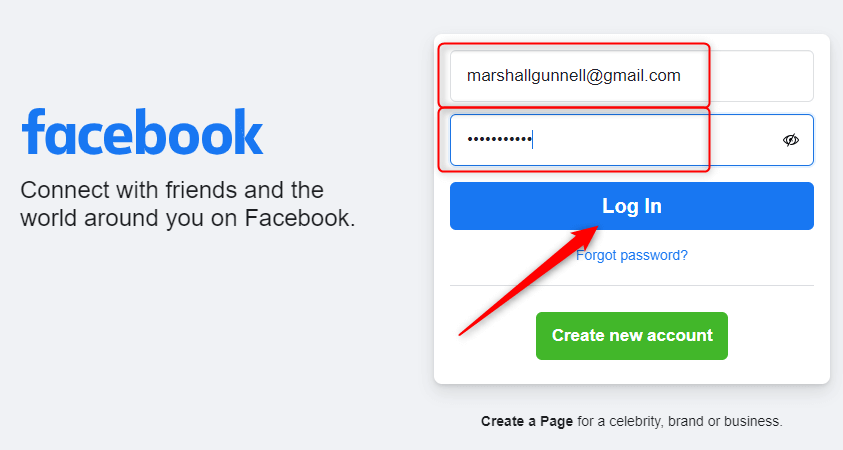
  1. Open Facebook on your desktop or mobile device.
  2. Log in to your account using the same email address or phone number and password associated with the deleted account.
  3. Click Log in.
 - how-to-recover-a-deleted-facebook-account-1-compressed

You’ll see a prompt that says your account is scheduled for deletion. Simply click Cancel Deletion and your account will be restored immediately. Welcome back!

If you don’t see the prompt and can’t log in, you’ll probably miss the 30-day grace period. Unfortunately, there’s nothing you can do and Facebook Support can’t help you. You’ll need to create a new Facebook account and start fresh.

Tags: Facebook
Share
Written by

Marshall Gunnell

Marshall is a technical writer based in Tokyo, Japan. His bylines are found on VGKAMI, How-To Geek, PCWorld, Zapier, and many other online magazines. <a href='https://www.online-tech-tips.com/author/mgunnell/'>Read Marshall's Full Bio</a>

View Marshall's Profile

Recent Posts

  •  - personal finance tools
    10 AI Money Apps That Make Mint Look MedievalJun 6, 2025
  •  - smartwatches
    Is a Smartwatch Worth It in 2025 and Beyond?May 20, 2025
  •  - slow wifi
    How to Fix Slow Wi-Fi on Your SmartphoneMay 6, 2025
  • Programmer coding at computer. - vibe coding
    Vibe Coding 101: Your Guide to AI-Powered ProgrammingMar 26, 2025

Search

Categories

  • Gaming (345)
  • How-To (1,119)
  • News (43)
  • Reviews (437)
  • Social Media (461)
  • Streaming (174)
  • Uncategorized (4)

Popular Tags

Adobe AI Alexa Amazon Android Buying Guides ChatGPT Chrome Discord Explainers Facebook FireTV Gadget Reviews Gmail Google Google Docs Google Maps Google Sheets Home Networking Hulu Instagram Internet LinkedIn Minecraft Netflix Nintendo Switch PlayStation Premiere Reddit Remote Work Roblox Roku Roundups Smart Home Snapchat Software Reviews Spotify Steam TikTok Twitch VR WhatsApp Windows X (Twitter) YouTube

Our Publishing Family

Online Tech Tips is part of the AK Internet Consulting publishing family.

  • HELP DESK GEEK
  • THE BACK ROOM TECH
  • SWITCHING TO MAC
  • XBOX ADVISOR

Daily Email Newsletter

Connect With Us

About Online Tech Tips

Online Tech Tips has published easy-to-follow technology tutorials, honest reviews, and practical how-to guides since 2007 — helping millions of readers solve tech problems and get more from their devices.

Learn More →

© 2007-2026 Online Tech Tips.com, LLC.
All Rights Reserved.

  • Home
  • About Us
  • Editorial Standards
  • Contact Us
  • Terms of Use
  • Privacy Policy
Online