
If you’re thinking of starting your own YouTube channel, it’s easy to get lost in ideas for content, or obsessed with building the perfect budget studio. With so much to plan, it’s easy to neglect your YouTube channel art.
A YouTube channel’s visual style is almost as important as the content it creates. Everything from the banner on your YouTube page to each upload’s thumbnail will affect whether people decide to watch your videos.
This article will show you how to decide on and make the perfect YouTube channel artwork.
YouTube Channel Art Explained
Before going into the technical details of actually creating your YouTube channel art, it’s worth learning what you’ll need to make. The main visual points of any YouTube channel can be divided into three parts:
- A profile picture – think of this as your channel’s logo
- A channel banner – a larger image representing what your channel does
- Individual video thumbnails – Similar themed but self-contained images designed to be enticing for viewers.
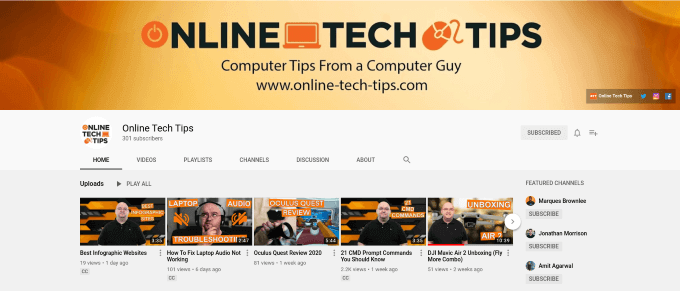
The OnlineTechTips YouTube channel uses a similar art style and color palette for all three elements. The profile picture features the name of the channel. The banner tells you it’s about technology, and each thumbnail shows specifically what’ll be talked about in the episode.
This isn’t just the way tech channels do it though. All kinds of YouTube channels use this winning formula, and it’s easy to see why. The profile picture and banner artwork make it clear what the channel is about, and each individual thumbnail gives a good idea of who will be in the video, and what it will be about.
Getting Inspiration From Other YouTube Channels
A good way to get ideas for your channel’s artwork is to take inspiration from others. 5 Minute Crafts is one of the most popular channels on YouTube. Their art is slightly different from other channels, relying mostly on strong colors and imagery rather than text.
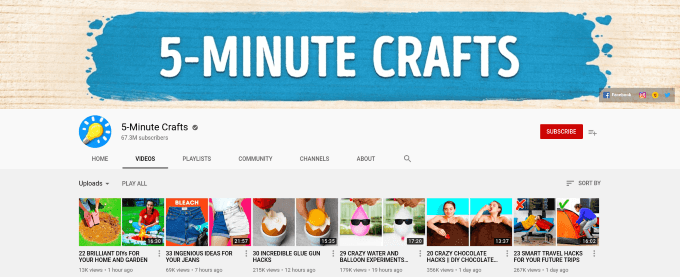
A good way to decide what to create for yourself is to think about what kind of video content you will create. Are you going to be on camera a lot? If so, then it makes sense to have an image (or drawing) of yourself in the artwork. Is your channel based more around talking and discussion rather than visuals? Then using text is probably a good idea!
While you will want to ultimately create something unique to your channel, spending time looking at how other channels present themselves can be a good way to get inspired.
Create Artwork Using Adobe Spark
Once you’ve decided on what you want your channel to look like, it’s time to choose the tools to create your YouTube channel art.
Adobe Spark is an online editor for creating simple graphics and web pages. It is one of the easiest options for YouTube artwork, as it has a vast array of templates for banners, thumbnails, and logos.
With an easy to use interface and many options for tweaking images to your liking, it’s easy to see why so many people use Spark for all their social media artwork. Adobe Spark offers a two-month free trial, after which you’ll be paying $11.59 per month for the service.
Free Options For Creating YouTube Channel Art
If you are looking for an easy to use tool for creating artwork on a budget, Canva might be for you. It’s a free to use service for designing graphics, including YouTube banners and thumbnails.
As a free option, you are expected to do a little more of the work than with a paid product like Adobe Spark, but as the above video from GCFLearnFree.org shows, it’s still a simple and quick option for creating great art.
The DIY Option
The best way to get your artwork looking perfect is to use image-editing software like Adobe Photoshop. You’ll have many more editing and filtering options than in any of the free or paid choices above. More importantly, you’ll have complete control over the file size and dimensions of the finished product.
If you don’t have access to Photoshop, plenty of powerful and free image editors are available. Learning the GIMP image editor’s basics will give you all the skills you need to create beautiful, unique artwork for your YouTube channel.
Going this route will mean you’ll need to source out your own images and graphics, but with so many awesome and free stock photo sites out there, you’ve got plenty to choose from!
YouTube Channel Art In Numbers
Whichever way you decide to make your artwork, it will need to comply with the following conditions:
- The image must be at least 2048 pixels wide by 1152 pixels tall (though YouTube recommends 2560 x 1440px)
- The image’s file size must be under 6 megabytes (MB)
Another important thing to consider is what section of your channel banner will be visible. The Google guide to creating YouTube banners shows which areas of the image are visible on computers, smart devices, and televisions.
Your channel’s profile picture is linked to your Google account and must be a minimum of 180 x 180 pixels. Don’t worry if it’s bigger, Google will resize it for you.
Thumbnails should be 1280x720px and smaller than 2 MB in size. Remember that these images will be seen across a variety of devices. Any text should be easy to read on even a smaller smartphone.
Getting Creative With YouTube Artwork
Starting a YouTube channel is a great way to challenge yourself creatively. Alongside your artwork’s graphic design elements, you’ll be learning other valuable skills like video editing and public speaking.