Skip to content
ONLINE 101010 TECH 010101 TIPS
  • News
  • How-To
  • Social
  • Streaming
  • Gaming
  • Reviews
  • Videos

Explore

  • News
  • How-To
  • Social
  • Streaming
  • Gaming
  • Reviews
  • Videos

About & help

  • About Us
  • Editorial Standards
  • Contact Us
  • Terms of Use
  • Privacy Policy
  • Advertise
0%
In this article
    1. Home/
    2. Social Media/
    3. How to Hide Your Birthday on Facebook

    How to Hide Your Birthday on Facebook

    Sandy Writtenhouse
    February 27, 2023
    3 min read

    Online Tech Tips is reader-supported. We may earn a commission when you buy through links on our site. Learn more.

    - Facebook Circle Button Icon 3D on Dark Bakcgorund. Elegant Template Blank Space

    Facebook has a handy feature for reminding you of your friends’ birthdays. Even though you might enjoy sending birthday wishes to pals, you may not want others to know your birthday.

    While there isn’t a simple switch to hide a birthday on Facebook, you can change who can see it. This allows you to keep your special day to yourself. Whether for privacy or another reason, here’s how to hide your birthday on Facebook.

    Hide Your Birthday in the Facebook App

    If you’re using the Facebook mobile app on Android or iPhone, you can hide your birthday easily. The process is currently the same on both devices.

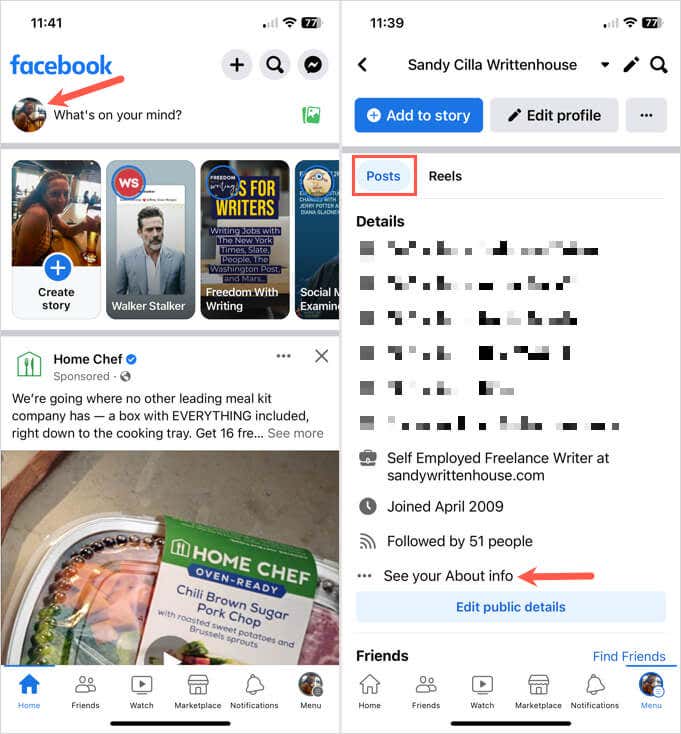
    1. Open the Facebook app and tap your profile picture at the top of the Home screen to display your profile page.
    2. Below your name, select Posts and then choose See your About info near the bottom of the Details section.
    - how-to-hide-your-birthday-on-facebook-1-compressed
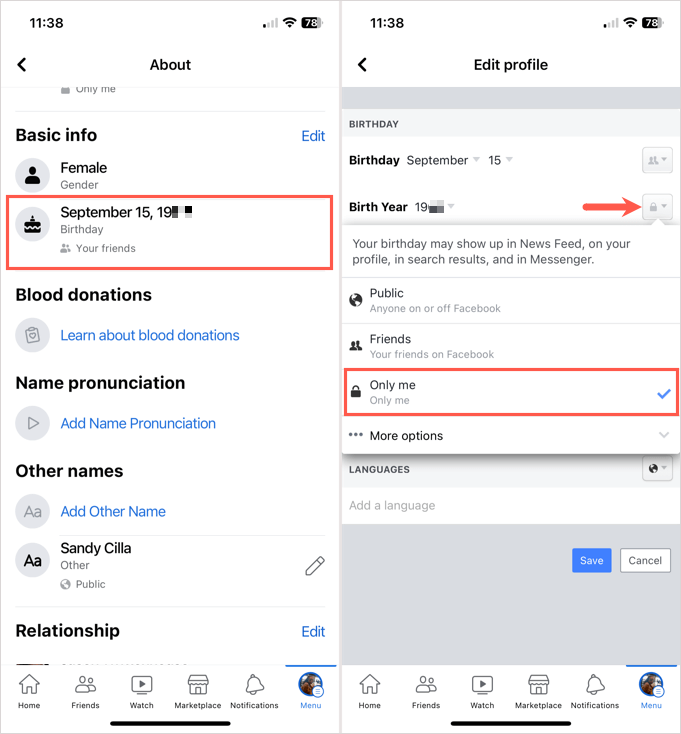
    1. Move down to the Basic Info section and you’ll see your birthday. Tap Edit on the right.
    2. Select the icon to the right of your Birthday (month and date) and pick Only Me in the drop-down menu. Then, do the same for the Birth Year if you want to hide both. This hides your birth date and year from everyone except you.
    3. Tap Save at the bottom.
    - how-to-hide-your-birthday-on-facebook-2-compressed

    You can then use the back arrow on the top left to exit each screen and return to your profile or the Home screen.

    Hide Your Birthday on the Facebook Website

    If you happen to be scoping out Facebook on the web or looking for your friends’ birthdays, you can take steps to hide your own special day there as well.

    1. Visit Facebook on the web, sign in, and go to the Home page using the icon in the top navigation.
    2. Select your profile name in the sidebar on the left to display your Facebook profile.
    - how-to-hide-your-birthday-on-facebook-3-compressed
    1. Below your name, select About. Then, under About on the bottom left, pick Contact and basic info.
    - how-to-hide-your-birthday-on-facebook-4-compressed
    1. To the right, move down to the Basic Info section and you’ll see your birth date and birth year.
    2. To change who can see both your birth date and year at the same time, select the Edit button (pencil icon) to the right.
    - how-to-hide-your-birthday-on-facebook-5-compressed
    1. Choose the audience selector for each.
    - how-to-hide-your-birthday-on-facebook-6-compressed
    1. Pick Only Me in the Select Audience box and select Done. Again, this hides your birthday from everyone except you. You can also use the Custom, Acquaintances, or Close Friends option if you want to show your birthday to only a custom list of people.
    - how-to-hide-your-birthday-on-facebook-7-compressed
    1. Then, choose Save to save your change.
    2. Alternatively, if you want to specifically change the birth date or the birth year audience, select its icon to the right. This may display as a contact icon, globe, or star depending on the current setting.
    - how-to-hide-your-birthday-on-facebook-8-compressed
    1. When the Select Audience box appears, pick Only Me and then Done as shown above.

    You can then return to the Home page using the icon in the top navigation or choose Posts to view your profile or add a post.

    If you want to keep your special day a secret or you have privacy concerns with it being displayed, you now know how to hide your birthday on Facebook.

    Tags: Facebook
    Share
    Written by

    Sandy Writtenhouse

    Sandy Writtenhouse is a freelance technology writer and former Project, Department, and Program Manager. She turned her education, job experience, and love of technology into a full-time writing career. With all sorts of gadgets in her home and her hands, she seeks to help others make life easier through technology. Read Sandy's Full Bio

    View Sandy's Profile

    Weekly Newsletter

    One email a week. Unsubscribe anytime.

    Recent Posts

    • How to Fix Netflix Poor Video Quality on Any Device (2026 Guide) - How to Fix Netflix Poor Video Quality on Any Device (2026 Guide)
      How to Fix Netflix Poor Video Quality on Any Device (2026 Guide)Sep 25, 2026
    • How to Fix Spotify Pausing When You Open Discord (Or Any Other App) - How to Fix Spotify Pausing When You Open Discord (Or Any Other App)
      How to Fix Spotify Pausing When You Open Discord (Or Any Other App)Sep 24, 2026
    • How to Fix Premiere Pro Not Opening or Crashing on Windows and Mac - How to Fix Premiere Pro Not Opening or Crashing on Windows and Mac
      How to Fix Premiere Pro Not Opening or Crashing on Windows and MacSep 23, 2026
    • Fix Discord Audio Issues with AirPods & Bluetooth Headphones - Fix Discord Audio Issues with AirPods & Bluetooth Headphones
      Fix Discord Audio Issues with AirPods & Bluetooth HeadphonesSep 22, 2026

    Search

    Categories

    • AI Tools (1)
    • Gaming (351)
    • How-To (1,182)
    • News (45)
    • Reviews (455)
    • Social Media (470)
    • Streaming (182)
    • Uncategorized (22)

    Popular Tags

    Adobe AI Alexa Amazon Android Buying Guides ChatGPT Chrome Discord Explainers Facebook FireTV Gadget Reviews Gmail Google Google Docs Google Maps Google Sheets Home Networking Hulu Instagram Internet LinkedIn Minecraft Netflix Nintendo Switch PlayStation Premiere Reddit Remote Work Roblox Roku Roundups Smart Home Snapchat Software Reviews Spotify Steam TikTok Twitch VR WhatsApp Windows X (Twitter) YouTube

    Our Publishing Family

    Online Tech Tips is part of the AK Internet Consulting publishing family.

    • HELP DESK GEEK
    • THE BACK ROOM TECH
    • SWITCHING TO MAC
    • XBOX ADVISOR

    Weekly Newsletter

    One email a week. Unsubscribe anytime.

    Connect With Us

    About Online Tech Tips

    Online Tech Tips has published easy-to-follow technology tutorials, honest reviews, and practical how-to guides since 2007 — helping millions of readers solve tech problems and get more from their devices.

    Learn More →

    Advertise →

    © 2007-2026 Online Tech Tips.com, LLC.
    All Rights Reserved.

    • Home
    • About Us
    • Editorial Standards
    • Contact Us
    • Terms of Use
    • Privacy Policy
    • Advertise
    Online