Skip to content
ONLINE 101010 TECH 010101 TIPS
  • News
  • How-To
  • Social
  • Streaming
  • Gaming
  • Reviews
  • Videos

Explore

  • News
  • How-To
  • Social
  • Streaming
  • Gaming
  • Reviews
  • Videos

About & help

  • About Us
  • Editorial Standards
  • Contact Us
  • Terms of Use
  • Privacy Policy
  • Advertise
0%
In this article
    1. Home/
    2. Social Media/
    3. How to Fix “This Page Isn’t Eligible to Have a Username” Error on Facebook

    How to Fix “This Page Isn’t Eligible to Have a Username” Error on Facebook

    Nicolae Bochis
    March 11, 2023
    4 min read

    Online Tech Tips is reader-supported. We may earn a commission when you buy through links on our site. Learn more.

    - how-to-fix-this-page-isnt-eligible-to-have-a-username-error-on-facebook-1-compressed

    Facebook pages are often created to gather people who share interests in a certain topic. Unique custom page names are what make them memorable to Facebook users, and the Facebook page gets a straightforward URL. This is especially significant if you create a Facebook page for your website, blog, or YouTube channel.

    Your page will share the name of your business and your followers will have an easy time finding you. With that said, when you create such a page you might face a “This page isn’t eligible to have a username” error because Facebook isn’t perfect.

    Custom-made usernames can trigger the “This page isn’t eligible to have a username” error. Facebook has yet to come out with an official fix for this error, but don’t worry, there’s an easy fix to get it up and running.

    What Is the “This Page Isn’t Eligible to Have a Username” Error?

    Facebook guidelines warn that newly created pages can’t have a username. At least not as soon as they are made. Some time needs to pass between creating a page and dedicating a unique username to it. In fact, there are several rules you need to follow to make your page eligible for a new username:

    • The username mustn’t be used by anyone else, even a personal account.
    • Your page needs to have a minimum of 25 page likes.
    • Multiple names are not allowed.
    • Your page username can contain only alphanumeric characters (A-Z, 0-9), and periods.
    • The username needs to have a minimum of 5 characters and a maximum of 15.
    • The username shouldn’t impersonate someone else.
    • The username must adhere to the Facebook Terms of Service.

    When one or more of these rules isn’t met, Facebook will display different error messages. The “Page Isn’t Eligible to Have a Username” error is just one of them.

    How to Fix Facebook “This Page Isn’t Eligible to Have a Username” Error?

    The solution to this username error has two steps: setting page roles and creating the username. That means that the solution to this issue is very simple. You can do it either over the Facebook app for Android and iOS, or by using a web browser.

    1. Setting Page Roles

    In step one you’ll assign a new page role to an account that’s not yours. That means you’ll have to choose a person you can trust to become an admin of your page. You can either set an admin temporarily or let the person keep their role, the choice is yours. Just be aware that the role of the admin is changed with Facebook’s New Pages Experience, and it’s not called an admin anymore. Instead, you’ll have to set Page Access. Here’s how to do it:

    1. Log into your Facebook account.
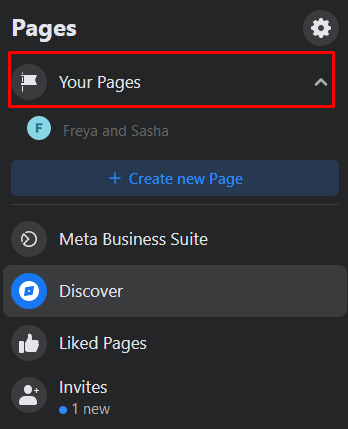
    2. You’ll see Your Pages on the left side of your Facebook profile. Select it, then go to the one you want to give a custom username.
    - how-to-fix-this-page-isnt-eligible-to-have-a-username-error-on-facebook-2-compressed
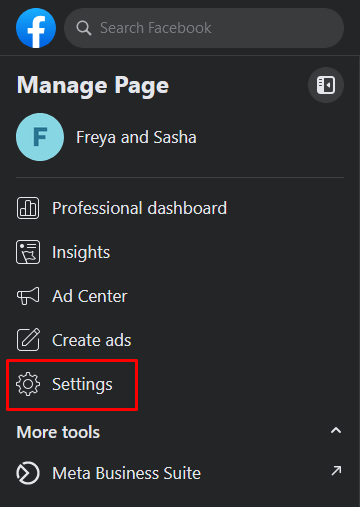
    1. In the Manage Page section, go to Settings.
    - how-to-fix-this-page-isnt-eligible-to-have-a-username-error-on-facebook-3-compressed
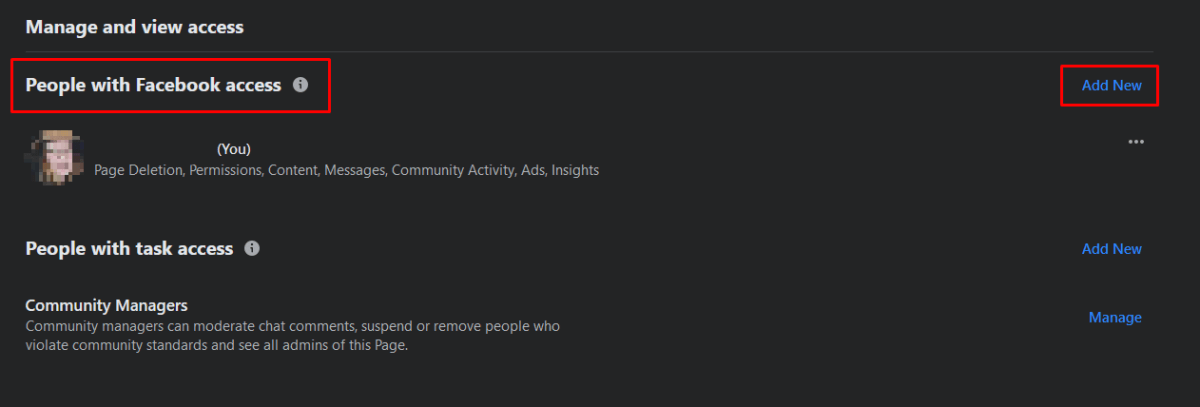
    1. Navigate to the New Pages Experience, and select it.
    2. On the main page find People with Facebook Access, and click Add New.
    - how-to-fix-this-page-isnt-eligible-to-have-a-username-error-on-facebook-4-compressed
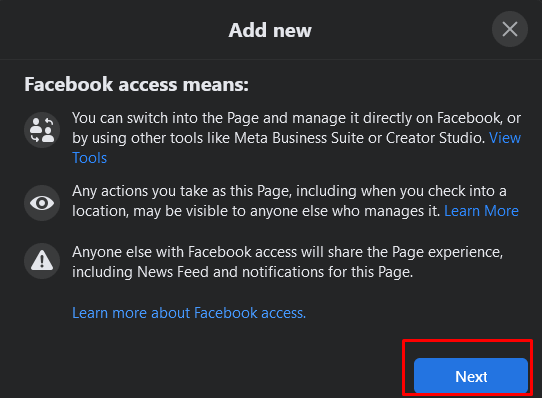
    1. A new window will appear explaining the Facebook Access. Click Next.
    - how-to-fix-this-page-isnt-eligible-to-have-a-username-error-on-facebook-5-compressed
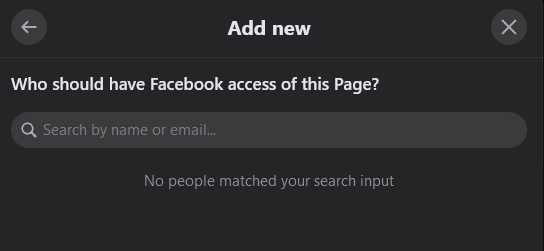
    1. In the text box, type the name of your friend’s account to whom you’ll give access.
    - how-to-fix-this-page-isnt-eligible-to-have-a-username-error-on-facebook-6-compressed
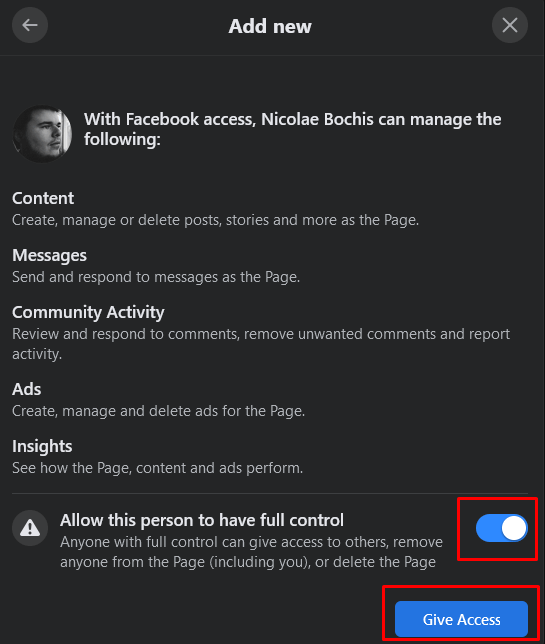
    1. Allow this person to have full access, and then click Give Access.
    - how-to-fix-this-page-isnt-eligible-to-have-a-username-error-on-facebook-7-compressed
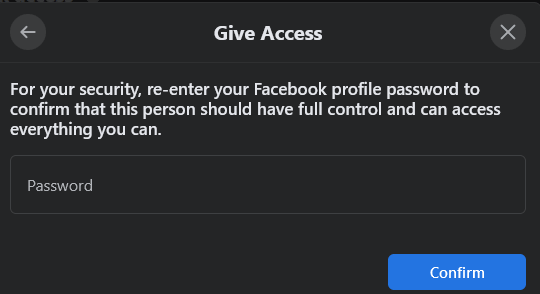
    1. You’ll have to type in your password for security reasons. Select Confirm.
    - how-to-fix-this-page-isnt-eligible-to-have-a-username-error-on-facebook-8-compressed

    Once your friend accepts the new role you assigned, you’ll be able to set a username for your page.

    2. Setting a Facebook Page Username

    Once you have your friend accept Facebook access, move on to set the page username.

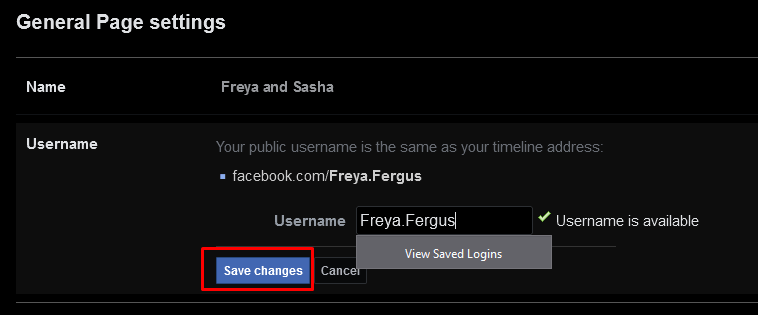
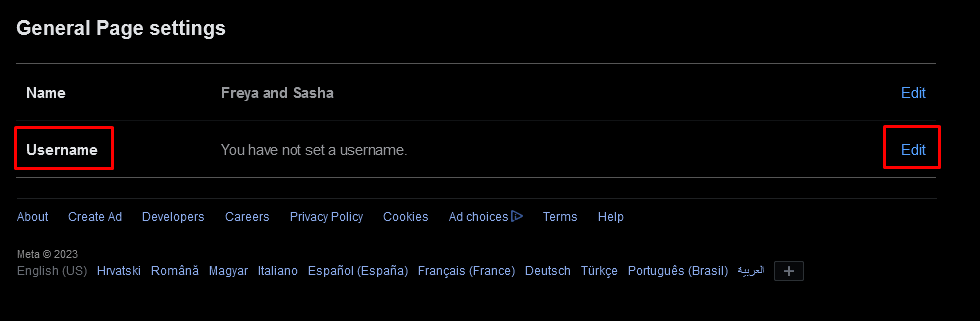
    1. Go to your page’s Settings. In the general section, click Edit next to Username.
    - how-to-fix-this-page-isnt-eligible-to-have-a-username-error-on-facebook-9-compressed
    1. In the designated field type in the username you want to add to your page. Make sure the name you choose is available. It should have a green checkmark next to it.
    2. Click the Save Changes button.
    - how-to-fix-this-page-isnt-eligible-to-have-a-username-error-on-facebook-10-compressed

    And that’s it. You successfully added the unique and custom Username to your Facebook page without getting the “this page isn’t eligible to have a username” Facebook error.

    Overall, this Facebook error is strange and can be a bit of a headache to tackle. Fortunately, you can quickly dispatch it with a few simple steps.

    Tags: Facebook
    Share
    Written by

    Nicolae Bochis

    Nicolae is a Jack of all trades technology writer with a focus on hardware, programming languages, and AI image-processing software. Over the last five years, he has ghostwritten numerous tech how-to guides and books on a variety of topics ranging from Linux to C# programming and game development. Nicolae loves everything that has to do with technology and his goal is to share his knowledge and experience with others. Read Nicolae's Full Bio

    View Nicolae's Profile

    Weekly Newsletter

    One email a week. Unsubscribe anytime.

    Recent Posts

    • How to Fix Netflix Poor Video Quality on Any Device (2026 Guide) - How to Fix Netflix Poor Video Quality on Any Device (2026 Guide)
      How to Fix Netflix Poor Video Quality on Any Device (2026 Guide)Sep 25, 2026
    • How to Fix Spotify Pausing When You Open Discord (Or Any Other App) - How to Fix Spotify Pausing When You Open Discord (Or Any Other App)
      How to Fix Spotify Pausing When You Open Discord (Or Any Other App)Sep 24, 2026
    • How to Fix Premiere Pro Not Opening or Crashing on Windows and Mac - How to Fix Premiere Pro Not Opening or Crashing on Windows and Mac
      How to Fix Premiere Pro Not Opening or Crashing on Windows and MacSep 23, 2026
    • Fix Discord Audio Issues with AirPods & Bluetooth Headphones - Fix Discord Audio Issues with AirPods & Bluetooth Headphones
      Fix Discord Audio Issues with AirPods & Bluetooth HeadphonesSep 22, 2026

    Search

    Categories

    • AI Tools (1)
    • Gaming (351)
    • How-To (1,182)
    • News (45)
    • Reviews (455)
    • Social Media (470)
    • Streaming (182)
    • Uncategorized (22)

    Popular Tags

    Adobe AI Alexa Amazon Android Buying Guides ChatGPT Chrome Discord Explainers Facebook FireTV Gadget Reviews Gmail Google Google Docs Google Maps Google Sheets Home Networking Hulu Instagram Internet LinkedIn Minecraft Netflix Nintendo Switch PlayStation Premiere Reddit Remote Work Roblox Roku Roundups Smart Home Snapchat Software Reviews Spotify Steam TikTok Twitch VR WhatsApp Windows X (Twitter) YouTube

    Our Publishing Family

    Online Tech Tips is part of the AK Internet Consulting publishing family.

    • HELP DESK GEEK
    • THE BACK ROOM TECH
    • SWITCHING TO MAC
    • XBOX ADVISOR

    Weekly Newsletter

    One email a week. Unsubscribe anytime.

    Connect With Us

    About Online Tech Tips

    Online Tech Tips has published easy-to-follow technology tutorials, honest reviews, and practical how-to guides since 2007 — helping millions of readers solve tech problems and get more from their devices.

    Learn More →

    Advertise →

    © 2007-2026 Online Tech Tips.com, LLC.
    All Rights Reserved.

    • Home
    • About Us
    • Editorial Standards
    • Contact Us
    • Terms of Use
    • Privacy Policy
    • Advertise
    Online