

Reddit isn’t just a social media platform—it’s a forum for communities to gather, a source to find funny videos and images, a place to gain advice or share problems, or just a place to let off some steam. If you’re on Reddit to enjoy video content in subreddits you follow, you may want to download the videos to enjoy them offline.
Downloading Reddit videos isn’t as easy as downloading videos from other websites, but it’s still possible (if you have the right tools). If you want to download Reddit videos onto your PC or Mac, here’s what you’ll need to do.
Is It Legal to Download Reddit Videos?
Before you start downloading Reddit videos, you should check that you’re allowed to do so. Reddit, like all online platforms, is subject to copyright laws. If you share copyrighted material on Reddit, expect it to be deleted. Likewise, if you download copyright material without the owner’s permission, you may end up in trouble.
This is a judgment call for you, depending on the video copyright. If you’ve downloaded a video that the original poster created and owns the copyright to, and they’ve permitted you to download it, it’s acceptable. The same rules apply to public domain videos, where copyright rules aren’t relevant.
Likewise, smaller video creators are unlikely to chase users who download Reddit videos to watch (but not share) elsewhere. Of course, it’s always best to ask for permission to download Reddit videos. But if you’re only planning on watching and not sharing videos, you shouldn’t face any issues with private viewing.
If you’re planning on downloading and sharing Reddit videos elsewhere, however, you’re likely to fall foul of Reddit’s terms of service. The laws in your country, too, may prohibit you from downloading videos from Reddit and other online sources, so make sure to confirm that you’re allowed to do this first.
How to Find and Copy a Reddit Video Link
Before you can download a Reddit video, you’ll need to copy the link to the video itself. When a video is uploaded to Reddit, the video is stored and played back using Reddit’s own video player, making it easy to stream and view video content on the Reddit website or in the Reddit mobile app.
Once you have the link, you can then download the video as a file, which you can then play independently in apps like VLC. You’ll need to follow these steps first before you proceed to download the video using any of the methods listed below.
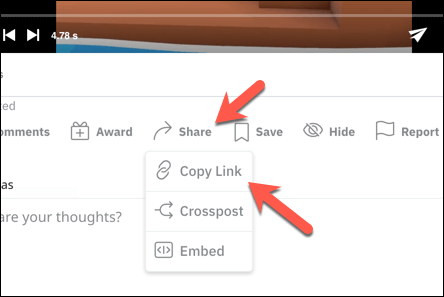
- To copy a Reddit link on PC or Mac, open the Reddit website using the new Reddit interface and find the video in the subreddit of your choice. Once you’ve opened a post containing a video, select Share > Copy Link.
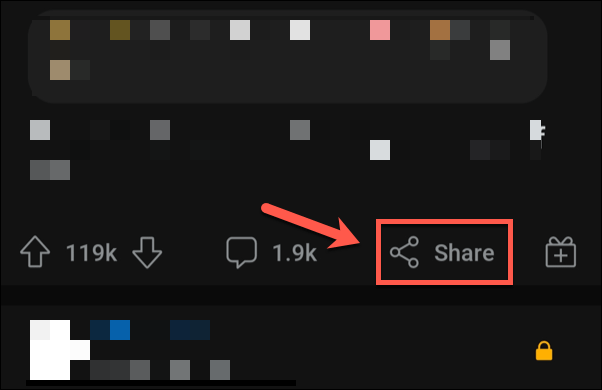
- To copy a Reddit link in the Reddit app, open the app on your mobile device and locate the video you want to save. Once you’ve found it, select Share, then choose to copy the link using your device’s share options.
The link in your clipboard isn’t a direct link to the video but rather a link to the post containing the video. Using this link, you can then use a tool to download Reddit videos (outlined below) to download the video to your device directly.
How to Download Reddit Videos on PC or Mac
As there are no official tools for downloading Reddit videos, you’ll need to use third-party tools to get the job done. One of the best tools available for this is YouTube-DL which, despite the name, is a video downloading tool for Windows, Linux, and Mac users that supports Reddit videos (along with other platforms).
This is an open-source, terminal-based tool, meaning you’ll need to use the Linux or Mac terminal or Windows PowerShell to use it. You’ll also need the video-sharing link for the video you wish to download by following the steps in the section above.
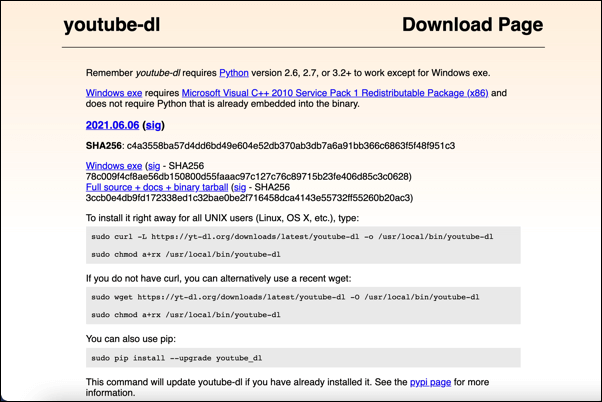
- To begin, download the latest version of YouTube-DL for your platform. Linux and Mac users will need to open the terminal app and follow the instructions, while Windows users can install YouTube-DL using the latest version as an executable file.
- If you’re running Windows, open a new PowerShell window after installation by right-clicking the Start menu and selecting Windows PowerShell (Admin).

- In your open terminal app (on Mac or Linux) or PowerShell window (on Windows), type youtube-dl url, replacing URL with the Reddit share link and then select the Enter key to begin the download.

If the link is correct, the download should begin immediately, saving the video in the source format to your PC or Mac. You can configure this tool further (for example, setting a custom video format or saving additional video information) by using the arguments available in the YouTube-DL documentation.
How to Download Reddit Videos Online
If you’d prefer to use a web-based service to download Reddit videos for offline playback, several platforms exist for this purpose, and you can find them easily with a Google search (e.g. Reddit video downloader).
For example, RedditSave is a simple web-based tool and Google Chrome extension for downloading videos from Reddit using your web browser on any platform.
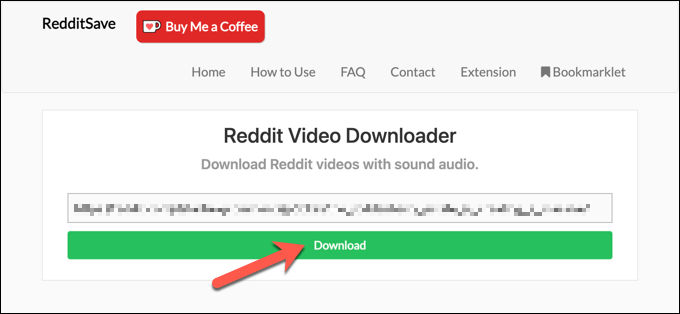
- To start, open the RedditSave website and paste the Reddit video sharing URL in the box provided, then select Download.
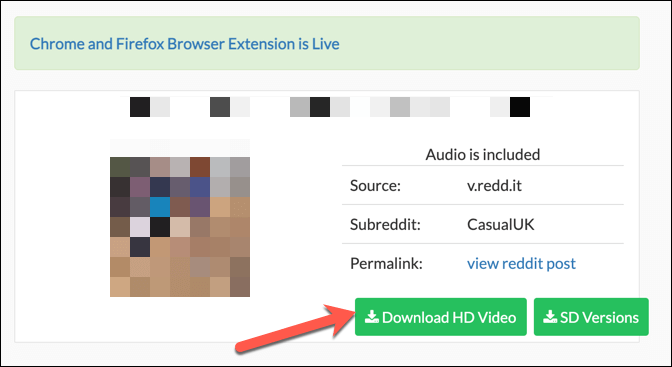
- The options on the next page will vary, depending on the source video. Select Download to download the video in the only available resolution, Download HD version to download the highest quality version, or SD Versions to choose a lower-quality version resolution (480p and below).
After downloading the video, you can then play it on a video player of your choice.
Enjoying Reddit Content
If it isn’t possible to stream videos on the go, downloading Reddit videos is a good way to get around the problem. You may need to check Reddit’s terms of service first but, as long as you’re not sharing the content without the copyright holder’s permission, you should be fine (but, where possible, you should still ask permission).
You can share your own content on Reddit, from text posts and videos to animated GIFs, as long as you have a Reddit account in good standing—if you’ve been shadowbanned on Reddit, your posts might be hidden from view. If you’re just starting, consider a Reddit subscription to go ad-free and gain extra perks.