Skip to content
ONLINE 101010 TECH 010101 TIPS
  • Latest
  • News
  • How-To
  • Social
  • Streaming
  • Gaming
  • Reviews
  • Latest
  • News
  • How-To
  • Social
  • Streaming
  • Gaming
  • Reviews
  1. Home/
  2. Social Media/
  3. How to Delete a Story on Snapchat

How to Delete a Story on Snapchat

Paula Beaton
February 10, 2024
3 min read
Snapchat ghost logo 3D render. - preview-media-how-to-delete-a-story-on-snapchat-1

Snapchat stories only last for 24 hours before they’re automatically deleted. But sometimes, you want to delete a story on Snapchat before 24 hours have passed. You can’t delete your entire story, but you can decide which Snaps to delete and which to keep, one by one. Keep reading and we’ll show you how to delete a story on Snapchat.

How to Delete a Story on Snapchat

When it comes to deleting a story on Snapchat, there’s no way to delete your entire story, as we just mentioned — instead, you can go through your story and decide which Snaps to nix, and which ones to keep. Here’s how to do that:

  1. Launch the Snapchat app on your device.
  2. Click the Profile icon at the top left to go to your Profile.
  3. Tap My Story to view your story.
  4. If you’ve added multiple Snaps to your story, tap to advance to the one(s) you want to delete.
  5. Press and hold on the Snap you wish to delete.
  6. Tap Delete, then tap Done.
  7. In the popup window, tap Delete to confirm the deletion of your Snap.
  8. Repeat this step for any snaps you want to delete from your story.

 - how-to-delete-a-story-on-snapchat-2-compressed

Note: If you created a story, you can delete not only any Snaps you added to it but also those added by anyone else.

How to Add Snaps to My Story

If you changed your mind after deleting a Snap from your story and want to add it back, there are a couple of ways to do this:

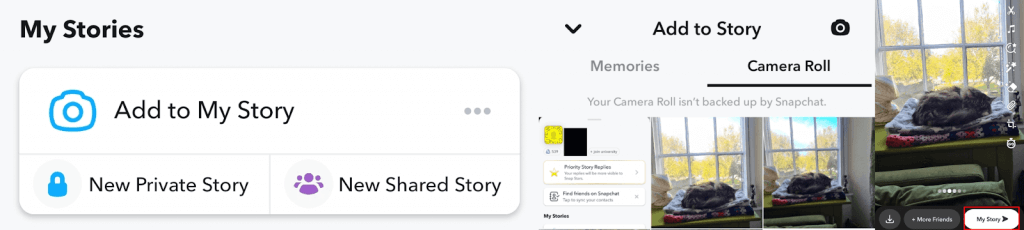
  1. Go to your Profile and tap Add to My Story or choose New Private Story or New Shared Story to add Snaps to your story. Then, select the Snaps you want to add from your Camera Roll or Memories and tap My Story to add them.
 - how-to-delete-a-story-on-snapchat-3-compressed
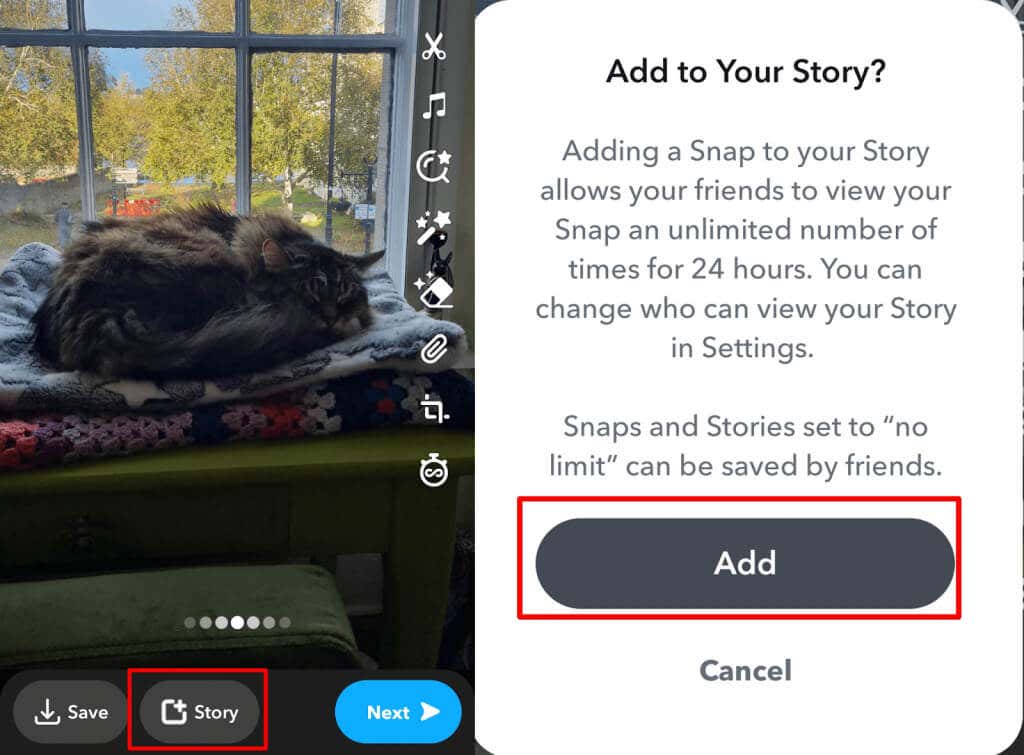
  1. Or, after you create a Snap with your Snapchat camera, tap the Story icon at the bottom of your screen, then tap Add to confirm you want to add the Snap to your story.
 - how-to-delete-a-story-on-snapchat-4-compressed

Now, there’s no need to worry if you accidentally upload a Snap to your story or change your mind after adding a Snap. It’s easy to delete a Story on Snapchat, whether you want to remove one or two Snaps from your story or delete the entire thing, Snap by Snap. Before you go, why not check out our guide on how to save Snapchat Videos?

Tags: Snapchat
Share
Written by

Paula Beaton

Paula Beaton is a freelance technology and food writer based in Scotland. Before making the move to writing, Paula worked as a call handler for the police, served refreshments on trains, and even trained as a nursery nurse. Since she became a writer in 2012, Paula has written everything from how-to guides to reviews, specialising in Android, Windows, and gaming. She’s also a foodie fascinated by food history and culture. <a href='https://www.online-tech-tips.com/author/pbeaton/'>Read Paula's Full Bio</a>

View Paula's Profile

Recent Posts

  •  - personal finance tools
    10 AI Money Apps That Make Mint Look MedievalJun 6, 2025
  •  - smartwatches
    Is a Smartwatch Worth It in 2025 and Beyond?May 20, 2025
  •  - slow wifi
    How to Fix Slow Wi-Fi on Your SmartphoneMay 6, 2025
  • Programmer coding at computer. - vibe coding
    Vibe Coding 101: Your Guide to AI-Powered ProgrammingMar 26, 2025

Search

Categories

  • Gaming (345)
  • How-To (1,119)
  • News (43)
  • Reviews (437)
  • Social Media (461)
  • Streaming (174)
  • Uncategorized (4)

Popular Tags

Adobe AI Alexa Amazon Android Buying Guides ChatGPT Chrome Discord Explainers Facebook FireTV Gadget Reviews Gmail Google Google Docs Google Maps Google Sheets Home Networking Hulu Instagram Internet LinkedIn Minecraft Netflix Nintendo Switch PlayStation Premiere Reddit Remote Work Roblox Roku Roundups Smart Home Snapchat Software Reviews Spotify Steam TikTok Twitch VR WhatsApp Windows X (Twitter) YouTube

Our Publishing Family

Online Tech Tips is part of the AK Internet Consulting publishing family.

  • HELP DESK GEEK
  • THE BACK ROOM TECH
  • SWITCHING TO MAC
  • XBOX ADVISOR

Daily Email Newsletter

Connect With Us

About Online Tech Tips

Online Tech Tips has published easy-to-follow technology tutorials, honest reviews, and practical how-to guides since 2007 — helping millions of readers solve tech problems and get more from their devices.

Learn More →

© 2007-2026 Online Tech Tips.com, LLC.
All Rights Reserved.

  • Home
  • About Us
  • Editorial Standards
  • Contact Us
  • Terms of Use
  • Privacy Policy
Online