
Reddit is a great community and a website where you can find practically anything: from recent news to real-life stories and advice to absolutely useless content. The latter might be fun for a short while, but soon after you might want to block specific subreddits and stop receiving notifications from them.
If you’ve decided to tidy up your Reddit, find out how to block subreddits from your r/all List on both old and new versions of the site.
How to Block Subreddits Using the Old Reddit
After the site’s makeover in 2018, Reddit users were split into two categories: those who enjoy the new redesigned site and those who prefer the Old Reddit.
If you’re one of those people who think that Old Reddit did it better and prefer to keep using the old version of the site, the process of blocking subreddits is a lot easier. To filter out the subreddits that you don’t want showing up in your r/all list anymore, follow the steps below.
- Open the Old Reddit website and log into your account.
- Go to your r/all page to see all of the most popular posts on Reddit.
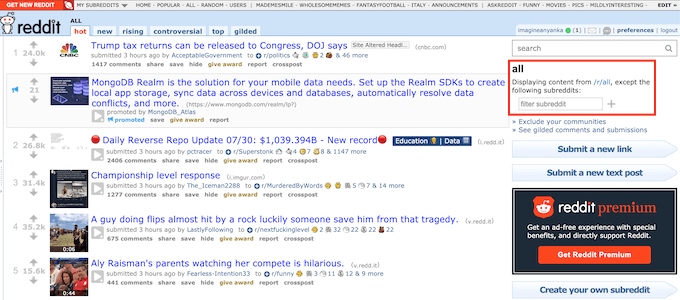
- On the right side of the screen, just below the search bar, find the filtering menu. Enter the names of the subreddits that you don’t want to be displayed in your r/all list and select the plus icon to confirm.

You can now see the names of the blocked subreddits in the list on the right side of your screen. That means that all the content from them is now filtered out from your r/all page.
How to Block Subreddits From Your r/all List
If you’re new to Reddit or prefer using the new version of Reddit, you probably noticed that blocking subreddits from your r/all list isn’t that easy. Even if you log into your account on the Old Reddit site and block certain subreddits, the new Reddit will still display them in your r/all list.
So what can you do if you want to get rid of content upvoted by other Redditors? To remove a particular subreddit from the r/all feed, you need to spam vote it. However, this will require thousands of spam votes before the subreddit will be removed.
The two alternative options are upgrading your account to Reddit Premium or using a third-party tool.
Block Subreddits with Reddit Premium
If you prefer only using the native Reddit apps and site, the best method to get rid of unwanted content for you is to upgrade to Reddit Premium. Even though this option is a little pricey (starting at $5.99 per month), the premium membership gives you plenty of benefits.
To upgrade your Reddit membership to premium, follow the steps below.
- Open Reddit and log into your account.
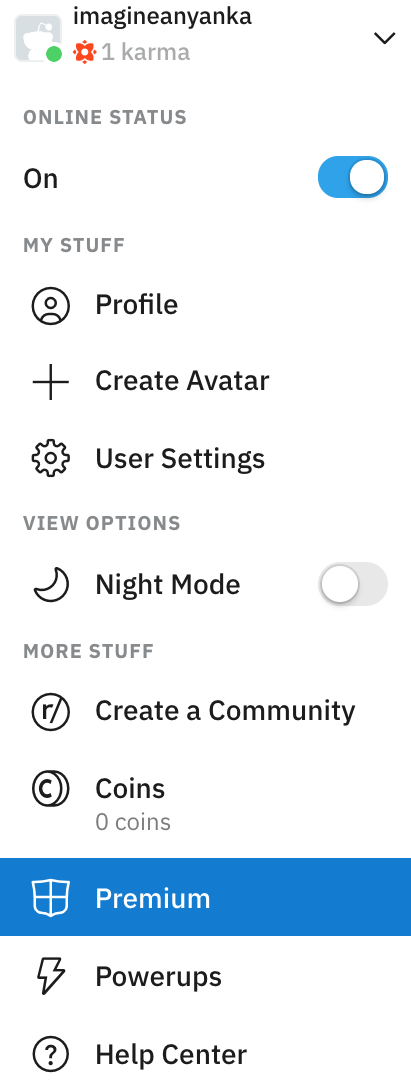
- In the upper-right corner of the screen, select the down-arrow next to your username.
- Select Premium.
- Select the right plan for you: $49.99 per year or $5.99 per month and proceed to the payment options. The steps are the same for both browser and mobile versions of the app.
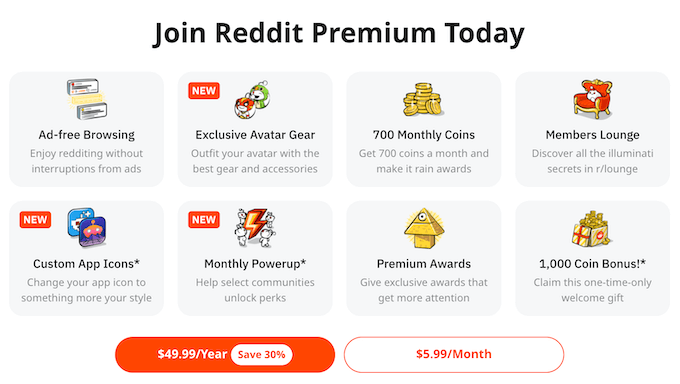
Aside from the ability to filter your r/all feed, it allows you to start using Reddit Gold – a special Reddit currency that enables you to interact with other users’ content. You also get ad-free browsing and other perks that true Redditors will value. Once you’ve joined Premium, the blocking process is pretty much the same as in the old version of Reddit, only with updated features.
Use Reddit Enhancement Suite to Block Subreddits from Your r/all Feed
If you’re not ready to pay for the premium subscription, you can install a third-party application that will enable you to get control over what’s shown in your r/all feed.
One of the best third-party tools for Reddit is a browser extension called Reddit Enhancement Suite. It’s compatible with several browsers, including Chrome, Safari, Microsoft Edge, and Mozilla Firefox.
To use Reddit Enhancement Suite to remove unwanted subreddits from your r/all list, follow the steps below.
- Download and install the extension to the browser that you use to browse Reddit.
- Open Reddit in your browser and sign in to your account.
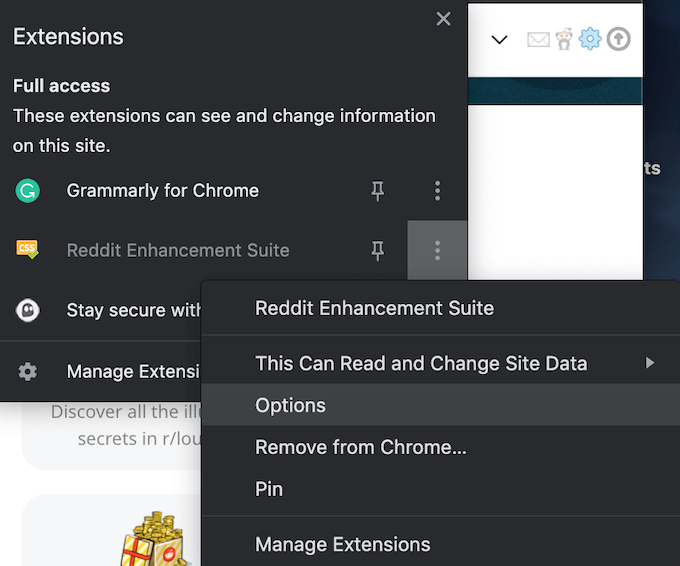
- In your browser’s Extensions menu, find Reddit Enhancement Suite. Open the extension’s menu (in Chrome – by selecting three vertical dots next to it) and select Options. This will take you to the Reddit Enhancement Suite page.
- On the Reddit Enhancement Suite page, select Subreddits > filteReddit from the sidebar on the left.
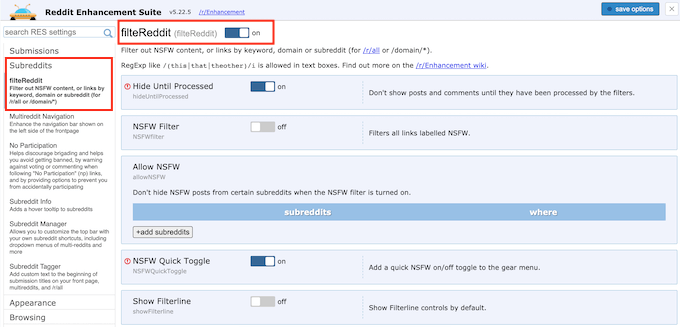
- Toggle the filteReddit switch On.
On the same page, you’ll find your regular subreddits filter, similar to the one used on the Old Reddit. You can use it to hide specific subreddits from your r/all feed. Aside from that, you can customize your settings to hide subreddits and comments from particular users, switch on the NSFW filter, hide posts with certain keywords, and more.
Take Control of What’s in Your r/all Feed
Let’s summarize. If you don’t like Reddit claiming the r/all feed and controlling what you get to see there, you have three main options to reclaim it back.
- Use the old version of Reddit.
- With the new Reddit, you can either buy a premium subscription or use a third-party tool that will allow you to filter out content.
- Alternatively, you can ditch Reddit and switch to a similar app.
Have you blocked any subreddits from your r/all list before? What method did you use to do it? Share your experience with managing your r/all feed in the comments section below.