
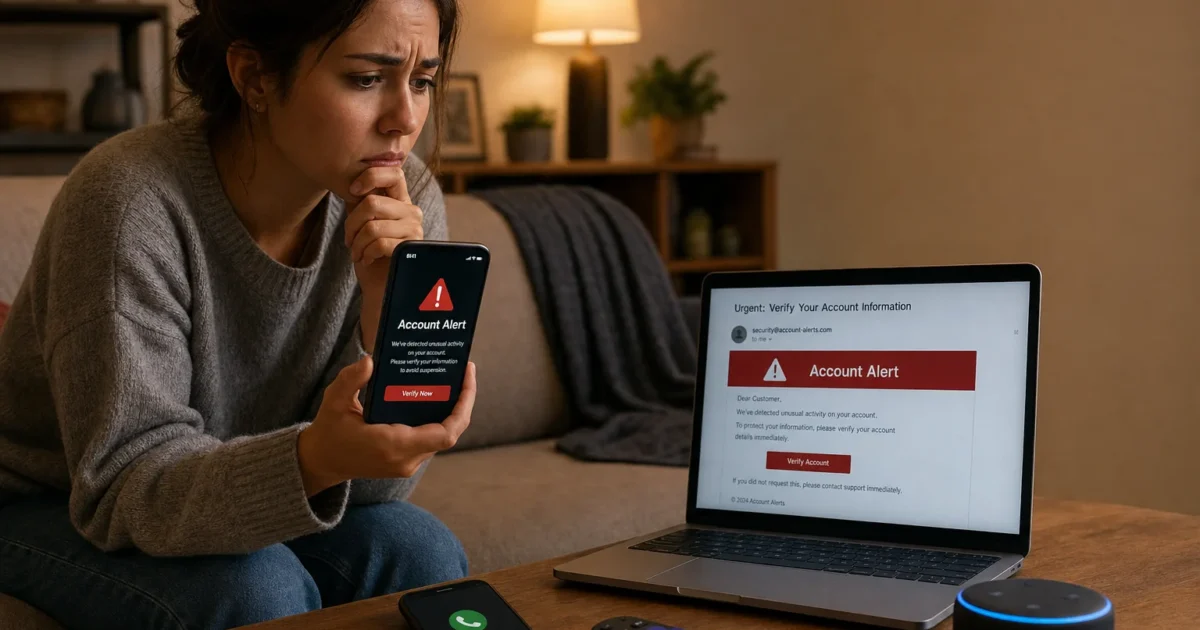
You’re browsing Amazon, minding your own business, when a text pops up warning you about a suspicious charge on your account. Or maybe you get an email saying your payment couldn’t be processed. Or a phone call from “Amazon support” about a product recall. It all looks and sounds completely legit, and that’s exactly the problem.
Amazon impersonation scams have exploded in sophistication since 2021, and in 2026 they’re more convincing than ever. Scammers are using AI-generated messages, fake recall alerts, and spoofed phone numbers to trick even careful shoppers. The good news? Once you know what to look for, these scams are a lot easier to dodge. This guide covers the most common Amazon scams right now, how to verify whether something is real, how to lock down your account, and what to do if you’ve already clicked something you shouldn’t have.

The Most Common Amazon Scams in 2026
Scammers tend to recycle the same tricks. They just keep getting better at disguising them. Here are the ones you’re most likely to run into right now.
Fake Order and Account Problem Alerts
This is the number one scam vector in 2026. You get an email, text, or robocall claiming there’s a problem with your Amazon order or account, maybe a suspicious purchase was flagged, your payment failed, or your account is about to be suspended. The message creates a sense of urgency and asks you to click a link or call a number immediately.
Don’t do either. Amazon reports that “order and account issues” are the most common pretext scammers use, and email is the top delivery method. The red flags to watch for:
- Generic greeting like “Dear Customer” instead of your name
- A link that doesn’t go to amazon.com (hover over it first)
- Pressure to act immediately or your account will be locked
- A phone number to call that isn’t Amazon’s official support number
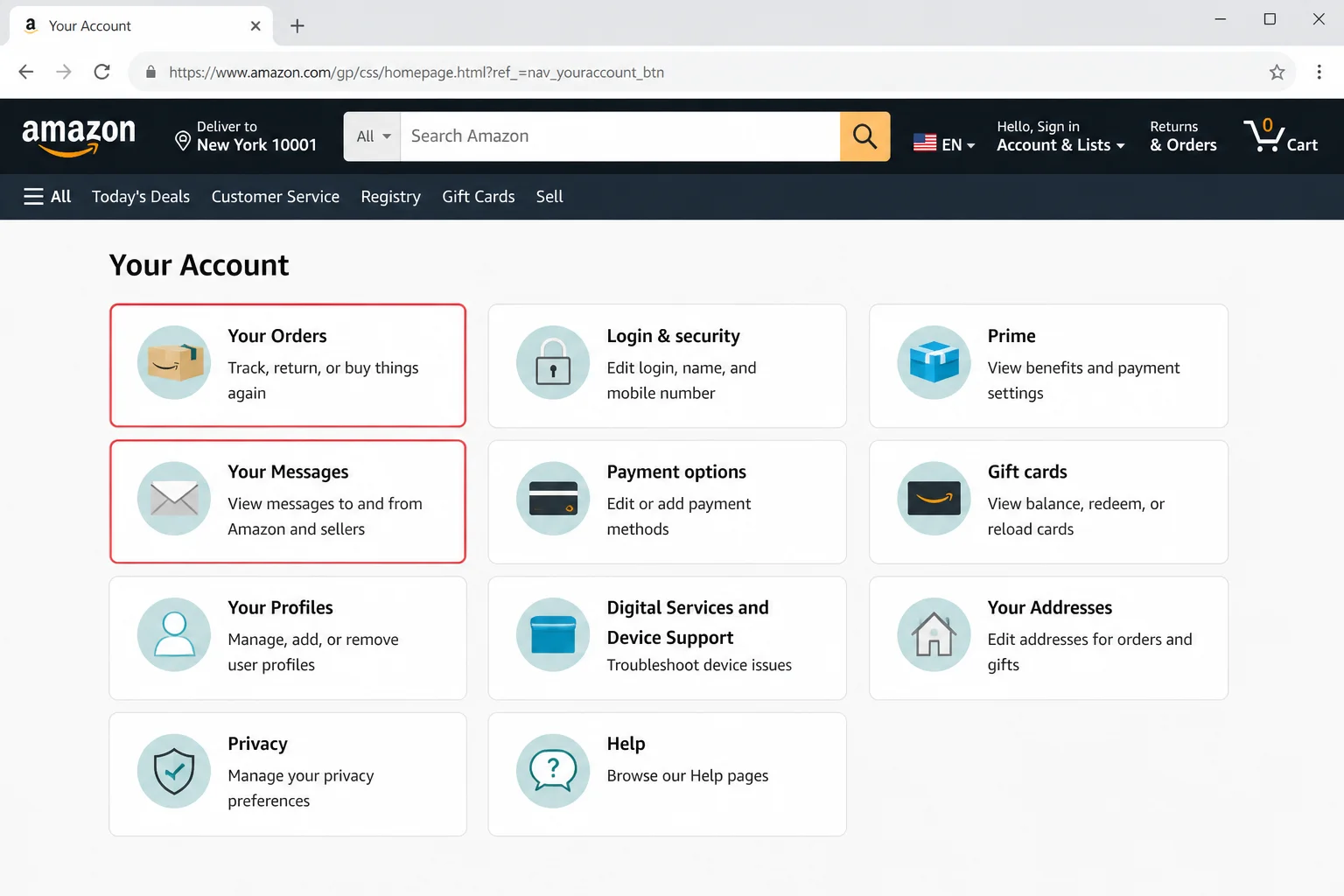
What to do instead: Open Amazon directly, type amazon.com into your browser yourself or open the official app, and check your Orders and Message Center. If there’s a real problem, it’ll show up there.
Fake Product Recall Alerts
This one is newer and particularly nasty. You get a text or email saying a product you purchased has been recalled and you need to click a link to claim your refund or submit your information. The message often looks shockingly official, complete with Amazon branding and a realistic-sounding product name.
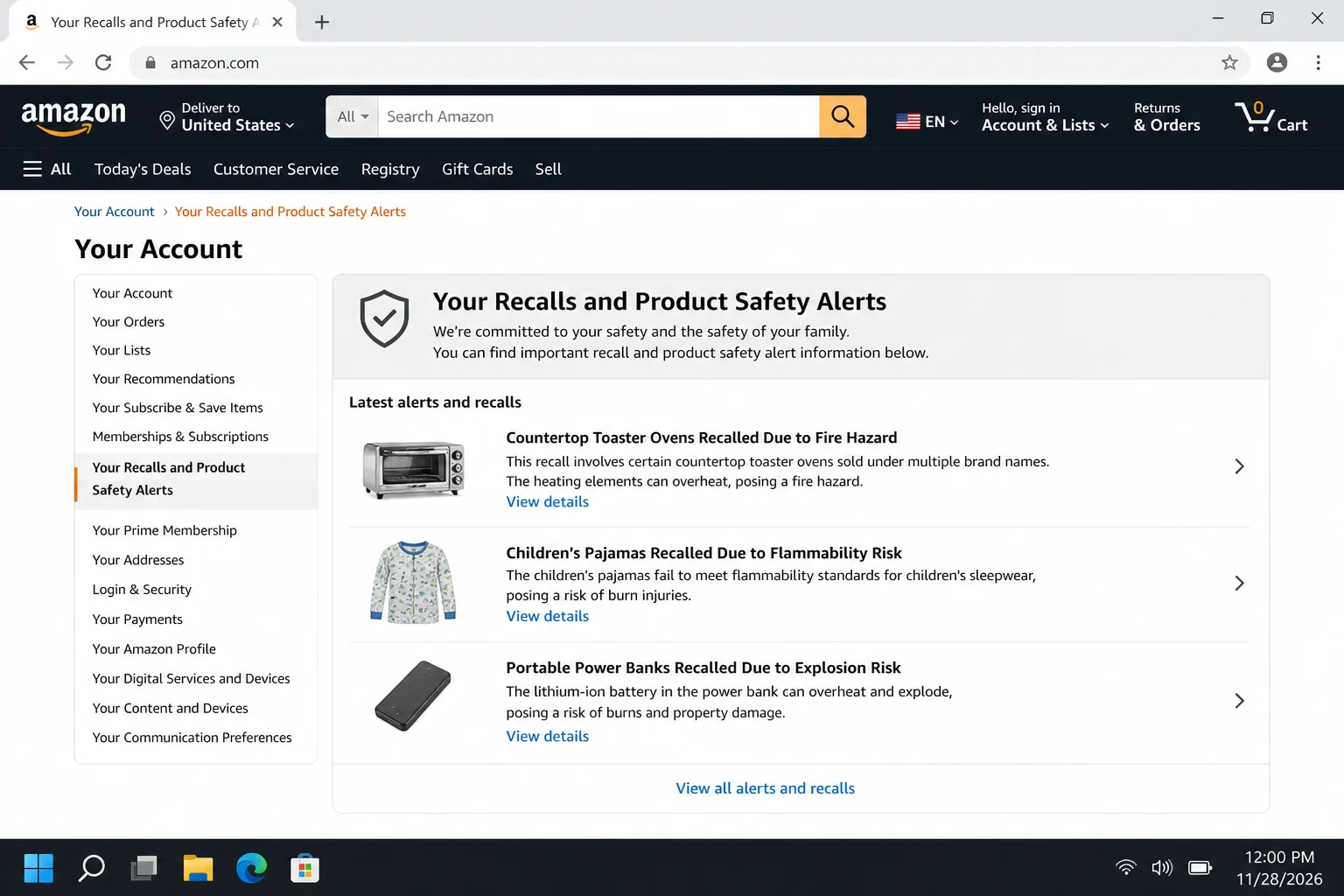
Here’s the thing: Amazon has an actual page for legitimate recalls. It’s called Your Recalls and Product Safety Alerts, and it lives inside your Amazon account. If there’s a real recall on something you bought, it will show up there, not in a random text from an unknown number.
What to do instead: Log into your Amazon account, go to Accounts & Lists → Account, and look for Your Recalls and Product Safety Alerts. That’s the only place you need to check.
The “Suspicious Purchase” Phone Call
Your phone rings. It’s “Amazon” calling to tell you there’s a suspicious charge on your account, maybe a $1,200 MacBook or a TV you definitely didn’t order. They say they can help you dispute it, but they need you to download a remote access app or verify your identity by reading them a code.
Hang up. Amazon will never call you out of the blue and ask you to install software or read out verification codes. This scam is designed to either give scammers remote control of your computer or trick you into transferring money. The FTC has documented cases where victims were walked through wire transfers, Zelle payments, or gift card purchases while the scammer stayed on the line the whole time.
Real Amazon support does not:
- Ask you to download remote access tools like AnyDesk or TeamViewer
- Request payment via gift cards, Zelle, Venmo, crypto, or wire transfer
- Ask you to read out one-time verification codes
- Call you unsolicited about a suspicious charge
Fake Refund and “You Were Overcharged” Scams
You get an email saying Amazon overcharged you and you’re owed a refund. Just click the link to claim it. Or maybe it says a refund is pending and you need to verify your bank details. These messages are often built with AI tools and look almost identical to real Amazon emails.
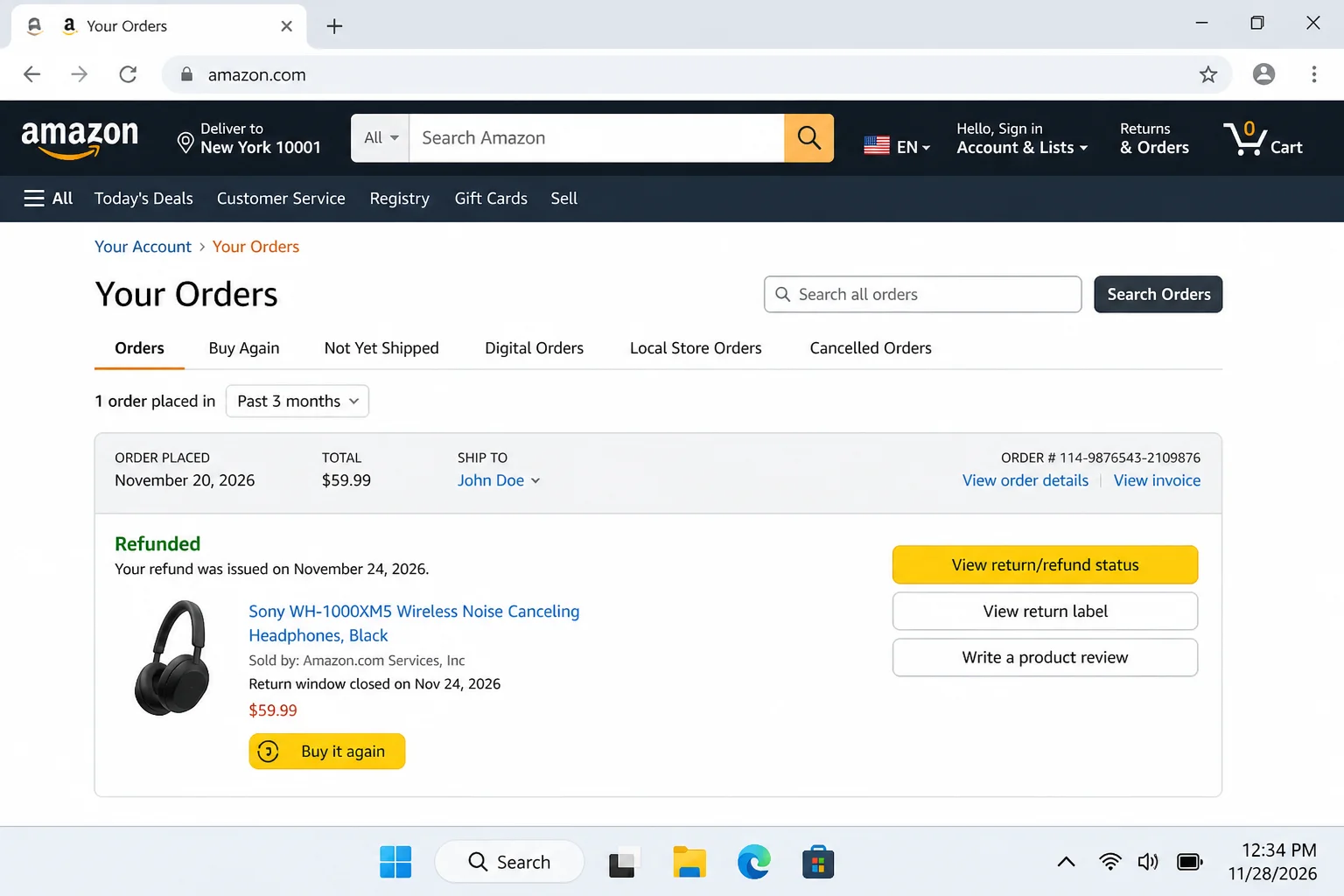
Legitimate Amazon refunds show up automatically in your account. You’ll see them under Your Orders or in your payment method balance. Amazon will never ask you to click a link in an email to “claim” a refund or verify your banking information.
Sellers Asking You to Pay Outside Amazon
A seller messages you offering a better price if you pay them directly via Zelle, Venmo, bank transfer, or gift card. Maybe they say Amazon’s fees make it impossible to give you the deal otherwise. It sounds reasonable. It’s not.
The moment you pay outside of Amazon, you lose every buyer protection the platform offers. There’s no A-to-z Guarantee, no dispute process, no recourse. And in almost every case, you’ll either receive nothing or get a counterfeit product. This is a scam, full stop.
Too-Good-to-Be-True Listings and Fake Reviews
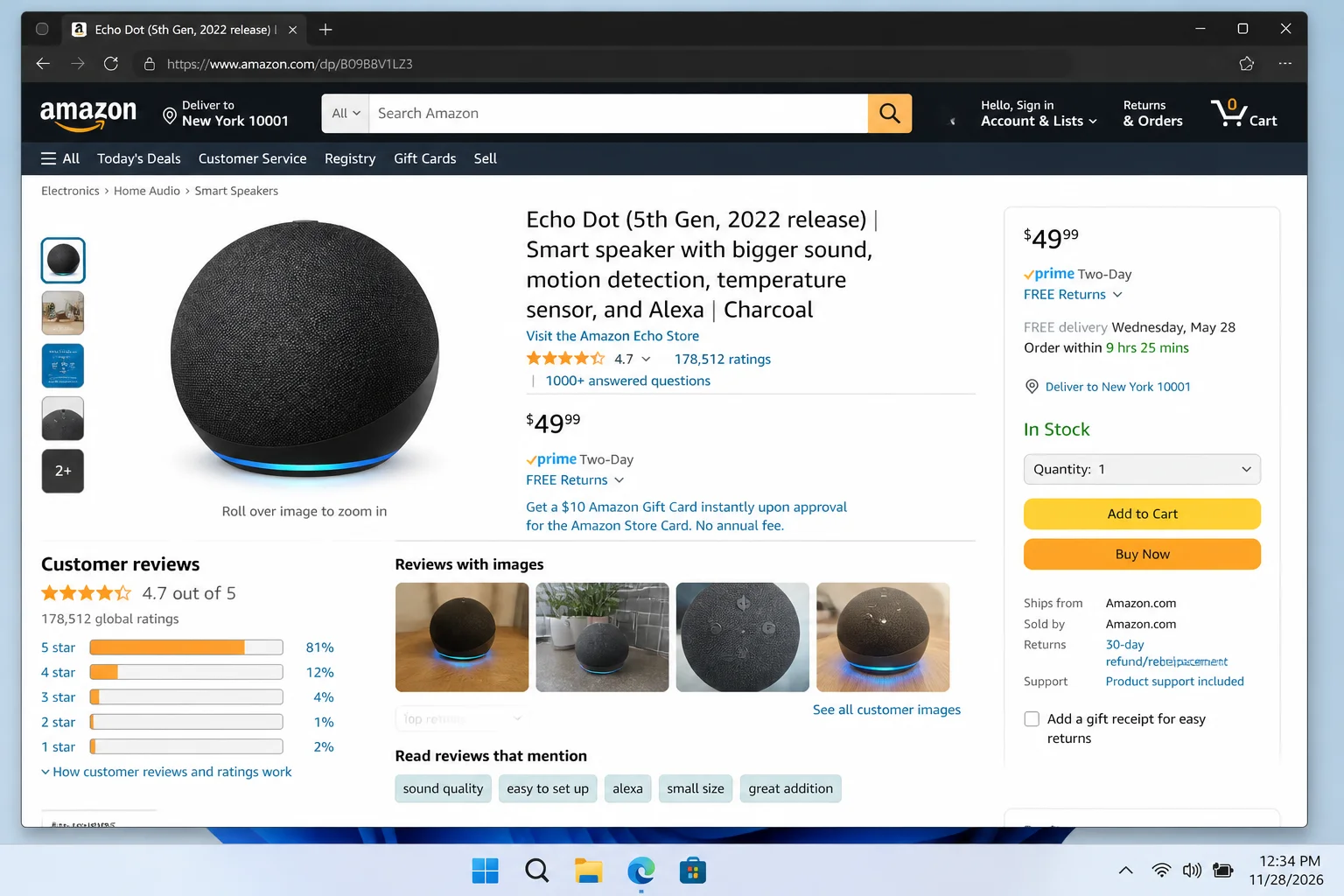
You know the saying: if it looks too good to be true, it probably is. A PlayStation 5 for $49. A brand-new iPhone for $75. These listings are designed to trigger an impulse buy before your brain catches up. Look closely at the product images and branding. You’ll often spot subtle misspellings or off-brand logos if you take a second to actually look.
The flip side is fake reviews. Entire operations exist just to flood Amazon listings with five-star reviews. Watch out for:
- Products with hundreds of glowing reviews but only a few weeks of seller history
- Reviews that sound vague, generic, or weirdly similar to each other
- A sudden spike in five-star reviews with no critical feedback at all
- AI-generated review language that’s suspiciously polished but says nothing specific
New Sellers With No Track Record
Amazon does a decent job of banning scam accounts once they rack up bad reviews, so scammers just keep creating new ones. A brand-new seller account with no reviews and no history is a yellow flag, especially if the price is unusually low or the shipping time is suspiciously long (more than two weeks is a red flag).
When in doubt, stick with sellers who have a solid review history and look for listings that are Sold by Amazon or Fulfilled by Amazon. It’s not a guarantee, but it’s a much safer bet.
How to Verify Whether an Amazon Message Is Real
The golden rule here is simple: never verify through the message itself. Always go to Amazon directly and check from inside your account. Here’s exactly how to do that.
Step 1: Don’t Click Anything in the Message
Whether it’s an email, text, or call, don’t click links, don’t call numbers listed in the message, and don’t download anything. Even hovering over a link to check it can sometimes be risky on mobile.
Step 2: Go to Amazon Directly
Open a new browser tab and type amazon.com yourself, or open the official Amazon app on your phone. Sign in as normal.
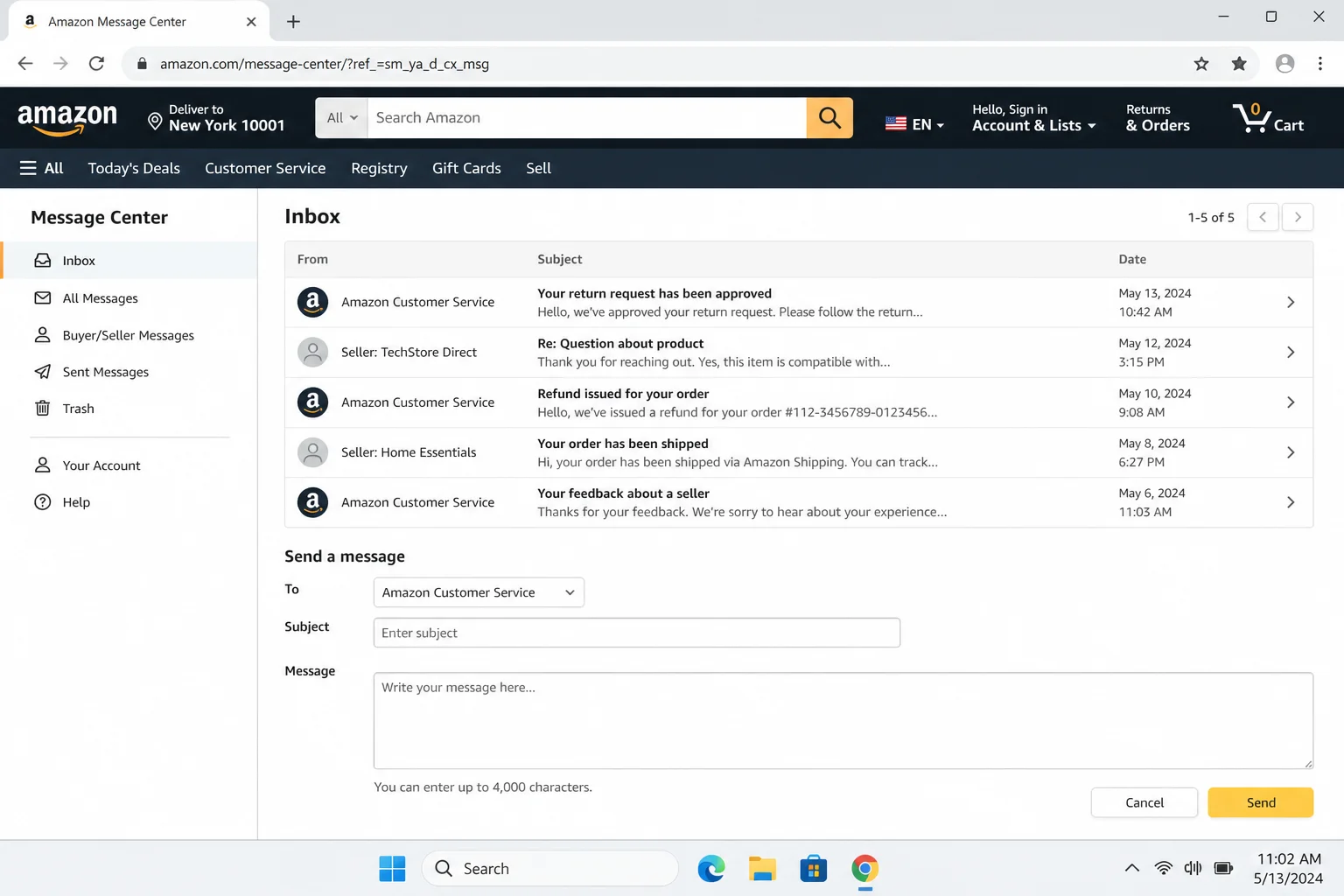
Step 3: Check Your Orders and Message Center
Once you’re logged in:
- Go to Accounts & Lists → Your Orders to see if there’s any order, refund, or dispute activity that matches the message you received.
- Go to Accounts & Lists → Account → Message Center (sometimes listed under “Communication and content”) to view any legitimate messages Amazon has actually sent you through its system.
- If the message mentioned a product recall, go to Your Recalls and Product Safety Alerts in your account. Real recalls show up there.
Step 4: If You’re Still Unsure, Contact Amazon Directly
Go to Amazon’s official Help page from inside your account and start a chat or call from there, not from any number or link in the suspicious message. That way you know you’re actually talking to Amazon.
How to Lock Down Your Amazon Account
Even if you never fall for a scam, it’s worth making your account harder to break into. In 2026, Amazon supports two-step verification (2FA) and passkeys, and you should be using at least one of them.
Two-step verification means that even if someone gets your password, they still need a second code (sent to your phone or generated by an authenticator app) to get in. Passkeys go even further. They let you log in using Face ID, Touch ID, Windows Hello, or your device PIN instead of a password, which makes traditional phishing attacks basically useless.
How to Turn On Two-Step Verification
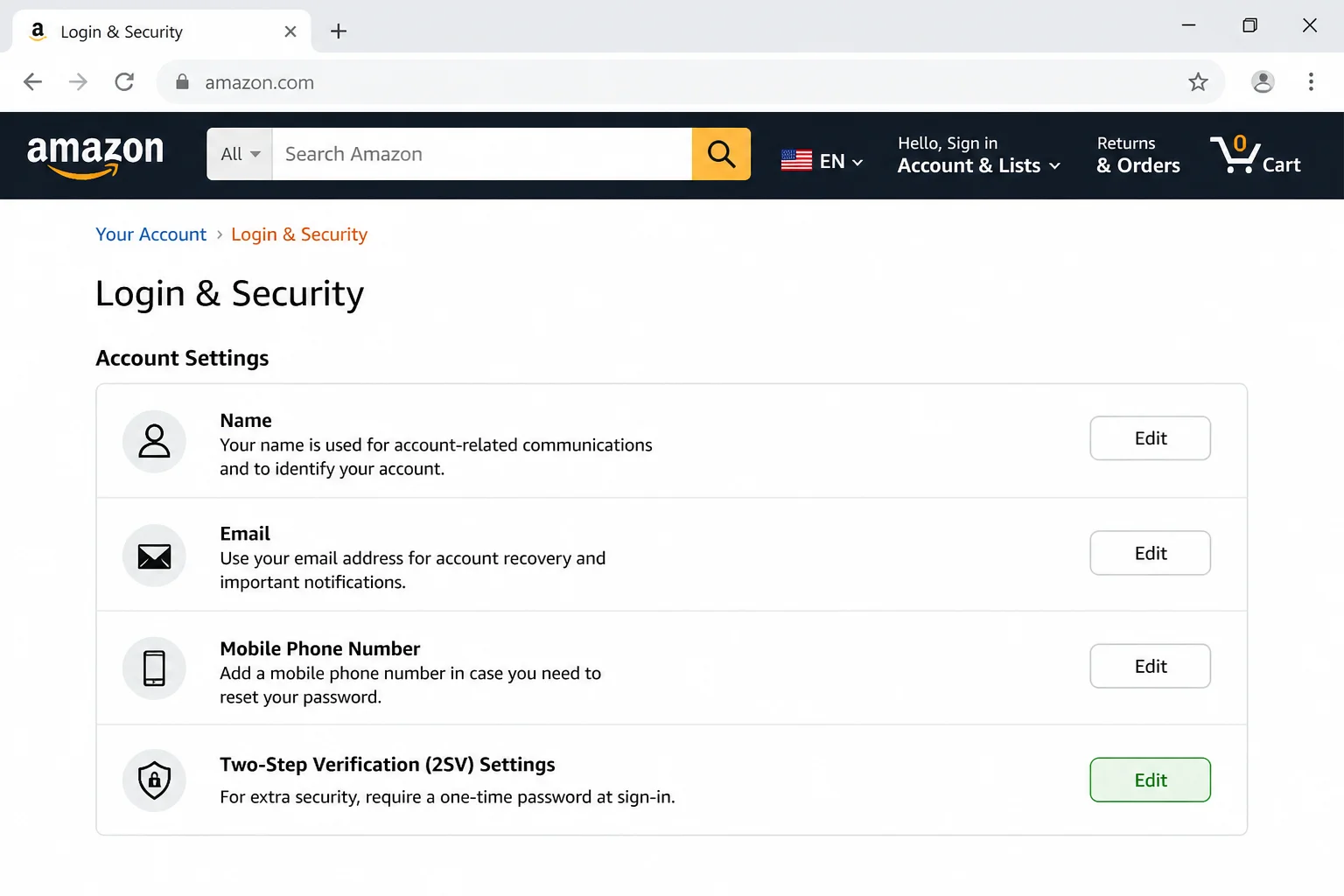
- Sign in to Amazon and go to Accounts & Lists → Account.
- Click Login & security.
- Under Two-Step Verification (2SV), click Edit or Get Started.
- Add your phone number or an authenticator app (like Google Authenticator or Authy) and follow the prompts to complete setup.
How to Set Up a Passkey
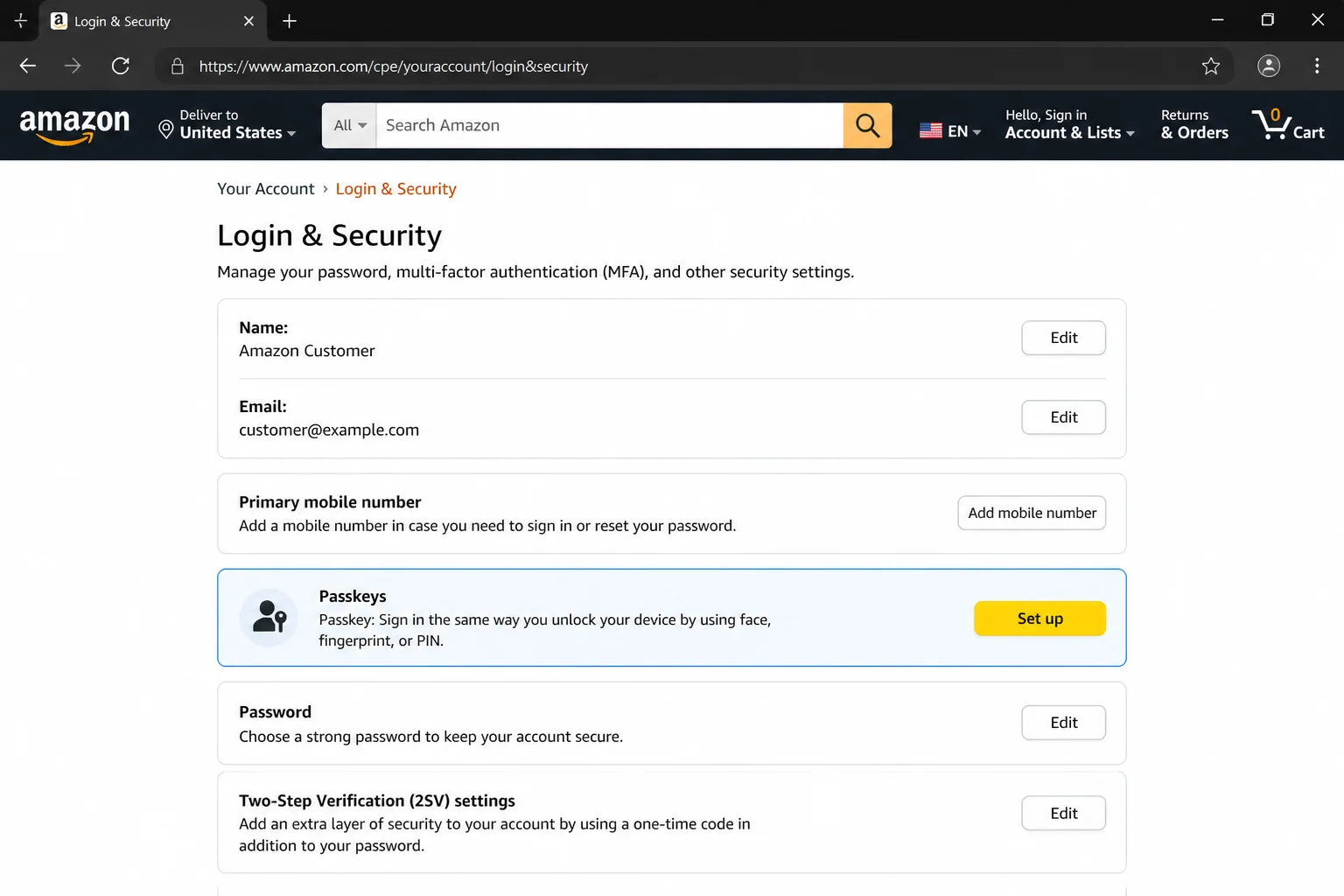
- Go to Accounts & Lists → Account → Login & security.
- Look for the Passkeys section and click Set up.
- Follow the prompts to register a passkey using Face ID, Touch ID, Windows Hello, or your device PIN.
- Once set up, you can sign in to Amazon using your passkey instead of typing a password, which means even a convincing phishing site can’t steal your credentials.
Also make sure your Amazon password is strong and unique. Don’t reuse it from another site. A password manager like Bitwarden or 1Password makes this easy to manage.
What to Do If You’ve Already Fallen for a Scam
It happens to careful people too. If you clicked a link, gave out information, or sent money, here’s what to do right now. Don’t wait.
If You Clicked a Suspicious Link or Entered Your Password
- Change your Amazon password immediately. Go to Login & security and update it.
- Turn on two-step verification or set up a passkey if you haven’t already (steps above).
- Go to Your Orders and check for any purchases you didn’t make.
- Go to Account → Payment options and look for any cards or bank accounts you don’t recognize.
- Check Login & security for any unusual recent account activity.
If You Sent Money or Shared Financial Information
- Call your bank or credit card issuer immediately and explain what happened. Ask them to flag your account for fraud and reverse any unauthorized charges if possible.
- If you sent money via gift cards, Zelle, Venmo, or wire transfer, contact those services directly. Recovery isn’t always possible, but acting fast helps.
- If you downloaded any software or gave someone remote access to your computer, run a full security scan with your antivirus software and consider contacting a tech professional.
How to Report the Scam to Amazon
Reporting helps Amazon track down bad actors and protect other shoppers. Here’s how:
- Suspicious emails: Forward them to Amazon’s security team. You can find the correct address on Amazon’s official security help pages. Don’t just reply to the scam email.
- Suspicious texts: Use your phone’s built-in “Report Junk” or “Report Spam” feature (available on both iOS and Android).
- Suspicious sellers or listings: Use the “Report” option on the product listing page.
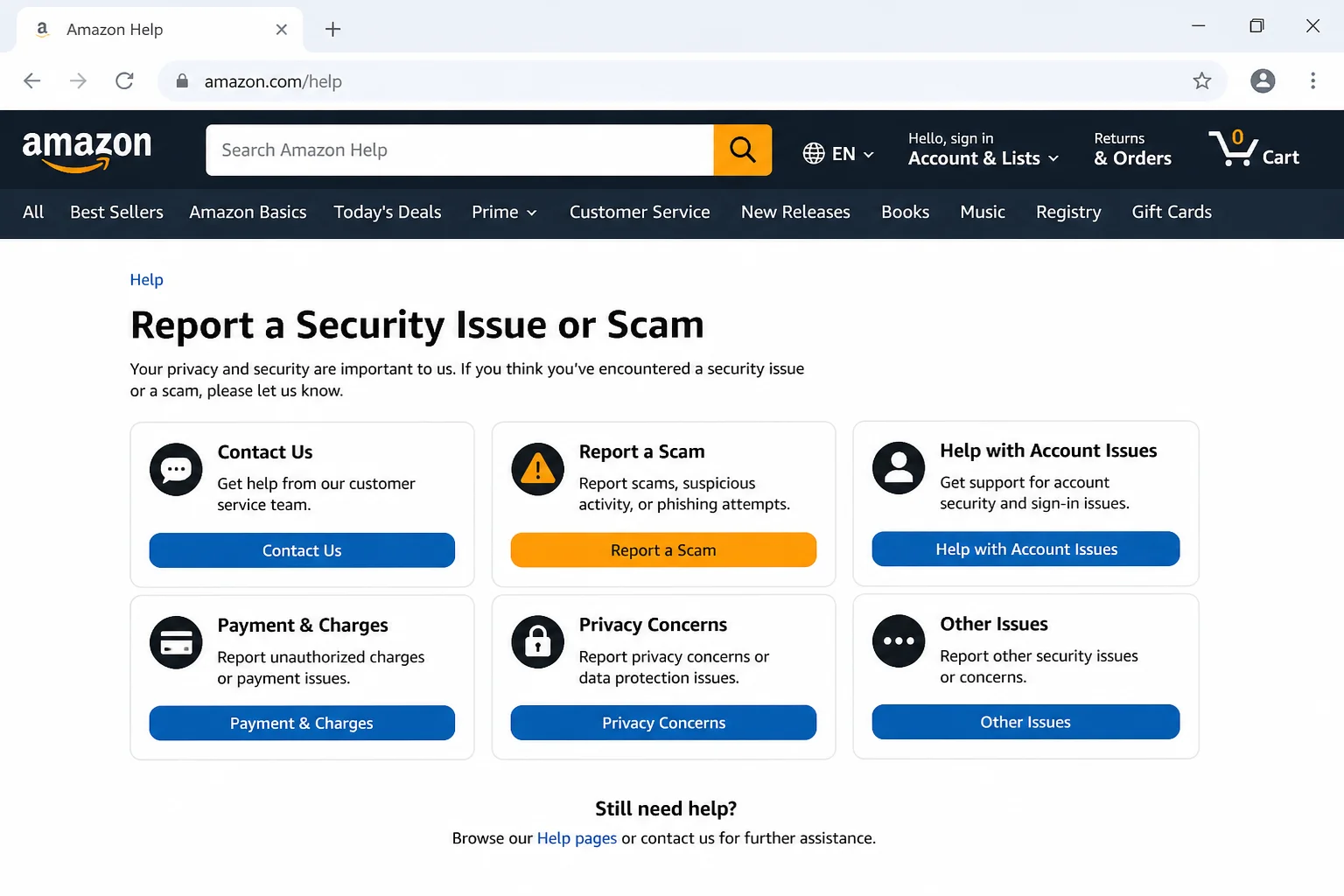
- General scam reports: Use Amazon’s Report a Security Issue page.
Tips and Troubleshooting
Quick Red Flag Checklist
When you get any message claiming to be from Amazon, run through this list before doing anything:
- Generic greeting? “Dear Customer” instead of your name is a red flag.
- Urgency or threats? “Act now or your account will be suspended” is a pressure tactic.
- Suspicious link? Hover over it (on desktop). If it doesn’t go to amazon.com, don’t click it.
- Asking for payment outside Amazon? Always a scam.
- Asking for gift cards, crypto, or wire transfer? Always a scam.
- Asking you to download software? Always a scam.
- Can’t find the issue inside your Amazon account? Then it probably doesn’t exist.
Pro Tips
- Use an authenticator app instead of SMS for 2FA. Text message codes can be intercepted through SIM-swapping attacks. An app like Google Authenticator or Authy is more secure.
- Your browser can help spot fakes. Modern browsers like Chrome, Edge, and Safari have built-in warnings for known phishing sites. Also, your browser’s autofill usually won’t trigger on a brand-new fake domain. If it doesn’t autofill your Amazon login, that’s a hint something’s off.
- Check the Message Center regularly. Legitimate messages from Amazon go through the Message Center in your account. If a message isn’t there, it didn’t come from Amazon.
- Don’t trust caller ID. Scammers can spoof phone numbers to make calls look like they’re coming from Amazon. If you get an unexpected call from “Amazon,” hang up and call back using the number on Amazon’s official website.
Wrapping Up
Amazon scams in 2026 are more convincing than ever, but they all rely on the same trick: making you act fast without thinking. The moment you slow down, go to Amazon directly, and check your actual account, most of these scams fall apart completely. Set up two-step verification or a passkey today if you haven’t already. It takes five minutes and makes your account dramatically harder to compromise.
If you’re shopping online more broadly, the same principles apply everywhere: verify through the official source, never through the message itself, and treat urgency as a red flag rather than a reason to act fast.