How to recover or restore a missing Recycle Bin icon in Windows Vista
Posted on December 25, 2007 at 6:19 am
Doing some spring cleaning on your computer and accidentally delete the Recycle Bin icon in Windows Vista? If your Recycle Bin icon is missing in Windows Vista, there’s a simple way you can get it back without having to edit the registry, etc as you might have read somewhere else. Unfortunately, it’s not the same method you would recover the Recycle Bin icon in Windows XP, so that’s why I get asked this question so much!
So without further ado, here’s how you would get your Recycle Bin icon back in Windows Vista if you deleted it or removed it by accident.
First, right-click on the Desktop and select Personalize. In the dialog box on the right hand side, there should be an option called Change desktop icons.
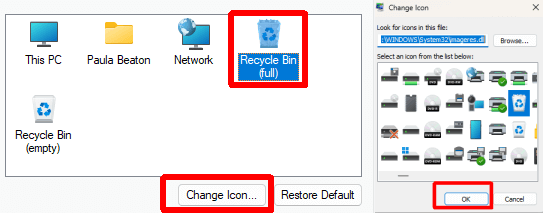
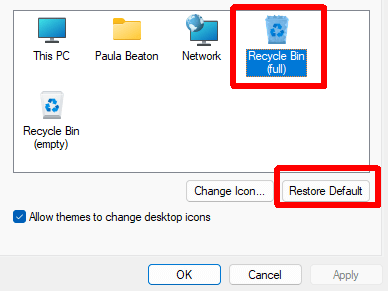
On the Change desktop icons dialog box, go ahead and check the Recycle Bin box to add that back to your desktop. You’ll notice that there is a Full Recycle Bin and Empty Recycle Bin icon.
If you click Apply, your icon should now be back on the desktop. However, there may be an issue for some people in which the Recycle Bin continually shows full or empty and does not change depending on if something is added or removed from the trash. It’s almost like Windows Vista gets confused and simply uses one icon instead of switching back and forth.
If you have this problem where the recycle bin icon does not change to reflect “full” and “empty” then you need to first check off Recycle Bin icon like shown above. Then go ahead and left click on the Recycle Bin full icon and click Change Icon. Select the highlighted icon which should be the full Recycle Bin icon. Do the same thing with the empty Recycle Bin icon and go ahead and click Apply.
The Recycle Bin icon should now be on your desktop and should automatically update based on whether there is data in the trash or not. Hopefully this helps out someone who has accidentally removed their Recycle Bin icon from their Vista desktop! Enjoy!
Technorati Tags: recover recycle bin icon, restore recycle bin, deleted recycle bin, vista recycle bin, recycle bin icons, find recycle bin, deleted recycle bin vista
If you enjoyed this post, make sure you subscribe to my RSS feed!
» Filed Under Windows Vista
Related Posts
- How to save your desktop icon layout in Windows XP
- How to change file icons in Windows
- How to recover the volume or sound icon to your Windows taskbar
- How to Recover Accidentally Deleted Files
- How to recover deleted, corrupted, or formatted pictures for free


I had deleted my recycle bin and you have helped me to recover it! I thought I was going to have to have a “shortcut” recycle bin forever!!! Thanks!
This is an excellent article. I had almost the same problem with Rhonda, but my problem was missing computer icon on the desktop. I’ve been spent a lot of time to recover my computer icon on the desktop. Now I can restore my computer icon. Thanks alot!
Thank you so much for posting this! I couldn’t believe I deleted the bin in the fist place, then I couldn’t figure out how to restore it! Your page was easy to follow and now I have my recycle bin back!!!!! Thanks alot!
Thank you so much- not only is this my first time using Vista, my OS is in Japanese!! So I couldn’t risk searching around for my icon and accidentally screwing up my system!!
thanx a million i had the same problem with rhonda bt within minutes i had restored my recycle bin
Thanx You so much i got my recycle bin back finally after a couple of weeks of trying to figure out how to get it back i asked all my teachers in school and no one knew then im like maybe i should search the net and i did and found ur website..Thanx a bunch
I have the same problem above .. but I solve it accourding to this wonderful methode .. I appreciate for you .
Thanks for this. Much appreciated.
OMG. Thanks i was going crazy. Not being able to find a methid to recover my recycle bin. Thanks alot agian!
thanks now my recycle bin is in my desktop.before that i almost faintad
Thank you, you saved me!!!
B-
You’re a life saver! Thanks a lot, I was banging my head against the wall and even that wasn’t helping!
Thank you for your quick and easy fix!
Phew!! Thanks Computer Guy
when i tried to clean up my system, suddenly recycle bin icon was missing, this article simply superb and gave a tips exactly for what i was searching.
Thanks a lot