
PDF has been everyone’s favorite file format for sharing documents. It’s mostly because it retains all the text formatting and graphics inside it, and also the end-user doesn’t really need anything to open it except for a free PDF reader software. The only downside of the PDF format is that you can’t search for text inside these files as easily as you can with other files.
However, there are a few methods that let you perform the PDF search operation so you can search for a specific word in multiple PDF files at once on your machine. The following guide teaches you how to do just that.

How To Search Multiple PDF Files Using Acrobat Reader
The most popular way to search a PDF or multiple PDF files is to use the Acrobat Reader software on your computer. Here’s how you perform the task in the software.
- Open the Acrobat Reader on your computer.
- Click on the Edit menu and select Advanced Search.
- Select All PDF Documents in and then choose your PDF folder.
- Enter your search term in the input box.
- Click on the Search button.
- Hit Allow in the prompt on your screen.
The software will search for your given term in all the PDF files in your specified folder. You’ll see the results right in the search pane.
Related: Need more Acrobat goodness? Check out our guide on how to change highlight colors Adobe Acrobat/Reader.
Searching For A Specific Search Term In Multiple PDF Files
Most PDF readers let you search for any text you want in your PDF files. It’s because PDFs are scannable documents, and like Microsoft Word files, their characters are also recognizable by your system.
What you can’t do easily with your PDF files, though, is that you can’t search for a specific term in multiple files at once. Pressing the Control + F key only searches the current document that’s open in the software but it doesn’t search any other PDF files.

If you have a lot of PDF files lying around and you’re looking for something specific in them, your best option is to use the advanced search feature of Acrobat Reader. It lets you look for your specific search terms in all the PDF files available in a single location on your computer.
Here’s the entire procedure to do so with Acrobat Reader:
Download and install Acrobat Reader if you don’t already have it on your computer.
Launch the software and you’ll see your recent files list. The option you’re looking for is located in the Edit menu. Click on the Edit menu at the top and select the option that says Advanced Search. Alternatively, you can press Shift + Ctrl + F.
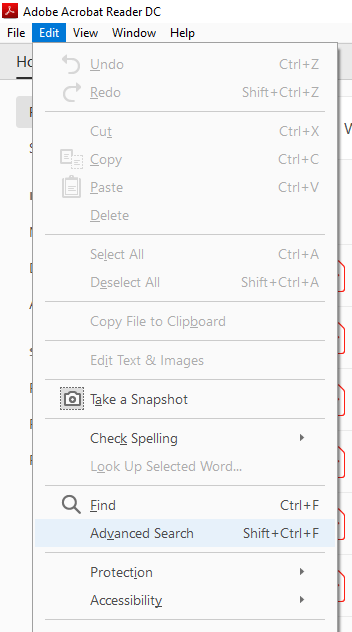
On the following screen, set the options as the following:
Where would you like to search? – select All PDF Documents in and then use the dropdown menu to select the folder where your multiple PDFs are saved.
What word or phrase would you like to search for? – enter the word you want to search for in your PDF files.
You can use the additional options to customize how your word is searched, such as tick-marking the Case-Sensitive checkbox so your search query is case-sensitive, and so on.
Finally, click on the Search button to begin searching.
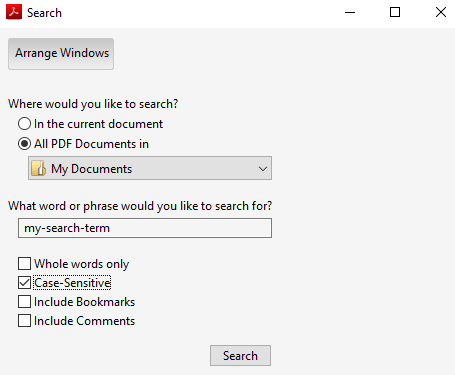
You can then review the results when they appear on your screen.
Using Windows Search To Search Inside PDF Files
PDF files can also be searched using the default Windows search option on your Windows machine. You need to first enable an option though as shown below.
Head to Control Panel > Indexing Options and click on Advanced.
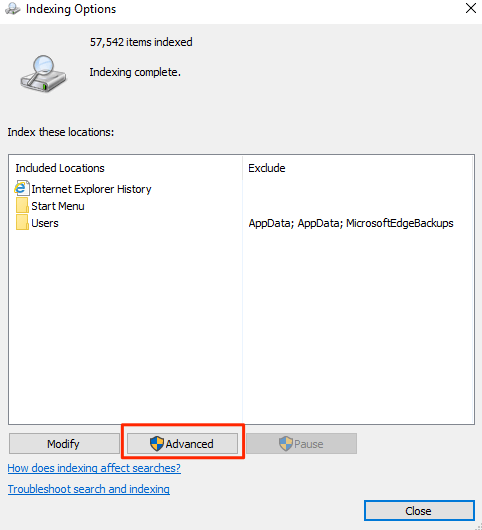
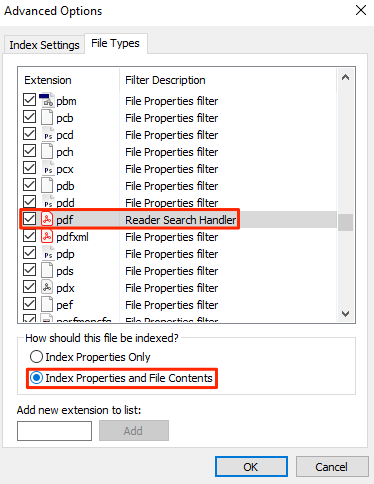
Select the File Types tab on the following screen and look for pdf in the list. Tick-mark the box for pdf. Then enable the Index Properties and File Contents option and click on OK.
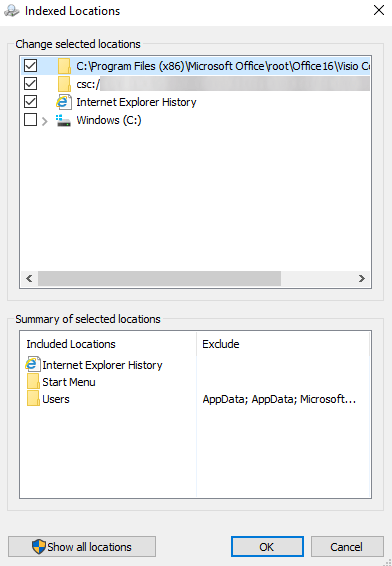
It’s time to add the PDF folders into the index list. To do so, open the same Indexing Options dialog box and click on Modify. Then choose the folder where your PDFs are and click on OK to get the folders added for PDF indexing.
Once Windows has finished indexing your PDFs and their contents, you’ll be able to search for text inside multiple PDF files at once.
Use SeekFast To Search PDF Files
SeekFast also lets you easily search for your terms in various file types including PDF. Here’s how it works.
- Download and install the software on your computer.
- Launch the software, enter in your search term into the search box at the top, click on the Browse button to select your PDF folder, and finally hit Search.
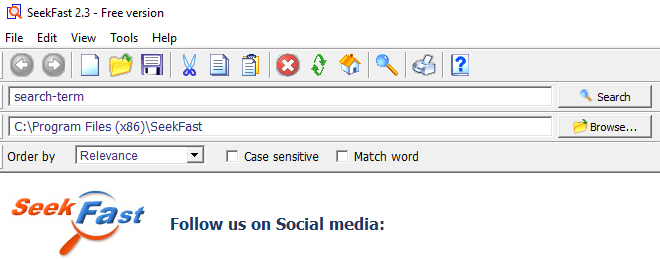
It’ll search for terms in all the PDF files located in your chosen directory.
Performing A PDF Search Using Foxit Reader
Foxit Reader also comes equipped with advanced search capabilities and you can use it to find whatever it is you want in your multiple PDF files.
Get the software installed on your computer and then launch it.
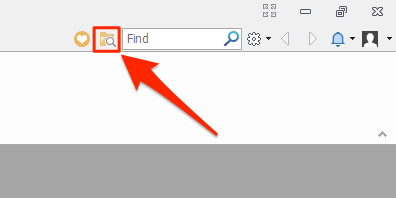
Click on the search icon next to the search box at the top-right menu. It opens advanced search options.
On the following screen, select your PDF folder from the first dropdown menu, enter in your search term in the search box, checkmark other filters if you want to apply them, and finally hit that Search button.
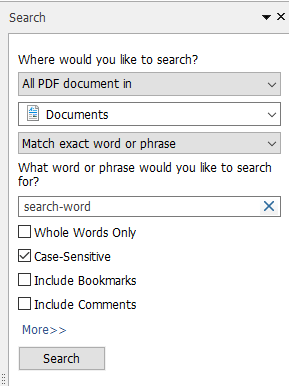
Your search results should now be on your screen.
How To Use UltraFinder To Search PDF Files
UltraFinder is an advanced search tool for Windows machines and it can be used to search for text inside your PDF files as well.
Install and launch the tool on your Windows computer.
Set the options as the following so it searches the contents of your PDF files. Then hit the green play button to start searching.
Find matches by – File contents
Find what – enter your search term here
Find where – add the directory where your PDFs are located
In files/types – *.pdf
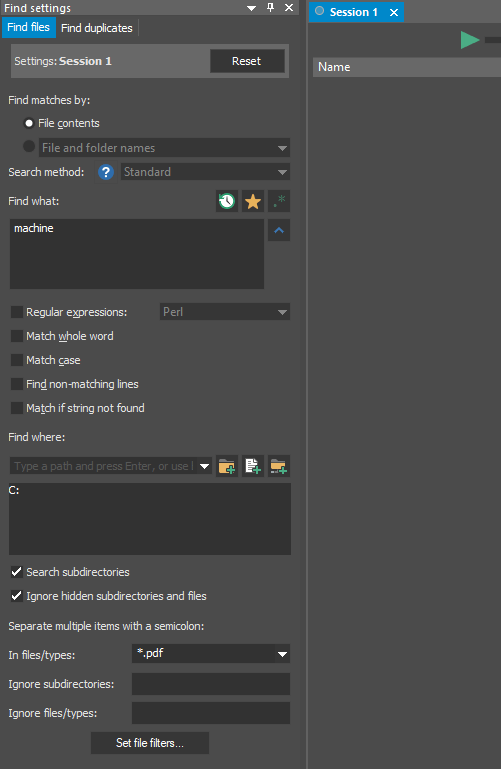
It’ll list out all the PDF files that it found your search word in.