Turn off or remove “Your computer might be at risk” in Windows XP
Posted on October 26, 2008 at 5:43 am
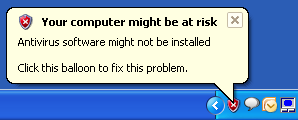
I recently reformatted my computer because it was running slow and after installing all updates and programs, I started getting that annoying message that started in Windows XP SP2, which is:
Your computer might be at risk. Antivirus software might not be installed.
It’s fine if you don’t know how to use a computer or forget to install something, but if you know what you are doing, then this nagging popup message is useless. So how can you turn off that message? Here’s how!
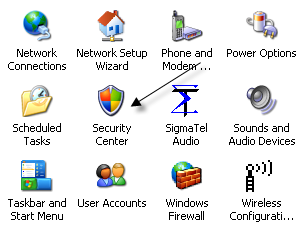
Step 1: Open the Control Panel and click on Security Center.
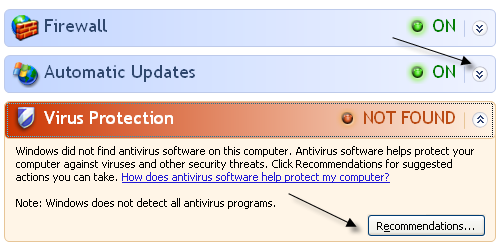
Step 2: Now on the item(s) that are in red, either Firewall, Automatic Updates, or Virus Protection, click on the double arrow that is pointing down and click on Recommendations.
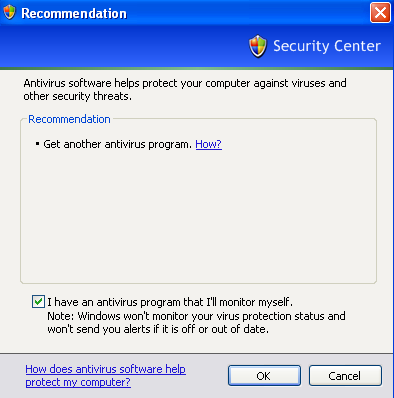
Step 3: At the bottom, click on the checkbox that says “I have an antivirus program that’ I’ll monitor myself” and then click OK.
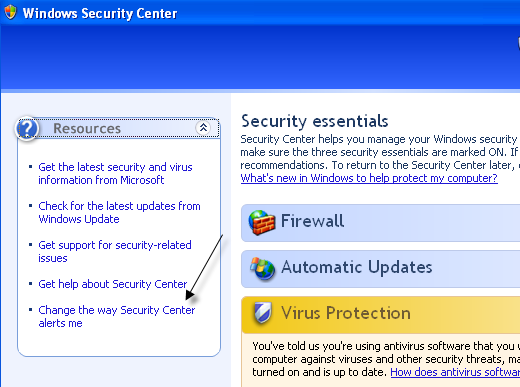
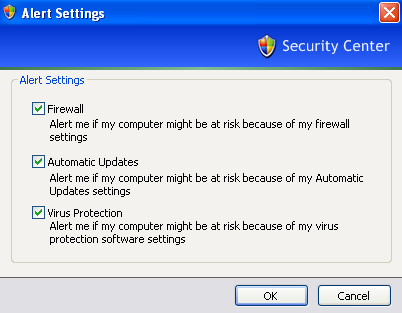
Note that you can do this for the “Firewall is not turned on” and “Automatic updates is not turned on” popup messages also. You can also simply click on the Change the way Security Center alerts me link at the left in Windows Security Center.
Now just un-check what you do not want monitored anymore and you won’t get the “Your computer might be at risk” message again!
That’s it! Pretty simple eh? Of course, you should make sure you do have some kind of anti virus program installed and a firewall also. Keeping Automatic Updates on is pretty smart too! Enjoy!
» Filed Under Windows XP
Related Posts
- How to protect your computer from viruses and spyware!
- How to turn on Automatic Updates in Windows
- Free PC/Computer Security Software for Windows Applications
- Disable restart now message after Windows automatic update message
- Tweak, disable or turn off UAC (User Account Control) in Windows Vista


Displaying notifications is all that security center does. The user might as well disable the service.
You really know xp in detail! Hats off!
Thanks a lot aseem. This was bugging me a lot
I tried to use your steps to remove the pop up ‘ your computer is infected’ BUT when i tried to click on RECOMMENDATION it sent me to the google page with the TIP that ‘antivirus 2009 is needed to up date my secutity center’. Each time I tried to used REcommendation it sent me to that google page. What do be now. Thank andrew
Andrew your computer has spyware installed on your system and it’s trying to get you to download a program.
You need to run spybot search and destroy or adaware to clean it up.
tnx
Great information, Thanks a lot, this message was really bothering me way to much…
Really… HATS OFF!!!
This is one of the most informative web sites I’ve seen yet! It’s got sooo much GREAT INFORMATION on it – I’ve set up a Favorites Folder where I can create different Files for each of the sites that either interest me or that I need for future use.
Somebody did a really good job at putting this together!
Thanks a lot!
Solved my issue! No more “your computer is at risk” messages!