How to export contacts from Outlook 2003, 2007 and Outlook Express

Posted on June 6, 2008 at 5:25 am

Want to learn how to export contacts from Outlook? I work at an office where there are three versions of Office installed on employee computers: Office 2007, Office 2003, and Office 2000! And when people switch computers, I usually end up having to export their email and their contacts to a different computer, which has a different version of Office installed.

And if you create multiple contact folders in Outlook, then you have to export each one of those individually. I’ll show you how to export contacts in these different versions of Outlook.

How to export contacts from Outlook 2003, 2007

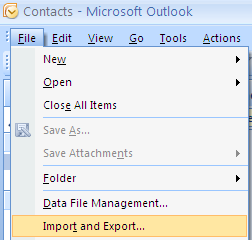
Let’s start with the latest and greatest version of Outlook, 2007! Note that the same procedure works for Outlook 2003. First open Outloo and then go to File and then Import and Export.

export contacts

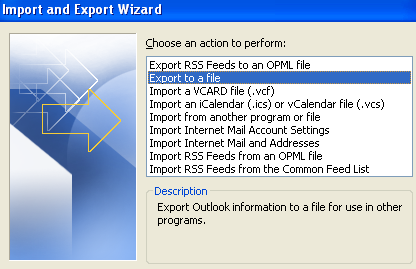
From the list, choose Export to a file and then click Next.
export to a file

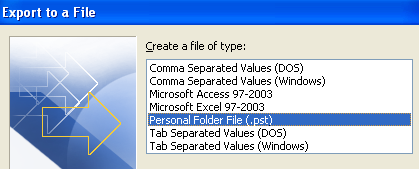
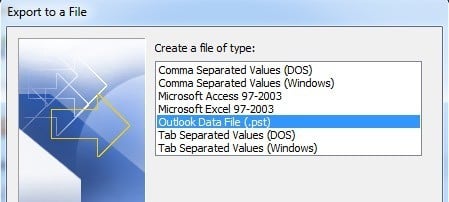
From the list, choose Person Folder file (.pst). I prefer to export it out as a PST file so that it can easily be imported into another Outlook, even of a different version.

personal folder file

Now you’ll get a list of all of your folders, including the Inbox, Calendar, RSS feeds, etc. Click on Contacts since we want to export Outlook contacts only. If you have created other contact folders inside the main contact folder, be sure to check off the Include subfolders box.
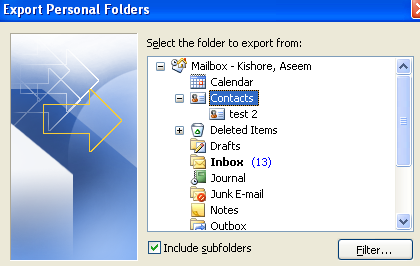
export contact outlook 2007

Click Next and then choose the location for your backup file. Make sure to browse to some other location as Microsoft defaults to a hidden folder. Click Finish and you’re done!

How to export contacts from Outlook Express

Outlook Express is slightly different, but pretty simple also. First, open Outlook Express and then go to File, choose Export, and then choose Address Book.
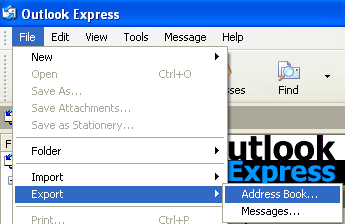
outlook express export contacts

Click on Text File (Comma Separated Values) and then click Export.
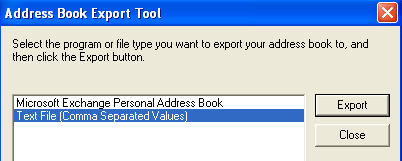
outlook express export address book

Click Browse to specify a location to save the file or type it in manually.
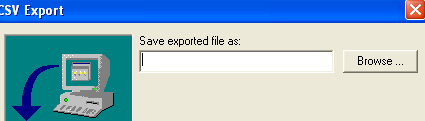
export contacts outlook

Click Next and then choose all of the fields that you want to export for each contact, i.e. First name, Email address, Street, Company, Phone, etc.

export contacts from outlook

Click Finish and you’re done! In another post, I’ll write about how you can export contacts from Yahoo or Google GMail. Enjoy!

Technorati Tags: , , , , ,

Enjoyed this post? Subscribe to Online Tech Tips via RSS Feed or via Email and receive free daily productivity tips.

» Filed Under MS Office Tips

Add to Delicious Save this page Mixx it Stir it up on Mixx
Reddit Add to Reddit StumbleUpon Stumble this page  

Related Posts

57 Responses to “How to export contacts from Outlook 2003, 2007 and Outlook Express”

  1. Ajat said on :

    thanks for this useful tip.
    is there any method so that i can directly populate my email account address to any email client ?


  2. akishore said on :

    Hi Ajay, can you explain your question a little more clearly…what do you mean by directly populate your email account address to any email client? Are you asking if there is a way to take your address book from any email client and import into another email client?


  3. Haris said on :

    Thanks buddy! That’s a very useful tip.


  4. akishore said on :

    Haris - No problem! Like I said, I’m always exporting Outlook contacts!


  5. Ajat said on :

    i am asking when i configure my email client to hotmail,
    i won’t automatically import the address book. so is there any way to import my email address book to my email client software.
    ex.
    i can use gmail from browser there i have address book and all things but when i start using with windows live mail i don’t have the address book.


  6. techno_man said on :

    thnx friend, your tip is good for me @_@


  7. Geoff said on :

    If you have folders in your Outlook Express addressbook, the export only includes the top level (main identitie’s contacts). There seems no way to export contacts in the folders.


  8. Vikrant said on :

    Hi,
    I want to copy all my contacts from Outlook Express 6 to Microsoft Outlook 2003. How can i do it?? Kindly help me


  9. U kamel said on :

    Can anybody help me with this:
    I have all my contacts on my PC - MS Outlook 2007. I would like to get these contatcs exported to Entourage (MS Office 2004 for Mac). Is there a way also to synchronise (through the wireless network) both folders specially that both are MS Office products (PC and Mac)?
    Thanks for help


  10. Julie said on :

    This was extremely helpful!!! Thanks


  11. Pati said on :

    How to I tranfer my contacts and all their information from my msn email to outlook contacts


  12. Robert Garfias said on :

    I am trying to important contacts from OUtlook 2007 into iphone 3g. I have several sepearate phone books, by country in outlook, be iphone does not recognize either outlook categories nor country as a group and so all contacts are imported into one huge unusable phone contact list. IN other words the “group” listing that itunes offers in the sync process does not recognize the category in outlook nor will it allow country to serve as a group.


  13. Zane Grant said on :

    I need to transfer my contacts list from Outlook 2007 to Outlook Express 6. Can you help


  14. Chris said on :

    Great simple instructions. Thanks.


  15. Alice Lightle said on :

    I am trying to export my Outlook contast as a csv file but I get a message that says the translator is not installed. What do I need to do?


  16. Tim said on :

    I am trying to export or link my contact list from outlook 2007 to access 2007 in order to make some reports. I have added user-defined fields and made a custom form but when I export the info or link it never comes over. What might I be doing wrong? I want to report on all the custom data I have.

    Thank you.


  17. Sakamoto said on :

    Como que eu faço para exportar um arquivo PST do Outlook 2007 para Outlook 2000?
    Estou fazendo um downgrade e apresenta erro de compatibilidade.


  18. Krieg Rainer said on :

    want to copy my contacts e-mail address (or as a whole) to my web based mail system. tried export, but don’t know what file to make and my web based mail does not have an option to import. I have tried copy paste, but underlying e-mail of friendly name is not copied. How? anyone?
    thanks for your support


  19. R. Town said on :

    How do you import contacts into Outlook 2007 from a regular excel spreadsheet?


  20. Fred Grandt said on :

    How do I include distribution lists when exporting contacts? Distribution lists are missing when the exported file is imported.


  21. Larry said on :

    I still don’t see a solution for exporting 2003 Outlook contact list to Outlook Express Address Book?


  22. Stuart said on :

    how do I import an outlook 2003 .pst file into outlook 2007 please?


  23. Sanjay Arora said on :

    I exported contacts from Outloook 2003 and imported the same in Outlook 2007. I have made several sub-folders within Contacts.
    Nw, all sub-folders show OK in Outlook 2007 Contacts. But while sending a message if I click on `To’ only the main Contacts folder shows, no sub-folders.

    Please advise how to see the sub-folders while sending messages.


  24. Robert Garfias said on :

    This forum is worthless. Many people ask questions but no one answers any. It is pointless.


  25. Tezblue said on :

    Thanks for the info on how to get contacts from one computer to another. I got a little lost when finding my network..but wow…how quick was the result!! Saved me hours of time.


  26. Bill said on :

    # Alice Lightle said on : July 16th, 2008 at 3:57 pm

    I am trying to export my Outlook contast as a csv file but I get a message that says the translator is not installed. What do I need to do?

    You need to click on install when that window pops up and have your original installation disk handy. You probably originally installed Office for a user on that computer instead of for ALL users of that computer so some of the installation files are missing for the user.


  27. Justin said on :

    OK, i am tech savvy but not an expert but i figured something out that may help people on this log–

    i wanted to get my contacts from Outlook 2007 to Yahoo Mail. I am not an anti-microsoft nut but was not easy to do–i am convinced that Microsoft wants to make it as difficult as possible to get your info into other programs.

    Anyway, here is one way to do it. first you need to get your Outlook contacts in a .csv file. Go to file, import export, export to a file, then select CSV (windows) select your contacts file in Outlook and save the CSV file to your desktop.

    Next, in Yahoo mail, make sure you are using “Yahoo Classic” mail–not the newest version. This is important. Click on the “contacts” tab then click “import export” on the upper right corner. Select import from Outlook csv file then browse to the CSV file on your desktop. It will pull all the contacts in the CSV file in.


  28. Karen said on :

    When you follow the suggested procedure for exporting Contacts,will a copy remain in Outlook? I want to make a copy of my contacts in WordPerfect address book. Do I use the method you suggested for that? And do I convert it to a PST file or soemthing else? Thank you.


  29. Iain said on :

    How do I import the file into Outlook 2007 my desk-top to my new laptop?


  30. Anthony Archer said on :

    What is the simplest way of transferring Outlook contacts from one computer to another? Can they be saved to a memory stick - or is it best to create a file and email it?


  31. tlb1116 said on :

    I was thrilled to see Justin’s solution. Although my 2003 never gave me the option to save the CSV file to my desktop. Had to run a search to find it and then save to desktop. Unfortunately, when I get to the final stage of importing to Yahoo (classic), clicking on their buttons does absolutely n-o-t-h-i-n-g!!!!!!!!!! I’m pretty exasperated with them. 80% of the time their “new” mail won’t load and I have to go to classic anyway. I do a lot of IM-ing and can’t do it from classic. Phooey on them!


  32. Robert said on :

    Wow! These instructions were right on the money! I successfully exported and then had to guess a little about the import, but was successful. Thank you for this detailed and informative guide.


  33. Jodi said on :

    Hi. I want to be able to save my contacts to a zip drive in case my computer dies. How do I do that?


  34. col naval said on :

    pl tell me how to copy contacts to nokia e71 mobile phone from outlook.


  35. gaye said on :

    I have two contact lists…I want both to synchronize to my cingular 8125 phone…it only is taking one of the lists..how can I get the phone to take both?


  36. karen said on :

    thx. now what if you can’t export from a pst file (too large to email). I exported to an excel file..and it imported all the info to a 2007 version - except the email addresses! am I missing anything? Or is my only option a pst file? (to burn on a CD-which haven’t done yet - cause the computers are not in same location). thanks!


  37. Sachin Shetty said on :

    Hi,

    I want to know how to transfer the outlook 2002 contacts to outlook 2003.Please help.


  38. Sachin Shetty said on :

    I would like to know when composing an email the address for a user must come from the saved contact list automatically in MS outlook 2003.

    Regards,

    Sachin Shetty


  39. Sachin Shetty said on :

    Reply for the question I would like to know when composing an email the address for a user must come from the saved contact list automatically in MS outlook 2003.

    1. Open outlook right click on the Contacts folder
    2. Select properties
    3. Click on Outlook addess book tab
    4. Check mark Show this folder as an email address book.
    5. Click apply and Ok
    6. Close outlook and reopen it and check.

    Thanks & regards,
    Sachin Shetty
    Covad IT Support
    M: 9282167562

    Phone 408.434.2700

    110 Rio Robles | San Jose | CA | 95134 | http://www.covad.com


  40. Lynn said on :

    How do I Export Contacts from a Public Contacts Folder to my Personal Contacts? Thanks!


  41. johnM said on :

    is there a way to copy contacts to any mobile phone from outlook. Mine accepts .vcf format files over Bluetooth.


  42. Donna said on :

    I need to transfer my contacts list from Outlook 2007 to Outlook Express. Please help.


  43. brian said on :

    I sure could use some help to find this question out. How do you when exporting contacts/emails/…from Outlook Office bring over the catagory names as you develope custome catagories. For some reason in 2003 Office, the catagories that you custom make do not get exported over. thanks
    bb


  44. Sarah said on :

    What about exporting .vcf files? I’m trying to transfer vCards from one data base to another and can’t seem to figure this out. Also, when the contact window appears it’s only for the email and not “my contacts”. Please advise! Thanks.


  45. Weiqin Xie said on :

    I am using Outlook 2007. However, I cannot find the Import and Export on the File menu as this help page shows. On mine under ‘Data File Management’ it is ‘Achive…’. I don’t know why.


  46. Kathy Longshore said on :

    How do I export my Outlook 2007 contacts into Business Contact Manager 2007 and Office Accountant 2008? Please don’t skip any steps. I can’t figure it out, even with the “help” areas. Thanks!


  47. Sarah said on :

    We are having trouble transfering Microsoft Outlook cards to a Mac user with Outlook. How is this done.Thanks Sarah


  48. Darrell said on :

    I have the same issue as noted below:

    Weiqin Xie said on : September 25th, 2008 at 11:27 am

    I am using Outlook 2007. However, I cannot find the Import and Export on the File menu as this help page shows. On mine under ‘Data File Management’ it is ‘Achive…’. I don’t know why.


  49. Scott said on :

    I have Outlook 2007 installed on my laptop and desktop computers. I have added contacts to both. Is there a way to merge the two contact lists so they both contain the same contacts?

    Thanks


  50. Rose Francis said on :

    How do I export my groups into an Excel or .CSV file? I can export the entire list, but not the individual groups.


  51. zlatan24 said on :

    I heard about not bad application-.pst convert contacts .vcf, can extract your contacts from files with *.ost and *.pst extension and convert it to *.vcf files. Other files can be extracted in *.eml and *.txt formats, another option consists in transforming *.ost file to a *.pst one.


  52. Budget Mom said on :

    How do I export my Outlook Business Contacts from one laptop to another. I followed the instructions on exporting (chose Business Contact Manager dat (.bcm), and it said the export was complete. But it never asked me where to put the exported file and I couldn’t find the file. Both laptops have Outlook 2007 with Business Contact Manager.
    Thanks.


  53. jim barrow said on :

    I’m am trying to back up my “contacts” on a stick i.e. not export them, this didn’t answer that question.


  54. George Nikel said on :

    Hi,

    I am trying to export my contact files from outlook to a flash memory so that I can load it into my Macbook Entourage program. Whenever I attempt to follow the export instructions it loads it into a PDF file and that I can not transfer. How do I get that disconnected so that I can export my file?

    Do not publish my E-mail address.

    George Nikel


  55. Red Ginger said on :

    the Import and Export option is missing from my File drop down in Outlook 2007. How do I enable this feature so I can export my contacts to a csv file?


  56. SJ Delaney said on :

    I’m having the same problem as #55. This problem just started as I have used 2007 for years.

    I’ve heard of a solution but forget what it is.

    -sd


  57. Jack said on :

    I had a mother board failure and moved the hard drive to another PC. I ran
    office 2000 and would like to bring back my outlook contacts and outlook express files and then export to a Mac. I can not find or know the process. Can you help with these issues?? Thanx, Jack


Please post your comments/suggestions!