Don't post up a flyer, try this

You’re probably reading this article if you were going to find the calculator on your Windows machine to perform an important calculation, but after a bit of searching you realized that your calculator program is missing!
Pretty weird right? Well this can happen for a number of reasons, but basically your calculator is gone! If you recently installed a service pack to Windows XP, such as SP2 or SP3, that could be the culprit. If you upgraded from Windows 7 or Windows 8 to Windows 10, that could also be the cause.
Table of Contents
Either way, here are a couple of ways you can get your calculator back in Windows XP and higher.
Method 1 – Reinstall Calculator (Windows XP)
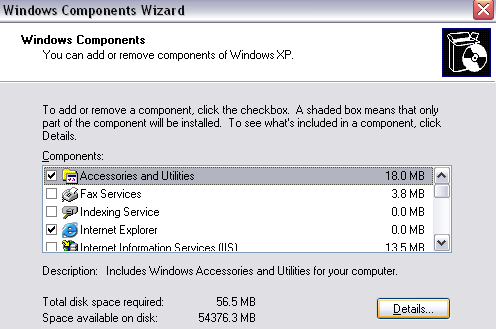
The first method is pretty straight-forward as long as you have your Windows CD. Pop it into the disk drive and go to the Control Panel. Now go to Add/Remove Programs, click on Add/Remove Windows Components.

Click on Accessories and Utilities and then click the Details button below:
Now click on Accessories and click the Details button again. Now make sure to check the Calculator box.
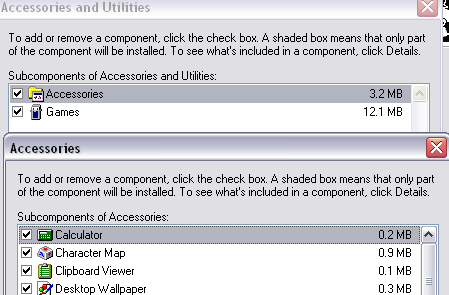
Now click OK all the way back and XP will go ahead and reinstall the calculator! If you can’t get a hold of a Windows XP disc, then try the second method.
Method 2 – Copy calc.exe (All Windows Versions)
The second way to get Calculator back and probably the easier method is to simply copy the calc.exe file over from another machine to your C:\Windows\System32 folder. Also, copy calc.chm to c:\Windows\Help.
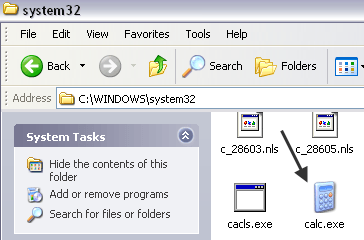
Obviously, you’ll find both of these files in those two directories on another computer that has the calculator working. After that, you can just create a shortcut to the calc.exe file on your Start Menu or wherever you like. If you can’t find the CHM file, don’t worry, all you really need is the EXE file.
If you get an error message when trying to copy to the System32 directory, you need to make sure you open Windows Explorer as an administrator.
To do that, click on Start, type in Explorer and then right-click on Windows Explorer and choose Run as Administrator. In Windows 10, right-click on the Explorer (Run Command) option.
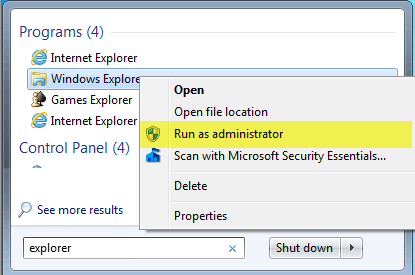
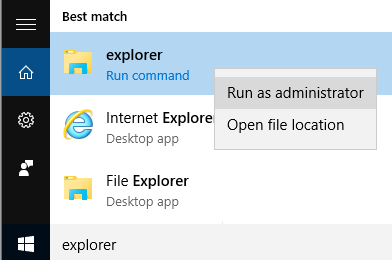
With an administrator rights Explorer window, you should now be able to copy and paste the calc.exe file into the System32 directory.
Method 3 – Download Calculator from Microsoft
If for some reason, you can’t get Calculator working on your system, just download it from Microsoft (now it’s only available from CNET). This works on all versions of Windows.
http://download.cnet.com/Microsoft-Calculator-Plus/3000-2053_4-10628441.html
Once you download and install it, you’ll probably be shocked by the horrible UI that is set by default. It’s purple and has oval buttons and looks terrible.
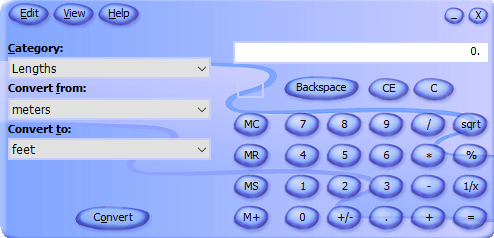
Thankfully, you can click on View and then choose Classic View to get a normal looking version of the calculator. If you don’t like the Calculator app that comes with Windows 8 and Windows 10, you can always download this version and use it instead.
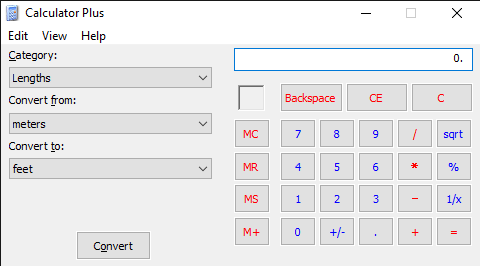
You can also click on View and choose Standard to remove the conversion options on the left and just have the old standard calculator.
In Windows 10, the calculator app should already be installed by default. If not, you can download the calculator app from the Microsoft Store.
Method 4 – Use CD and SFC
If you have a Windows XP CD, you can also try popping the CD in and running these two commands, where X is your CD/DVD drive letter.
expand -r X:\I386\calc.ex_ c:\windows\system32
expand -r X:\I386\calc.ch_ c:\windows\help
If you’re not running Windows XP, you can try running system file checker (SFC), which is a built-in command that checks all the system files to make sure they exist and are not corrupt. You can read my previous post on how to use the SFC command in Windows. If you have any questions, feel free to comment. Enjoy!