If you forgot your password or are having connectivity issues

I recently was asked by a friend how they could reset their wireless router back to its default settings since they no longer could remember the WiFi password. Ever happen to you? Me too!
There are a couple of reasons why you may need to reset your wireless router: 1) You used a hard to remember password, forgot it and don’t have the password stored anywhere or 2) It was setup by someone else and you don’t know the password or 3) You want to reset the router due to performance or connectivity issues or 4) You think your router may be compromised and want to reset it to block any unauthorized users.
Table of Contents
Note that if you are simply having connection issues, you may not need to reset your router at all, but just need to reboot it. In order to reboot, just unplug the router from the wall, wait about 20 seconds and then plug it back in. It’ll take a minute or two for the router to restart, but most connection issues can be solved by doing this.
Once you reset the router, the password for logging into the web interface and the WiFi password will be reset to their default passwords. Check out my post on how to find the default password for your wireless router.
Hard Reset (Physical Button)
Resetting a wireless router is a fairly simple task, but the results are pretty serious, which means you’ll need to spend quite a bit of time setting everything back up. When you reset a wireless router, you will lose all settings including the following:
Router admin login (username & password)WiFi username and password, security type, channelSSID nameAny port forwardsAny dynamic DNS setupAny firewall rules or settings
Just about every modern router can be reset by following a very simple procedure. Either flip the router upside down or look on the back for a small hole with the word RESET. All you have to do now is just find a small paper clip and stick one end into the hole while the router is turned on.
Normally, you will have to hold down the button for 10 to 15 seconds. At this point, you should see the wireless router lights flash, blink, or simply restart. Once it has fully rebooted, the router is back to its original factory default state.

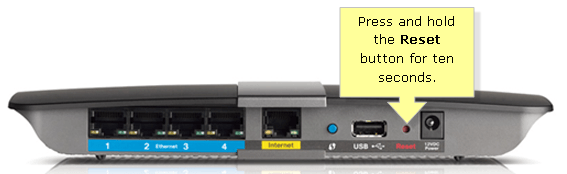
That’s pretty much it! Some older routers may require you to turn off the router first, then hold down the reset button and then turn the router back on. If neither one of these two methods work, then you should probably take a look at the manual that came with the router or find the manual online.
Soft Reset (Web Admin)
The second way to reset a router is to restore factory defaults from inside the web admin interface. In order to do this, you have to know the IP address of your router and type that into your web browser.
Where you have to go in the web interface will vary wildly depending on which router you are using. The best places to check are under headings like Management, Administration, Advanced, System, Maintenance or something similar. I have Verizon FIOS and mine was located under Advanced for my Actiontec router.
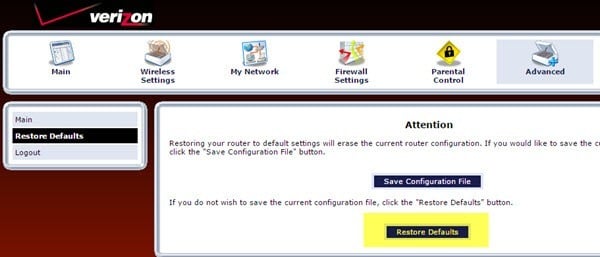
There should be a button called Restore Defaults or Restore Factory Settings, which will do exactly the same thing as the physical reset button. The only difference is that most modern routers also have the option of backing up your settings to a configuration file that you can use to restore at a later point.
If you’re having issues with your router, you probably won’t want to restore the current settings, but it’s a very good idea to reset your router, setup everything and then save a backup of all your settings once you have it properly configured again.
Now that your router is back up and running, you are going to need to connect to it using your web browser to configure all the settings again. In order to do this, you need to find the IP address for your router.
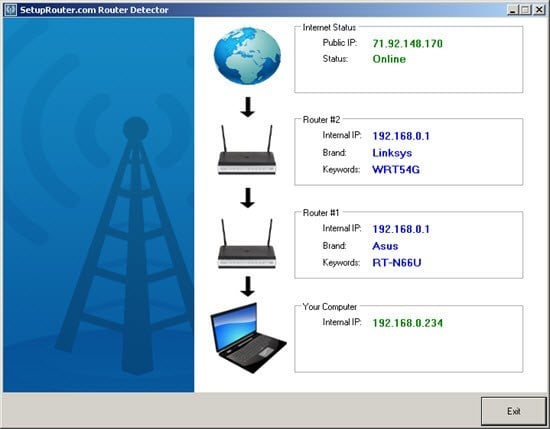
If you are not able to follow the instructions from the previous link, you can also checkout a program called Router Detector from a website called Setup Router that basically finds the router for you.
Once you have logged in, you should do two things: change the default password for logging into your router and then setup your wireless settings.
Make sure to read my post on how to secure your wireless network so that others cannot use your bandwidth and how to disable SSID broadcasting for more security.
If you are having any trouble resetting your wireless router or are having problems maintaining a connection to your wireless router, post a comment and I’ll try to help. Enjoy!