It's pretty simple and quick to do

Recently a friend asked me how to make a YouTube video smaller for his posting to his blog, so I did a little bit of research and gave him a solution! Depending on the video that’s been uploaded to YouTube, the width and height of the video is set to a particular default value. For example, on most HD videos, the width is 560px and the height is 315px.
If you’re looking to quickly resize the video for posting to your blog, website or social feed, then it’s a pretty simple process. Back in the days, you had to manually edit the embed code given by YouTube to customize the size of the video. Now YouTube lets you pick from a set of predefined sizes or choose your own custom size.
Table of Contents
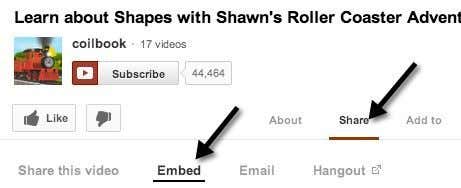
The first thing you’ll want to do is find the actual video on YouTube that you want to make smaller. Then click on the Share link and click on Embed, if it’s not already selected.
The code will look something like this:
<iframe width=”560″ height=”315″ src=”http://www.youtube.com/embed/aBUjH2KJns4″ frameborder=”0″ allowfullscreen></iframe>
You will notice the WIDTH and HEIGHT values in the code. Overall, the embed code is very easy to understand. You have the width and height, the src tag which is the URL to the YouTube video, a frameborder value and an option to allow the video to be played full screen. There are other options in addition to these, but this is the basic embed code.
You could go ahead and paste this code into a text editor of your choice, like Notepad, and manually change the width and height setting, but then you would have to worry about maintaining the aspect ratio yourself. Instead of worrying about that, you can just use the Custom size option and it will do all the calculations for you.
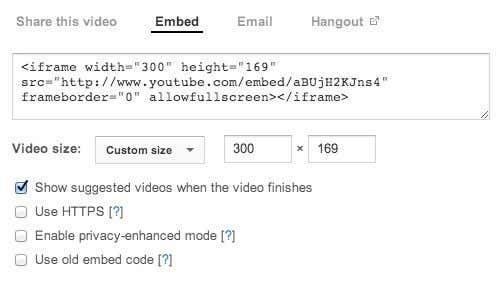
For example, just type in a width and then press the Tab key. The height value will automatically be calculated and filled. You can also type in a value for the height, and the width value will adjust in the actual embed code. For some odd reason, the width box won’t change values, which could be a bug.
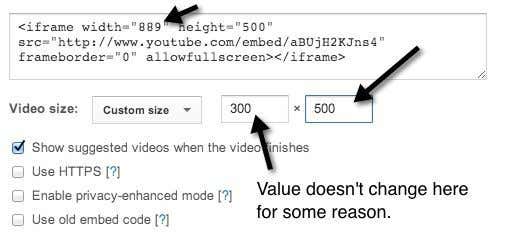
Obviously, you can make the YouTube video smaller or you can make it bigger if you like also. If the video was shot in HD (1080, 720), you can increase the size and you won’t lose any quality. So that’s about it! Very simple indeed to make a video smaller. Now let’s look at the options:
1. Show suggested videos when the videos finishes – This is pretty self-explanatory. If you the video to simply play and stop after it’s finished, then uncheck this box.
2. Use HTTPS – If you’re embedding the YouTube video to a site that uses a secure connection (SSL/HTTPS), then you have the option to use HTTPS in the embed code too.
3. Enable Privacy-Enhanced Mode – By default, YouTube can capture information about every visitor that comes to the page where the YouTube video is embedded. By checking this box, they can only capture information about visitors on your site who actually play the video.
4. Use old embed code – Yuck, no idea why you would want to do this. The old embed code relied on the OBJECT tag and required Flash to play. The new embed code uses the IFRAME tag and supports HTML 5 video in addition to flash.
Those are the visible options, but there are also some hidden options to customize the video even more. If you want, you can have the YouTube video start playing automatically when the user visits the page. Just add ?autoplay=1 to the end of the URL in the src part of the embed code:
<iframe width=”560″ height=”315″ src=”http://www.youtube.com/embed/aBUjH2KJns4?autoplay=1” frameborder=”0″ allowfullscreen></iframe>
Nice! You can also choose to start the video at a certain time by adding #t=1m30s to the end of the src URL:
<iframe width=”560″ height=”315″ src=”http://www.youtube.com/embed/aBUjH2KJns4?autoplay=1#t=1m30s” frameborder=”0″ allowfullscreen></iframe>
As you can see from above, the different parameters can be combined. In the example above, I am having the video auto play and I’m making sure it starts at 1 minute and 30 seconds into the video.
There are probably other secret parameters you can pass into the embed code, but the above-mentioned items will work well for most people. Making a YouTube video smaller is a piece of cake thanks to the new embed code, which will also now work in most modern browsers without any need for Flash. Enjoy!