Fix when they get messed up when connecting to a TV or projector

This post was born from the fact that I really enjoy customizing the layout of the icons on my desktop, such as placing system icons at the top left, moving all application icons to the right side of the screen, etc, but I hate it when all of the icon positions get messed up whenever I connect my computer to a TV or projector.
Once your screen resolution changes, Windows automatically re-arranges all of your icons and all of that hard work is lost! However, there are free tools that you can use to quickly save the icon layout on your desktop in Windows. For Windows Vista, Windows 7 and Windows 8.1, my recommendation would be a program called DesktopOK, which supports 64-bit operating systems. For Window 95, 98, ME, 2000, and XP, there is an older program that still works great called Icon Restore.
Table of Contents
DesktopOK
DesktopOK is a tiny little app that I really like to use because it doesn’t have a lot of features and it doesn’t require you to install it on your system. If you’re someone like me and you just want to save your desktop icon layout once or twice a month, then this program is perfect. It does have some automated functionalty also, so if your needs require saving the layout more often, DesktopOK can handle that too.
Once you download it, just unzip the file and move the executable to a more permanent location before you run it. The interface is very simple and that makes it very easy to use.
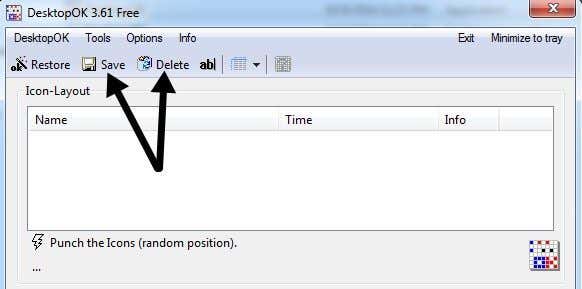
To save your current desktop layout, just click the Save button. The listbox below will automatically be populated with a new entry. The name will be the resolution by default and it will also record the time. If you want to adjust the naming convention, click on Options and then Save options and you’ll be able to add extra items to the name such as the user name, PC name, etc.
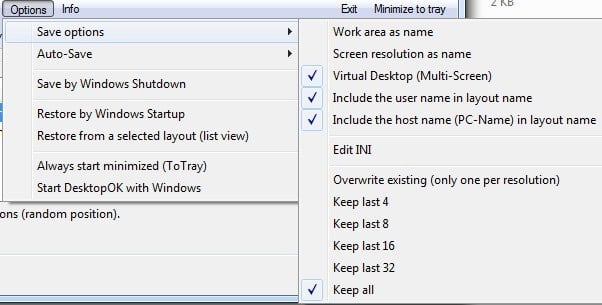
Under Options, there are also quite a few other items that are worth mentioning. Firstly, Auto-Save is useful if you want to capture your desktop icon layout at set time intervals. The auto save feature also has an option to only save in there are changes in the layout, which is useful because you’d have a lot of duplicates othrerwise.
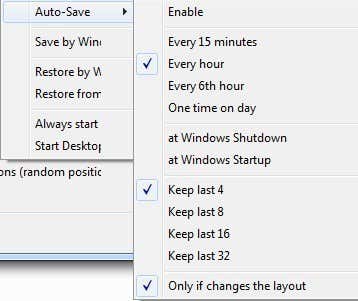
You can also save the layout when shutting down and restore the layout when booting back up. You can also have it always restore to a specific layout when booting up. Finally, you can set it so that DesktopOK starts when Windows starts and runs minimized in the system tray automatically.
When you want to restore a layout, just click on the layout in the listbox and then click Restore. There is one important thing you should realize about how DesktopOK works, which is the way I think it should work, but it can be confusing to new users: when you restore a desktop layout, any new items you have added to the desktop will remain in the current positions.
If DesktopOK didn’t know about them when you performed the save, it won’t delete or move them around until you perform a new save with the new desktop items. I personally think this is better because I would not want something I added to the desktop to suddenly disappear when I perfored a restore.
The program also has a couple of other small, but useful features under the Tools menu item. Under Windows, you can tile or cascade windows. You can also hide your mouse cursor when it’s no longer moving for a certain number of seconds.
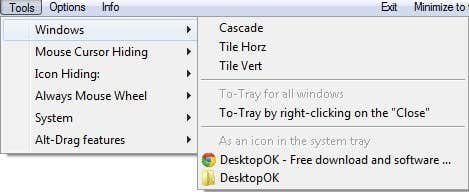
If you like a really clean desktop, you can hide your desktop icons when the mouse doesn’t move for a certain number of seconds. You can then choose to show them again when you left or right click on the mouse. If your mouse has a wheel, you can use it to control the volume when your mouse is in the taskbar or scroll through windows when it’s in the main desktop area. Under System, you can open some common dialogs in Windows like User Accounts, Task Manager, Display, etc.
Overall, DesktopOK is a useful tool for Windows users who want to maintain their desktop icon layout. I have found it very useful on my office laptop because there my desktop icons constantly get scattered whenever I connect my laptop to an external display or projector. Now I can bring my desktop back to normal in just a couple of clicks.
Icon Restore
Icon Restore installs a DLL file called layout.dll that comes with the Resource Kit and the required registry entries. Once installed, you’ll find two new options when you right-click on any Windows system icon, Save Desktop Icon Layout and Restore Desktop Icon Layout.
By Windows system icon, this means you can right-click on My Computer, My Documents, or the Recycle Bin to access the new menu options.
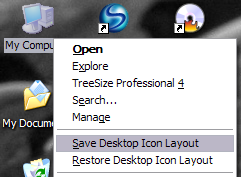
Once you have arranged the icons on your desktop in the desired way, go ahead and right-click on My Computer and left-click on Save Desktop Icon Layout. Now if your computer screen resolution ever changes or you have to start your computer in Safe Mode, etc, you can easily restore your previous icon positions by right-clicking and choosing Restore Desktop Icon Layout.
There are other programs out there that are more advanced and allow you to do things like create multiple icon layouts, etc, but this program is free and works well for most people!
I played around with the program by saving the desktop, deleting a program executable file that I had downloaded off the Internet, and then restoring the desktop to see what happened. If you delete anything off your desktop, that item will not appear when you perform a restore. This includes shortcuts, program files, text files, anything basically!
I prefer this type of behavior because there are times when I add a bunch of shortcuts to my desktop, but delete them later on. Icon Restore will not restore those deleted icons, but will keep the original positions of the other icons.