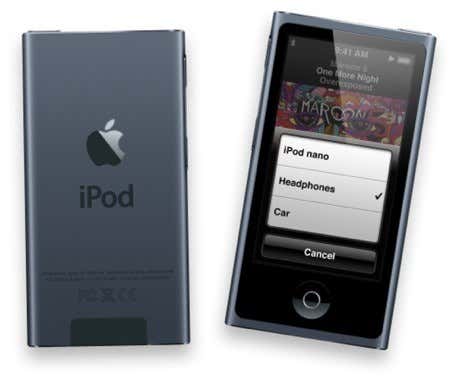
How to reset or unfreeze an iPod Nano, iPod Touch, iPod Classic, or iPod Shuffle

Posted on February 3, 2008 at 6:09 am

Because I work in IT, I end up getting a lot of questions that deal with technical support, such as how do I unfreeze or reset my iPod device! I’m not sure why so many people have been asking me that lately, but since they are, I thought I would write up a quick post on how to go about resetting your iPod if it has frozen up!

Of course telling you how to reset an iPod Nano may work for some, but not for those who have an iPod Touch, so I’ll try to list out the instructions for as many as I can! Here we go!

How to unfreeze or reset an iPod Touch

To reset iPod touch, press and hold the Sleep/Wake button and the Home button at the same time until you see the Apple logo show up on the screen:
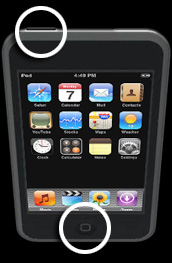
reset ipod touch

How to unfreeze or reset an iPod Classic

1. Toggle the Hold switch on and off. (Slide it to Hold, then turn it off again.)

2. Now press and hold the Menu and Select buttons until the Apple logo appears, which may take about 6 to 10 seconds. You may need to repeat this step.

Notes:

  • If you are having problems resetting the iPod, go ahead and set it on a flat surface. Then make sure the finger pressing the Select button is not touching any part of the click wheel. Also be sure that you are pressing the Menu button towards the outside of the click wheel, not near the center.
  • If the above mentioned steps do not work, then you can try connecting your iPod to a power adapter and plug the power adapter into an electrical outlet, or connect the iPod to your computer. Make sure the computer is turned on and isn’t set to go to sleep.

How to reset an iPod Nano (1st, 2nd, and 3rd Generation)

This one is similar to how you would do it for an iPod Classic:

1. Toggle the Hold switch on and off. (Slide it to Hold, then turn it off again.)

2. Now press and hold the Menu and Select buttons until the Apple logo appears, which may take about 6 to 10 seconds. You may need to repeat this step.

You can also reset an iPod Mini in the same way as the above steps.

How to reset or unfreeze an iPod Shuffle

1. First , eject your iPod shuffle from iTunes, if you have it connected.

2. Then remove the iPod shuffle from the USB dock.

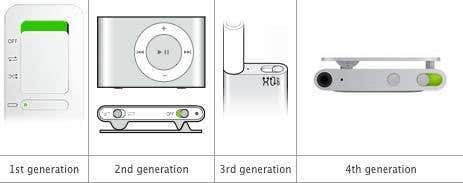
3. Move the switch that is on the top of the iPod shuffle to the off position.

Note: When iPod shuffle is off, the green stripe by the switch is not visible.

4. Wait 5 seconds.

5. Move the switch back to the on position so green stripe will be visible in either position.

And that’s it! Hopefully, now that you know these steps, you don’t have to keep taking out the battery to unfreeze your iPod! Any comments or questions, make sure to write below! Enjoy! Source: Apple Support

Enjoyed this post? Subscribe to Online Tech Tips via RSS Feed or via Email and receive free daily productivity tips.

» Filed Under Computer Tips

Add to Delicious Save this page Mixx it Stir it up on Mixx
Reddit Add to Reddit StumbleUpon Stumble this page  

Related Posts

162 Responses to “How to reset or unfreeze an iPod Nano, iPod Touch, iPod Classic, or iPod Shuffle”

  1. Alvaro Restrepo said on :

    I was able to unfreeze my classic. Excelent tip page, you saved me a long waiting support call or a visit to an apple store.


  2. Rob said on :

    ive tried resetting my ipod classic and will still not turn on or my computer will not rekonize it

    cheers

    Rob


  3. kathryn said on :

    this still isnt working what else do i do im in so much trouble as it is not my ipod its my brothers!what can i do?wb asap


  4. kathryn said on :

    Thanks tried it again and the apple sign appeared!Thank you so much that is an excellent bit of information!This is 1st class!thanks!


  5. akishore said on :

    Alvaro, I’m glad your iPod was unfrozen! Happens to me a lot too!

    Rob, you might have a hardware issue with you iPod if it’s not turning on.

    Kathryn, I’m glad I saved you from your brother’s wrath! :)


  6. Alan said on :

    Hi i tried pressing menu and select button for my classic then it just shows the apple sign and doesnt do anything.Please email me at alan6556833@yahoo.com


  7. Bailey said on :

    Mine does not work. When I reboot my ipod touch it freezes at the home screen again and does not appear on itunes or my computer.


  8. annette said on :

    yes man thankz 4 da help it worked tank you!!!!!!!!!!!!=)=)=)=)=)=)=)


  9. Neno said on :

    that is a sick tip my 80 gig classic was frozen after i resetted it like wshown in this website it works fine… Thanks.
    Neno


  10. happy said on :

    tahks you guys helped me so much I was freaking out


  11. john said on :

    you’re a genius


  12. chivers said on :

    cheers mate i thought id broken my ipod yet again and im on my 4th in 3 years
    curse you apple!


  13. Kelly said on :

    My ipod has frozen. I have followed your instructions but it won’t turn off. The Apple logo smiles at me and turns back on. help


  14. sandy said on :

    My ipod 5th generation will not play on my Bose docking system. It makes very loud staticy sounds..I have tried everything. My daughters Ipod touch works on the bose with no problem. My ipod 5th works on my ATHOme docking system.
    PLease help.


  15. patrick said on :

    yay thanks for the tips ill visit here next time it freezes again


  16. Mo said on :

    I’m having problems with my old ipod nana (1Gb-2006 version), it was doing fine a few days ago with the touch key(s) and whenever I play my music to either fast forward or to go in order, the ipod automatcially skips with just one slide of the button. If you can advise me on how i can fix it I greatly appreciate a response. Thank you for your time and have a great day.


  17. jeremy said on :

    i try the instrutions but it still didnt work i have a ipod nano wat to do


  18. Annie said on :

    Hey…….this info really workd…..m damn thankful t ya fr dis……..ma ipod wasnt workin since da last week…..n now followin ur instructions..da apple logo appeared n it kindda started workin…………thanz……

    Cheers!!!


  19. Amber said on :

    The ipod classic is still frozen and the main menu stay shown up. I tried all the reset techniques and the wheel wont even move, you cant see the lock show on the screen and its just all froze!!!!!!!! I’VE LOOKED EVERYWHERE AND I NEED HELP!!!


  20. Chrissy said on :

    omg….thnxs so much cause i had a track mmet that moring when it got stuck and i was getting dress for the track meet andi relize it was stuck so i jump on my commputer real fast and got your website so thnxs so much it
    it worked and it was so fast to lol


  21. USAFRN said on :

    Ok, I hooked up my ipod nano into my friends car adapter and it worked great until, I disconnected. Once I disconnected my ipod the ipod screen went crazy and then it froze. I’ve tried all the suggestions and NOTHING has worked. I’m soooo frustrated since I constantly use my ipod…HELP!! The restarting instructions does nothing but every once in awhile, the ipod will beep twice, that’s all. Otherwise there’s no sign of life…:-(


  22. Veronica said on :

    hey guys? my little sister has screwed up my iPod! I guess she accidentally pressed the “screen lock” button because whatever I do, its locked! :’( And I dont even know the combination key! :( I got this iPod on Christmas. I feel so sorry for my parents they spent so much money on it and now it doesnt even work!! *crying* I cant just throw it away. Y have no idea how excited my Dad was about giving it to me. *crying* I’ve bben to like EVERY website and they’ll all crappy and useless. *crying* even this tip doesnt work on my iPod. PLEASE HELP ME!!!! *CRYING!* :””(


  23. Diane said on :

    WOW, thank you a MILLION. We used your tips, after putz’n around for a couple hours with our iPod Classic. WORKED like a charm!

    Whew!


  24. James said on :

    Hey=] Thanks for your advice, I’ve used it before to unfreeze my i-pod classic, however this time, when I hold the menu and select button, my i-pod flashes on and off, and then the apple sign re-appears, and my laptop doesn’t detect it when I plug it in.

    If you know what is causing this, or what I should do, please email me at: its_psychedelic@hotmail.co.uk

    Thanks


  25. brenda christie said on :

    hey, i tried to press and hold the menu and select buttons to reset my ipod… but its still not working. e-mail me back at chevysux91@aol.com
    -thanx


  26. Karla said on :

    Hello,

    Thank you so much I have the ipod classic 160gig and my select button wouldnt click, and I didnt know how to reset it, my husband followed the steps and my ipod works again.

    Thank you
    so much

    Karla


  27. Louise said on :

    Thank you!


  28. Michelle said on :

    Thank you thank you thank you! My poor son was in tears this morning when he woke me up, cuz he thought his ipod was broken! WONDERFUL explanation, unlike other sites…


  29. Tim said on :

    This seems like on odd appraoch, but my ipod didn’t respond. I was about to experiment with a hammer and a large screwdriver, but then I tried the unexpected, I threw it to the concrete floor. I expected it to shatter, but it hit at an odd angle and didn’t. Imagei my surprise when I picked it up and it started up and began working! Now I wouldn’t try this unless you are convinced it is totally dead and unrecoverable.


  30. DS said on :

    This page is absolutely priceless! I thought for sure that my Nano was toast and that this couldn’t possibly work. But it worked like a charm. Thank you, thank you, thank you!


  31. Rita Tyler said on :

    thank you, I tried several other websites on how to unfreeze, including apple’s. None of them worked. But your suggestions were easy to follow and worked on the first try. The other sites did not mention moving the hold button to on and off and then hitting menu and select. Thanks again.


  32. Jessie said on :

    I was able to unfreeze my i-pod 3rd gen. nano…I was about to go on a trip and i wouldn’t of had my IPOD

    Thnx!

    Jessie


  33. Allison said on :

    Thanks sooo much. I just got an ipod nano 3rd gen. yesterday for my b-day, and all of the sudden it froze. I was so ttly freaking out! This page is genious! :)


  34. hachkajones said on :

    is there any way to reset your 2nd generation ipod classic from mac to pc compatibility?


  35. Sucka 4 Love said on :

    U are the greatest. I was so scared that I would have to tell my Dad that I broke my ipod. I just got it on june 5th (thursday). I went to other places that said to press menu, the center, and move the hold back and forth. I thank u so much I thought I had broken it because I was mad at my sister so when we got in the car I just kind of tossed my purse in the seat. So when I got home I tried to lock it and it wouldn’t turn on. First I thought it was on hold. But anyways u saved me from losing my mind. I’m going to tell all my friends to come here when something happens to theres.

    Thank You So Much!!! :]


  36. Jonathan said on :

    My ipod video froze and i have tried your instructions but it still is frozen. Is there any other way to unfreeze it?


  37. Jay said on :

    HI i hv an ipod nano ist generation, when i unplug it it still shows “do not disconnect” sign and the backlight does not even on. i tried the advice aove but still nthg happens ….
    sum1 help….


  38. hayley said on :

    thanxx soo much its greatly appreciated it workedd..!!! THANK YOUUUUUUUUU!!!!!!! <333
    muchh lovee

    Hayleyy.,


  39. suicidalsam said on :

    thanx, u wrote a great post, helpful and simple to understand for even a novice. I was having problem with resetting my ipod touch. thanx to you it is solved now.


  40. Laura said on :

    OMG THANK YOU!!!


  41. nivedita said on :

    Hey i have a problem guys!! When i tried the select + menu key [ i have a 80 GB Ipod Classic ] the apple Logo is coming, but nothing seems to be happening! Can somebody please help? IM GETTING FREAKED OUT!


  42. SLAY {SMC} said on :

    omg man thank u soooooooooooooo mmmmmmmuuuuuuuuuuuuuuuucccccccchhhhhhhhhh my iopd nano video was frozen i thought for sho it was broken thank u man i thought 2 my self no i wasted 150 bucks for nothing man again thank u man

    -SLAY [S.M.C]


  43. JJxo said on :

    Help!!!
    my ipod works normally as does itunes, until you plug the ipod into the pc! as soon as i do my pc & itunes freezes, although my ipod shows as connected & charging as if nothings wrong! i have tried resetting my ipod, restarting pc etc etc - any ideas any1?? i have ipod classic 80GB. xoxo


  44. Skylar said on :

    i need help my ipod nano lock its self on the combonation lock when it was in my back pack. i keep on trying to hit menu and the middle button but it keeps on going to the combonation thing. please help i cant stand it anymore


  45. Asfand said on :

    I got this new i pod nano 3rd gen and i havent even used it once. It froze when i removed it from the computer. I did wat u guyz have written but it resets and then the apple sign appears and does nothing. No matter how many times i reset it the apple logo disappears and then comes back. Is there some software problem or what. Please help me its brand new.
    damn apple
    mail me at asphande@hotmail.com


  46. S.F Giant said on :

    dude my ipod (nano) wont work. The button 2 lock and unlock the ipod broke off and now my ipod stays locked and wont turn on. Any tips on how to get it 2 play again????


  47. Ashley said on :

    wow you saved my life
    I am going on vacation soon and I didnt know what i was going to do and I dont have the money right now to go buy a new nano thanks alot
    but it didnt work until I put it flat on my desk


  48. Tara said on :

    Thank you so much!!! your tips for the ipod classic worked immediately!!! amazing.. YAY!!


  49. RohnCrivello said on :

    i accidentally locked my screen up/ipod classic 80g ,silver.I cant get the apple logo to come up ////HELP/// ..I was having so much fun with it and then Bam….SCREEN LOCK…havent the slightest idea what the code was,is or! ..I bought it ofF the original owner ,but now he has disappeared completely and will never be found.What is the procedure (to not feel so ignorant)i cant do anything cept listen to whatever comes out of it at the volume it was set at,cant choose anything.(not very much fun anymore)sad and lonely.


  50. Erin said on :

    heyy well i tried jiggling the hold switch and repeatedly holding down the menu and select button but it still won’t work.
    its my sisters ipod nano 2nd generation and her friends nano 3rd generation. they froze when they both plugged them into an ipod home which was connected to a rusty old wet outlet and it zapped them.
    can you help me a.s.a.p.?!?!
    sashaluvr_w@hotmail.com


  51. manny c. said on :

    you rock man. thanks a bunch you saved the party bro……………


  52. Psyclown said on :

    Ipod nano 3rd gen. froze for 3rd time, tried resetting it 3 times, had to just toss it to the side and let the battery die, which doesn’t take long since the stupid light stays on. Why couldn’t they just put the pinhole reset in the bottom like all others, worked every time without fail. This is starting to remind me of my Windows software….arrrrggg!!!!


  53. VSL said on :

    hi, i just got an ipod classic 80GB silver and i locked the volume control, i have no idea what the combination is, is there a way to reset, please help….


  54. allie said on :

    your the best thank you ! simple easy to find! without having to read to much crap!


  55. emma said on :

    well i just got an ipod recently and its the ipod classic, when i first got it i put all my music ect.. onto it then didnt charge it… my sister told me that i should of charged it for at least 5 hours and now the battery life will only be short.. is that true?? And is there anything i could do to change that??

    Please replay!!


  56. bob said on :

    THANK YOU!
    I was getting worried that I’d have to send my touch in to get it fixed, but this worked perfectly


  57. pam said on :

    i have an ipod classic. my hold button is stuck which keeps me from being able to reset. i neeeeed my ipod. what do i do now?


  58. raul said on :

    ah…tonight my ipod classic froze … just 5 hours before a LOOOONNNNGGG flight … U JUST SAVED MY TRIP!!!!!
    THANKS!!!!!!! A LOT!!!!!!!!!


  59. D ryder said on :

    it wont reset…do i hold every botton??


  60. Thomas said on :

    YES YES YES!!!!!
    IT worked!!!!!
    TNX TNX TNX!!!!


  61. Taylor said on :

    thnx so much


  62. JMS said on :

    Thank you! My lock screen was stuck on my nano. Holding down the select and Menu buttons worked!!


  63. Derek said on :

    Wow it worked great for my ipod touch! I just did what it said and a few seconds later and it was working again.


  64. Jay said on :

    thanks so much ! you’re amazing . aha .


  65. Electrogeek said on :

    Cheers! my itouch was just not doin anyfin. the screen was still where i left it, but nothin happened! i used the method you subscribe and it is as good as new. I ]t didnt reset as well, so all my stuff was still there, which is a great bonus!!!!!!


  66. ipodnanofreak said on :

    Latest ipod nano 4GB - stopped in the middle of a song, display blank. Looked like it had hung, tried the reset thing and it duly beeped twice but no display. Tried attaching it to PC, recognised in itunes OK. Tried itunes reset - nothing. Still has blank screen, when played with it alternates between a bright screen, a more dull grey screen and a dark grey screen and gives the odd beep. Is my display ferooked or is there something else I can try?


  67. Mike said on :

    Thanks a lot for the advice on the Ipod Classic, I got a little nervous when it froze since I had a lot of stuff organized and put on there, but that quick fix made me feel a lot better. Awesome!


  68. jeffrey said on :

    Thank you very much for your helpful tips! Your advice helped me unfreeze my 30g ipod.
    Again, thanks!


  69. jezza said on :

    thanx man


  70. melissa said on :

    thanks! i was freaking out!


  71. megan said on :

    my ipod nano (video)wont work it just stopped randomly working and i tried everything my computer doesnt even recognize it


  72. alain mjally said on :

    oh my god thank u thank u very very very very very very much….i was scared 2 death when my ipod classic froze…but it worked again!!!!


  73. leanne said on :

    My Ipod Nano just mysteriously stopped working. I cannot turn it on at all, even after following the directions to reset on the apple site? Any suggestions??


  74. Ant said on :

    for ipod classic 80gb hold the round button in the middle and menu at the same time and voila! it should had unfroze


  75. alex said on :

    i tried the steps to unfreeze my ipod and it doesn’t work…. mine’s a 3rd greneration


  76. Gia said on :

    I have an Ipod Classic which won’t come on at all. I’ve tried re-setting it and connecting it to my computer but still no joy. The screen is blank even when i put it on to charge (docking/speakers). I don’t know what to do. Help!!!!!!!!!!!! Please.


  77. Hervey said on :

    I had all the morning with my ipod touch 1st gen working slowly and freezing, I tried your tip and it worked.. suddenly the apple logo appeared. Now my ipod works as normal. Thnx a lot!


  78. mattlok said on :

    thank you sooooooo much man


  79. adnilcdn said on :

    thank you so much… couldn’t get the darn thing to disconnect. was ready to do a restore but itunes was frozen & wouldn’t do it either.
    found you site - Excellent tip iPod Nano 3rd gen. it worked!


  80. Zinc said on :

    THERE IS ANOTHER WAY… it didnt work for me either, but holding down the MIDDLE button and MENU did work first time on my 3rd gen nano :D good luck


  81. angela said on :

    thks so much i just got my ipod a couple days ago and to it just froze and u saved me from freeking out thanks so f much


  82. rissa said on :

    my ipod classic screen is blank, but the music still plays. what do i have to do for the apple logo to appear.


  83. Rina said on :

    yay! it worked! thanks


  84. David said on :

    Thank you!

    My 160 classic was frozen

    now ok again


  85. Thankzz said on :

    THANK YOU SOOOOO MUCHHHHHHHHHHHHHHHHHHHHHHHHHHHHHHHHHHHHHHHHHHHHHHHHHH!!!

    I THought it was Broke and it works on 4th Gen Nano:)


  86. nike said on :

    I’ve got an problem with my first generation Ipod Nano. The problem is that he won’t unlock anymore.
    Do you have any advise?
    Thanks if you can help.


  87. mm said on :

    dude…you are a real life saver without you i would probably be crying


  88. not so happy said on :

    I have a first Gen Ipod classic. When I last plugged it in for sync, it wanted set into a restore mode. So I went ahead and restored it according to the itune instructions. Now it’s stuck in a restore mode and will not sync. Please Help! I tried the suggestions above to reset it but it will not reset to the apple screen when it hold down the select and menu button. It does nothing. HELP!


  89. Gary said on :

    I have an Ipod 160 classic which wouldn’t charge, just said “charging please wait”. I tried all the resets etc but nothing worked. After stripping it I found that the left hand end of the battery had been rubbing against the mounting screw for the hold button and the positive track was exposed causing it to short out the battery. Placing a piece of plastic between the battery and the mounting screw sorts out the problem. My ipod charged and the battery still works fine. Judging by the number of queries it seems to be a common problem with this model.If you want more details email me at martin.gary13@yahoo.com


  90. adam said on :

    my menu buttons broken and there for isnt working is there another way ?


  91. Dirtsat said on :

    This information was so helpful for my iPod Touch.. Thanks!!!


  92. sid said on :

    thnx a lot buddy whoevr it is who postd dis it wrkd for me nd i dint evn lose ny data thnx a lot dude


  93. shakey said on :

    cant thankyou enough my 80gb classic crashed tonight this worked a treat cant thank-you enough


  94. carmelina said on :

    my ipod screen went blank and i tried to reset it and it won’t work it still plays music but i can’t see anthing
    help plzzzzzzz


  95. kelly said on :

    The volume display is stuck on my screen.. any tips?


  96. OverKill said on :

    WOOOHAAAAAA Excelent !! Thanks a lot!!!


  97. annie said on :

    hey,
    my ipod touch froze when i tried to take a pic. so the screen is white, and it won’t restart. what do i do?


  98. Katy said on :

    Thank you soooooooooooo much, it’s alive!

    Katy
    xox


  99. Shelby said on :

    Thanks for this amazing tip, I was about to go to Best Buy and freak out on the staff. You saved me and the Best Buy Staff from a lot of unneeded hassle, thanks again.


  100. hope said on :

    its not working on my ipod classic! Why wont it????

    tell me!


  101. lisa marie said on :

    woah baby it actually worked!!!


  102. J said on :

    hello - I’ve tried re-setting it and also plugging it into itunes but nothing! The apple logo appears but does not reset and itunes doesn’t detect it! Any suggestions?? Thank you. I’ve a 5th generation ipod.


  103. maria said on :

    I have an ipod clasic and is frozen and i don’t know how to unfreeze it?. I tried your suggestions but is not working. I turn the switch on and off, but the lock still appears on the screen even if the lock switch is off. Please help me.
    Thank you,
    Maria


  104. agnes said on :

    need help please..have an ipod classic 80gb and ive tried all the tips and still doesn’t work…apple logo just keeps flashing on and off…and if i put the ipod close to my ear….i hear these funny noises inside…almost like a cliking sound then it just kinda makes this beeping sound then it just repeats itself..can you help please?

    thanks
    agnes


  105. agnes said on :

    need help please..have an ipod classic 80gb and ive tried all the tips and still doesn’t work…apple logo just keeps flashing on and off…and if i put the ipod close to my ear….i hear these funny noises inside…almost like a cliking sound then it just kinda makes this beeping sound then it just repeats itself..can you help please?


  106. jonathan said on :

    my friend gave me an ipod but it has a backround like hacked into it and i have tried formating it but it wont come off. any ideas?


  107. leo said on :

    this was the most helpful! many thanks!
    ive only had my nano 4th gen for about 12 hours and it has already frozen
    im so glad it is working again, got panicked.


  108. Boob Baap said on :

    thx alot it worked great


  109. Johnny said on :

    Thank You so much! My lights went out and your help was unbelievable….thanks!


  110. ily said on :

    OMFG THANK YOU SO MUCH MY IPOD TOUCH IS WORKING PERFECTLY. I WOULD HAVE GOT IN SO MUCH TROUBLE CAUSE MY MOM WENT THORUGH SO MUCH TROUBLE TO GET ME THIS FOR CHRISTMAS THANK YOU SO MUCH!!!!!!!!!!!!!!!!!!!!!!!!!!!!!!!!!!!!!!!!!!!!!!!!!!!!!!!!!!!!!!!!!!!


  111. eagleguy105 said on :

    This was perfect for unfreezing my ipod touch 2g. Thank you very much.


  112. Dina said on :

    omggggg thank u sooo much my ipod froze over night and now after reading those instructions its working thanks once again =)♥


  113. ? said on :

    thank you so much. my ipod was frozen for a day and i got so mad!!! well thanks now it works as good as new.


  114. jonnnayayayayaaa said on :

    dude true thanks brah…


  115. Jack said on :

    my ipod classic froze after syncing songs, so i decided to follow these steps and restart my ipod. the only problem is, the apple logo appears, and then 5 seconds later the ipod, turns off and reboots itself. it has been doing this for the past 3 days. so i decided to wait until the battery died hoping it would load when i recharged it. but i have got the same problem keeps automatically turning itself self on and off every 5 seconds. al i want to do is listen to my songs haha. have you any idea whats wrong with it? any solutions?

    thanks jack


  116. Pregador27 said on :

    Excellent tips! Clear info on how to reset my iPod Nano. Thank you!


  117. sophie said on :

    ..i thought i was gonna have to take a trip to argos with my guarantee!! thanks sooo much!! excellent


  118. rorigh said on :

    i bought my new ipod nano (which is reeeeeeely cool) and it froze and would’nt do the cover flow when i turned it 90 degrees. so i reset it and now it works perfectly. cheers, you stopped me panicking


  119. bree said on :

    Thankyou very much,
    your tips helped me on my ipod nano.
    Thanks again


  120. jim said on :

    THANK YOU SOOOO MUCH i just got an ipod and ir froze on me i was getting so pissed thanks for the help


  121. joseluis said on :

    thanks so much i though my ipod touch wasn’t gonna work no more i though it was done but then i saw this website on how to unfreeze it and it worked thans so much.


  122. kate said on :

    This is the same info they give you with the manual. I tried it 15 times and this did NOT work. If the thing is set in the “lock” position, it doesn’t matter what buttons you hold down; nothing registers.
    The problem is that the ipod does not know the “hold” button is off, it just keeps the little lock icon on there.


  123. Revhead29 said on :

    thankyou so much! i was terrified that if i reset it i would lose everything on my ipod, but i decided i was desperate enough, followed ur instructions and it worked! thanks heaps!


  124. Clarence said on :

    my ipod nano 3rd doesn’t turn on, please help me


  125. JP said on :

    I just performed a restore for my 20gb ipod i just got from a friend. I had to convert it from Mac to Windows and it had me restore to factory settings. Now it is stuck on the plug into external power figure. I didn’t have a wall plug at that time, but I ran out and got one and plugged it in. It’s been plugged in for hours and is still stuck on the same figure. Can you help?


  126. maryjuana. (: said on :

    thank you so much,
    my iTouch was being difficult.
    hahaa. (:
    well thanks again. (:


  127. oli said on :

    thanx.
    this was so helpful as I only got my itouch for christmas and i was so worried. I doubted it would work because everything else didnt. thank you so much


  128. Rhonda said on :

    Hey my 120gb ipod is displaying “charging, please wait…” message when plugged in and when unplugged the screen goes black. I tried the reset when it was plugged and after 10 secs the screen went black and when unplugged nothing happened. Please help!


  129. lLenn said on :

    Thx for this info, it really heled me!


  130. Kimberley said on :

    OMG!!!! Thanks a billion.My ipod wouldn’t work for three days and now it is !! Hurrah!! xox


  131. Iris said on :

    My ipod touch was frozen and every other website, even the apple one, didnt work or help.It was brand new too; i was freaking out. thanks so much; your worked!!!!


  132. Pam said on :

    My daughter forgot to “eject” before she removed the cable from the ipod after she charged it. Now it is frozen. I tried to hook it back up to itunes, but the eject icon is not on the computer screen. How do I fix this? She’s soooo upset.


  133. Amanda Michele said on :

    Oh my god Thank you so much first my iPOD wouldnt play musicc andd then it froze and i did this and now it works thank you :)


  134. Tia said on :

    My ipod touch is still frozen. It is now stuck on “cancel” and “slide to power off”. What am I to do now?


  135. beccah said on :

    Thankyou heaps (Y)
    Bloody brilliant. Worked straight away!


  136. Bradley said on :

    This was perfect. Right away the symbol appeared. I am so relieved not having to wait and spend money for a simple issue. No money loss or time loss, let alone stress and concern. Thank You for putting time into making this tip page.

    -Bradley


  137. Hannah said on :

    Thankyou so much
    my ipod touch has been frozen for 24 hours
    THANKYOU :D
    x


  138. Luciana said on :

    Thank you sooooooooo much… I was so worried… my iTouch was working perfectly and then all of the sudden, the screen went black and nothing would make it come back. I charged and nothing, I synced with iTunes and it was all fine… I was even able to turn it on and off but I still could not see anything on the screen. the funny part was that the touch part of it was working because I mimicked how I generally do to slide my finger to turn it off and it did… when I finally see your post and tried… ohhhhh boy I was beyond myself…. thank you thank you and thank you sooooo much.


  139. azzy said on :

    i have my ipod for six months and now it keeps freezing,every time i conect it to a computer. your advice for ipod nano worked i was so happy! thank you so much


  140. mary said on :

    hi. my ipod touch, about 3 months old, keeps “freezes up” it wont turn on. i plug it into my computer and i hear the regular noise it makes and it pops up on my computer but i cant actually turn on my ipod. i had it working an hour ago and now, nothing. it did this the other day and i plugged it into my sterio and it turned on and worked fine. but i don’t want this to be a regular deal, please help. if its broken, my moms gonnna KILL ME!!!! HELPPPP!!!!!


  141. Paulo said on :

    Thanks for your help. I was able to unfreeze my Classic 80g iPod in seconds. Thanks again.


  142. mohammed ihsan said on :

    thank u very very very very very very very very *deep breath* very very very very very much i cant explain how much i shit myself when my itouch froze hehehe :)


  143. Kim said on :

    My screen shows the padlock icon and won’t do anything. I’ve pushed the hold button back and forth, pressed Select + Menu, reset the whole iPod, and charged it from a wall socket power source. I still can’t get the lock mode to go off and the wheel to move. I appreciate any suggestions! Thank you!


  144. Djaymelek said on :

    My ipod was playing a game when It froze and was frozen for a very long time. Thank you for the helpful hints on how to unfreeze the ipod :)


  145. James said on :

    I have seen this question before but have not seen the answer. My Ipod nano 3rd gen has no display and beeps twice when I try to reset it. Can you please help me?


  146. caitlin said on :

    for those of you that can’t unfreeze even after this, do a quick search on putting an ipod into disk mode.
    it worked for me.
    hope i helped.
    :)


  147. Nina said on :

    Oh My God!! Thank you SOOOOO much. I was about to kill myself for ruining my $345 ipod. I literally was pulling my hair out. Thank you thank you, thank you!


  148. Claire said on :

    Wow i really thought i had wasted £200 on this ipod when it froze, i never thought i would get it to work again by following a simple technique like this. Thanks guys


  149. Hannah said on :

    thank you! Managed to unfreeze my ipod.. when it gets stuck on the app store. (: thanks again! 10/10 help :D


  150. Zack said on :

    Thank you sooo much my iPod Touch 2nd Gen froze and i could not get it to work and then i tried this and it WORKED!!!!!!!!!!!!!!!!!!!!!!!!


  151. nani techaira said on :

    thank you my iPod unfroze..


  152. samirae said on :

    I held down the select and menu buttons and the apple sign showed up but then nothing else happened…
    any suggestions?


  153. Jaxxster said on :

    YES!! The forward button on my IPod Touch was not responding when I would hit it and it was SO annoying at the gym and the wrong song came on and I couldn’t skip it! Thanks to this very easy helpful tip - I’ve been saved!! THANK YOU!


  154. Randy said on :

    My iPod Classic screen is frozen. the time in the top left corner is showing 10:12pm for over 3 hours. I have tried the switching back and forth while holding the Menu key to no avail. I was listening to a podcast yesterday and the screen of the podcast is still showing. how do I remove and unlock the Classic?


  155. Paula johnson said on :

    Ive tried your tip but still NOTHING but a black blank screen!!! Any other suggestions to unfreeze my ipod 30gb Missin it sniffle sniffle Please Email any suggestions to FloridaCntryGrl@aol.com Thanks Anyway


  156. james said on :

    cheers. this actually worked.

    thankss :]

    knighty


  157. Anonymys said on :

    Thanks so much. Helped unfreeze ipod touch first g and ipod video


  158. Noah said on :

    Thnx man. your instructions unfroze my ipod touch 2nd gen. it was strange, i was listening to music, and all of the sudden i heard a click as if i pressed the hold button but it wasnt in my pocket and the screen went white. first i tried plugging it into itunes but it did not work. then i looked for a site and i found this one and i followed the instructions and it reset and the apple logo came up but it stayed there and i shut it off again and then plugged into itunes again and it turned on and started charging and it worked!

    thnx again


  159. Yvette said on :

    Everytime I try to reset it, it just wont work! I did the steps that were posted and it still wont work. My computer wont even recognize it.
    Please respond back.
    Thank you.


    Pingbacks
  1. Best posts on Online Tech Tips from Febuary 2008 Says:

    [...] How to reset an iPod Nano, iPod Touch, iPod Classic, or iPod ShuffleBecause I work in IT, I end up getting a lot of questions that deal with technical support, such as how do I unfreeze or reset my iPod device! I’m not sure why so many people have been asking me that lately, but since they are, I thought I would write up a quick post on how to go about resetting your iPod if it has frozen up! [...]

  2. Pingbacks
  3. Customize iPod skins and themes using iPodWizard Says:

    [...] iPod theme on their website. If something goes wrong and your iPod freezes, check out my post on how to unfreeze or reset an iPod. Enjoy! Source: Lifehacker Enjoyed this post? Subscribe to Online Tech Tips via RSS Feed or via [...]

  4. Pingbacks
  5. How to Jailbreak your iPod Touch 2.0, 2.1, and 2.2 Says:

    [...] the latest firmware (2.2), post it in the comments! Also, check out my previous post on how to reset or unfreeze an iPod, iPod Touch, or iPod Shuffle. Enjoy! Enjoyed this post? Subscribe to Online Tech Tips via RSS Feed or via Email and receive free [...]

Please post your comments/suggestions!