How to read and open .DAT files in Windows

Posted on March 28, 2008 at 6:51 am

So you just received an email with an attachment that someone sent you, but the extension on the file is .DAT. What exactly is a .DAT file and how to you open .DAT files? Those are two questions I’m going to try to answer as this is an issue that I’ve seen many times in my IT career!

The first thing to understand about .DAT files is that it indicates a file that has arbitrary data. That means it’s not associated with any one particular program or application. When you see a file with a .XLS extension, you know it’s referring to an Excel file, and so on. But with .DAT files, you have to figure out how to open it yourself and it may not be the same program each time.

file types
Image Source:http://www.hannonhill.com

The best way to open a .DAT file is to use the program that created it. However, if you’re not sure, you can always try Notepad. Now when you open it in Notepad, you may be able to recognize some of the data, but the rest will most likely be junk spewed out by the program that created it.

You’ll normally only see this file format when receiving emails with attachments. Most common programs today do not generate .DAT files and only computer programmers use these files on any kind of regular basis.

So your first step would be to ask the person who sent you the email if they know which program was used to create the file. Now if they tell you that they actually sent a picture or a document and they are not sure why it’s a .DAT file, it could be that the file extension was changed in the process of having the email routed to you.

For some strange reason, some email programs automatically change the file extension on email attachments to .DAT. So if the person sent you a picture and now it’s a .DAT file, you first need to save it to your computer and then change the file extension to JPG or GIF or PNG or whatever you think it’s supposed to be. If they sent you a Word document, change it to .DOC, etc.

You can change the file extension on a file by first going to My Computer, clicking on Tools and then Folder Options.

tool folder options

Next click on the View tab and then scroll down to the option “Hide extensions for known file types” and UNCHECK it. In this way, we’ll now be able to see the file extension and change it to something else.

hide file extension

Now simply right-click on the .DAT file and change the file extension after the dot to the desired file format.

change file extension

You should also see the icon representing the file change to the appropriate program use to open that file type, i.e. Excel in the above picture.

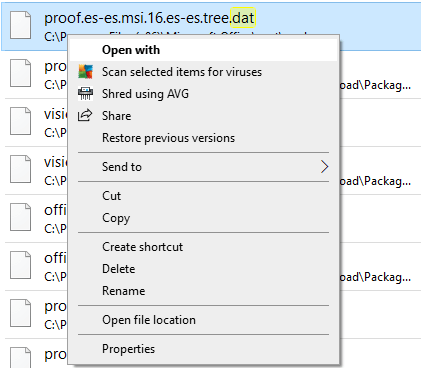
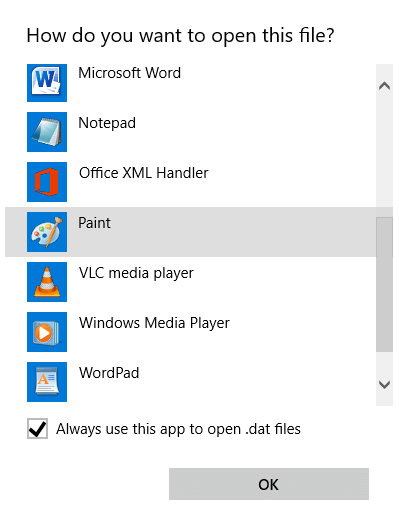
So what do you do if you’re not sure which program it came from or what the original file extension was supposed to be? You can also try right-clicking on the file and then choosing Open With and try different programs. For example, I changed one of my Excel files to a .DAT extension and then right-clicked on it to open it with Excel and it worked!

open .dat file

Now I just chose Microsoft Excel from the list and Excel was able to read the file since the data was written by Excel, it just had a wrong file extension.

open file

You can also try other programs like Windows Media Player since it will open it if it happens to be a video, MP3, or similar media format. So hopefully you are now able to open your mysterious .DAT file using one of the above mentioned methods! If not, post a comment and I will try to help! Enjoy!

[tags].dat file, open dat file, how to open a dat file, how to open a dat file, dat file extension, what is a dat file[/tags]

» Filed Under Computer Tips

Related Posts

Comments

96 Responses to “How to read and open .DAT files in Windows”

  1. Madhur Kapoor said on :

    I always thought that DAT files were for Videos . My doubts are cleared.


  2. akishore said on :

    Hey Madhur,

    .DAT files can be video files and are a lot of times, but the format itself is for “arbitrary” data. Emails programs have a tendency to change the file extension to .DAT.


  3. lorraine said on :

    my .dat file is a video file but can’t open with windows media player and realplayer. please advise any other software allows me to watch this video file.


  4. Julie said on :

    Opening the file is not the problem. I can’t figure out what program it was created in and have tried everything–all the instructions say use notepad–doens’t work!!


  5. akishore said on :

    Julie, who did you get the file from? If you have any slight idea what the DAT file could have been generated from, then just try to rename the extension and see if it opens. I would try .XLS, .DOC, .AVI, .PNG, .JPG, etc etc. It’s got to be a common extension.


  6. zoheb said on :

    you’re the man!! this post was a great help….i was breaking my head in trying to download corel from the internet coz i thought it was a file made in corel. and after reading your post i just chged the extension to .jpeg and hey presto i get my file……thanks buddy for your efforts !!


  7. Galzaga said on :

    I have a site with videos i surf often but it doesnt allow you to download the “suppoused” wmv files. Now, I play the videos in IE, then I go to settings and view files and the file is there, and of course is a video file lets say 20meg. The name of the file is usually something like this: video1.wmv#0;000;0;0;1:2;2:2. What I do is to copy that file and paste it in desktop and I get a file wich a different name, usually something like: video1[1].dat.
    I tried all different kind of codecs, video inspectors, different video programs and no succes, there was no way to open those files, I hope somebody can help, thanks


  8. mª jose said on :

    me es muy dificil abrir el archivo


  9. James Slattery said on :

    Many thanks for your ideas on identifying a .dat file. Without your prompts I would not have been able to open the file.


  10. Philippe said on :

    Bonjour,

    Si vous recevez un fichier par email dont l’attachement a ete decoupé en plusieurs fichiers .dat par exemple fichier1/2.dat + fichier2/2.dat, il suffit d’ouvrir les deux fichiers sur Notepad, de reassembler le contenu et de le sauvegarder dans un seul fichier.dat puis de l’ouvrir grace à WinZip

    Philippe


  11. alucard said on :

    disculpa pero yo tengo un juego con extencion .DAT no se puede abrir mediante las opciones q mencionaste…q puedo hacer??


  12. terry said on :

    Me ha servido de gran manera, gracias…


  13. Paulo Neto said on :

    Olá,

    Achei muito interessante essa explicação sobre .dat
    no entanto estou ainda com uma pequena dúvida.

    Eu tinha um computador que ao receber arquivos .dat abria
    os arquivos sem ser necessário descobrir que tipo de arquivo realmente era (ex. .doc, .xls, etc).

    Não sei se ele tinha alguma aplicação que fazia isto, você
    pode me dizer se realmente isto existe e como posso obtê-lo

    Grato.


  14. GRISELDA said on :

    mil gracias, siguiendo las indicaciones puede abrir
    un archivo data sin complicaciones.

    saludos


  15. Mehdi said on :

    Dear friend!

    If you have a DAT file, Windows Media player and most other software on Windows can not open it. Please try the “Kmplayer” to open the DAT file. It worked for me.

    thanks!


  16. Linda Derwick said on :

    my dat file came from a mac–applefile supposedly as a compatible word file–I used your suggestion and changed file extension to doc but still can’t read it in word. Does anyone have any suggestions?


  17. Tammy Storrs said on :

    I did a search on Google for how to open DAT files, and your answer is the best I have found.

    thank you,


  18. cyndi said on :

    HELP! I got a dat file and I can’t seem to open it at all. it came through in winmail.dat


  19. Shirley said on :

    I am having a problem… using PSPX2..when I save and send an image its being received as DAT file yet I saved and sent it as a JPG file …must be a setting that is incorrect but cannot find it…

    thanks for any help


  20. Sandra said on :

    8-8-2008
    Good Afternoon..

    First thank you for your detailed
    instructions regarding how to Open
    up a .Dat file in Windows XP Prof.

    Well, I went to My Computer, Tools
    Folder Options, View and UNCHECKED
    the Hidden files..
    Then went back and Rt clicked on
    the .Dat file..but still it will
    not allow me to do a thing..
    It says I can go to the Internet
    maybe in a List find something
    to assist me to Open this .Dat
    file..
    Must say, this is a tad confusing
    for me, as I am so NOT Technically
    inclined per say..
    So if you can suggest another way
    to Open the .dat file.
    I haven’t tried Windows Media Player
    because it isn’t Music, but a Knitting
    Pattern a friend sent me..??

    Thanks again.
    Regards..


  21. Ket said on :

    I’ve tried to open the dat files for years and I couldn’t open it. They’re still well keeping on my computer and my next computer too.

    They are pictures that very important to me. It’s my wedding photos.

    I shot them with the digital camera. The guest who participated the event try to impress us. He download them to my computer and make it viewable by PowerDVD. They just worked like a charm.

    We love it at first, but as he left, I don’t know why, we cannot open it as he demonstrated.

    The pictures can still be viewed by PowerDVD but at very fast rate, less than a seconds per picture I guess, so we cannot actually view the photos.

    Since we cannot print them out, I just keep them safe on my computer.

    And now I am divorced, I really want to watch those photos again. I search high and low through google and run into your site.

    I would be very very appreciated if you can help me.

    Thanks


  22. L White said on :

    I am experiencing the same problem Cyndi is. I also received an e-mail with a winmail.dat attachement. I followed the steps and tried renaming the file so I can open it, but no luck. I just sent an e-mail to the person who sent me the attachement to ask which program was used to create the program. This wesbite was very helpful and Akishore, although I was unable to open my attachment the information you provided was very helpful and informational. You didn’t have to create this site, but you did and it is appreciated.


  23. L White said on :

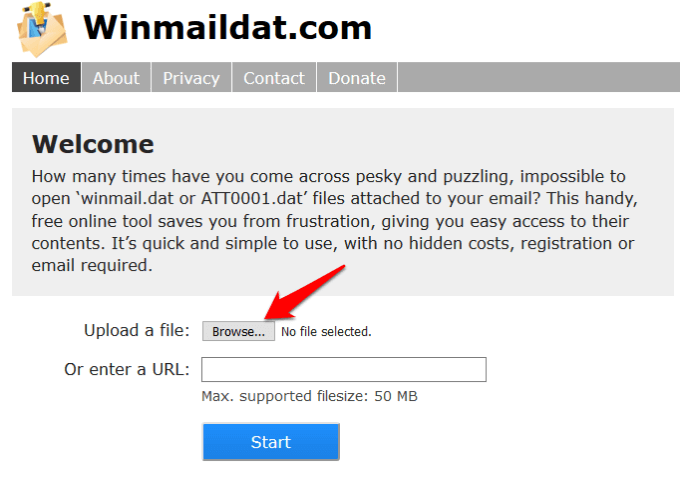
    I stumbled onto this website http://www.kopf.com.br/winmail/download.php and was able to open the attachment winmail.dat. Hope this helps everyone else.


  24. jefu said on :

    this site was very helpful. although i wasnt able open my winmail.dat file, i did learned something from here.. i tried following the solutions you provided but it didnt work. ill just have to ask my customer to ask the person who sent that file and ask him what kind of software he used to create that file.. thanks a lot..


  25. anm said on :

    Hi… How do you open .dat files that are archived conversation from Yahoo Messenger? i tried what u said but i didn’t work.. will appreciate ur help.. tq


  26. Silver said on :

    @ ket: chance the file extension of the file to .psz
    so instead of .dat you will have psz and will be able to open with powerdvd if im correct.

    @anm: try to open with .txt

    i hope this helps for you guys.


  27. Gaiyya said on :

    actually i want to open one of my yahoo messenger archives! and its in this “Video CD Movie” format or whatever and it has the .dat format. and i open it using notepad but i get a lot of gibberish!! :S :( heeeeellllpppppppp!?


  28. Tom Tonks said on :

    Try IrfanView. It will open many pictures and movies.


  29. Gigi said on :

    Thank you. This is very helpful.


  30. KP said on :

    downloading a setup.exe file from ITunes, saves as a .dat file and not an executable. If I change it to .exe, will i then perform the setup?
    Secondly, why would it download as a .dat as opposed to a .exe in the first place?
    Many thanks


  31. Sudhir Vardhan said on :

    This information was simply great. It saved me a lot of hassle of finding out what kind of file it was. I was perplexed to see the .dat extension files in my email. the sender told me to open in the fax viewer. I was unable to open the same in Window Vista. Ultimately based upon your guidance stated above i inserted the extension .jpeg and behold!!!!! the file opened. BINGO!!! BINGO !!!


  32. jamil said on :

    I have a dat file and i don’t know by which program it was created.Is there any way to open the file other than checking with different program


  33. Esteban said on :

    Ecellent post man, I resolved this with that. Was simply amazing and easy *-* Jeje! *-* Thank you again!!


  34. Anthony said on :

    I have a .dat file that is part of a program how can I open that file.


  35. Matt said on :

    Ah well done.
    Changed the attachment extension to .jpg, and viewed the photos without a problem.
    Thanks for the excellent explanation too.
    Seems my service provider has an email server that strips off the extensions and replaces them with .dat for email attachments.
    Cheers!


  36. drago said on :

    hello
    I have a .dat file downloaded from a website to unlock my iphone but i just can’t open it whit anything. it’s a program but it doesn’t want to open. can someone help me please. I’m from holland (netherlands)
    thanks


  37. chen said on :

    thanks for the info. i just want to know if there is a relation between DXF Files, SDNF files and DAT files?
    can you explain it to me please.


  38. Recker said on :

    I’ll say it again in English! Your advice was a great help and I’m really thankful, since I do receive files that I canb’t open from time to time, and it was usually with a dat extension. My question was just if I should leave the box “Hide ….” unchecked without any risk or if I should check it again. Thanks anyway, people like you are really godsent!


  39. Chate said on :

    I have a .dat file but it isnt a text format it is from an unknown program.Is there a way i could find out which program it is?


  40. Garry said on :

    Hi, I received a cd that had information copied to it from MYOB13 and when I place it in my laptop, it comes up as a dat file. My computer is Windows XP, I have read your article but I am still stumped (and frustrated)my partner’s computer whom copied it for me, is Windows 98. Please help!


  41. natalie said on :

    i restart my laptop everyday which has vista on it an i get a box pop up saying that qysmuim.exe has caused a problem an needs to close it came with 3 dat files also named qysmuim dont know where it came from… its in my user\username\appdata\local\microsoft\qysmuim.exe did a search on the web to see what qysmuim was an found nothing.. needless to say the exe an the dat files wont open an i scaned for virus an there was none.so now what? lol


  42. Wayne said on :

    Thanks for the help. Just a side hint for everyone;
    At bare minimum, if you do open a DAT file in notepad or some other text editor – often you can read in the file header what the file type is and then what you can open it with.

    Good luck!!


  43. Joel said on :

    I want to open .dat file. Let me know from which application it will get opened…since it is a file which has to be filled and sent to a company

    Let me know ASAP

    Regards
    Joel


  44. Lisa Love said on :

    Thank you L White for your post in response to Cyndi’s problem because I was experiencing the same issue, and even though this posting itself was very helpful I still needed more help. Your post, which I C&P here: “L White said on : August 16th, 2008 at 11:42 am

    I stumbled onto this website http://www.kopf.com.br/winmail/download.php and was able to open the attachment winmail.dat. Hope this helps everyone else.”

    with the link was my lifesaver. Thank you so much for sharing. Hope this helps a lot of other people, too.
    Happy Holidays!! (^_^)


  45. shravanti said on :

    gr8 post… it was really helpfull


  46. jignesh said on :

    Thanks very much. After changing DAT extension to pdf i can open file with adobe acrobat.


  47. Ronald said on :

    I have a .dat file and still can’t open it. Tried renaming to .doc -NO PRIZE! Tried opening with notepad, excel, access – NO PRIZE! I tried your directions, nothing works. Any ideas?


  48. BRUCE said on :

    I have dat files created with a multitrac recording studio, the mrs1044cd by ZOOM. I copied the audio files usb02 to a folder/desktop, and although I can play them on the zoom hardware I would like to have copies on my harddrive. any tips would be cool. Bruce


  49. sekhar said on :

    I got wonderful answer to my problem. Actually I have a .dat file and still can’t open it. After reading the artcile from ur website, i opened it.

    Thank u very much
    Sekhar


  50. Summer said on :

    I went to burn a video disc through Nero and somehow it has changed it into a dat file. I have tried everything and I am getting really frustrated. It will be 2 years in May, and am still trying to open it. I have my son’s birthday and my niece’s 21st birthday on there. Please help!!!


  51. Jorge said on :

    After following your step by step instructions and applying the change in MY Computer.

    I went to the folder where I stored the .dat file , I right clicked and went to properties , there I replaced the .dat with .jpg and clicked on Change….

    It worked like a charm , my .dat file was now .jpg and the picture was viewable , Thank You for the information.


  52. Ben said on :

    I have a vista, if I clicked properties and saw “opens with:(program here)” what would that mean? Should I download the file or what?


  53. Ritesh said on :

    Thanks Boss…thanks a ton…


  54. Aisha said on :

    Hey this is a great and useful post however i amk still stuck and i wonder if you can help me. you see i downloaded some DAT files from the following site http://www.ffxidats.com/list.php?c=E2. I clicked on the links to get them, they are images but they appear to be in DAT format, however, I cant seem to access them when using a PNG BMP or JPEG extension. Would you be able to help? ill be most grateful Thanks in advance.


  55. ken said on :

    If you need to open .dat files from Yahoo Messenger try this link:

    http://www.ikitek.com/products.....coder.html

    It worked on my older YM archives from 2007

    Good Luck


  56. Dean said on :

    I RECOMMEND TRYING TO OPEN .DAT FILES (THAT YOU KNOW ARE SAFE OF COURSE) IN INTERNET EXPLORER. IE CAN HANDLE MANY FORMATS AND ALOT OF TIMES IT WILL BE OBVIOUS WHAT PROGRAM YOU SHOULD USE TO OPEN THE FILE. BEWARE THAT .DAT FILES FROM UNKNOWN SENDERS CAN BE HAZARDOUS TO YOUR COMPUTER AND SHOULD BE HANDLED WITH CAUTION.

    SORRY caps.


  57. aytee said on :

    You are my hero! THANKS


  58. Hany Nadim said on :

    I always send excel files as mail attachments, but they receive it in .DAT extension. i do not know why it changes
    to a DAT file. i want the file to arrive in it’s original format Excel. pls help


  59. Dilian said on :

    I have an Icy Tower game MOD and the file format is .DAT, so how can I open it, which program must i use???


  60. el super terminator 2 rebelandose contra las maquinas said on :

    what you can try also is to open it with internet explorer, It worked for me (it was an image)


  61. Rita said on :

    Dear friend,

    I have read your article cause I was searching a method to open my .dat file. Unfortunately this system does not work with me. I have converted this file in numerous extensions but nothing! Could you help me to solve this matter? It’s important cause is a file for working!

    Thanks

    Rita


  62. Sacha said on :

    i emailed myself outlook contacts, but when i recieve them they appear as attachment of .dat files. i followed your instruction on changing it to approriate application (.vcf) but when it opens all the data on the contact card is missing! PLEASE HELP!!!
    not sure what i need to do to make the contact details appear with the card! :(


  63. Aina said on :

    I can never open .dat files in my aol account, but when I forward the email to my yahoo account, I can open the files? Tried hotmail also, but it didn’t work. For some reason yahoo is able to read the files?


  64. carroll said on :

    I just received an email with the .dat file extension at my work email (I use thunderbird). Couldn’t open it so I forwarded it to my gmail account and all the information came through no problem!


  65. Suzanne said on :

    Your first few paragraphs saved me!! Someone sent me a huge excel spreadsheet that came through as a .dat file. Your feedback was perfect in explaining what a .dat file is, why a file might come through with that extension and how to change the settings that would allow me to change the extension. Once I did all that, no problema! It’s never a lost day when I can say I learned something new! Thank you so much!


  66. Shevon said on :

    I am trying to open a map that is an .at5 file, can you help? Thanks


  67. Aiv J. said on :

    It’s a nice post you have there. Solved a major problem.
    Thanks!


  68. Shirl Smith said on :

    I received .dat files on a CD. They were photos taken
    with a digital camera and I imagine were originaly
    .jpgs. I was told they were for the TV DVD player. That
    didn’t work, but realplayer on my computer opens them.
    Not a perfect solution but can view them one at a time
    not as a slide show which I would have prefered.
    Shirl


  69. kavita said on :

    Hello,

    I have several files: .dat, .idx, .ibk, but this not any kind of video file. These are some database files. Can any one tell me how to open or see the content of these files?


  70. sp said on :

    I just saved the file to my desktop, renamed the extension to XLS and double-clicked on it to open. Worked fine!


  71. Erin Adkinson said on :

    Thank you so much! I changed the file extension on an IMPOSSIBLE .DAT file and was able to open it on the first try in .PDF format. Now I can get my client invoice to him today as promised! You saved the weekend!


  72. Tim Mcdonald said on :

    Hi,

    I’ve been trying to play a .dat file all day. Its from a VCD but the computer doesn’t recognize it. I’ve tried open with media player too, but it says cannot play this file type… any more idea?


  73. Sue said on :

    I want to uninstall a game but the only file in the ‘uninstall’ folder is a .dat file which I can’t open. I don’t want to keep the game in my com as it takes up a lot of space. Can you give me any advice?


  74. Jo C said on :

    Thank You, Thank You, Thank You!! Your suggestions saved the day!


  75. Jim Hammond said on :

    Thanks for the help! I’m putting a food & wine article to bed, but needed a chef’s recipe to complete it and it arrived in .dat format. Used your info, guessed it was in .doc and was right. Submission done in time, phew!


  76. Fran said on :

    I tried to open some archived messages from yahoo messenger that was sent in an email as an attachment.. tried changing from dat and will still not allow me to read. Any sugggestions?


  77. James said on :

    Thanks for your help. This post was a great one. I can now open DAT files.


  78. Pat said on :

    Thanks! A colleague had forwarded two files with “.dat” — interestingly, two others came through as “.doc”.

    It turned out one was a .doc and one was .xls, and we were all able to view these files.

    Thanks again.

    Pat


  79. concon said on :

    Hi! I need my old chats but when i opened it, it is a DAT file and the icon is for my media player! I tried all kind of ways to covert it to txt, doc, xls. It is a messages archive from my past chats that I need to present to the US embassy of chats with my husband!! Pls help!!!!


  80. Dee said on :

    This is really helpful. My boss was impressed with me! :)

    Thanks a lot.

    Cheers!


  81. siete uno said on :

    hi! I just tried to change a .dat file to .txt, .doc, .excel, .mp3 and to any other known file types. unfortunately, none of them worked. :(

    what im actually tring to convert are the messages from my YM Archives. They are all in .dat form.

    I can open the files using Yahoo Messengers Archive but I am trying to convert them to word files so i can just create a 1 page document for the conversations that i had.

    Is it possible?

    Hope I made some sense in my query. :)

    Thank you,

    siete uno


  82. vish said on :

    Hi,

    First of all thanks for such useful information. ‘index.dat’ file which gets created in ‘Temporary Internet Files’ folder contains the names and even the dates of your first visits to many pages. I tried to open it with different progs like notepad, wordpad, word, excel….but i am not able to read the content…if you find any solution, email me at “vish2686@yahoo.in”

    Thanks.


  83. Margaret Swank said on :

    Help. A good friend sent lots of photos via email. I downloaded them, sent them to windows media player. When I tried viewing them, a message pops up to tell me; the selected files has a extension (.zip) that is not recognized by windows media player, but might still be able to open it, then I check that box,and get another message. In other words, it won’t open it. I have windows vista.


  84. james said on :

    try VLC player…


  85. Ananta C said on :

    In our company we generate .dat files with inhouse application, I had fixed strange problem. I can open those .dat file in excel by browsing file –> open , but not when I double click ( after associating to open always open in excel ). below is solution

    open folder option —>file types — dat and click advanced button ( some times you may have restore button, click restore and you will get advanced )

    in advanced – select open — edit and paste the path of “x:….\excel.exe” /e and click ok/apply

    eg : “C:\Program Files\Microsoft Office\Office12\EXCEL.EXE” /e

    boom.. it should work


  86. Elizabeth said on :

    Thanks very much for excellent explanation and solution. I changed the name to extension .jpg and could view and save the picture. Can it be caused by the person sending the attachment using plain text?


  87. Luke Alexander said on :

    Thanks for sharing and posting your article here. This one is a great help. I had no clue how to open a .DAT file.


  88. S Murthy said on :

    I have been using Windows outlook 2007 after upgrading from 2003. Now all files that i send are converted to .DAT files. This is creating problems for my clients as I need to transfer various kinds of data at a time and cannot really specify the file type everytime. Is there some way to configure outlook to send mails as is without converting it. Thanks


  89. JIM said on :

    I was sent a pdf file whcih converted to a dat file. I changed the file extension to pdf, but it would not open


  90. Ellie said on :

    I exported my earthlink messages in folders to a flash drive in anticipation of setting up a new vista machine. The file is there as a .DAT and now I can’t export it to the new machine. Any suggestions?


  91. Jeff said on :

    Hi,

    my .dat file is a map related file.(map for GPS unit) which program should i use to open it?

    Thanks.


  92. andrei said on :

    video formats: avi mp4 mpeg mpg flv


  93. andrei said on :

    hey, this post is great. I know a litle about this and here it goes:

    For video files even those pictures made for powerdvd should open with vlc and is really nice now(much improved.)

    For pictures you should try more endings: .jpg .jpeg .png .iff .tiff. it all depends where it came from. now days pictures from the internet come as png. if is a scan chances are it is an tiff or a ttf. normal pictures ussually store as jpg or jpeg, espeacially from everyday camera on the market. very few have specific attributes, I came across a jvc once with a jvp format but I think it only goes for the copycat’s on the market (the really cheap chinese trickery products.)

    If it is from a game it is deffinetly in their own language and not sure at all if can be open by anything. if notepad doesn’t see just blocks and squares then it is probably encripted.

    For messenger (yahoo) files u can go to http://www.cnet.com and see what is around for decoding there are several programs there and most are free or free period trial. sa decode and don’t forget to save in something else.

    For the rest I saw a lot of good answers. and usualy just changing the attribute should work (careful now cause docx is way different then doc, and so forth xls, and ppt). for the pictures slides u can try pps or ppt. even mp3 work like that some times. and most recent video format on the net is flv. I think this is about everything. hope it helps.

    So remember if u can’t see it in notepad it is probably encrypted and very few programs can decrypt it directly (vlc, ie, irfanview for pics, and if I remember correctly PowerISO for cd images or magic iso).

    good luck!!!


  94. S Mirza said on :

    Worked perfect for me! Thanks


  95. Nadeem Ahammad said on :

    Hi I changed the file to different formats but it wouldn’t open…I tried pdf, xls, doc, jpg, png, gif, pdf but it couldn’t be opened! plz some more examples to open .DAT files…thanks..Nadeemdg


  96. Ricardo said on :

    Thanks for your help. I was able to open it with Word after learning from the sender that she had created it with that program although on a Mac. I wonder if it has anything to do with that? Thanks again.


Please post your comments/suggestions!