An annoying problem that can come out of nowhere

I recently worked on a client’s computer that was giving him the error “no active mixer devices available” whenever he clicked on the volume icon in the taskbar. This problem came up out of nowhere and it was almost as if the computer never had sound before!
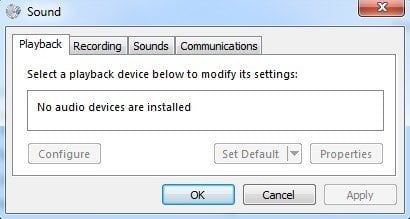
In the Sound and Audio Devices or Sound applet in Control Panel, everything was grayed out and there was a message saying No audio device under the Volume tab. On Windows 7, it will say No audio devices are installed on the Playback tab.
Table of Contents
Missing Drivers
Upon checking under the Hardware section via the System Properties, we found a couple of yellow exclamation points next to Multimedia Audio Controller. Now this issue would have been easier to fix if the computer had a separate sound card installed and would have simply involved downloading and re-installing the latest driver for the sound card.
Sometimes the driver becomes corrupt and the sound disappears. In this case, just go to Dell, HP, or your manufacturers web site and download the audio drivers. Once the proper drivers are installed, you should go to Device Manager, right-click on the audio device under Sound, video and game controllers and see something like below.
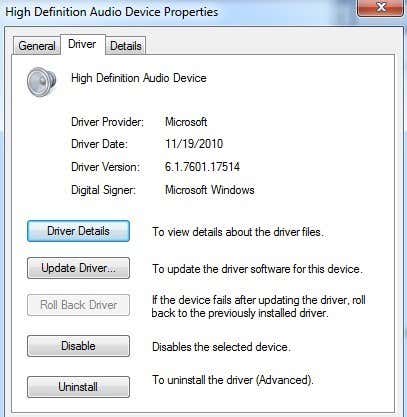
For Driver Provider, you may see other names like Realtek, etc depending on the manufacturer of the sound card. If your sound card is integrated into your motherboard, you’ll have to re-install the motherboard chipset drivers. Follow the previous link to install the chipset drivers for your motherboard manufacturer.
Windows Audio Service
If you’re getting the grayed out issue in Control Panel, but the driver seems to be installed fine in Device Manager, then your only other issue is probably related to the Windows Audio service. If, for any reason, the service is stopped, then you will have the above-mentioned problems. To fix the issue, we need to open the Services dialog.
To do this, click on Start and then run and type in services.msc in Windows XP or just click on Start and then type in services.msc in Windows Vista, Windows 7 or Windows 8.
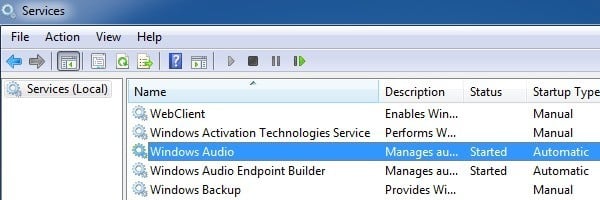
By default, it should say Started under Status. If not, you need to double-click on service, start it and then set the Startup Type to Automatic.
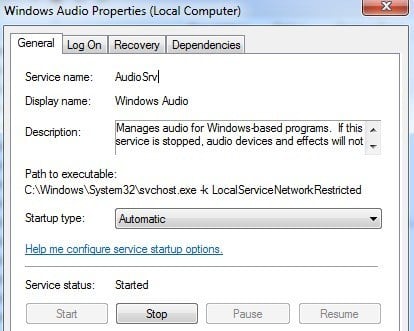
Go ahead and restart the computer and hopefully you should be able to change the sound properties in Control Panel and play sounds on your computer. If you’re still having issues, please post a comment and we’ll try to help. Enjoy!