How to fix "Host process for windows services stopped working and was closed" on Vista
Posted on May 18, 2008 at 5:25 am
Don’t you just love crazy Windows errors? In this post, I’ll be going through some steps you can take to fix the “Host process for windows services stopped working and was closed” error message in Windows Vista.
I’ve already written about a few, such as “there no active mixer devices available” error message and “Internet Explorer has encountered a problem and needs to close” and “runonce.msn.com runonce2.aspx error in IE7“. Too many to mention!
Sadly, most of these error messages are cryptic to the core and give you no insight into what the problem actually is. When getting the Host process error you might also notice that your Internet connection in Vista slows down considerably and you might have to constantly restart the computer to fix it.

This error seems to happen due to some incompatibility between a program on your computer and Windows Vista. It could be a lot of different applications, so you first have to determine which program is actually causing the problem. You can do this by viewing the Event Logs on your Vista machine. Here’s how.
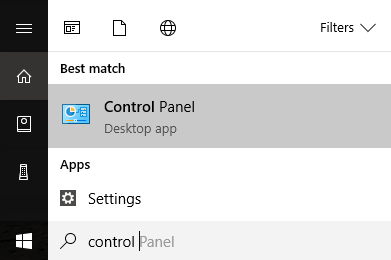
First go to Start and go to the Control Panel.
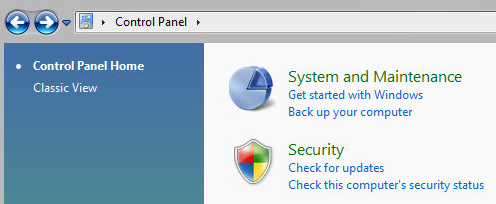
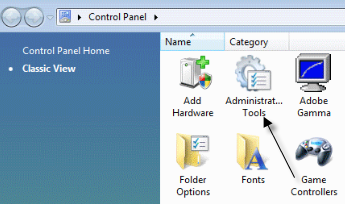
Now depending on your view, you can either click on Administrative Tools if you are in Classic view or click on System and Maintenance if you are in Vista view.
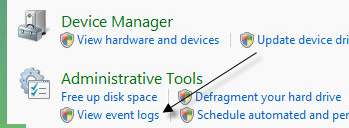
If you are in Classic view, you will see an icon for Event Logs and in Vista view you will see at the very bottom a link called “View event logs“.
Now you’ll want to browse through the Windows Logs folder and view the Application and System logs.
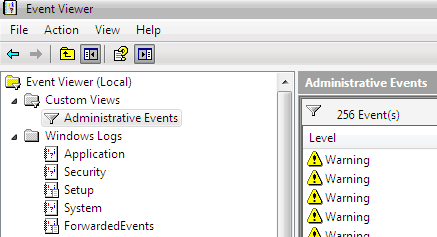
You should now look for events with red X’s next to them and that have the word Error. Look for them around the same time or before you got the “Host process for Windows stopped working” error message.
Method 1
Some people have had this issue with ATI Catalyst Control Center and found numerous errors in their event log. You can then try to find an update for the program or uninstall it if it is not needed. You might also have this problem with Windows Defender, so try to find an update for that. Also uninstall useless HP printer software, and check for other events from Nero, etc.
Method 2
It could also be caused by an incompatible driver installed on Windows. This could be for any piece of hardware on your system. You can figure out if it’s a hardware issue by booting up in Safe Mode and seeing if you get the error. If it’s not there, then it’s definitely some driver that’s being loaded when Windows starts up.
Method 3
If that didn’t do anything, you might be having an issue with the Background Intelligent Transfer Service (BITS) Windows service. If you starting getting this message after you did a Windows update, then BITS could be the culprit. You’ll need to follow the instructions in this Microsoft KB article on how to repair the corrupt BITS files.
Method 4
If you see an error in your Event logs that has EMDMgmt, then your issue might be caused by a thumb drive or some other external memory device, like a memory card reader. For some strange reason, you might have to connect the camera to your computer directly rather than using a card reader.
Method 5
This could also be caused by a faulty RAM memory stick in your computer. You might want to run a full diagnostic on your computer to make sure your RAM does not have errors on it. If you find a memory chip with errors, take it out and see if you get the error message. You can download a free app called Memtest86 to test the memory on your computer for errors.
Hopefully one of these methods fixed the Host process for Windows has stopped working. If not, post a comment and I’ll try to help! Good luck!
[tags]host process for windows services stopped working and was closed, host process for windows services stopped working[/tags]
» Filed Under Computer Tips
Related Posts
- How to fix “Page fault in non paged area” error
- How to turn on Automatic Updates in Windows
- Windows 7 Cannot Connect to Internet
- Fix for Cannont Empty the Clipboard in Office
- How to fix Microsoft Windows Search Indexer stopped working and was closed


THanks a lot for this. This used to bug me a lot.
I am having this problem since I installed a new update but when I try any of these fixes my computer says “the pipe state in invalid” and won’t let me. Any suggestions
hey thanks for the info but when i go into the event viewer it says (big red X) event viewer service is unavailable. verify that the service is running.
well i never shut the s.o.b off… Vista is sounding like just another pos microsoft bag of crap
any help would be greatly welcomed
thanks
hi i am having major problems with my computer i wont let me do anything, its always ‘the pipe state is invalid’ and its driving me nuts it seems to be happening since i installed bullguard but it wont let me uninstall it because of the pipe state is invalid? any help ? email me if you have answers and if they work i will post answer everywhere
regards justin. davison_js@hotmail.co.uk
hey thanks, i think method 3 was the solution
though i’m not 100% sure if it was fixed
hi, tnx for the info.. does it work in any situation? mine is.. i installed the online game audition… when i am just about to play.. this eerror came out and the audition window was closed.. does it work here?
I, too, continue to be plagued with these cryptic errors in Windows Vista. A search of the event logs yields no clues.
I don’t understand how Microsoft can go about saying that most problems in Windows Vista have been fixed when evidence such as this runs rampant.
What is the technical novice expected to do when confronted by such impenetrable error messages? This is why I’ve been recommending Macs to acquaintances who do not possess technical skills.
I am also getting this error. I think that it is due to my HP printer, but can’t seem to figure out how to fix it. HP has given me zero solutions. The problem signature is as follows:
Product
HP Network Devices Support
Problem
Stopped working
Date
10/7/2008 9:43 PM
Status
Report Sent
Problem signature
Problem Event Name: APPCRASH
Application Name: svchost.exe_HPSLPSVC
Application Version: 6.0.6001.18000
Application Timestamp: 47918b89
Fault Module Name: StackHash_a9c6
Fault Module Version: 6.0.6001.18000
Fault Module Timestamp: 4791a7a6
Exception Code: c0000374
Exception Offset: 000b015d
OS Version: 6.0.6001.2.1.0.768.3
Locale ID: 1033
Additional Information 1: a9c6
Additional Information 2: 6725e949b4196e62fd0b8a2fc0254ad0
Additional Information 3: 4579
Additional Information 4: 252ecb488a68b686b70a485676ea1e47
Extra information about the problem
Bucket ID: 644765480
Thanks for any help you may be able to offer!
I didn’t get the message once I turned the computer on safe mode. And I tried all the other methods but with no avail. When I turn on my computer in the regular mode, I still get the message. So according to you the problem lies with one of my drivers. How do I know which driver is giving me the problem and how do you delete it if it is no use?
Thanks.
Faulting application svchost.exe_wuauserv, version 6.0.6000.16386, time stamp 0×4549adc4, faulting module dpx.dll, version 6.0.6000.16609, time stamp 0×475774d3, exception code 0xc0000005, fault offset 0×000148cf, process id 0×16f0, application start time 0×01c964f8138a62fe. <<<>>>>
The Service Control Manager tried to take a corrective action (Restart the service) after the unexpected termination of the Windows Management Instrumentation service, but this action failed with the following error:
An instance of the service is already running.
Hi really good advice but sadly this dosnt apply to myself.
I think i picked up a virus on my laptop and now get pop ups when connecting to the internet saying “host process for windows services has stopped working” i checked my event logs but dont really understand it as there is errors critical errors and warnings etc.
I dont know what to do lol
please help.
Thanks
So, I had this problem and was on the verge of returning my new laptop to buy one that was sold with XP loaded. I called HP tech support and they had me install IE 8 Beta 2, restart, then uninstall beta 2, then restart. This takes you back to the IE version you had before. Apparently, this leaves behind some files that fix the problem. My computer hasn’t had the problem yet and it usu has buy now. Give it a shot.
I read this is an audio driver (Cmajor) problem, but Windows update and the dell cmajor battle over the newest version. I am on a Dell xps-m1330. There always seems to be a clash. However, it could be the printer, I guess, that is wireless and an HP. It doesn’t seem to prevent me from doing anything (that I am aware of) on my PC so I just continue with regular updates.and wait for a real fix.
to “Charles” – and his message here 4th of January 2009 :
You are a *. How did you find out ???
Installing IE8 and uninstalling it did work for me !!!
Joern
Ooops. My message 4 days ago was not quite correct. Still have the error. Please ingore.
Joern
Whenever I try to move between files in Outlook (from inbox to calendar or to notes, vice versa) I get these error messages about host process/cryptograhic services has stopped working/telephony has stopped working. I tried looking up the event viewer, and the error that keeps popping up is:
svchost.exe_TapiSrv
6.0.6001.18000
47918b89
tapisrv.dll
6.0.6001.18000
4791a771
c0000005
0001b45f
1288
01c9800c8f372d1f
Anyone have ANY idea what this is???
Thanks, Buffie
Thank you for this information
Thanks for this info. However, I think it would be more helpful if you described what to look for to determine whether your Error is svchost related or not. Simply, just add that the user should look for a line reading “svchost.exe_” when they click on the error and read the details below. The service name (which will appear where I put the arrow brackets) should be disabled by Googling the service to find out its full name and what it does, opening Services from the administrative tools menu, scrolling to the service and opening its properties page to Stop the service and Disable it.
For me, the service was hpslpsvc, which helped my HP Printer handle dynamic IP assignments (through DCHP) on my network. Solution: disabled the service and gave the printer and all the computers on the network a Static IP through MAC address binding.
In my comment above, there should be arrow brackets containing the words “service name here,” but I assume they were filtered out due to html filtering. It should read: “…look for a line reading ’svchost.exe_**Service Name Here**’…(which will appear where I put the double asterisks) should be disabled by Googling…”
This should prevent any confusion caused by the html filtering. Thanks!
I need some help! I cannot even open my events log to see where the problem might be. When i click on “view event logs” a message pops up that says “class not registered”. ??? Help!
Hi,
I got all the way to the point where I clicked on view event logs and another error message came up saying,”Event log service is unavailable. Verify that the service is running.” Not sure how I do that…
Remicks – can you please explain:
Solution: disabled the service and gave the printer and all the computers on the network a Static IP through MAC address binding.
I have the same issue!
My wife’s Sony Vaio went nuts and her desktop disappeared, screen went black, application shortcuts disappeared and multiple Windows applications would fail with the error ‘host process for windows services stopped working and was closed’. This is the first search link that I clicked on. As I was following the suggestion of removing useless HP drivers, leftovers from the previous owner’s printer, using the uninstall feature the screen did the exact opposite and her desktop returned to normal. THANKS FOR THE TIP!!!!!
Cheers!
Hi there,
I don’t have a (red X) instead I have a (red exclamation mark)in the administrative event viewer and the error is:
“VDS Dynamic provider”
In the General tab under the events viewer I have the following explanation:
“The provider failed while storing notifications from the driver. The Virtual Disk Service should be retarted. hr=80042505″
Mind you, I do have 2 external hard drives inserted into the laptop USBs at the time this error came on my screen. Any idea what does the message mean?
Regards
Everytime I try to open the event log, It doesnt work : it says check to see if event log service is available.
what is the cause of the “Host process for windows services stopped working and was closed” on Vista???
Hello,
I have this problem when i play my game, Counter Strike: Source. When it gets really intense it either
A.)says the following error “Hl2.exe has encountered an error and has shut down” OR
B.) “”Host process for windows services stopped working and was closed”
Most times it is A, but B, I’m sure is the culprit.
Thanks
I had the same Windows – error – popup; and nothing seemed to get rid of it on my new 2009 laptop…
I finally decided to RESTORE the system to ‘factory-settings’ and now everything works like brand new. (perhaps it was a virus or some bug that I stumbled into while clicking onto some info sites about M.J.-death) – yes, there are always bad-motive ppl. out there!
be careful what you click on, even if you do have antivirus + defender + firewall…
thank you.
I have the host process has stopped working problem.
I am currently using a USB wireless broadband modem which is a 3G modem. It used to work fine. But now when i try to connect it, it show’s that the windows host process has stopped working. Any solutions?
thanks. this helped me out. The event viewer showed me a lot of errors which where connected to my hard disk. I told me it had corrupt sectors. I performed a desk check and found some errors indeed.
The following shows up on my screen “WLAN Auto Config has stopped working” How can I fix this?
I also am experiencing the same issue with the HP printer and the ” Host process for windows services has stopped working” after installing a new wireless model with a dell xps and my mother in law just purchased a Dell inspirion with a Hp wireless and is having the same issues right out of the box. Help Please! Thanks
I got this error on a dell M1330. Had all kinds of problem, usb drives and cd/dvd not working no wifi. Tracked to the ATT software for the USB mobile internet. Un-installed it and no more error and devices working again. Laptop was only at SP1 (vista Home Prem x86) so I’m going to pack it up to SP2 and install it again as see what happens.
Thanks for posting this but unfortuanatly none of these worked, mainly because my event log viewer has nothing in it, it says error. And to be sure i hadnt aquired a virus i ran a full virus scan using norton and nothing showed up, also alot my program files are disapearing
I have the host process has stopped working problem. My graphic card is ATI Radeon. By stdudying all above comments I knew that the problem is with the ATI Radeon card.
Thank-you so much for posting this, my notebook is working again!! Method 3 fixed it for me.
I have Host process for windows services stopped working and was closed” error message in Windows Vista. I used the information above to check under administrative tools, event viewer, windows logs and under application. I have the following two errors.
Description:
Windows cannot access the file C:\Windows\Prefetch\AgAppLaunch.db for one of the following reasons: there is a problem with the network connection, the disk that the file is stored on, or the storage drivers installed on this computer; or the disk is missing. Windows closed the program Host Process for Windows Services because of this error.
Program: Host Process for Windows Services
File: C:\Windows\Prefetch\AgAppLaunch.db
The other error is:
Description:
Faulting application svchost.exe_SysMain, version 6.0.6001.18000, time stamp 0×47918b89, faulting module sysmain.dll, version 6.0.6001.18000, time stamp 0×4791a770, exception code 0xc0000006, fault offset 0×00018fa7, process id 0xc60, application start time 0×01ca3628c1b75016.
These are the only two errors present that show up in the event viewer when I start up in regular mode.
Could use some help. Thanks!
I constantly get the ‘Host process for windows services stopped working and was closed’ message everytime i switch my computer on. For example i will get to the home screen and not select anythong but every 2-5 minutes the message will pop up even though i have not tried to use any systems.
Having looked in my logs i am currently getting this (below) with red error mark;
The Service Control Manager tried to take a corrective action (Restart the service) after the unexpected termination of the Server service, but this action failed with the following error:
An instance of the service is already running.
Can anybody help please???
host process for windows stopped working… i get this along with several others, like superfetch stoped working etc. and constant blue screens, and firefox crashing all the time… well here’s there info on my host process error
any help?
Description:
Faulting application svchost.exe_SysMain, version 6.0.6001.18000, time stamp 0×47918b89, faulting module sysmain.dll, version 6.0.6002.18005, time stamp 0×49e03808, exception code 0xc0000005, fault offset 0×00004de6, process id 0×17e0, application start time 0×01ca70d32424adf3.
Error 12/15/2009 2:49:29 PM WMI 10 None
This is error showing in Event Viewer when Host Process for Windows Services stopped working & has closed. My computer is usually very slow just before this error pops up. I have Vista 64 bit.
Thanks
More information on my problem with Host Process for Windows Services has stopped working and has closed.
SELECT * FROM __InstanceModificationEvent WITHIN 60 WHERE TargetInstance ISA “Win32_Processor” AND TargetInstance.LoadPercentage > 99
0×80041003
You would figure that Microsoft has been in the OS business long enough that they would figure out how to resolve errors. I got the generic Host error and when clicking on the “Event log online help” found this…
Results for: Microsoft Product: Windows Operating System; Version: 6.0.6000.16386; Event ID: 8210; Event Source: System Restore;
No results were found for your query. Please see Search Help for suggestions.
Why give an error if even Microsoft cannot figure it out on their own software.
Hi,
the problem i have is that this message keeps coming up ‘Windows must now restart becasue the plug and play service terminated unexpectedly’ which is accompanied by this message ‘Host processs for windows services stopped working and was closed’ and ‘Windows must now restart becasue the DCOM server process launcher service terminated unexpectedly’.
I have run various malware detections softwares that have come up blank and just cant figure out what is the problem.
Would really appriciate some help.
Thanks
Hi,
I am needing help. I keep getting errors a few minutes after windows starts up that says “Host process for windows services stopped working and was closed” along with either “DCOM Processor stopped working and will restart” or “Plug and Play stopped working and “windows will restart”. Fortunately Vista has Command Prompt shutdown -a where I can stop the reboot. I am really frustrated and need the best solution possible. Can you help? Thanks!
I am still having this same problem. I altered the host file under C:/windows/system32/drivers/etc and need to restore it back to the original, because this is the problem. I tried to do that but nothing worked. I need help.
Here are the error messages from the event log that might help: *Faulting application svchost.exe, version 6.0.6001.18000, time stamp 0×47918b89, faulting module unknown, version 0.0.0.0, time stamp 0×00000000, exception code 0xc0000005, fault offset 0×1041f798, process id 0×27bc, application start time 0×01ca9b210ad0646e.* – *Faulting application serverf.exe, version 0.0.0.0, time stamp 0×2a425e19, faulting module serverf.exe, version 0.0.0.0, time stamp 0×2a425e19, exception code 0xc0000005, fault offset 0×00055c6a, process id 0xd74, application start time 0×01ca9b20aecbbbb2.*
hey man, i have 2 problems that i cant solve and i need help.
1) Plug and play terminated unexpectedly
2) DCOM Server Process Launcher Terminated Unexpectedly
I really need help with these two problems. If u know how to fix them can u email me the solution at nimalan1618@hotmail.com if possible. Please if anyone can help me that would be great.
Hi,
My problem is that I keep getting a message that says, “Windows must now restart because the Plug and Play Service terminated unexpectedly”, which is accompanied by “Host Process for Windows stopped working and was closed”, and “Windows must now restart because the DCOM Server Process Launcher terminated unexpectedly”.
Thankyou, your help would be greatly appreciated.
I, too, am receiving the same three errors as the most recent 5 posts, as well as a WPD File System Volume Drive error.
If someone finds a fix, PLEASE post it. Thank you!!
well, i figured something out that makes the rebooting process stop. Go to START, type in CMD, press ENTER. type in Shutdown -a, press enter. This will stop the rebooting process to stop. After using the command prompt, Go to START type in services and press ENTER. Scroll down to DCOM server process launcher and right click. Then click START. This will restart the DCOM process. Also scroll down to Plug and Play. right click and click on start. It seems that both the DCOM and Plug and Play work together somehow. I think Plug and Play and DCOM has to do with the audio because I noticed that the audio stops working after these error messages come up. Thats all I know as of now.
My laptop keeps saying DCOM terminated unexpectedly restart in one minute and auto restarts, I tried to fdo this, but I can’t delete the files in the event log which say “error” or “warning”, how do I do this?
It’s making me really annoyed, I can’t put up with it restarting every 30 minutes. And yeah it always says something about “Host processor launched” or something, and then.. It says something about “Plug and Play” I’m actually clueless about laptops, it’s a Toshiba Satellite, and it’s really agitating. Please help!!
Hii I have the exact problem as you WES, well the solution when I go on CMD and type Shutdown -a, it says “Unable to abort the system shutdown because no shutdown was in progress. (1116)”. what do i do?
Hi,
I think i picked up a virus from my thumb drive and my pc restarts on its own. The error message saying “host process for windows services has stopped working” i checked my event logs but don’t really understand it as there is errors critical errors and warnings etc.
I dont know what to do lol
please help.
Thanks
Amazing this problem has existed from the first post dated May 18th, 2008 until the latest post January 26th, 2010.
This should have been addressed by Microsoft by now.
I’m so frustrated with this pop up I could scream.
Here here Moana… it’s driving me insane too!
This is really starting to annoy me! I followed the advice offered in the title post – and this is the message I got from the problem areas:
http://www.download.windowsupd.....ootstl.cab
A required certificate is not within its validity period when verifying against the current system clock or the timestamp in the signed file.
what the hell?! I don’t understand what that means!!